Hi Neville and László,
Please don’t take me wrong for the questions I’m about to ask, but I have some doubts about this subject and I’d like to learn a bit more about it
I have a question: If Sheila already has /home on the / partition, how should she move /home to another partition? I know how to create the mount for /home in the fstab, but I don’t know how to transfer /home entirely to another partition.
I have a question: I’ve never resized the partition for free space behind the partition, I’ve always done it forwards. When we resize the partition to free space behind the partition, are the files on the partition we’re resizing moved to the new start of the partition or do they stay on the sectors of the disc where they already were?
Once again I apologize for these questions, but it’s something I don’t know and would like to know.
Hi Sheila,
I’ll try to tell you how I usually do.
Because I don’t know the questions I asked, what I usually do is back up my personal files, delete all the partitions on the disc and do a new installation of Linux Mint, creating a partition for / and another for /home.
I’ve already tried Clonezilla, but I’ve had no success in restoring the clones to partitions other than those initially created, but I believe this is my mistake and my lack of knowledge about how Clonezilla works.
What I also check after formatting the partitions and installing Linux Mint is that no trace of Windows remains in the UEFI with the efibootmgr command. If there are, I delete them with the same command.
For example, these are my UEFI entries:
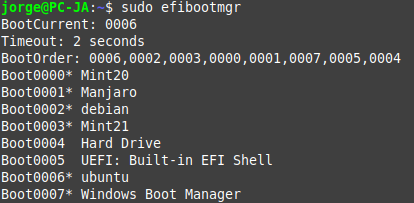
In my case, Windows is entry ID 7 in the UEFI (Boot0007). If I want to delete Windows from the UEFI, I run the command sudo efibootmanager -b 7 -B.
Jorge