Do you harden your Linux distro for better security?

I just tried out an ISO of XFCE Artix (with Dinit) from 2024 - in kvm (virt-manager)… It booted fine and loaded XFCE - but after going through the graphical installer - just ended up with a blank screen (i.e. the installer didn’t finish) - if I wiggled the mouse, I could see the cursor - but that’s it. I powered it off - downloading a later (April 2025) version with XFCE and Dinit… Will give that a go in virt-manager / kvm…


Hmmm - well - I force powered it off, then powered it up again (VM) and it seems fine…

Odd - that the screen went black and didn’t report success, or failure, of install…

Hmmm - looks like the installer didn’t finish…

Somethings have menu items for launching stuff, that don’t launch anything…

Will wipe it and install the 2025 version…


OK - 2nd time around - kept the session alive by clicking in it every so often while it was running the installer and it finished and now I can boot into it…

Artix has an even later version (by default!) of ffmpeg than Ubuntu 24.04 - 7.1 …

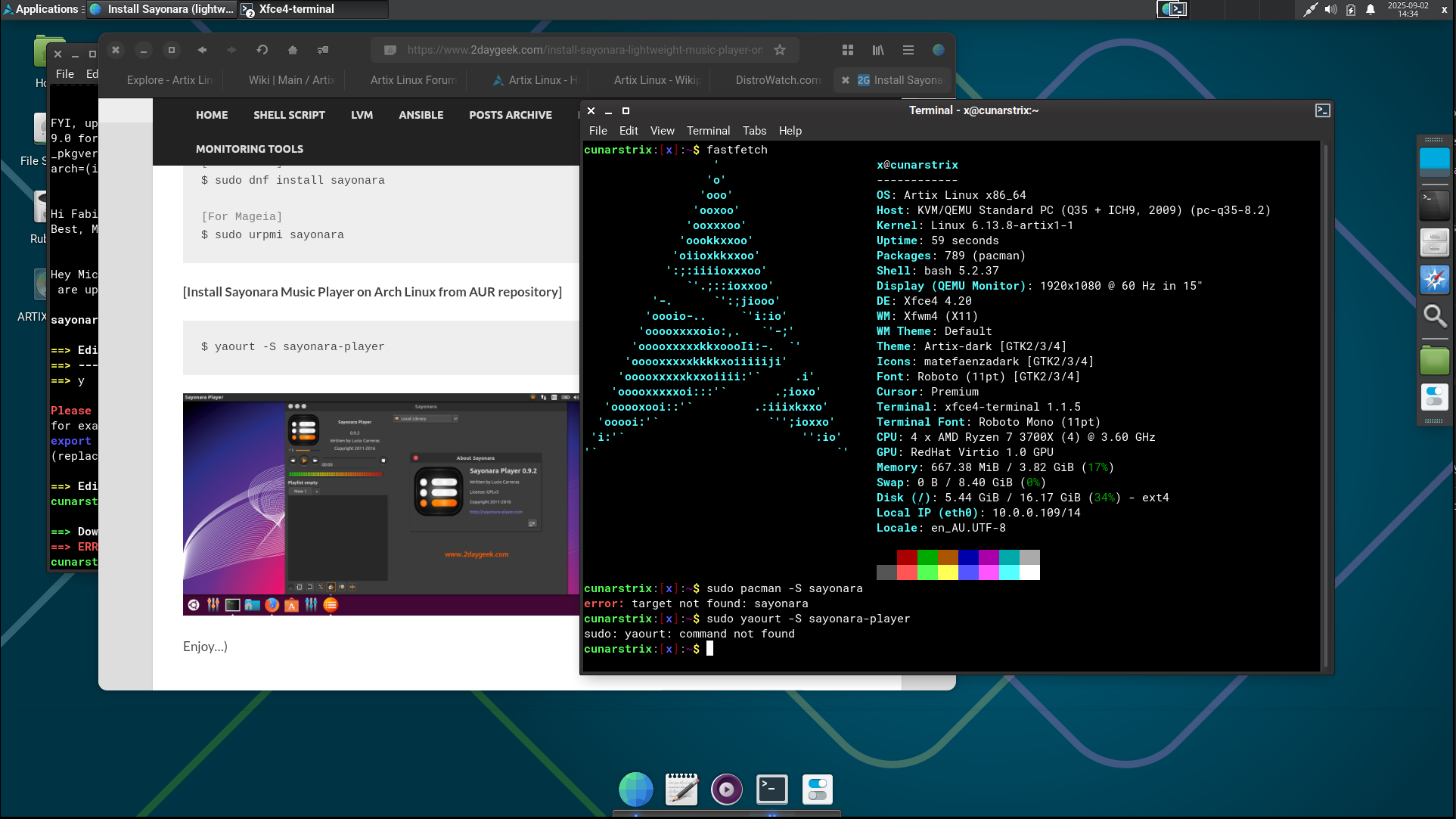
I quite like it too (Artix) :


BTW - that “panel” at the bottom is in fact “plank” - I moved Panel2 over to the right and arranged it vertically… I prefer a dock to a static panel…

Note : there a slight horizontal line about 30-40 pixels above plank (it’s hard to see) - that’s something I’ve seen before with XFCE and Compiz when you run plank…

I ran into an issue with Artix - installing sayonara-player… it says to use yaourt - so I had to install yaourt via pacman, then run “yaourt -S sayonara-player” - and it looks like it’s building it from source… and it keeps bombing : with some message about “fakeroot” and I give up…

4 Likes

Well at least you got Artix to run, and like what you saw.
You will test it more heavily than me, because you use much wider range of software.
You may have to dip into the AUI to get some things… use ‘yay’ with pacman… same as in Arch

Sounds like its build enviroment is not right

While you are there, have a look at dinit.. It has an easy small set of commands.

2 Likes

Going to persevere with Artix in a VM for a while…

For a VM - not having Sayonara is not a showstopper… but it’s a litmus test for whether it would be suitable to run on bare metal!

From a user / admin perspective “dinit” doesn’t seem much different from SystemD…

e.g.
SystemD start ssh daemon :
sudo systemctl start ssh
and enable it to run all the time :
sudo systemctl enable ssh

Dinit start ssh daemon :
sudo dinitctl start sshd
and enable it to run all the time :
sudo dinitctl enable sshd

I prefer how the daemon name is “sshd” - it’s consistent, the client is “ssh” and the server is “sshd”… I haven’t delved into the dinit “back end” - but it does look vastly more simple than SystemD - and there’s /etc/dinit.d/ with fairly simple looking files - however - how do I tell if something’s enabled to run on boot? That’s not obvious in those files - and Artix doesn’t seem to have “runlevels” (runlevels still exist on SystemD distros - e.g. “who -r” on Ubuntu 24.04 reports “run-level 5”). e.g. :

cunarstrix:[root]:/etc/dinit.d# sudo dinitctl disable sshd
Service 'sshd' has been disabled.
dinitctl: note: disabled service may have other dependents

cunarstrix:[root]:/etc/dinit.d# cat sshd
type            = process
command         = /usr/bin/sshd -D
smooth-recovery = true
depends-on      = ssh-keygen
depends-on      = network.target
before          = login.target

cunarstrix:[root]:/etc/dinit.d# sudo dinitctl enable sshd
Service 'sshd' has been enabled.

cunarstrix:[root]:/etc/dinit.d# cat sshd
type            = process
command         = /usr/bin/sshd -D
smooth-recovery = true
depends-on      = ssh-keygen
depends-on      = network.target
before          = login.target

i.e. /etc/dinit.d/sshd file doesn’t change… If I wanted to find where something was started on SysV Init - I’d find out my runlevel (e.g. 3, or 5) then change to /etc/rc3.d/ and see if there was symlink to a file in /etc/init.d/ - e.g. /etc/rc3.d/S99sshd as a symlink to /etc/init.d/sshd… I guess I will have to do some more digging / learning :smiley:

AND : Surprise SURPRISE!

I didn’t actually do anything - except maybe reboot (not as part of trouble shooting this issue though) : BRIDGE NETWORK is working in virt-manager / kvm / qemu!

My Artix guest has got an IP address from my WiFi / Ethernet / VDSL router!

I was quite surprised - virt-manager is now defaulting to bridge device on the new VM wizard / doohickey :

Here’s my Artix VM NIC config :

And in the “new VM” doohickey (defaults to bridge device):

I just tested ssh’ing from my Ubuntu 24.04 ThinkPad - to my Artix VM on my home LAN (hosted on my 24.04 desktop) - and it works! And confirmed - from my Pi4 running Debian / Raspbian 12 - success…

I might try reverting my other VMs (like RHEL 9 instance) to using bridged mode…


I’m always pleasantly surpised when something just starts working that I’d been struggling with… Just switched my RHEL9 KVM VM to use “Bridged Mode” and it works!

SUCCESS!

Unlike that other shonky issue I have at work - slightly different chipsets on Fibre NICs running under Oracle Linux - one NIC works fine all the time, the other never works… Ongoing… PITA…


Oh - one thing I find confusing with Artix VS RHEL9 or Ubuntu 24 - as KVM guests… Two way clipboard works with the latter two “out of the box” - not so with Artix… I have installed spice-vdagent - but still clipboard not working in either direction…

4 Likes

dinitctl status or
dinitclt is-enabled name
or
I think if it is pre-installed or installed by a dinit package it will be enabled.

I found this
"
Dinit stores information about enabled services within the boot.d subdirectory of its service description directories, such as /etc/dinit.d/boot.d or $HOME/.config/dinit.d/boot.d. For a service to be enabled and start at boot, its service description file must be placed in a boot.d directory.

Here’s a breakdown of how it works:

    1. Service Description Files:

Each service has a service description file (e.g., sshd, vsftpd) located in a service directory like /etc/dinit.d.

    1. Enabling a Service:

To enable a service, you create a symbolic link (symlink) from the service’s description file to the boot.d subdirectory within the Dinit service directory.

    1. The boot.d Directory:

This directory contains links to services that are designated to be started during the system’s boot process.

    1. Default Directories:

Dinit checks several default directories for service files:

  • System-wide: /etc/dinit.d/, /usr/local/lib/dinit.d, and /lib/dinit.d.

  • User-specific: $HOME/.config/dinit.d or $XDG_CONFIG_HOME/dinit.d."

So it uses a symlink to enable… like runit, but it is all in the one directory.

2 Likes

I did have to reboot at some stage, and I got that same NIC menu as you, but it definitely did not work for me? I need to retry from scratch.1

1 Like

One thing that doesn’t quite work…

hmmm - interesting…

No reboots of guests or KVM server…

Earlier this morning - my KVM guest (e.g. Artix VM) was unable to SSH to the main IP address of my desktop machine, but it could SSH to the IP address my bridge device is using…

Actually - I’m going to stop redacting my home VLAN IP addressing - pointless really…

╭─x@titanii ~  
╰─➤  ip a
1: lo: <LOOPBACK,UP,LOWER_UP> mtu 65536 qdisc noqueue state UNKNOWN group default qlen 1000
    link/loopback 00:00:00:00:00:00 brd 00:00:00:00:00:00
    inet 127.0.0.1/8 scope host lo
       valid_lft forever preferred_lft forever
    inet6 ::1/128 scope host noprefixroute 
       valid_lft forever preferred_lft forever
2: enx00e04c680151: <BROADCAST,MULTICAST,UP,LOWER_UP> mtu 1500 qdisc fq_codel master nm-bridge state UP group default qlen 1000
    link/ether 00:e0:4c:68:01:51 brd ff:ff:ff:ff:ff:ff
3: enp39s0: <BROADCAST,MULTICAST,UP,LOWER_UP> mtu 1500 qdisc fq_codel state UP group default qlen 1000
    link/ether 2c:f0:5d:74:48:b8 brd ff:ff:ff:ff:ff:ff
    inet 10.1.1.162/14 brd 10.3.255.255 scope global noprefixroute enp39s0
       valid_lft forever preferred_lft forever
4: wlp41s0: <BROADCAST,MULTICAST> mtu 1500 qdisc noop state DOWN group default qlen 1000
    link/ether 68:54:5a:d3:53:74 brd ff:ff:ff:ff:ff:ff
5: nm-bridge: <BROADCAST,MULTICAST,UP,LOWER_UP> mtu 1500 qdisc noqueue state UP group default qlen 1000
    link/ether 96:c9:66:3b:45:ee brd ff:ff:ff:ff:ff:ff
    inet 10.0.0.123/14 brd 10.3.255.255 scope global dynamic noprefixroute nm-bridge
       valid_lft 163769sec preferred_lft 163769sec
    inet6 fd00::ccaa:c178:9cf0:d1b5/64 scope global temporary dynamic 
       valid_lft 24sec preferred_lft 24sec
    inet6 fd00::58ab:bda6:c206:db9d/64 scope global dynamic mngtmpaddr noprefixroute 
       valid_lft 24sec preferred_lft 24sec
    inet6 fdb4:6257:7ebd:b64c:d648:2d48:bf53:736e/64 scope global temporary dynamic 
       valid_lft 1746sec preferred_lft 1746sec
    inet6 fdb4:6257:7ebd:b64c:11b9:9348:cd73:584d/64 scope global dynamic mngtmpaddr noprefixroute 
       valid_lft 1746sec preferred_lft 1746sec
    inet6 fe80::a50c:11e5:b617:5d62/64 scope link noprefixroute 
       valid_lft forever preferred_lft forever
6: virbr0: <NO-CARRIER,BROADCAST,MULTICAST,UP> mtu 1500 qdisc noqueue state DOWN group default qlen 1000
    link/ether 52:54:00:16:f9:68 brd ff:ff:ff:ff:ff:ff
    inet 192.168.122.1/24 brd 192.168.122.255 scope global virbr0
       valid_lft forever preferred_lft forever
19: vnet9: <BROADCAST,MULTICAST,UP,LOWER_UP> mtu 1500 qdisc noqueue master nm-bridge state UNKNOWN group default qlen 1000
    link/ether fe:54:00:44:3e:81 brd ff:ff:ff:ff:ff:ff
    inet6 fe80::fc54:ff:fe44:3e81/64 scope link 
       valid_lft forever preferred_lft forever
20: vnet10: <BROADCAST,MULTICAST,UP,LOWER_UP> mtu 1500 qdisc noqueue master nm-bridge state UNKNOWN group default qlen 1000
    link/ether fe:54:00:23:b1:f8 brd ff:ff:ff:ff:ff:ff
    inet6 fe80::fc54:ff:fe23:b1f8/64 scope link 
       valid_lft forever preferred_lft forever

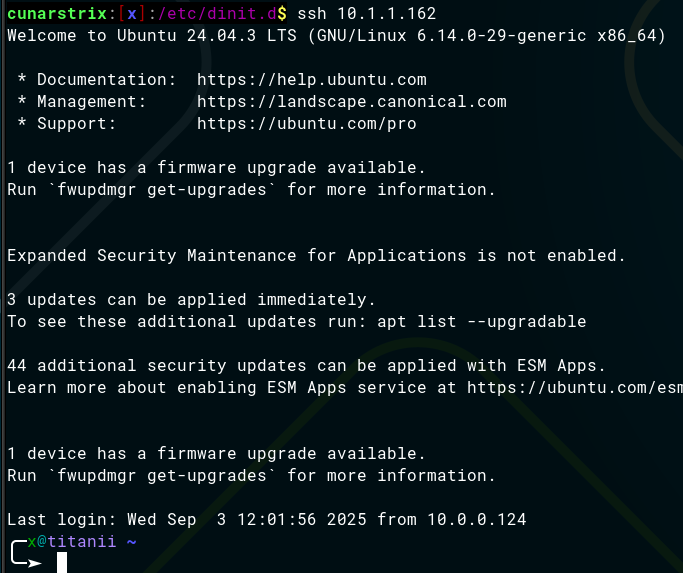
So - earlier today - my Artix guest was able to ssh to other hosts on my ethernet (e.g. an RPi4 on ethernet, a Thinkpad on Wifi) - but - not to 10.1.1.162 which is my main NIC on my desktop machine hosting KVM - however I could ssh to the IP address of “nm-bridge” 10.0.0.123 (note my CIDR - /14 - so 10.0.0.123 and 10.1.1.162 are on the same IP network).

But I tried again just now and it worked! And I don’t know why or how!


That’s a screenshot because I still haven’t got 2-way clipboard (or even one way) working between guest and host (but it works both ways on the RHEL9 VM - and I didn’t have to install anything).

Here’s all the files with “spice” in their name on Artix :

cunarstrix:[root]:~# find / -iname \*spice\*
/usr/share/man/man1/spice-vdagent.1.gz
/usr/share/man/man1/spice-vdagentd.1.gz
/usr/share/gtksourceview-4/language-specs/spice.lang
/usr/share/gdm/autostart/LoginWindow/spice-vdagent.desktop
/usr/share/gdm/greeter/autostart/spice-vdagent.desktop
/usr/bin/spice-vdagent
/usr/bin/spice-vdagentd
/etc/xdg/autostart/spice-vdagent.desktop
/etc/conf.d/spice-vdagentd
find: ‘/run/user/1000/gvfs’: Permission denied
/run/udev/links/virtio-ports\x2fcom.redhat.spice.0
/dev/virtio-ports/com.redhat.spice.0
/var/cache/pacman/pkg/spice-vdagent-0.22.1-4-x86_64.pkg.tar.zst.sig
/var/cache/pacman/pkg/spice-vdagent-0.22.1-4-x86_64.pkg.tar.zst
/var/lib/pacman/local/spice-vdagent-0.22.1-4

I’m guessing it works out-of-the-box on RHEL9 because RHEL does a fair bit of work on KVM and includes that agent if it finds the host hypervisor is KVM…

Note : I rebooted that Artix instance - and still no clipboard sharing between host and guest… That paste / output above I did via SSH to my Artix guest…

1 Like

You need to install spice-vdagent in the guest. RHEL probably has it.
And spice-vdagentd. … I think the package should install both.
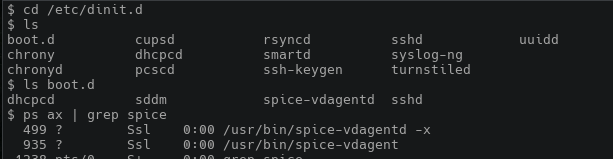
when you do ps ax | grep spice in the guest you need to see both spice-vdagent and spice-vdagentd running… if not start them by hand.
You dont need anything in the host.( maybe spice and spice-protocol)

I dont have Artix in a VM, but I have Chimera which is also dinit
It has this


so only vdagentd is enabled by dinit.
I think vdagent is started when you open an X terminal?
and
in Chimera, copy/paste only works with X11, not Wayland.

It is interesting, spice-vdagentd has a different pointer

$ ls -l boot.d
total 0
lrwxrwxrwx  1 root root  9 Dec 23  2024 dhcpcd -> ../dhcpcd
lrwxrwxrwx  1 root root 17 Dec 28  2024 sddm -> /lib/dinit.d/sddm
lrwxrwxrwx  1 root root 27 Jan  1  2025 spice-vdagentd -> /lib/dinit.d/spice-vdagentd
lrwxrwxrwx  1 root root  7 Dec 28  2024 sshd -> ../sshd
$ 
It does not point to the config files in /etc/dinit.d.  Maybe because spice-vdagentd is a 'oneshot' rather than a daemon?.... no /lib/dinit.d/spice-vdagentd is a dinit config file with 'type=process' so it is a conventional daemon.

So what is all the stuff in /lib/dinit.d?.... looks like system services?.... Yes udevd is there.
2 Likes

If you look at my pastes - you should see - that spice-vdagent is installed…

I don’t know how to make it run though…

I guess I could just try :

/usr/bin/spice-vdagentd &

But I’d rather get it running via my init system (i.e. dinit)…

The installs of spice-vdagent and qemu-guest-agent didn’t create any entries in /etc/dinit.d/

I tried running spice-vdagentd and nothing was running… So I tried with spice-vdagent (sudo) - and there was a spice-vdagent process running - but still no clipboard sharing in either direction…

Killed it and tried without sudo - and there’s a PID running “spice-vdagent” - but still no clipboard sharing in either direction - here’s it running (connected via SSH) :

cunarstrix:[x]:~$ ps -ef |grep spice
x          972     1  0 08:44 ?        00:00:00 spice-vdagent

Anyway - I found this page :

So I went ahead and
sudo pacman -S spice-vdagent-dinit

And then

cunarstrix:[x]:~$ sudo dinitctl enable spice-vdagentd
Service 'spice-vdagentd' has been enabled.
Service 'spice-vdagentd' started.
cunarstrix:[x]:~$ ps -ef |grep spice
root      1065     1  0 08:49 ?        00:00:00 /usr/bin/spice-vdagentd -x -d

But still no clipboard sharing in either direction… It’s not necessarily a “showstopper”… Getting Sayonara running (or not) - will be a showstopper to ever trying it out on bare metal however…

If installing Sayonara-Player on Artix involves building it from source - I won’t bother… When I install my desktop - I want a music player off the bat… And can’t be arsed trying others (Clementine is so ugly and clunky and bloated compared to Sayonara)…

1 Like

Yes it is installed… but I dont see a dinit config file.
You might need to find another package called spice-vdagentd.dinit to get the config files for dinit.
Then
Just use dinit to enable vdagentd
vdagent should look after itself… X11 starts it, or should.

What do you get from ps ax | grep spice in an X window
You should have both vdagentd and vdagent running

If vdagent is not there, start it.
I think it has to be X11, not Wayland.
You may need spice and spice-protocols packages in the host… not sure.

2 Likes

If you look in the outputs I posted above - the output of “ps -ef |grep spice” shows it running… “ps ax” is kinda deprecated isn’t it? I know it’s still the norm on BSD (in fact ps -ef doesn’t work on BSD - I seem to remember you had to use “ps ax |grep process” on SunOs 4.x [which was BSD] but Solaris was a SystemV UNIX - so “ps -ef |grep process”) - but using Solaris and Linux systems last 25 years, I’ve always used “ps -ef”… I have how to kill a pid in muscle memory :

kill -9 `ps -ef |grep ProcName | grep -v grep | awk '{print $2}')`

But more correctly should replace backticks - so I usually remember to do it like this :

kill -9 $(ps -ef |grep ProcName | grep -v grep | awk '{print $2}')

Because some systems don’t have pkill or killall (e.g. Solaris - last time I checked anyway - actually just checked on Solaris 11 - it does have pkill and killall!).

Anyway - I rebooted the Artix VM and it’s working (two way clipboard sharing)… So maybe it needs to run BEFORE X11 is started?

Also - I’m surprised how quickly VMs start in KVM / virt-manager…

Noticeably faster than they do in Oracle VirtualBox… And Artix seems to boot up and load the WM a lot quicker than RHEL9, and probably slightly quicker than Ubuntu 24.04… And Debian 13 (Gnome) about the same time as Ubuntu 24.04…

So - win win : got bridged networking working, and two-way clipboard sharing in Artix with dinit as a KVM guest!

3 Likes

I missed that, sorry.
But only vdagentd is running… vdagent should be there too.

You solved it, vdagdntd needs to be there before x11 starts, or vdagent will not start.

Yes, especially Artix… it is noticeable.
I guess it is not loading any drivers… so a smaller kernel

Great.
Now try mounting some host filesystems with NFS

ps ax …
That is my ‘seniors card’

1 Like

I already did that way way before I got bridged networking sussed out… NFS support is usually my litmus test…

i.e. “mount 10.1.1.10:/mnt/BARGEARSE /mnt/BARGEARSE” worked when I was stuck using NAT mode - i.e. my guest VM was on some hideous 192.168.x.x DHCP lease from kvm/qemu NAT… So my KVM knew how to get to 10.1.1.x VLAN…

Pretty sure it worked as seemlessly on MacVTAP adapter in KVM / virt-manager… But it never worked (nothing worked) when I tried to use bridged mode…

So when magically “bridged” started working - I tried it again - and “mount 10.1.1.10:/mnt/BARGEARSE /mnt/BARGEARSE” just worked…

NFS is nearly bulletproof…

Beats me why anyone would preference CIFS / SMB over it…

Yeah - lack of NFS is another show-stopper when I’m evaluating UNIX like operating systems :smiley:

If it won’t do NFS - or makes that tricky - that’s nearly always a showstopper…

I had no idea how baked-in NFS is, into the Linux kernel… but it is… if your kernel image can’t support NFS stuff - you’re basically f–ked!

I was using NTC C.H.I.P. single board computers for a while (circa 2015) - they were great devices - pre-dated the RPi Zero - but - this is a HUGE “BUT” - they had to leverage some of their kernel using the Android ARM (armhl? arm7l) Linux kernel - and - guess what? That kernel cannot, and will NOT do NFS! WTF? I think I found work-a-rounds at the time (using either rsync, or “unison” - but it was ugly)…

I encountered something similar - I had a Nexus 5 smartphone, and ran MaruOS on it - basically a Debian Jessie XFCE desktop via a chroot - that would display via Slimport (USB to HDMI) interface… And try as you might - you couldn’t get NFS client support…

This all comes down to Google having way too much power - they can do a kernel build that excludes (and blocks) support for something so small and trivial as NFS client? Why? How many bytes of extra code did it chew up?

A shit-ton (that’s an Australianism) of SBC vendors (single board computer) leveraged the Linux kernel by scavenging from the Linux kernel for ARM - for f–king Android…

If you hadn’t guessed by now - I kinda LOATHE Android… The few times I’ve delved deep enough - I think Apple’s iOS / iPadOS is superior - because it uses BSD… Yeah - and I actually never got an NFS client for iPad (there never was one I could find) - but interestingly - MacOS (I have two M1 MacBooks on my desk) support NFS out of the box - MacOS is a “UNIX”…

And that’s why we should remember the RMS (Stallman) mantra - it’s not “Linux” it’s “GNU/Linux” - without GNU - you might as well be running Android - which is just a JVM and it’s a piece of crap mostly… a shit ton of FreeBSD and the others - also run “GNU”…

Wow - what a rant…
– edit –
Yeah - NFS client worked flawlessly under Artix when it was running in NAT mode, MacVTAP, and Linux bridged mode…
What impressed me most about Artix - was out of the box it had NFS… I didn’t have to install anything extra to get nfs client… I remember Ubuntu dropped that some time back - but - I’m pleased to note - in Ubuntu 24.04 - it “pre-ships” with NFS client support…

When I say “NFS is bulletproof” - the big storage vendors - still preference it - e.g. NetApp and Nutanix and Oracle…

From experience - supporting enterprise hypervisors on NFS NAS is way easier than doing block storage allocation…
2 Likes

NFS is a kernel module, plus some daemons like nfsd, rpc, and mountd…so it is partly in kernel space and partly in user space
Both linux and bsd have the kernel module… if Android took it out they are crazy.
I remember trying to implement the nfs daemons in Antix with S6 init system… there are dependencies among the daemons.

1 Like

At work the NAS solution we were using supported both CIFS and NFS. But a share could be either CIFS or NFS. Not both. The least painful solution was to make them all CIFS and mount them that way on Linux servers and of course Windows servers.

2 Likes

I’ve supported NetApp filers in the past - you could simultaneously share the same data via NFS and CIFS… At one customer - they replaced their VMware environment with Nutanix (which uses VMware anyway) and replaced their NetApp with a Nutanix AFS platform - that was so feature limited compared to NetApp - and sharing te same folders over NFS and CIFS was a real PITA… it felt like a kludge…

On my home NAS - TrueNAS - I have one huge NFS share… Subfolders of that directory are setup as CIFS shares - so it’s the same data… But I hardly ever use the CIFS shares - occasionally from Mac because it finds them more easily than it does the NFS (e.g. directly in “The Finder”) - but I do sometimes mount the whole NFS share on one of my Macs - but usually from the shell e.g. :
sudo mount baphomet.local:/mnt/BARGEARSE /private/BARGEARSE easy 'cause MacOS is UNIX (and I usually have an /etc/hosts entry for baphomet.local in case for whatever reason avahi/bonjour/zeroconf [avahi is great - but yet another thing Poettering developed!] is not working).

Oh - and I’ve never found an NFS client for Android or iOS / iPadOS - so I use CIFS from those devices too…

What it looks like from an NFS client (my Linux desktop “titanii”) :

╭─x@titanii /mnt/BARGEARSE  
╰─➤  pwd
/mnt/BARGEARSE
╭─x@titanii /mnt/BARGEARSE  
╰─➤  tree -L 1
.
├── BNZ
├── config
├── Downloads
├── DTZ
├── ftp
├── FUNGIBBLEZ
├── home
├── iocage╭─x@titanii /mnt/BARGEARSE  
╰─➤  pwd
/mnt/BARGEARSE
╭─x@titanii /mnt/BARGEARSE  
╰─➤  tree -L 1
.
├── BNZ
├── config
├── Downloads
├── DTZ
├── ftp
├── FUNGIBBLEZ
├── home
├── iocage
├── MPZ
├── MVZ
├── tranny
├── TVZ
└── VIZ
├── MPZ
├── MVZ
├── tranny
├── TVZ
└── VIZ

Those 3 letter folders - e.g. “TVZ” and MVZ and MPZ are shared over CIFS - as “TVShows”, “Movies” and “Music” respectively… there’s stuff there I can’t even remember what it was for… e.g. “iocage” was what FreeBSD was using for jails - I used to have a FreeBSD jail on there - but it broke… “ftp” is used by my Brother MFC to upload scans to - it’s simulaneously an ftp share, a CIFS share, and accessible from NFS clients as /mnt/BARGEARSE/ftp…

:smiley:

I heard a rumour, that every time a Linux user opts for some other init system over systemd, he strangles a kitten… :smiley: it’s true - I heard he keeps several in the pockets of his parka…

2 Likes

Well I dont want any of his software.

1 Like

I visited the NetApp office in Minneapolis about 20 years ago. We never did use or support any NetApp though.

The CIFS xor NFS NAS solution was over 10 years ago. Since then, we’ve switched to Ctera. I’m pretty happy with that. It runs as a turnkey solution on a dedicated VMWare server. I wonder if they’re in the process of retooling to avoid VMWare like about 90% of the rest of the world.

2 Likes

DAMN!

I had bridged networking running flawlessly in KVM previously (and not sure how exactly - I did eventually get it working!).

Anyway, the other day - I plugged in my RPi Zero 2W “gadget” and tried to config the USB ethernet “gadget”… without realising I was tampering with my working bond on a USB gigabit adaptor - now it’s ALL BROKEN!

Doh!

Now my bridge device has some random MAC address… I think previously it has the MAC address of the USB Gigabit NIC… and it was getting an IP address from my router…

Maybe I have to reboot? Not doing that just yet… still few hours more work left in Friday…

I guess I’ll have to go back to macvtap or NAT - but I’ve now got 13 KVM guests… PITA…

This is in reference to a Led Zeppelin song “The Crunge”:

3 Likes