Is anyone interested in any other DE apart from Xfce in antiX. ?
I cant try them all, but I could try some if anyone is interested.
I think it would have to be X11, not Wayland
I am tempted to say Cinnamon but then would ask the question WHY ?
Is the existing not good or is it change just to see what happens as a learning experiance
IceWM and Xfce are both OK for me.
Choice of DE is personal.
I just felt people may be wary of trying antiX because they do not get their familiar DE by default. I wanted to show that one could successfully install any DE in antiX along with any choice of init system.
Have completed checkout of Xfce4 in antiX25beta1.
All the configurations that I use seem to work.
It works in all 4 init systems.
Here is my xfce4 screen in dinit
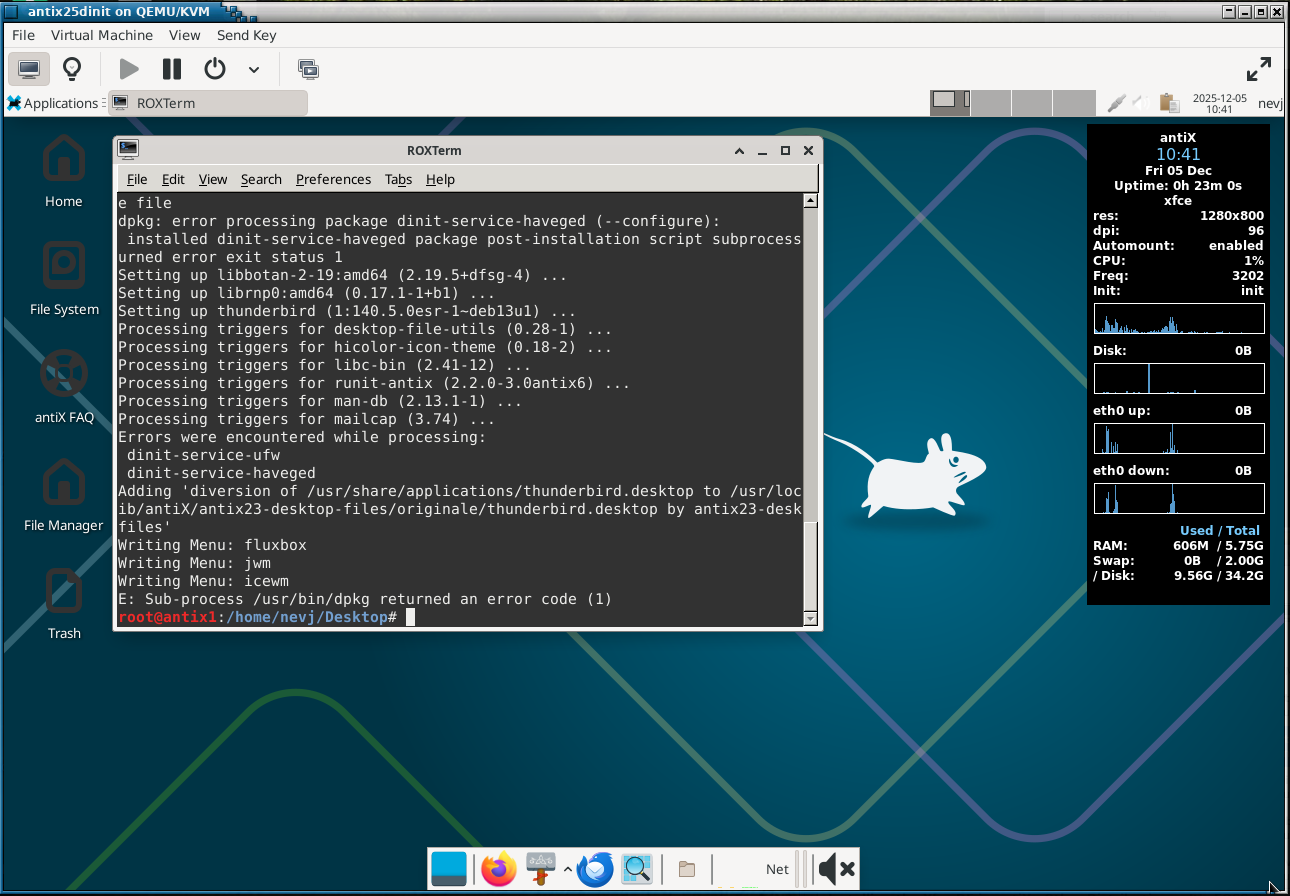
I have a lower panel with firefox, thundebird, Thunar and cpu and network monitors.
The workplace switcher is in the upper panel, that is default.
There is no logout in the menus. You have to use the init system or the CLI to poweroff. I think that is an antiX feature. Some distros dont like a user being able to shutdown the system.
Conky is well configured by default.
That is a VM. It is time to try a hard install.
My xfrc screen looks nothing like that, but mine is mint versioned, so looks more like a mint desktop. But interesting.
Most distros ( like Mint) customize their DE screen, and make it conform to their themes, etc.
What you see with my antiX xfce is a raw Xfce as obtained from the upstream supplier.
antiX does no customization, other than what Debian might have done… antiX uses the Debian repo so its Xfce is installed from there.
Gentoo is the same… maybe even less customized than antiX
If want a distro with coordinated themes across all apps, choose something like Mint or MX. Minimal distros like antiX and Gentoo dont do it.
I tried Cinnamon. It got listed as an option on the login screen, but failed to start properly… no menu, mouse doesnt work, …
I tried LXQT … is was the same.
I tried LXDE… it installed successfully first try. Looks like this
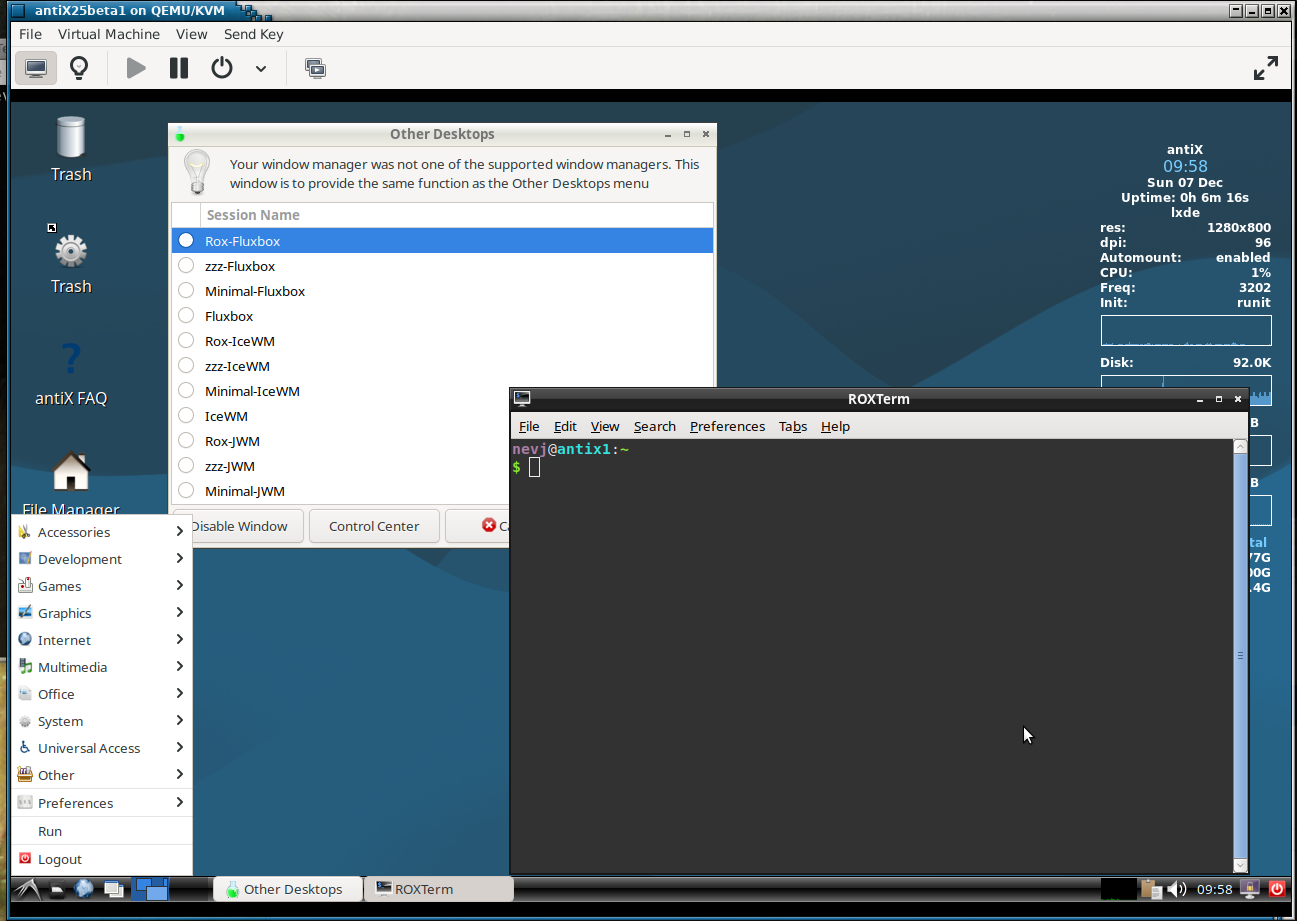
It has a lower panel, like IceWM and Xfce, and 2 workspaces.
So from my point of view it is about as effective as IceWM or Xfce.
What is wrong with Cinnamon and LXQT I dont know? There may be an issue with some systemd calls in these DE’s
For those interested, here is a full list of available desktops on my install of antiX25
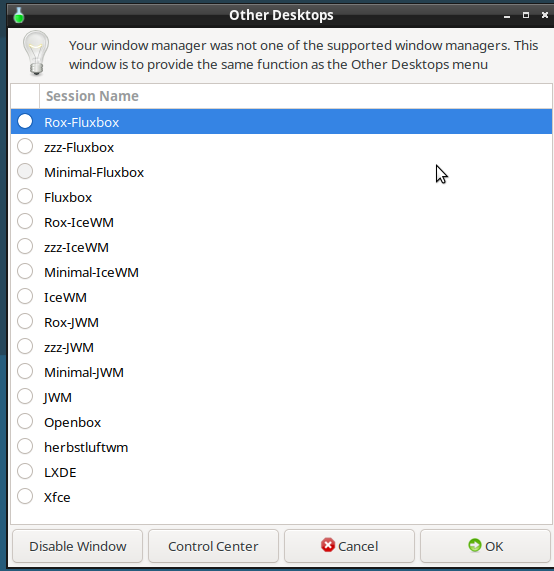
They are all present by default except LXDE and Xfce.
Hi Neville, 
thanks for the update.
How did you get this window? Does antiX provide it this way?
Cheers from Rosika 
Hi Rosika,
It comes up in Antix when the DE starts.
I suppose it may be there in the menus, I have not checked.
I dont use it… I can choose my window manager in the login screen
It is interesting that none of these WM’s or DE’s seem to clash in Antix … I have had clashes before in Debian.
Regards Neville
Hi Neville,
thanks for the info.
So this window informs you about window managers that work well with antix 25.
That´s a nice touch. I like it.
Yet I noticed the i3 tiling window manager doesn´t seem to be a part of the list.
It´s a bit of a shame. I like it quite a lot, especially when running my Vms with it
(Arch Linux, and Debian).
Many greetings from Rosika
Do you have any space left to do any work with all these
Some of them I have never seen or heard of
Can you load and snap each one so we can see the difference….. perhaps make it a quiz, guess the desktop. !
Hi Rosika,
No, it is a list of WM’s that are installed and available.
It is quite impressive… antiX comes with 10 WM’s , and I added 2 DE’s , so there are 12 in my list
It will be in the Debian repo. I will try installing it. I have used i3 before in Void.
Regards
Neville
None of the WM’s take much space. The 10 WM’s come pre-installed. Antix is quite small, even the full iso. They also have base iso ( X11 only no WM or DE) , and core i stall (CLI only, not even X11). It is meant for older less well equipped computers.
The two DE’s I installed (xfce and lxde) are both small DE’s… I noticed when I tried cinnamon it installed heaps more packages.
I will do a couple of the major ones. All the variants of IceWM look the same… the differences are under the bonnet.
If that is the case why bother ?
Guess I am just lazy
Looks are not everything. The variants include different toolkits
Rox contributes a filer and a terminal emulator to IceWM
There is nothing like choice.
Hi Neville,
Ah, I see. Seems I misunderstood. Thanks for clarifying the matter.
Yes, that is impressive indeed.
So you can select which window manager you want to use on a per session basis.
Nice.
Many greetings from Rosika
Hi Rosika,
Yes. You can select from the login screen, or, if you are logged in you can use that list window.
One of them, herbstluftwm, is a tiling WM like I3
Regards
Neville
Hi Neville,
O.K., but it seems I don´t quite understand.
If you´re already logged in how would you be able to change the window manager?
Perhaps select one from the list, then log out and log in again?
Or can a different WM be run if another is already active? 
Thanks. I´ve already heard of that one but my only experience comed from i3.
Cheers from Rosika
You can only run one WM at a time, of course.
I think when you select one from the list, it logs you out and in again.
I tried it, it works … you see nothing… it jumps to the new WM
Hi Neville,
So there´s no new log out and log in involved after all.
It just jumps to the new WM. 
That is impressive indeed.
Thanks for trying it out.
Many greetings from Rosika