
1 Like
For that, it’s too early here.
2 Likes

Yes, it’s back again now.
1 Like
You are right… as @ihasama reminded me , it only sets flags and config files
The stage3 tarball does not supply X or a DE either. … you have to manually install them, like I am doing in Alpine at the moment.
I need to practice more Gentoo.
1 Like
And I hope I taught you the importance of the “/etc/portage/make.conf” file it is what makes or breaks Gentoo!!!
3 Likes
Yes, you taught me that, and a lot more. I need some more practice at installs to reinforce it.
3 Likes
OK, after deep reading Working with Gentoo, chapters A Portage introduction and USE flags it looks much clearer. This should be done BEFORE starting any installation.
@ihasama @Daniel_Phillips
More general questions arise:
- Do you set anything to ACCEPT_LICENSE in /etc/portage/make.conf?
- How often do you pull updates, and how exactly?
Thanks in advance.
2 Likes
I accept all licenses. Update approximately once a week. You can speed up the update process if you use git for the
emaint -a sync
and use binaries. I usually update with emerge -avuND @world but sometimes I add --with-bdeps=y
Every time portage has issues it gives a lot of info. If it says something about needing to modify config files you can just ask it do it automatically
dispatch-conf
Remember to clean after update!
emerge -c
EDIT: if you see a message after update which says something about building modules just emerge @modules-rebuild (I don’t remember the exact command but it is shown on the message). Also if you see a message that theres news items they are important! They are only shown if the news is affecting your system. You can read them
eselect news read
3 Likes
Since you asked!!!
This is my “make.conf” for my Acer Mini PC!!! Notice, the make.conf is machine specific and this is the second step with Gentoo after the stage3 emerge.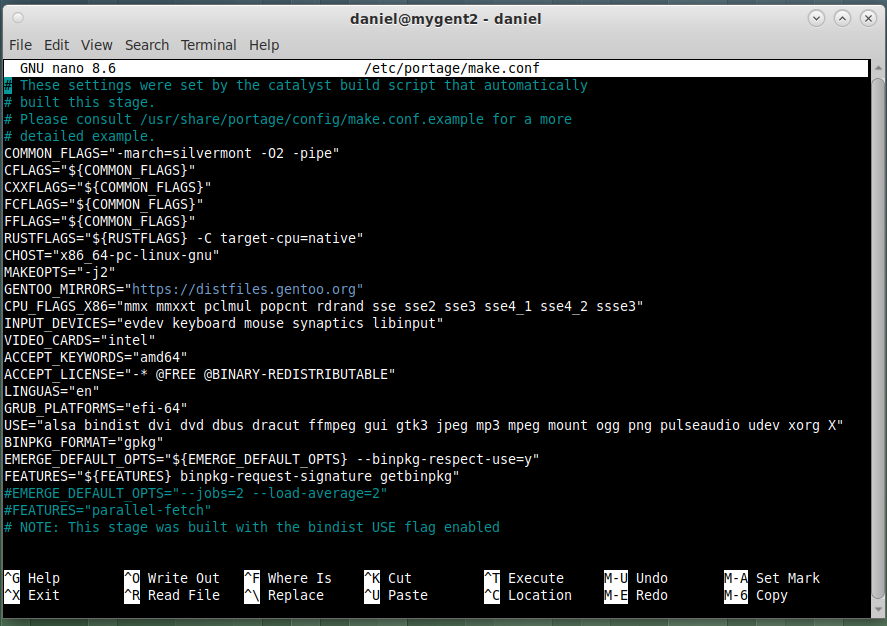
Now, I am old school and a self taught Gentoo user for over 10yrs now, and am still learning. You will see I have binaries enabled, but that is not done until I am in the CLI before emerging Xorg, and if the machine is capable. not even then!!! Why? because it slows an already slow machine!!!
Now my fellow Foss friend @ihasama, have a different view when it comes to updating!!!
First stay away from emaint until Gentoo is running, just use “emerge-webrsync and emerge –sync” it does the same thing as “emaint” !!!
USE flags!! Start with no more than you need and add as you go!! If you use xorg then “USE=”xorg X” will suffice!!! Remember, USE flags in the “make.conf” are Global and affect the whole system.
If you do a “cd /etc/portage” you will see directories, like “package.use. package.mask”. If you then cd package.use and use “touch” to create a file “package.use’ for enter specific use flags, per package, so use “nano /etc/portage/package.use/package.use” and enter the package name!!!
Do not blindly install packages, unless I really know what a package needs, I always use “emerge –ask –pretend” to have a look at the deps a package is in need of!!
Yes, Gentoo can be a pain, but Gentoo can be locked-down and run a very long time with just one install!!
2 Likes
This is my highlight #1: the ability to only install the things I really need or want.
Currently I’m just trying to get familiar with Gentoo on my laptop. If everything comes up in a healthy manner, I’ll include my desktop as well and completely drop LMDE.
1 Like
So you now compile everything up to the CLI, and then switch to binary for the apps.?
Is it possible to go totally binary from the start?
1 Like
Yes, keep the “-march=” to the machines specs, you get a lot better running Gentoo if you delay to enable binaries, and if the machine is capable, their is really no need for binaries!!!
1 Like
Thanks. I am going to have some more practice in a VM. … as soon as I finish with NetBSD. Try a few different things and refresh my memory.
2 Likes
Your laptop, will present a few more tweaks to run Gentoo!! I would need the amount of ram and cpu specs, to advise further!! But keep the “make.conf” simple, and you may run into “graphics issues”!!!
2 Likes
I don’t think we are on different view here. Abu was asking how to update, he has Gentoo running, no DE yet. On handbook it says to use emerge-webrsync during chroot build process which is fine but when you’ve booted to the system it’s better sync with emaint at least according to wiki:
emaint
Performs package management related system health checks and maintenance.
See repository synchronization about how to use emaint to synchronize repositories. See man 1 emaint for detailed information.
Note
The emerge --sync command is now implemented with emaint.
3 Likes
I understand doctors offer treatment for withdrawal symptoms. Stick with what works and does the job
1 Like
Yes. But I started with LMD2 or 3, IIRC. Over time, LMDE evolved into a real feature creature. And it’s close to impossible to kick off things you never use without the risk of breaking the entire system. I’m old-fashioned, grew up with the rc-scripts, and never welcomed the systemd monster.
Here I prefer a system where I can decide what to install, even if I have to learn many new things.
2 Likes
Me too. I was using Ubuntu for appr 20years and then got bored of trying to undo someone’s decisions on how to use my computers. I tried almost all of the diy OSes and ended on Gentoo because of portage and to not being tied to systemD.
1 Like