On ALL my own machines - I use ZSH for “me”, but default to bash for root…
So I know when I’m root… Even on MacOS - i.e. the default shell for MacOS desktop users is ZSH these days (and Oh-My-Zsh installs just fine on MacOs like it does on Linux) - if I 'sudo -i" (become root) - I get /bin/sh as my shell and no fancy schmancy prompt…
I kinda HATE red writing in a terminal window (I have background set to black) - being Red / Green colour blind, I find it really difficult to read…
and - my preferred Oh-My-ZSH them is called “gnzh” - but - the default hostname prompt, if I’m a remote user, is in red - so I change that in my .oh-my-zsh/custom/themes and use
.oh-my-zsh/custom/themes/dmt-gnzh.zsh-theme as my zsh them, and use sed to replace “red” with the value 141 which is some kinda “dark blue”.
My Ubuntu 24.04 on Dell Latitude still has the default colour for my ZSH theme - and I hate it but I barely ever remote to it :
Here’s the default :
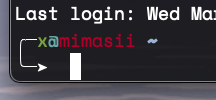
I have HUGE trouble reading that red text.
And here’s what I usually change it to (#141) :
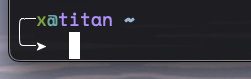
But that “bluish” value for #141 - is still different to when accessing locally (e.g. in Gnome Terminal) :
My default session in Gnome terminal - sorta “Greenish” I think - then I “ssh 0” (0 is a sorta alias or shorthand for 127.0.0.1 - that’s an ancient UNIX legacy that still works in Linux) - I get the blue prompt (#141) :
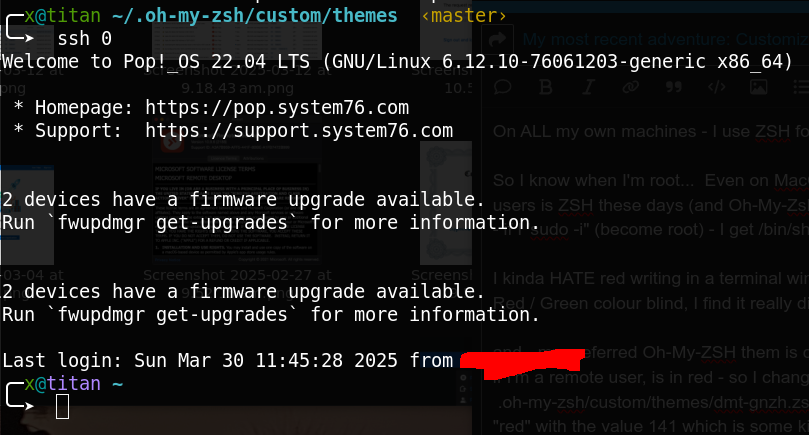
That “
<master>” bit on the green prompt - is 'cause oh-my-zsh is “GIT Aware” - so if there’s some git dot files in the $PWD - it shows that… I barely use GIT, but, I do like that feature…
Here’s what my main oh-my-zsh custom theme looks like :
# Based on bira theme

setopt prompt_subst

() {

local PR_USER PR_USER_OP PR_PROMPT PR_HOST

# Check the UID
if [[ $UID -ne 0 ]]; then # normal user
  PR_USER='%F{green}%n%f'
  PR_USER_OP='%F{green}%#%f'
  PR_PROMPT='%f➤ %f'
else # root
  PR_USER='%F{141}%n%f'
  PR_USER_OP='%F{141}%#%f'
  PR_PROMPT='%F{141}➤ %f'
fi

# Check if we are on SSH or not
if [[ -n "$SSH_CLIENT"  ||  -n "$SSH2_CLIENT" ]]; then
  PR_HOST='%F{141}%M%f' # SSH
else
  PR_HOST='%F{green}%M%f' # no SSH
fi


local return_code="%(?..%F{141}%? ↵%f)"

local user_host="${PR_USER}%F{cyan}@${PR_HOST}"
local current_dir="%B%F{blue}%~%f%b"
local git_branch='$(git_prompt_info)'

PROMPT="╭─${user_host} ${current_dir} \$(ruby_prompt_info) ${git_branch}
╰─$PR_PROMPT "
RPROMPT="${return_code}"

ZSH_THEME_GIT_PROMPT_PREFIX="%F{yellow}‹"
ZSH_THEME_GIT_PROMPT_SUFFIX="› %f"
ZSH_THEME_RUBY_PROMPT_PREFIX="%F{141}‹"
ZSH_THEME_RUBY_PROMPT_SUFFIX="›%f"

}
Note : that stuff for “root” is irrelevant for me - because for a start, I don’t use ZSH as my shell for any of my systems for the root user…
What I like about ZSH themes - is - they look and read a lot like a bash shell script…