NixOS and Nix ... is this a flatpak alternative?

Nope!

I’m almost 100% sure it’s because it can be controlled and managed…

No configuration drift! Centrally corporate controlled configuration “one size fits” all…

And yeah - variations for specifics can be implemented… I’ve done “not dissimalar” stuff where members of one AD group have different privileges from everyone else, on Linux… Users “x” from AD group (or LDAP) needs Application Z - but all other users don’t…

This is stuff Windows admins have been doing for decades…

But by and large - managing a SOE for desktop users is a nightmare!

So - if huge entities are going to Linux DE for desktop - they need control…

It’s nearly 20 years since I supported Linux Desktop - it was AD integrated - but we used Ghost to image new RHEL4 workstations - then re-configure as necessary - but - by and large - most of our users were scientists anyway (seismic geologists) and could mostly be trusted not to complete f–k things up… Would you trust a corporate accountant? A marketing manager? A PR constultant? Yeah nah…

Could not agree more !

I read all the entries on our community some I dont both going into any depth just skim read, unless it’s mint. Then I read completly.

Mint works for me and so many others, it just appears to be a distraction to go into all the difficulties presented by the other versions, my time is treasure so spend it in other ways.

Just my small contribution, don’t want to waste it.

I run Gentoo because I cannot be arsed into running Mint, Ubuntu or NixOS, or Windows that cannot run on my machines, to start with!! There is more to Linux, other than Mint and Ubuntu!!

I agree. I do the same myself … if I just want to do some routine job, I use MX , … because it is always there and it works.
I use other distros for several reasons

  • they help me to understand how things work … the variety is what helps.
  • they each provide an environment specially configured for one type of task … so they separate jobs
  • I like to support non-systemd initiatives
  • a rolling release distro like Void gives me the latest versions , while a more fixed release like MX or Mint gives me stability … I can have both.
  • what you call difficulties are actually learning opportunities.

When I first went to Linux,I spent 5 years on one version of Debian … never even did an update … buried in my R programming project.
Then I changed . Went multiboot with Void and Solus , in addition to my Debian. There I dicovered that some distros compile R better than others. It made a huge difference to the running time of my software… I was impressed … distro hopping had taught me something. Now I compile R myself … the right way.

It went from there to looking at how various init systems work . That got me into Artix and antiX and Devuan, and more recently into Gentoo. BSD has always been on the horizon.

I like distros that put things together in unusual ways … so I,like antiX and Chimera. Why? Because it helps to see why Linux does things in certain ways. Maybe this is what NixOS would do for you?

There is no ideal Linux distro … it is smorgasboard of adaptive evolution. We might as well be part of it.

Waiting for the Arch users to enter the board… In all seriousness, whatever works best for you is what you should use.

Absolutely love it!! It took over a year though, lot of tinkering, Flakes/Home-Manager, strange packages and some “spotty” package upgrades. If your administrators are closet developers, or hang out with them, smooth sailing! It’s great to have a Linux that breaks userspace apart from global installation. And there’s nix-shell, opening up even a locked-down system to “one-off installs” that won’t break the running system.

Updates are pretty simple, but as you point out, the docs are lacking all over the place. sudo nixos-update switch –upgrade does the trick, and if you’re running Flakes, every run of nixos-update switch results in updated packages and even kernels.

If I was still a sysadmin instead of a retired geek, I would break down my nix files according to the main business lines of my organization. That is, ‘dev_tools.nix’ if it was a software shop, ‘db_tools’ if more data-science-centric, etc.

I see that the Dutch and French have already waded into those waters, and are replacing large-scale Windows/Intune/SCCM (very specialized admin knowledge required and high licensing costs) with NixOS.

Whatever your favorite Linux distro (even Arch), you can install Nix as a package, opening up the broad wealth of packages – probably the world’s largest – available via NixOS natively.

In short, it really grew on me, but the learning curve is probably 5x over moving through the Ubuntu 18-26 lifecycle. And Flatpaks and even SNAPs are available too. It’s natively sandboxed and atomic, with easy rollbacks even on ext4 fs’es. Not true of OpenSUSE rolling distros, unless you choose btrfs at installation.

All that said, make sure you have plenty of disk space: even on lab VMs I usually start with 40GiB disks and/or break out my /home and swaps onto their own virtual disks that I can share with other distros. With server/DE-free systems, 12 GiB does fine unless you do very frequent updates (uncommon for server apps).

BSD has always done it that way.

That needs to be explored.
Slackware with Nix might be interesting.

I wonder is Nix portable … could I use it with musl? … could I use it in BSD?

As I mentioned earlier - you can run it in WSL (Windows Services for Linux) on Windows and you can run it on MacOS… Dunno about the BSDs (see below FreeBSD - not sure I understand was “musl” is other than a C library?)… Dunno quite how it works on MacOS or WSL - maybe containerised?

From Download | Nix & NixOS

curl --proto '=https' --tlsv1.2 -L https://nixos.org/nix/install | sh

“install” is the same thing for Linux and Mac, and it’s only 129 lines - and yeah - it includes FreeBSD (the OS detection case statement):

 27 case "$(uname -s).$(uname -m)" in
 28     Linux.x86_64)
 29         hash=0c3960a9792331a22081c3c7a5d8465db9b17c50b3acdf18587fa4c6f2cb1158
 30         path=3d229fmjbbhn74zwp21z6rfx2a35ryy8/nix-2.35.2-x86_64-linux.tar.xz
 31         system=x86_64-linux
 32         ;;
 33     Linux.i?86)
 34         hash=55363adb55f1447be49298c671f5beb539526f2f3181e8e11eab669af6d5990b
 35         path=bzfrrx38n5qc3kj6id18zqbysk48vykz/nix-2.35.2-i686-linux.tar.xz
 36         system=i686-linux
 37         ;;
 38     Linux.aarch64)
 39         hash=4d0302a2910f5eec1c33b8deef634f04899a75737e7001ec49908d003ae5efda
 40         path=f8vsr7dbkb5slmwiv6s2cc5bjw73xqwn/nix-2.35.2-aarch64-linux.tar.xz
 41         system=aarch64-linux
 42         ;;
 43     Linux.armv6l)
 44         hash=2f79330820e2de68279d1c796827d4d6269396c3cbb22bacf6c238639db9b306
 45         path=j3i097mi5gf31qqcfimgmdqmdrncpvnc/nix-2.35.2-armv6l-linux.tar.xz
 46         system=armv6l-linux
 47         ;;
 48     Linux.armv7l)
 49         hash=e4a68bd13f20b10f67b551178116655520323f5a29a7e82a2db24a6b2a166e89
 50         path=jq9dyz2q83d4z6rhfgfzbaqgcar7ss82/nix-2.35.2-armv7l-linux.tar.xz
 51         system=armv7l-linux
 52         ;;
 53     Linux.riscv64)
 54         hash=98ee79540d4b9ccfe733655ea049a67af24f15860fbf92103bc1911bbd905a53
 55         path=1slh67389ncg34nqsz1a0ampcwzlcxq8/nix-2.35.2-riscv64-linux.tar.xz
 56         system=riscv64-linux
 57         ;;
 58     Darwin.x86_64)
 59         hash=d725518d89f3b0b8d4af702a9d38d519814014cbe125afb3ed0545c9d755f6a5
 60         path=q89r761wxaykz2zhb2l8j0rsljm9k9ak/nix-2.35.2-x86_64-darwin.tar.xz
 61         system=x86_64-darwin
 62         ;;
 63     Darwin.arm64|Darwin.aarch64)
 64         hash=1695c13aba5afa7c2ecd6dc4a9393f602e7bbc440ed45e81602c831546580ec3
 65         path=hl0qj2xiq7npi3xxk1byan3nc75kx0q1/nix-2.35.2-aarch64-darwin.tar.xz
 66         system=aarch64-darwin
 67         ;;
 68     FreeBSD.amd64|FreeBSD.x86_64)
 69         hash=e944893995e82989a13df992e6f636f1050a2498f7792f9cef3cb2e1d18ba692
 70         path=j9ll2y5d3mh1ichmkrfnjfrjc64z18gf/nix-2.35.2-x86_64-freebsd.tar.xz
 71         system=x86_64-freebsd
 72         ;;
 73     *) oops "sorry, there is no binary distribution of Nix for your platform";;
 74 esac

I’m going to assume WSL will show as Linux.x86_64

You know if it included vi/vim by default I might be tempted to spend more time on it - but it’s such an ordeal replacing nano (which I LOATHE) with vim I can’t be bothered - given that configuring ANYTHING on it means editing text - and to do the vim bit - you have to use nano!

However - just read this :

So :

[x@nixos:~]$ nix-shell -p neovim

Will give me neovim and and I can run nvim - so I could alias “vi” to nvim… That’s better than being forced to use nano to get a real :smiley: text editor installed… That’s what I’m going to do next time I try NixOS install. Get neovim running, alias vi to nvim, then I can use vi to edit the other files (like to install vim, openssh-server, enable sshd, enable passwordless sudo) - i.e. by “files” - it’s mostly just the one file : /etc/nixos/configuration.nix

I may try creating a FreeBSD jail on my NAS and see if I can install NixOS in there… From my understanding - it’s not just an O/S - it’s an API and it’s a package manager…

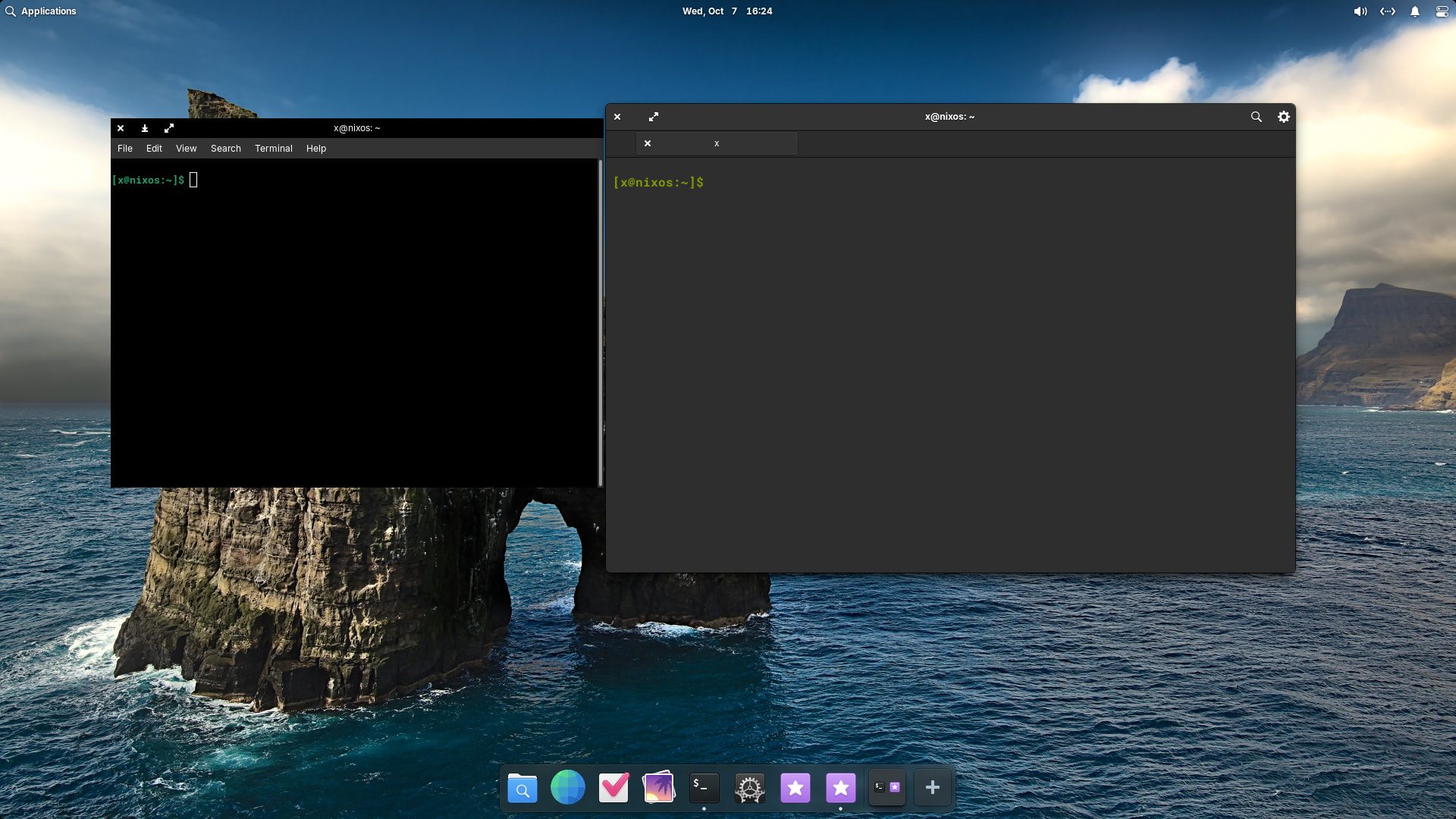
OK - further playing with Pantheon desktop on NixOS (a VM in KVM) and the ugliness and lack of opacity settings in both terminals bothers me :


That’s Gnome Terminal on the left - so ugly… Also seems I need to install a compositor to get transparency/opacity settings… I’m sure that happens by default on other distros…

I might actually try it on my Pi5…

But I am slightly impressed by NixOS - kinda prefer it to Arch anyway…
– edit –
I’m not about to give up - but hit another hurdle - it won’t let me run something as an AppImage… Tried getting Sayonara player to work/run - it’s ugly - doesn’t respect my dark mode or window control location… So I downloaded an AppImage of Sayonara :

[x@nixos:~/tmp]$ ./Sayonara-1.8.0-beta1.AppImage 
Could not start dynamically linked executable: ./Sayonara-1.8.0-beta1.AppImage
NixOS cannot run dynamically linked executables intended for generic
linux environments out of the box. For more information, see:
https://nix.dev/permalink/stub-ld

Yeah, nah… two steps forward, one step back…
I think not.
You cant generally run linux programs in BSD if they have system calls… unless you use the linux compatanbility layer and that may not be a good idea for a package system.
OK, they have a FreeBSD version … great

Musl is an alternative to glibc library. It is strictly Posix so lots of programs fail if the library calls include GNU extensions.

OK - gave up on my TrueNAS running FBSD 12-2 - end of life… I can’t create new jails 'cause it can’t find the 12-2 release “stuff”…

Booted / installed a FBSD 13 VM in KVM - too old - FBSD 13 packages have been moved elsewhere (e.g. aarnet no longer host anything earlier than FBSD 14.1)

Booted / installed a FBSD 15.1 VM in KVM - installed curl, wget and sudo (a default install of FBSD doesn’t install sudo).

Ran the curl command NixOS installer suggests :

x@feelfree:~ % curl --proto '=https' --tlsv1.2 -L https://nixos.org/nix/install | sh
  % Total    % Received % Xferd  Average Speed  Time    Time    Time   Current
                                 Dload  Upload  Total   Spent   Left   Speed
  0      0   0      0   0      0      0      0                              0
100   4499 100   4499   0      0   3559      0   00:01   00:01              0
downloading Nix 2.35.2 binary tarball for x86_64-freebsd from 'https://releases.nixos.org/nix/nix-2.35.2/nix-2.35.2-x86_64-freebsd.tar.xz' to '/tmp/nix-binary-tarball-unpack.XXXXXXXXXX.MOUhkX0211'...
  % Total    % Received % Xferd  Average Speed  Time    Time    Time   Current
                                 Dload  Upload  Total   Spent   Left   Speed
100 23.58M 100 23.58M   0      0  5.93M      0   00:03   00:03          5.26M
Note: a multi-user installation is possible. See https://nix.dev/manual/nix/stable/installation/installing-binary.html#multi-user-installation
performing a single-user installation of Nix...
directory /nix does not exist; creating it by running 'mkdir -m 0755 /nix && chown x /nix' using sudo
copying Nix to /nix/store...

installing 'nix-x86_64-unknown-freebsd-2.35.2'
Segmentation fault (core dumped)
/tmp/nix-binary-tarball-unpack.XXXXXXXXXX.MOUhkX0211/unpack/nix-2.35.2-x86_64-freebsd/install: unable to install Nix into your default profile

I don’t know what caused that - but - it looks “fatal” and I really don’t care enough to persevere… Was just a tad curious on what it does on a non-Linux system (no way am I going to try it on MacOS!).

I have a GhostBSD VM - I might clone it and try NixOS…

– edit update –

Yeah, nah… Segmentation fault on GhostBSD (25, running FBSD 14.2)…

Now I’m genuinely curious what benefit there would be doing this in the first place… I might try it on a Linux VM…

Yeah, core dump is usually serious. VM maybe?
I suppose you should report it.
Thats bad luck … after finding a real fbsd version … a bit deflating.
Looks like you try a linux version.

Have you used virt-clone … it worked for me.

nevj@trinity gentoovm]$ virt-clone --original gentoo-2 --name gentoo-2a --auto-clone
Allocating 'gentoo-2a.qcow2'                             | 120 GB  00:36     
Allocating 'gentoo-2a_VARS.fd'                           | 528 kB  00:00     

No - I just use the “clone” option in virt-manager - I assume it does exactly what you suggested “under the hood”.

I successfully installed in a cloned Ubuntu (server) 26.04 VM…

So - it installed there - now what to do?

I would say about a 2 month learning curve.

I kinda like how NixOs works - less hoops than Arch… a few more than Fedora…

About equal with that last “gaming oriented” distro I tried (I forget the name - I think it was Bazzite)… But kinda better - 'cause I feel like I’m more in control…

I’m 100% comfortable now - editing :

sudo vi /etc/nixos/configuration.nix

Too easy… It’s almost muscle memory… Yeah - a bit of pain getting a proper UNIX text editor going (nano is for children - you can fumble your way around in it and still get the right answer - try that on vi/vim).

I’m going to do another clean install as a VM - get neovim working and figure out the rest…

Next step after that will be on one of my laptops… Hmmm - yeah, nah… I want openssh-server / sshd running after first boot… I don’t care about sudo with password… Just gimme SSHD on boot…

Sh_te!

My NixOS VM won’t let me use the X select buffer on my host machine… WTF? i.e. in a terminal session on Ubuntu 24.04 and SSH to my NixOS host - what I drag and select - is NOT going into the X Select Buffer… I kinda hate that…

Yeah - that’s highly secure… But why?

Stay tuned - I haven’t given up… I want to be able to paste stuff into a remote (vi ssh) vi / vim / neovim session on my NixOS host…

I think you need spice-vdagent … in the VM … and spice in the host.
Alternative is use sftp, but that is slow.

Nothing to do with that - I was ssh’d to the NixOS host in a gnome terminal window from my Ubuntu desktop…

I NEVER assume copy/cut/paste is going to work on a virtual console for a VM - it’s an exercise in futility that will only end in pain and suffering… writing from experience with iLOM/aLOM/iDRAC on physical hardware - or - VMware - or EC2 on AWS… fuggeddaboudit!

SFTP is vastly too slow… Yeah nah…

This is something I’m seeing far too often these days - the default behaviour on Debian seems to inhibit paste into a vi session when you’re remote… WTF? This is the “heart and soul” of my job…

I have to create a ~/.vimrc on the Debian hosts I run at home (both Raspbian on RPi and x86_64 hardware).

╭─x@mimas ~  
╰─➤  cat .vimrc
syntax on
set mouse-=a
set ttymouse=

And - because the remote host won’t let me even paste that shyte into the file when I’m editing it - yeah - I do scp that from my local system to the debian instance…

So - if I have to do that once - ok - but I hate even that… I know the whole world is moving to “zero trust” but I should be able to sign a waiver “yeah this is my own shit and no hostiles have access to my internal LAN so TRUST ME!”

Sorry, I missed that.
You are in effect pasting into the remote machine , but the terminal window is local?
That is nonsense …it should work natively… I will do some tests.

I remember that GNOME recently decided to do something to copy and paste in a non-fun way.

It’s something I first noticed in Debian (Raspbian on RPi)…

Had to edit my .vimrc (first time ever) - forget how many years ago now : 2 or 3? Probably first noticed on Raspbian 12… note : Ubuntu don’t do this! But it happened on my Debian 13 Trixie x86_64 too (Optiplex running JellyFin) - so it’s a Debian thing - and probably something Ubuntu remove…

syntax on
set mouse-=a
set ttymouse=

Who asked for this feature to be enabled (disable remote paste into vi session)? Why? Now I’m curious if they do this on nano as well… Anyway - I have a “master” DOT.vimrc on my cloud share - I can just copy this onto a new system…

Yeah - there’s always talk of disabling the x select buffer (drag to select text, middle button click to paste) - and I think it’s the case with Ubuntu 26.04 (I’m not running that) - but it can be re-enabled with a single checkbox in the settings applet (or maybe gnome tweaks). But for how long? When will they remove that as a tweakable “thing”? And I really wish they’d install Gnome Tweaks with Gnome by default - I loathe Gnome without Tweaks or Extensions (or Extension Manager).

I remember in Gnome Files (nautilus) you could slow double click (i.e. left click, wait a couple secs, left click) to rename a file - just like on Windows and MacOs since the last 30+ years or so (longer than that on Mac). Then the Gnome devs decided to remove that feature (why?) but I think you could re-enable it again - that was some 10 years ago? You can’t even enable it today… It’s a feature you can turn on in Nemo… Not sure about Thunar… But I really want it in the default file manager for me DE…

Every simple thing you can do with a few mouse-clicks - since forever on UNIX “X” - they’re wanting to remove - the less often you need to remove your hand from the mouse to type - the quicker your workflow… Sheezuz! MacOS terminal (and iTerm2) lets you middle button paste text (assuming you have a middle button - but tap three fingers on touchpad = middle button click) into a terminal…

So why do you use Gnome?
What are the essential features that keep you there?