Ernie , you ard right , but that is a confusing way to say it.
One should look to see if one’s IP address of the internet interface is in any of the special ranges
192.168.x.x
10.x.x.x
172.16.x.x
You can , if you want , check that your public IP address is different from these internal addresses by curl ifconfig.me
If it is different , NAT is using IP masquerading properly
I am sure there are other ways.
Most modems setup NAT by default.
I dont know what happens with IPv6
returns an IPv6 address for me…
I think that’s a fudge - I can ssh to that IPv6 address and it takes me to the same host - so the IPv6 being returned isn’t an “internet” IP address… It’s the 2nd IPv6 address my desktop machine gets on NIC 1 (enp29s0)…
I don’t think I’ll ever get my head around IPv6…
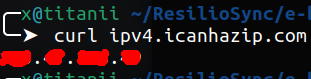
If I want to know my external IP address (it’s the internet address I get from my ISP’s CG-NAT) I use ipv4.icanhazip.com :
The IP address my router gets - it’s a private address - but it’s CIDR I’ve never seen before (i.e. not 10.x.x.x or 192.168.x.x or 172.x.x.x) :