SparkyLinux is rolling release and Debian based.
I have no idea how its user interface performs.
According to their website you get the choice between semi-rolling and stable, not rolling. That leaves the question, what do they mean with semi-rolling?
Also: their website is full of ads. Not particularly trustworthy.
Like MX. Works like a full rolling distro until they hit a new major release. So you get package updates as well as security updates in between major releases.
Dont like the sound of that. Next step is adds in the updates.
I’ve been using Artix as my main guest in KVM / virt-manager (with dinit) - because it starts up and shuts down so quickly! I’m impressed… Still troubleshooting my bridged (host) mode VS NAT VS “macvtap” - and it’s handy to fire up a VM and see if it worked (BTW - it’s still broken [bridged host mode] - and I have NO idea how I got it working in the first place!) - Artix starts in maybe 15 seconds or less - i.e. grub to desktop… Just timed it - under 10 seconds…
I actually hate it when distros remove tiny stuff - like “ncal / cal” why? Most CLI / tty / ncurses apps are tiny…
– update –
If I ever dig out my Samsung N150 netbook (2 GB RAM and 64 GB SSD) - I reckon I’ll stick Artix on it… But when I’m going through my crates of obsoleted tech junk - I only ever find either :
- Samsung power brick
- Samsung N150
never the two together…
I have not tried it but there is Rolling Rhino Remix.
That seems like a better choice if you want rolling + deb.
Main thing is a team that knows how to manage a rolling release.
Do bridges self-configure?.. like switches
That may explain erratic behaviour
I never got a bridge to work… on the back burner.
Yoh are suppised to be able to
- create a bridge at CLI
- go into virt-manager and configure it to use existing bridge.
but it does not work for me.
A hard install boots considerably slower. Drivers I guess.
It worked for me for a little while - until I started playing with the WRONG USB ethernet adaptor  (thought I was configuring a USB ethernet “gadget” on a Pi Zero 2W plugged into USB port)
I have several USB 3 gigabit ethernet adaptors…
I might try another one and see how I go…
“macvtap” sorta works - but not as transparently as a host-bridge… I think “macvtap” uses the same vibr0 device that NAT uses…
I prefer “regular” network bridge like how it works in Oracle VirtualBox… But that’s not enough to make me jump from kvm/qemu back to VirtualBox…
Here are some instructions for a bridge used by qemu ( not virt-manager) in Netbsd
30.3. Configuring bridged networking on a NetBSD host

While QEMU user networking is easy to use and doesn't require root privileges, it's generally slower than bridged networking using a tap(4) device, and doesn't allow the use of diagnostic tools like ping(8) inside the guest.

To configure bridged networking on a NetBSD host, you must first make note of your host machine’s primary network interace. Find the one with an address assigned and a route to the outside world with ifconfig(8).

In this example, the host machine’s primary interface is wm0. All of these commands run on the host machine.

Create a virtual tap(4) interface:

# ifconfig tap0 create
# ifconfig tap0 descr "NetBSD VM" up

Create a bridge(4) connecting the actual interface and the virtual interface:

# ifconfig bridge0 create
# ifconfig bridge0 descr "LAN VM bridge" up
# brconfig bridge0 add tap0 add wm0

Configure NetBSD to do this all at boot time by editing /etc/ifconfig.tap0:

create
descr "NetBSD VM" up
! ifconfig bridge0 create
! ifconfig bridge0 descr "LAN VM bridge" up
! brconfig bridge0 add tap0 add wm0

You can now pass the arguments to QEMU to run with bridged networking:

-netdev tap,id=tap0,ifname=tap0,script=no -device virtio-net-pci,netdev=tap0
It says what I was saying… you set the bridge up first in the host with CLI, then access it from the VM.
Now, can you explain to me what tap0 is for?
OK I read a bit and found this
" Hypervisors like QEMU/KVM use TAP devices to give virtual machines access to the network, allowing them to send and receive traffic as if they had their own Ethernet ports. "
So if that is all it is, virt-manager already has a tap interface? Why make another one?
Yes,ok,but if you have a small drive you don’t want stuff like libreoffice asnd other stuff
i rather install it myself,which is in Artix and other Arch-based distro’s very easy!
This warning when you attempt to use Macvtap device :
“In most configurations, macvtap does not work for host to guest network communication.”
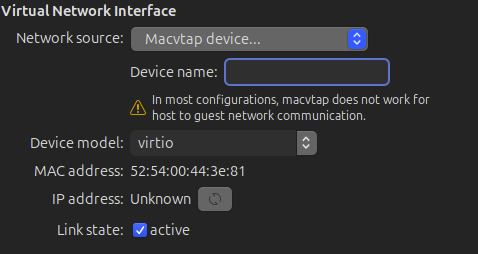
I’m pretty sure Macvtap uses the same vibr0 as NAT…
Which is precisely what I experienced… i.e. I’d like to be able to SSH to my guest, from my hypervisor / kvm host… hence why I was chasing up the bridged networking (host based)…
You can do that without a bridge. Host can talk to its guests, even with NAT.
Do you mean from some other remote host?
Yeah - with NAT you can from the host - if you know the NAT IP address of the guest - but you can’t SSH to the guest from another host on the VLAN (except to use ProxyJump in .ssh/config). With Macvtap - you can ssh to the guest from another host on the VLAN - but not from the “host” itself…
Bridged mode on VirtualBox just does this automatically without fiddling… i.e. a guest presents itself on the ethernet LAN just like a real device, requests a DHCP lease, and you can reach it from anywhere else on that VLAN (including the machine running VirtualBox).
So I know all the workarounds - but - I won’t be happy until I can make it (once again) work like it does on VirtualBox (and I think VMware is the same - or similar)…
Opened to take a look. The first window that pops up: one of these “Can we use your data to sell and show you personalised ads?”.
OK, that’s it. Never using this distro unless it finds a more ethical, less user-annoying and privacy-friendly monetary approach and until it stops tracking. Ublock blocked 15 trackers on 3 secs on that site.
Talking lifespan of hardware ,my equipment ranges from 2010 -2011 -2013 and 2014 all happily running 64 bit versions of the latest Mint and Zorin distros.
Frank in County Wicklow -Ireland
2-14
OK, I missed the bit about “not from host itself”.
Think I am in a similar boat with the age of my netbooks one is still on 32 but it’s that old 2008
Just today I watched a video on YouTube about to resurrect an old Asus Eee PC 1000HE Netbook and in some comment was mentioned
Not sure if was mentioned before what I am just sharing just in case
It seems wattos is x86 and x86_64… so yes it has 32 bit.
It is a lightweight Debian.
According with this link
among many points appear these two at the top practically together:
- Based on Debian 12 Bookworm - Stable release
- Kernel 6.1 for 64bit PC installation
So it seems it does not support 32bit