Sounds like a gnome problem.
So you use gnome extensions? Try disabling them.
3 Likes
Yes - and yes… and no…
Might try (disable extensions) next time it happens… However restarting gnome without losing running apps and windows (and their locations across multiple monitors) works - so may stick with that…
User-installed Extensions (only 4 enabled) :
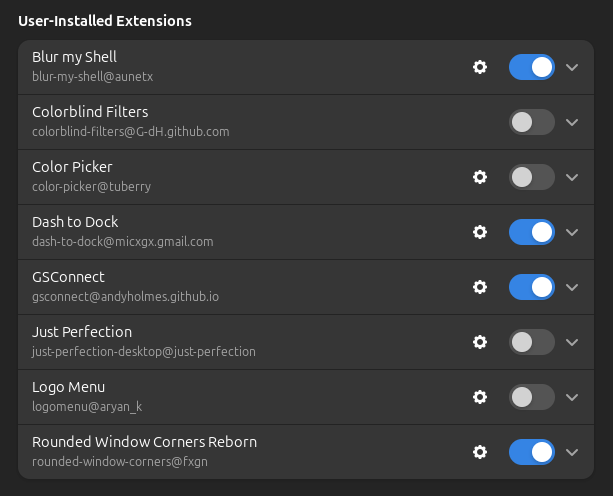
I hardly ever use the two “Color” extensions
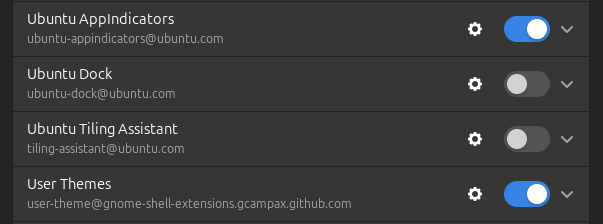
And only two “system extensions” (User Themes gets enabled when you check it in Gnome Tweaks):
4 Likes
I don’t think I posted this before. At work, we were chatting about uses for MCP and it made me think of a candy bar with a few good things inside. I had AI create an image for it.

2 Likes
Well that is neat way of gettjng me to learn something today
I suggest we all have a read, before languagegate leaves us behind.
3 Likes
Just happened now… I can’t exactly put my finger on it - but - it seems to happen after I’ve been gaming (full screen using GPU)…
Disabling extensions made no difference…
Alt+F2 an “r” restarted Gnome and my applications and windows were the same…
2 Likes
That is a clue.
Maybe the GPU or X11 needs some sort of reset.
Blank screen means screen is not being driven … some part of the screen drive process is not being executed.
2 Likes
No - not a blank screen - my application windows are still there - how they were arranged before I went full screen with a game…
Also - I have two monitors - only game on my main curved one - so the app windows in the other monitor are still there (mostly mpv streams of stuff like my IP cameras, youtube feed of the Collins St peregrine falcons, stream of ABC TV from TVHeadEnd running on a Pi3)…
The “blank” screen is that my wallpaper (on both monitors) goes black and I can’t change it - restart my DE (Gnome) and my wallpaper comes back…
3 Likes
Juat a thought, but if you ha e an NVIDIA GPU, and you’re using the open source drivers, try the proprietary ones, or vice-versa. I’ve seen issues with them that switching in one direction or the other helps.
3 Likes
I used NVidia (with proprietary drivers) and gave up in the end and got a reasonably high end AMD GPU around 2022? Most expensive GPU I ever bought… but still only around the $500 AUD mark..
Having said that - I’ve “inherited” NVidia “workstation” class GPU that cost literally thousands of dollars when released… Inherited - they were going to junk the whole thing so I removed the GPU and RAM… It’s quite hideous when you stop and think about it - $2-3000 for an
NVidia Quaddro GPU…
I did buy some NVidia consumer grade GPU for “gaming” - and - you could firmware hack them to present themselves as Quaddro… Never got around to that… But I did once SLI a pair of NVidia gaming GPU - and basically trippled the performance of a Windows 7 machine…
I just couldn’t be arsed with all the posturing some of these gaming twonks loved to do when they overclocked or whatever to get 50% in FPS in some shitty FPS game… Useless arsehats spent so much time trying to impress their online community - they couldn’t enjoy the f–king game! Gaming is about the game… and human pleasure…
4 Likes
The desktop shell is crashing … maybe a memory leak … your restart starts a new gnome shell.
Next time it happens, have a look with ps and verify if the shell is not running.
You may find some messages in the systemd logs about the gnome shell crashing.
3 Likes
If the shell was crashed - surely my dock / dash, and top bar with “system tray” would stop working too… But they carry on working fine… I can launch new application instances from the dash (e.g. Gnome system-settings applet)…
1 Like
Not sure about that? Depends how Gnome works. Some DE’s start an empty screen and the Window Manager starts everything else.
You seem to have the window manager running but not the basic screen.
Why not check what is running now, then again when it happens… something will be missing.
I read that the Gnone shell does start the screen background, but it also starts extensions which provides things like system tray and your dock.
So maybe the shell partly fails? I dont know?
Maybe the extensions start as separate processes and survive a dying shell? … No I checked that … they are dynamically loaded … like kernel modules!
It needs to keep refreshing the background as you move things, so maybe the refresh hangs?
I can understand the windows surviving a lost shell, but not the panel?
1 Like