I am not. I am using the qemu default which is legacy boot.
Setup Alpine for msdos and grub boot and isolinux will detect grub and boot the VM, or it should!!!
My Alpine seems to only have isolinux, not grub
I have one SOLUTION
Here are the steps.
- Do a loop mount of the alpine .iso
mkdir /mnt/isomnt
mount -o loop /mnt/share/alpine-standard-3.22.1-x86_64.iso
- Copy the content of the iso to a workfile
mkdir newisocontent
cp -r /mnt/isomnt/*  newisocontent
- Edit syslinux.cfg
chmod 744 syslinux.cfg
vi syslinux.cfg
  add noapic to the APPEND line
- Make a new bootable iso
$ xorriso -as mkisofs -r -J -V "MyAlpine.iso" \
 -b boot/syslinux/isolinux.bin \
 -c boot/syslinux/boot.cat \
 -no-emul-boot -boot-load-size 4 -boot-info-table \
 -o /mnt/share/MyAlpine.iso ~/newisocontent

xorriso 1.5.4 : RockRidge filesystem manipulator, libburnia project.

Drive current: -outdev 'stdio:/mnt/share/MyAlpine.iso'
Media current: stdio file, overwriteable
Media status : is blank
Media summary: 0 sessions, 0 data blocks, 0 data, 16.3g free
xorriso : WARNING : -volid text does not comply to ISO 9660 / ECMA 119 rules
Added to ISO image: directory '/'='/home/nevj/newisocontent'
xorriso : UPDATE :     127 files added in 1 seconds
xorriso : UPDATE :     127 files added in 1 seconds
xorriso : UPDATE :  9.12% done
xorriso : UPDATE :  34.40% done
ISO image produced: 137764 sectors
Written to medium : 137764 sectors at LBA 0
Writing to 'stdio:/mnt/share/MyAlpine.iso' completed successfully.
xorriso is a fork of mkisofs with additions. I believe one can also do this with mkisofs or genisoimage
Note: the -b and -c parameters are the location of the files isolinux.bin and boot.cat in the filesystem of the .iso.
The file it makes is bootable
$ file *
alpine-standard-3.22.1-x86_64.iso:       ISO 9660 CD-ROM filesystem data (DOS/MBR boot sector) 'alpine-std 3.22.1 x86_64' (bootable)

MyAlpine.iso:                            ISO 9660 CD-ROM filesystem data 'MyAlpine.iso' (bootable)
Not quite the same as the original .iso file ( no DOS/MBR boot sector) but bootable.
- Try booting it in NetBSD
I did all the above in MX.
I can then take the file MyAlpine.iso into NetBSD using my shared ext2 filesystem , and boot it with qemu as follows
 qemu-system-x86_64 -m 512 -nic user -display sdl,gl=on \
     -boot d -hda alpinevm.qcow2 \
     -cdrom /mnt/share/MyAlpine.iso
It boots (slowly?) brings up a small window, then about half way thru the boot process the qemu window becomes large…so large I can not access the bottom line… because my NetBSD screen is only 800 x 600. … but it does boot.
It looks like this
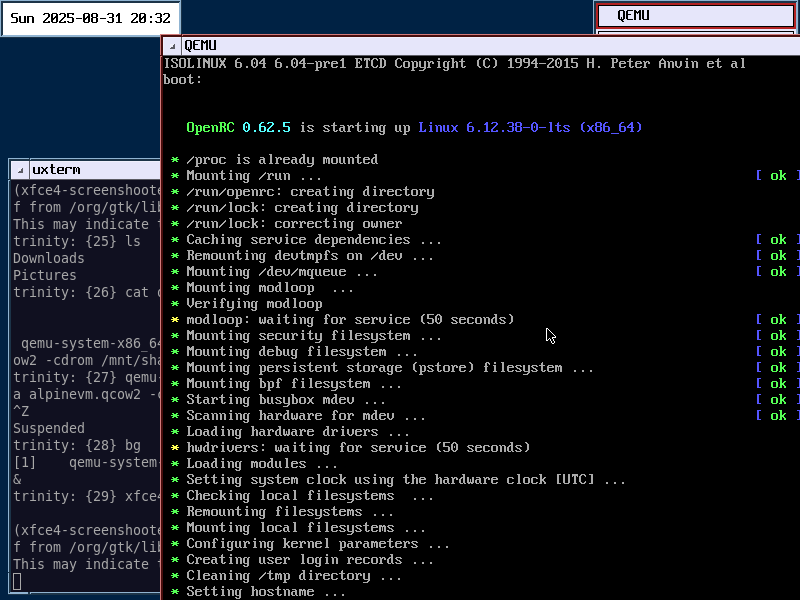
That is the CTWM window manager at 800 x 600 in NetBSD. You can see the qemu window hangs off the edges and I cant resize it… Alpine sets the size while booting. If my amdgpu worked it would be OK.
So that is one SOLUTION. There are probably other ways…including what you suggest … get grub into Alpine.