An X11 Window I have made named "bare"

Hey! I’ve been working on my own minimal X11 window manager called hmwm (horrendous micro window manager), written in C.

I wanted something simple that I could fully understand and maintain myself, without a huge codebase or unnecessary features.

Features

  • 3 workspaces
  • Master/stack tiling
  • Keyboard shortcuts for common actions
  • Terminal launching
  • Moving and resizing windows
  • Moving windows between workspaces

The main source file is around 211 lines of C. I’m running it on Gentoo, where it uses roughly 2.9 MiB of resident memory on my system.

This has also been a learning project for me. I’ve learned quite a bit about C, Xlib, window management, and debugging X11 issues along the way.

Source code: GitHub - toromirvana/bare · GitHub

I’d appreciate feedback, especially on the code’s simplicity and anything that could be improved without making the project unnecessarily complicated.

I’d also like a new project name for my project,since hmwm is just a placeholder name for now. So if you have something on your mind,share it!

I might have a look at that. I am interested in setting gentoo up with a small window manager.
Yours depends on X11. Do you know of any small X11 alternatives … I know you can avoid GTK and Qt, and maybe Mesa, but is there any small X11 alternative?

It’s a fun little project, but readability isn’t exactly its forte.

I’d like to point out some things to improve readability:

  • The ws variable isn’t exactly clear what it means.
  • There are several occasions where you use the comma separator to do two things on the same line, such as this one:
    int x = e->x_root, y = e->y_root; on line 179 in the c file. Instead have the following:
int x = e->x_root;
int y = e->y_root;

Yesyes, it’ll net you an additional line – it’ll also net you additional readability.

  • Also, two statements on the same line is a bad idea.
    for (int i = 0; i < count[ws]; i++) if (!floating[ws][i]) { on line 161 in that same file.
    Instead:
for (int i = 0; i < count[ws]; i++)
    if (!floating[ws][i]) {

yes, it’s additional lines, it’s also, again, additional readability. Don’t forget about the indentation for the rest. :slight_smile:

  • The below is totally evil and ought to be avoided like the plague:
wins[s][count[s]] = w; floating[s][count[s]++] = f; focus[s] = count[s] - 1;

Why? At a quick glance you’ll see a single statement, while in reality it’s three.

I know this is not a very lot of code, but try to inform the future reader of what you’re trying to achieve, through comments.

Also, I’ve noticed some magic numbers in there. These can trip you up later as the project grows. Try replacing them with a constant. No, do NOT use #define for that (prone to misinterpretation), use the const keyword for that. If you’re setting a bit pattern, be sure to OR the individual flags when setting up the initial values.

Get rid of those #define at the beginning of your c file. When you get a warning or error involving the value they contain, they will just show up as magic numbers. The only valid use of #define is with header guards, or optional compiling for different platforms.

Avoid one letter variable names, these can trip you up. In the function tile, I had no clue what the variables n and k were for. On top of that, those were initialize with magic numbers.

Finally:
Why are all of your globals static? I really don’t see a need for a lot of them to be static.

NASA’s JPL has a good guide on quality, readable C. These guys hold a standard of code which compiles with no bugs at all. You can find it here. They write code that goes into deep space probes, so their C needs to be flawless.

thanks for the feedback. I’ll try reading the JPL once I have time.

I think “frame” by CHasm should work.. though I’m not sure

Wow 20000+ lines of assembler.
I wonder is it AI coded?
Will try. Thanks

I found it used AI
“, much of the heavy lifting was done with help from Claude (Anthropic’s AI coding assistant). The author mentions turning to it whenever something breaks or a new feature is needed. It’s a great example of how modern AI tools can help tackle ambitious low-level projects that would otherwise be extremely time-intensive.”

That does not deter me.

There was another topic on this forum about small progrxms that do one thing well.

Your hmwm is a good example.
Sure @xahodo has suggested some things to make code readable, and I agree with him, but overall it is a great effort.

Assembler AND AI?

I see two problems with this:

  • AI usually takes the shortest route, this means that the code probably won’t perform as well. Odds are a well designed C program functions better than all this X86-64 assembler.
  • C was designed to 1. Provide the performance of machine language, and 2. Be cross-platform compatible.

There are things even C can’t do, though. In those cases – and ONLY in those cases – the Linux kernel uses Assembler. Openssl is another project which uses Assembler. However, it’s hand tuned for performance.

I would just go with a regular X server written in C. I have very much the impression the one writing an X server in Assembly picked the language because he thought Assembly automatically means performance and it would look cool, which is not automatically the case.

When the AI finally messe up, they’ll regret so much picking Assembly.

@toromirvana I failed to express my appreciation for this project. While I did have feedback, it’s quite the acheavement to build an X windows manager in a few hundred lines of code.

I like the idea of keeping a window manager small enough that you can actually understand the whole thing. There aren’t many projects where you can read through almost all the logic in one sitting anymore.

I had a look at hmwm.c and config.h, and one small thing caught my attention.

You’re grabbing the key combinations with the exact modifier masks from config.h. I wonder what happens when Num Lock or Caps Lock is enabled? From what I understand, X11 includes those modifiers in the key event state, so some Super key shortcuts might stop working.

Maybe grabbing the combinations with the relevant lock modifiers as well, and ignoring those bits when matching KeyPress events, would be worth considering.

I haven’t managed to run hmwm in an X11 session yet, so I can’t say I’ve reproduced it. Just something I noticed while reading the source.

Other than that, I think keeping it minimal rather than adding more features is a good direction. That’s really the interesting part of the project to me.

that’s a problem I just caught on to through your comment..Caps Lock doesn’t let me use my keybinds to do stuff. Num Lock probably has the same issue, though I can’t test it since I don’t have a 100% keyboard on me. Could someone test it out through Xephyr?

That is the bigest issue with assembler.

C is fine. I am not looking to escape C.
X11 is 4 million lines of C.
frame is 20000 lines of assembler
I am looking for something smaller than X11

Other options are
Phoenix … written in Zig ( Zig is a cleaned up version of C … the kernel mob should have chosen Zig rather than Rust)
Xlibre
Arcan display server
Xenocara fron OpenBSD
The Xserver used in Tinycore Linux. (TinyX)
Xquartz from MacOS
Tinyxserver from Puppy Linux
Yserver written in Rust

Do you know of any other options

One can use framebuffer graphics that preceded X11, but that would not support modern x11 dependent apps.

I had a first try. In a Gentoo VM with no Xserver… just a condole.

I made a directory called Frame

cd Frame
git init
git pull https://github.com/isene/frame

What downloads is

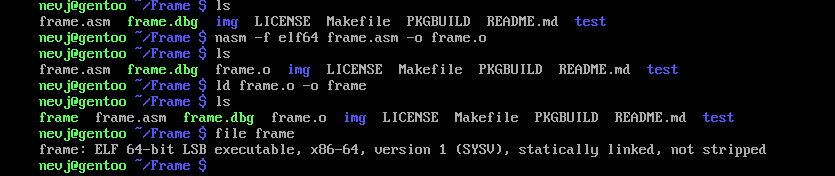
So I used nasm to build frame.o then loaded it to frame with ld

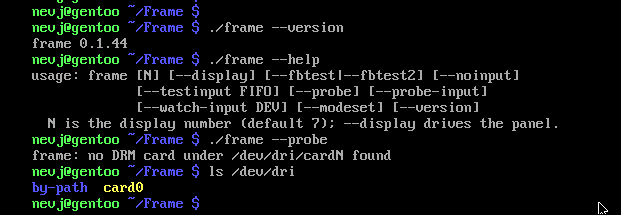
So lets test it

The notes say it needs /dev/dri/card1

It looks like my Gentoo kernel is missing DRM ?
I used a binary kernel.
Will have to research.

" /dev/dri/card1 is a character device file in Linux representing a Direct Rendering Manager (DRM) graphics or display card interface.

What It Does

  • Graphics & Display Management: It allows user-space programs (like Xorg, Wayland compositors, or 3D/Vulkan applications) to communicate directly with your GPU kernel driver to handle mode-setting, display outputs, and hardware acceleration."

My gentoo is in a VM … it has a virtual graphics card … maybe that is the issue?

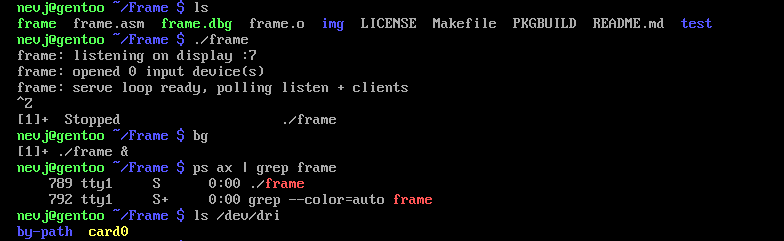
It does run

but is says opened zero input devices … I guess it wants card1?

More research
" the numbering of the DRM devices is not necessarily consistent with the number of graphics cards in the system. Usually /dev/dri/card0 is used for the graphics card that is integrated on the motherboard whilst /dev/dri/card1 would then be allocated to the graphics adapter plugged in on a PCI bus, but the kernel allocates things as it finds them and it doesn’t always do so in the same way due to (near) parallel processing, different states on different boots and other factors"

Found this on Rpi forum
" ```
root@pi400:~# ls -l /dev/dri/by-path/
total 0
lrwxrwxrwx 1 root root 8 Mar 12 12:17 platform-fec00000.v3d-card → ../card0
lrwxrwxrwx 1 root root 13 Mar 12 12:17 platform-fec00000.v3d-render → ../renderD128
lrwxrwxrwx 1 root root 8 Mar 13 13:40 platform-gpu-card → ../card1


renderD128 and card0 are the 3d only core, it can do 3d rendering, but never do any video output

card1 is the 2d subsystem, it deals with converting a 2d framebuffer into a usable video signal on one of the many output ports on the hardware"

Not sure if that applies everywhere?

Quick update: I’ve renamed hmwm to “bare” and also added the project to codeberg. toromirvana/bare: bare, a minimal window manager written in about 250 lines of C code. - Codeberg.org and GitHub - toromirvana/bare · GitHub. Thanks to the feedback from the FOSS community, I’ve also cleaned up the code to make it more readable and fixed the Caps Lock/Num Lock handling so keybindings keep working with those modifiers enabled. The goal is still the same: a small, simple X11 window manager with only the features I actually need. :slight_smile:

I am interested! Need to install Xorg to my VM. I would like to install bare for test in my Gentoo VM so I made a sketch for an ebuild. Please comment if I need any depends or if there’s anything else:

EAPI=8

inherit git-r3

DESCRIPTION=“Minimalistic X window manager”
HOMEPAGE=“toromirvana/bare: bare, a minimal window manager written in about 250 lines of C code. - Codeberg.org”
EGIT_REPO_URI=“toromirvana/bare: bare, a minimal window manager written in about 250 lines of C code. - Codeberg.org”

LICENSE=“MIT”
SLOT=“0”
KEYWORDS=“”

DEPEND=“x11-libs/libX11”
RDEPEND=“${DEPEND}”

src_compile() {
emake CC=“$(tc-getCC)” TARGET=bare SRC=bare.c
}

src_install() {
dobin bare
}

I’ll try make a x11 working (been using Wayland so long now) and then install Bare for test run.

Xorg installed OK in my hard disk gentoo

looks good! if you want,you can also add st and dmenu as dependencies since those are the default programs that i use in the config.h file

Ok! I was going to ask this later but is it same to add let’s say $browser = firefox-bin in the config as in i3/sway/hyprland? Can one add a waybar there too to start automatically?

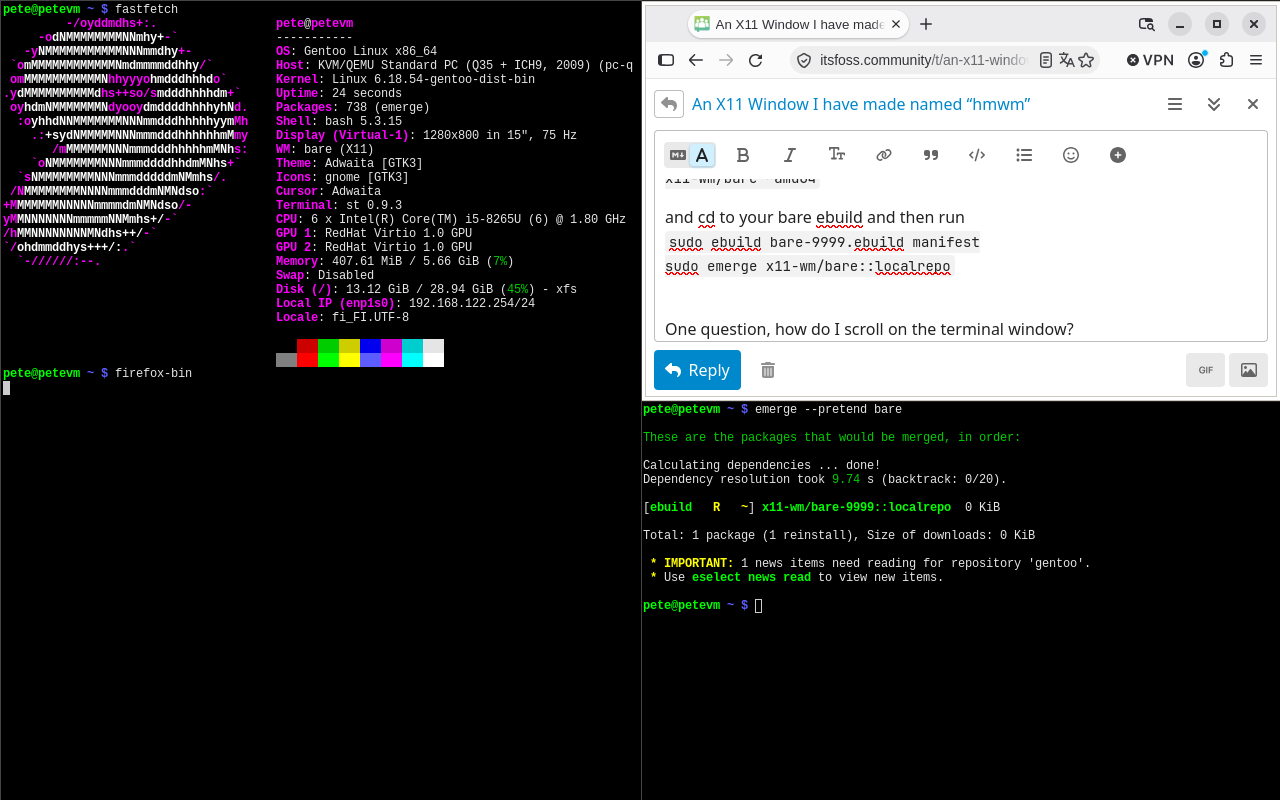
I just got it to work with portage so I can emerge it like all the other programs. Here’s a screenshot. On left the obligatory fastfetch and then Firefox-bin on to on right and on bottom you can see the emerge --pretend in action.

You need these files if you like to make a Gentoo local layer where to install bare:

/var/db/repos/localrepo/metadata/layout.conf:

masters = gentoo
thin-manifests = true


/var/db/repos/localrepo/profiles/catecories

x11-wm

/var/db/repos/localrepo/profiles/repo_name

localrepo

/var/db/repos/localrepo/x11-wm/bare/bare-9999.ebuild

EAPI=8

inherit git-r3 toolchain-funcs

DESCRIPTION=“Minimalistic X Window Manager”
HOMEPAGE=“https://codeberg.org/toromirvana/bare”
EGIT_REPO_URI=“https://codeberg.org/toromirvana/bare.git”

LICENSE=“MIT”
SLOT=“0”
KEYWORDS=“~amd64”

DEPEND="
x11-libs/libX11
x11-terms/st
x11-misc/dmenu
"
RDEPEND=“${DEPEND}”

src_compile() {
emake TARGET=bare SRC=bare.c
}

src_install() {
dobin bare
}

then add amd64 to your package-accept keywords:
cat /etc/portage/package.accept_keywords/bare
x11-wm/bare ~amd64

and cd to your bare ebuild and then run
sudo ebuild bare-9999.ebuild manifest
sudo emerge x11-wm/bare::localrepo

One question, how do I scroll on the terminal window?

EDIT: I re-emerged the base with my custom config.h but it didn’t add my WIN-f to open firefox-bin. Can you check my custom file:

~/bare-src $ ls
bare.c  config.h  custom-config.patch  LICENSE  Makefile  README.md
pete@petevm ~/bare-src $ cat custom-config.patch
diff --git a/config.h b/config.h
index 496228c..a2ebfd0 100644
— a/config.h
+++ b/config.h
@@ -5,18 +5,20 @@
#include <X11/keysym.h>

// visual aesthetics
-#define BORDER_WIDTH   1
+#define BORDER_WIDTH   2
#define COLOR_FOCUSED  0x444444

// Default Applications (pretty self explanitory.)
const char* terminal
 = { “st”, NULL };
const char* launcher
 = { “dmenu_run”, NULL };
+const char* browser
 = { “firefox-bin”, NULL };

#define MODKEY Mod4Mask

typedef enum {
CMD_TERM,
CMD_LAUNCH,

  CMD_BROWSE,
  WS_1, WS_2, WS_3,
  MOV_WS_1, MOV_WS_2, MOV_WS_3,
  FOCUS_NEXT, FOCUS_PREV,

@@ -37,6 +39,7 @@ typedef struct {
static const KeyBind keys
 = {
{ MODKEY,               XK_Return,      CMD_TERM },
{ MODKEY,               XK_p,           CMD_LAUNCH },

  { MODKEY,               XK_f,           CMD_BROWSE },
  { MODKEY,               XK_j,           FOCUS_NEXT },
  { MODKEY,               XK_k,           FOCUS_PREV },
  { MODKEY,               XK_h,           CMD_SHRINK },


and this is how I modified the ebuild adding these between RDEPEND and src_compile

src_prepare() {
default
eapply “${FILESDIR}/custom-config.patch”
}
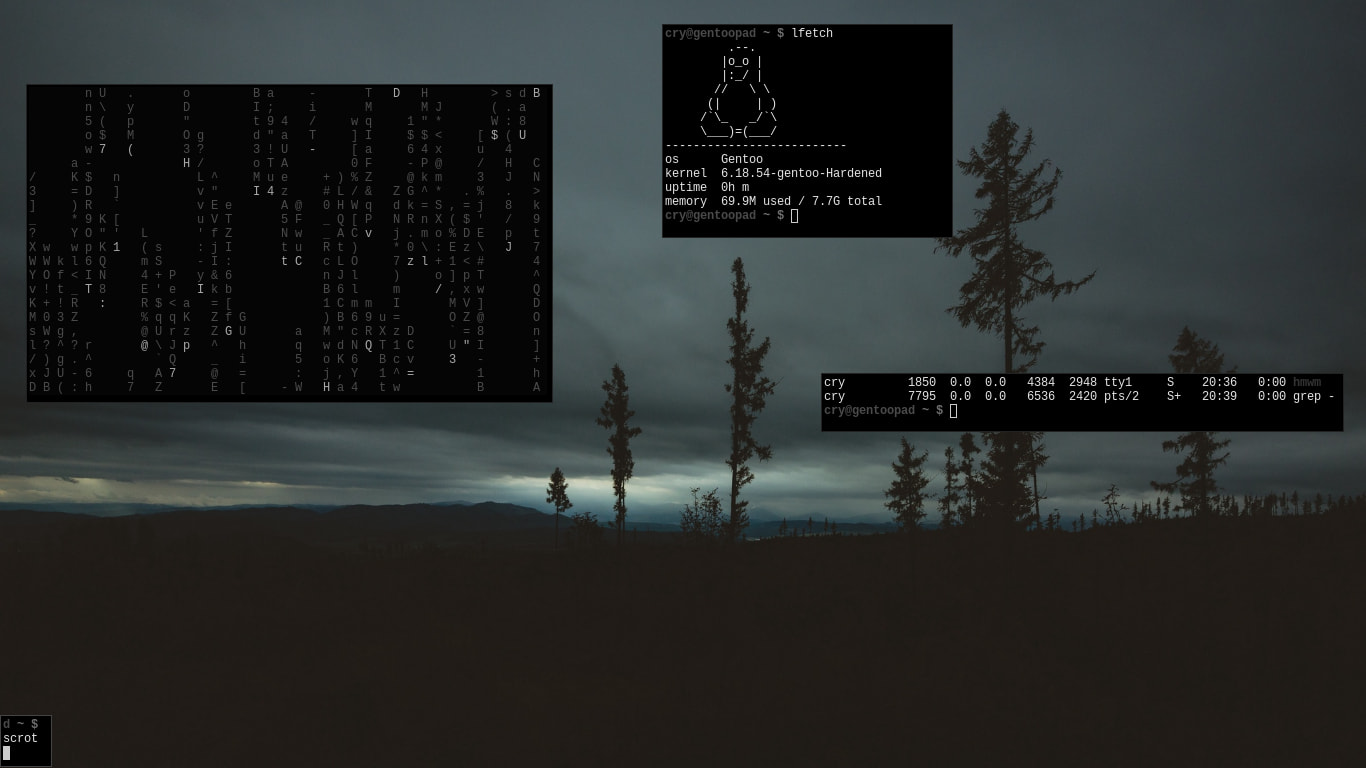
well..you’ll have to edit the main bare.c file to add the browser keybindings,the same with the waybar stuff since the window manager is desgined to use the least. thats why the window manager is only about 250 lines of code. you’ll have to use dmenu to open firefox,and use your .xinitrc file to open things by default i guess. If you don’t want to do that,that’s completely fine