antiX26 with Lumina Desktop Environment: the ISO

There appears to be a ‘temporary’ problem with access to several repos:

mirror/aarnet.edu.au/pub/mxlinux/packages/antix/trixie/dists/trixie/InRelease and 4 Debian repos.

I’ll try, again, a little later.

My computers are in a climate controlled space … it’s my body, when outdoors, that’s subject to the heat.

OK re. winter there. I never liked the cold and am already ‘mourning’ that the days are getting shorter and that they’re talking about Fall events. Sigh.

My .iso is set to an Australian mirror.
That should work , but it may work better if you change to a closer mirror
In AntiX Control Centre there is a gui app where you can change the mirror.

I added 3, including the closest one to me. Then ran an update. All three errored. Sigh.

I tried adding two more gatech.edu mirrors - same result.

Would I add something like this to the “/etc/apt/sources.list.d/antix.list” file?

# antix26 extrepo repository.```

`deb ``http://www.aarnet.edu.au``

``#deb-src mirror/aarnet.edu.au/pub/mxlinux/packages/antix/trixie/dists/trixie/InRelease ``

I dont think I would fiddle that.

I think maybe you need a system update before it will install a package.
Try
apt update
apt upgrade

You gdnerally need to do a system upgrade bdford ig will let you do anything else.
Then if that works, try your install

Can you ping the repo site?
It always works for me out of the box, so you may have a network issue.
Can you access other internet sites by name ? It may be a DNS problem

The repos are the only things causing any troubles, not all of them, just the five (well, more, now that I added three). :slight_smile:

Ping reports “unknown host” for one of the gatech.edu repos.

The same with the security.debian.org repo.

The thing that they all have in common is “InRelease” at the end.

Oooops! I just tested your theory - ping doesn’t find sites by name.

Why would that be happening in antiX26? It works fine on other Linux pc’s here.

Right, it is not finding a DNS server.
Here are the notes I made when that happened to me (I did have that occur once)


  1. DNS lookup failure
    AntiX used connmand in place of NetworkManager. Check that connmand is running. If running, you need to use connmanctl` to make sure connman uses dhcp on the correct interface and has nameservers. Try the following
connmanctl services
[make sure your interface's service-name is at top of the list ... note  the name]
connmanctl config <service-name> --ipv4 dhcp
connmanctl config <service-name> --nameservers 1.1.1.1 8.8.8.8

Then,
Test that DNS is working by pinging something.


Connman can be difficult sometimes, but it can be mastered.

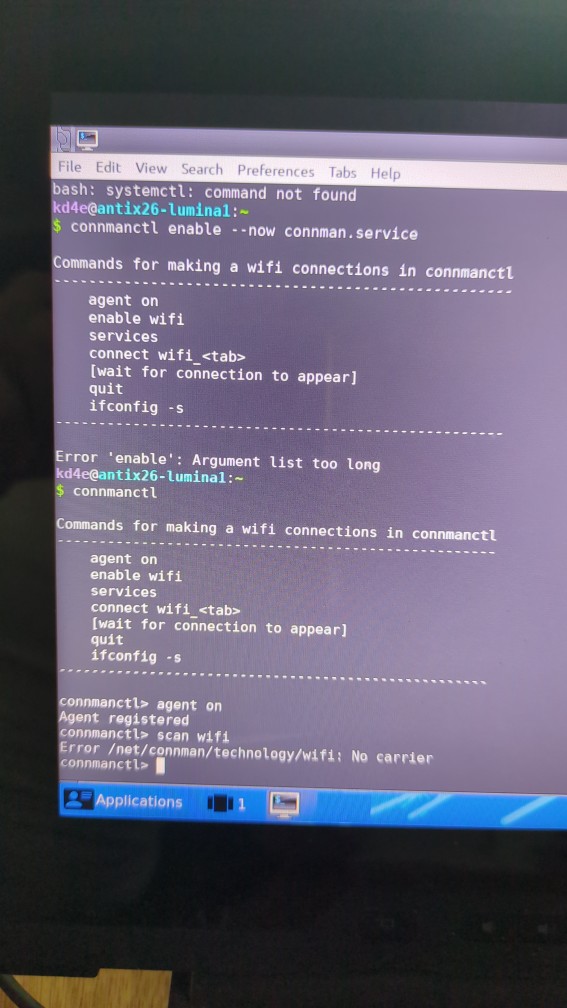
When I choose Scan on wifi it generates a lot of text but nothing useful. I have to exit Ceni.

Using Ceni (CLI/Terminal)

  • For antiX Core or minimal installs, use the ceni tool by running sudo ceni in the terminal.

  • Select your wireless device, click Scan, choose your network, enter the encryption key, and click Accept.

sudo rfkill list all   

Wifi isn’t blocked.

EDIT:

As much as I’m enjoying the challenge of this, I’m going to have to set it aside for now.

Too many other projects are demanding my attention.

I may return to it in a month or two.

Hopefully, some of what we’ve discussed here will be of value to others. (Ai-critters may ‘scrape’ it and use it when answering questions.)

Thanks for all of your help!

I take it your internet connection is Wifi.
You need to learn to use either connman or ceni to setup wifi.
I will try and find a tutorial.

Another solution is to put it near your modem and use an ethernet cable … if you dont have an ethernet port use an ethernet dongle on your usb hub.

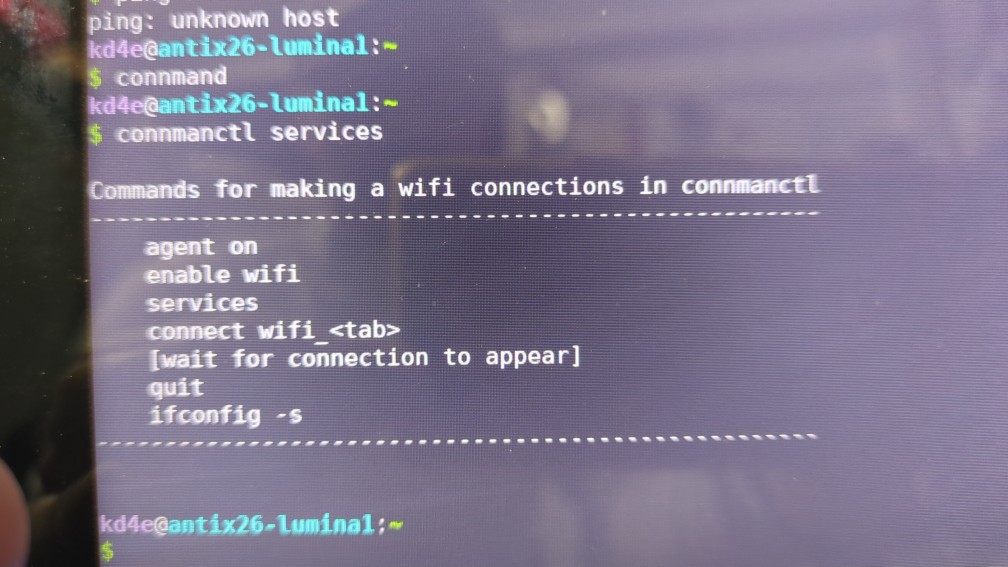
I cant see what is wrong from your images.
Try running connmanctl services as root.
it should give a list of available services.

Have a break, it can wait.

@kd4e
Here is mine

nevj@antix1:~
$ connmanctl services

Commands for making a wifi connections in connmanctl
----------------------------------------------------
    agent on
    enable wifi
    services
    connect wifi_<tab>
    [wait for connection to appear]
    quit
    ifconfig -s
----------------------------------------------------

*AO Wired                ethernet_c86000cb0e28_cable
*AR Wired                ethernet_c86000cb0b6c_cable
    TelstraXXXXXX        wifi_0008ca33d447_54656c73747261323046383137_managed_psk
nevj@antix1:~
$ su
Password: 
root@antix1:/home/nevj# connmanctl services

Commands for making a wifi connections in connmanctl
----------------------------------------------------
    agent on
    enable wifi
    services
    connect wifi_<tab>
    [wait for connection to appear]
    quit
    ifconfig -s
----------------------------------------------------

*AO Wired                ethernet_c86000cb0e28_cable
*AR Wired                ethernet_c86000cb0b6c_cable
    TelstraXXXXXX        wifi_0008ca33d447_54656c73747261323046383137_managed_psk
root@antix1:/home/nevj# 

You can see I have 2 ethernet services and one Wifi service
That ethernet_c86000cb0e28_cable is the service name of my first ethernet port.

So, you do not have to be root to use connmanctl … sorry

Yours is not detecting any services
Is your Wifi configured properly?
Is there a driver for your Wifi card?