That looks normal … did you see my previous reply ,… I think I have found the problem
I chose “Use the whole disk” option.
You want me to change the Dell tablet SSD drive to a MSDOS/MBR partition table using gparted?
And/or stop the boot in BIOS and change the setting to UEFI boot?
Which is preferred for maintaining antiX on this tablet?
I think I would prefer the modern setup … ie leave the tablet’s disk set at GPT partitioning , and change the BIOS to boot in UEFI mode.
Yes, I thought you would have done that .
I am surpised that it went ahead and tried to do a combination that is not recommended. We will report it to antiX once we are sure.
Use the “Use the whole disk” option. when you retry.
Just change the bios to uefi boot.
At which step do I change the BIOS to UEFI boot, please?
I think you said that the USB stick won’t boot except in Legacy Mode.
Before you do anything.
No, it will boot with grub in efi mode
It is confusing there are 3 ways to boot
- legacy boot with grub
- efi boot with grub
- boot with the uefi bootloader, ignoring grub
My .iso will do the first 2
OK, so either of the first two, but does either have any impact on the need to at some point set the ssd to UEFI boot?
You dont set the ssd , you set uefi or legacy boot in the bios.
What is set on the ssd is the partition table type … GPT or MSDOS(MBR)
I would set the bios to efi boot, and just choose “Use whole disk” in the installer.
It looks like the whole disk option will automatically make the ssd GPT.
I dont think you need to pre-set the partitions on the ssd , because you are using “whole disk” option .
(If you were using “Custom partitioning” you would need to setup the ssd beforehand )
@kd4e
I checked your boot directory … it is identical to mine.
It seems everythingis being faithfully copied to your SSD.
I hope that I’m doing things in the correct order.
Booted from the Live USB stick.
Answered questions and started the new install.
When it’s done, and before I exit and shutdown - then reboot, is that when I change a setting … somewhere … to the BIOS and to the ssd?
OR, should I have made the change to the ssd (using gparted) prior to starting the install?
BTW: Do I double-click on “demo” to access gparted on the USB stick?
The order is
- set the bios to efi boot
- boot the live usb stick
- use the install antix icon
- in the installer choose " use whole disk"
- when install ends press “Finish”
- if it doesnt power off turn the power off
- remove the usb drive
- press boot button … antix should boot from the installed copy.
You should not have to do anything to the ssd… the installer should automatically set it up with GPT like it did previously … only this time you will have an EFIsystem partition and a root partition.
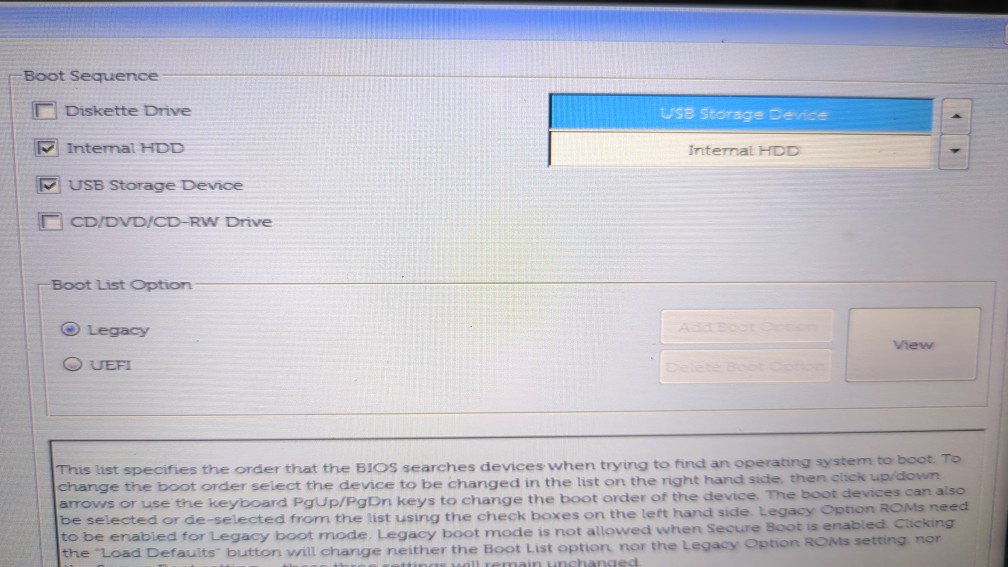
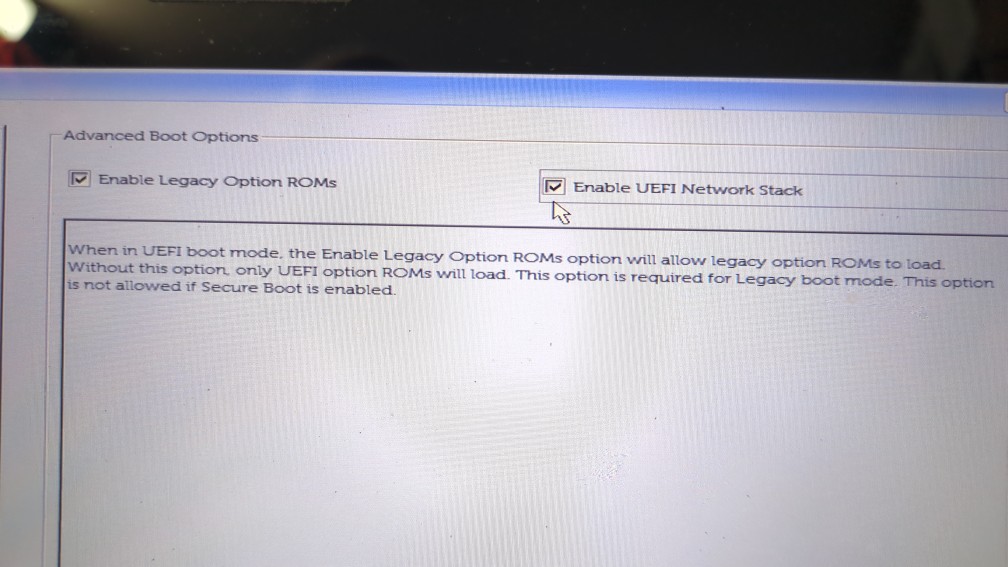
It doesnt matter. If it goes back to the live distro and the exit antix button is available you can use that to exit elegantly.
In your picture, you have set legacy boot. You need to set uefi boot if it will accept it. You need to set it before you install.
The other 2 options of where to boot from are fine… leave them both set
It refuses to boot from the USB stick if I set UEFI. (see BIOS page image) I just restarted from the other settings and got the same “No boot device found.” I’m going to install MX Linux to see if there may be something from the previous FreeBSD install that’s getting in the way. If that works, then I’ll try antiX26/Lumina, again. Thanks for your patience.
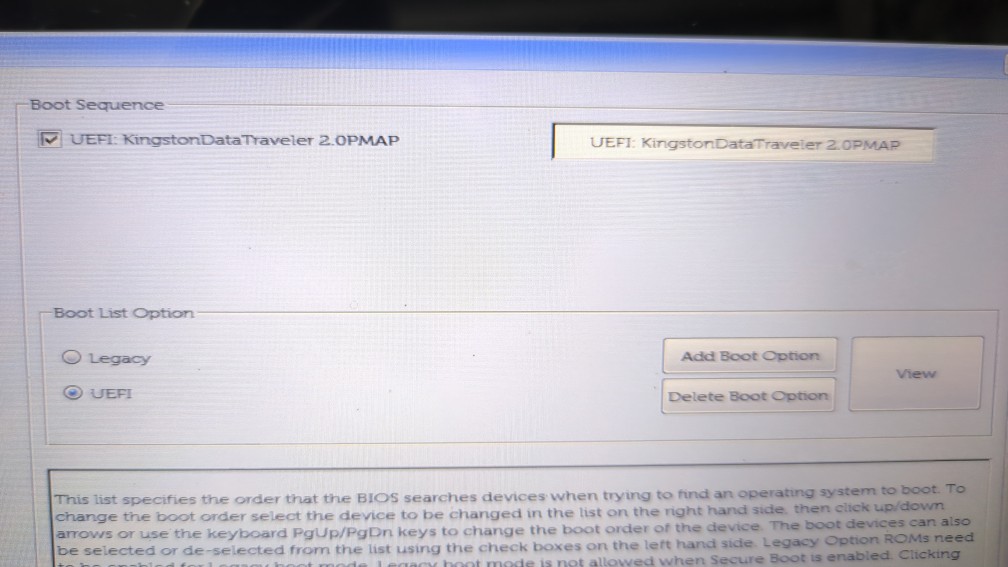
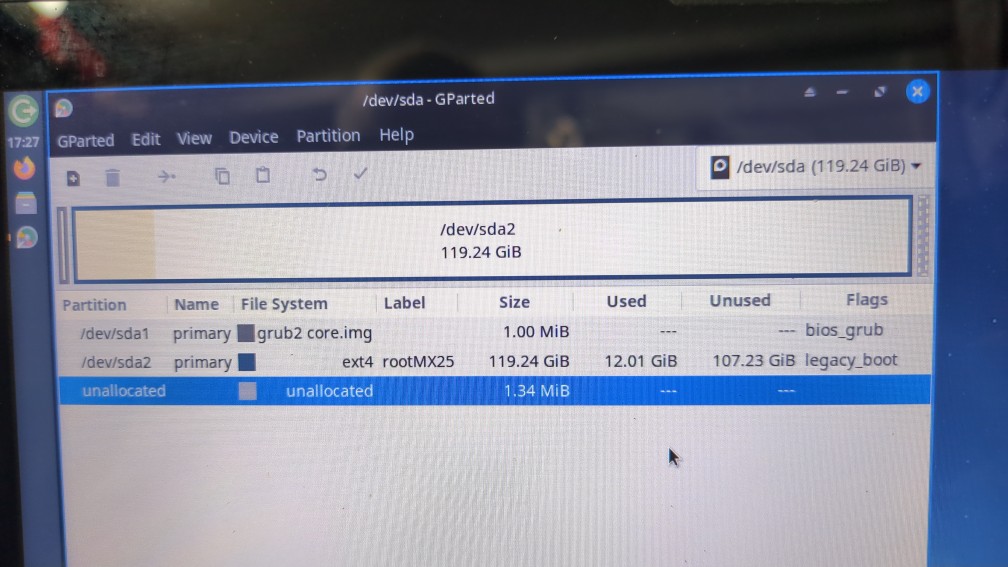
OK you are going to have to use legacy boot
That is good trying that… we know the problem is not antiX or my iso
I know what is wrong , and what to do
You are forced to use legacy boot
but
when you boot in legacy mode the “Use Whole Disk” option in the installer makes a GPT partition table and makes 2 partitions
grub2.core.img
rootmx25
That should work with legacy boot, but it doesnt (maybe because it is an SSD).
You are going to have to use “Custom partitioning” in the installer and force it to MSDOS (ie MBR) partition table.
I would do it like this…
before you start , use gparted on the SSD and
- set it to MSDOS partition type
- make one partition only … formatted to ext4 … but leave 1Mb of free space before the partition starts ( that is to leave space on the SSD for the MBR region )
- give the ext4 partition a boot flag
Then boot the .iso, run the Install Antix icon, and choose “Custom” instead of “Whole Disk”.
Inside “Custom” , dont make any partitions, just label the ext4 partition ‘/’ so it mounts , then quit.
Let the install finish.
Remove the usb drive and try to boot.
I can echo that.
We can conquer this.
We have victory! The inanimate object must never be allowed to win.  Thanks!
Of course, now I have to get acquainted and try not to break things …
Any reason that pacman doesn’t seem to be present, please?
I tried it to add librewolf and it errored “command not found”.
I went to add the /extra repository to /etc/pacman.conf and that file didn’t exist (nano opened an empty one).
Hooray for that. Thanks for sticking with it.
Becase antiX is debian based, not arch based.
In debian you use apt
eg
apt install librewolf
apt search browser
You may want to make Dolphin the default filemanager … it is set to the lumina Insight filemanager, which you may not like
BTW … why did you choose to look at the lumina de rather than the other options?
OK, I’d missed that Arch vs Debian difference. I saw your thread, here Librewolf Is Now Available Arch’s Extro Repo and was following it without reading closely. I blame working outdoors in the 99F, feels-like 115F, weather.
The Lumina version sounded interesting. I was curious.
NOTE: sudo apt install librewolf errors “unable to locate package librewolf”.
The package name is correct , but you need the repo … it is not in the Debian repos
"The actual package name for the LibreWolf browser is librewolf. It is not included in the official main Debian software repositories, so you must add the official LibreWolf repository using extrepo before you can install the package via apt. [1, 2, 3]
How to Install LibreWolf on Debian
To add the repository and install the librewolf package, run these commands in your terminal: [1, 2]
-
Install and set up
extrepo:sudo apt update && sudo apt install extrepo -y -
Enable the repository:
sudo extrepo enable librewolf && sudo extrepo update librewolf -
Install the package:
sudo apt update && sudo apt install librewolf -y[1]"
I have never used extrepo … I have always edited the /ètc/apt/… files by hand.
Watch your computer temp in those conditions.
We are in Winter in Australia. … about 20deg C max… 7deg C min.
Lumina came from the PCBsd project (TrueOS).
It is not in the repos anymore, I had to compile it.
It is very configurable.
Let us know how you get on with Lumina.
antiX has quite a few good tools … see its Control Centre.
eg there is an ISO maker that you might use to backup your system to a usb drive.