I have been trying to install Openindiana OS (OpenIndiana.org) but there’s been issues with the graphical and cli installer. Maybe it’s because Openindiana uses ZFS as file system or that my tower uses Nvidia GTX 1060 GPU. I have tried to install it as dual boot and that also might be the issue. One thing was that the installer couldn’t use the same pool where my FreeBSD is. I also tried to install it to my laptop. I made a solaris partition there. The graphical installer didn’t find my screen, it uses Xorg. Tried to install manually and it did finish but couldn’t boot to it.
My next try is to use an external drive for the install and let the native bootloader do the booting (because I couldn’t get grub to recognize ZFS filesystem, bootloader looks same as with FreeBSD).
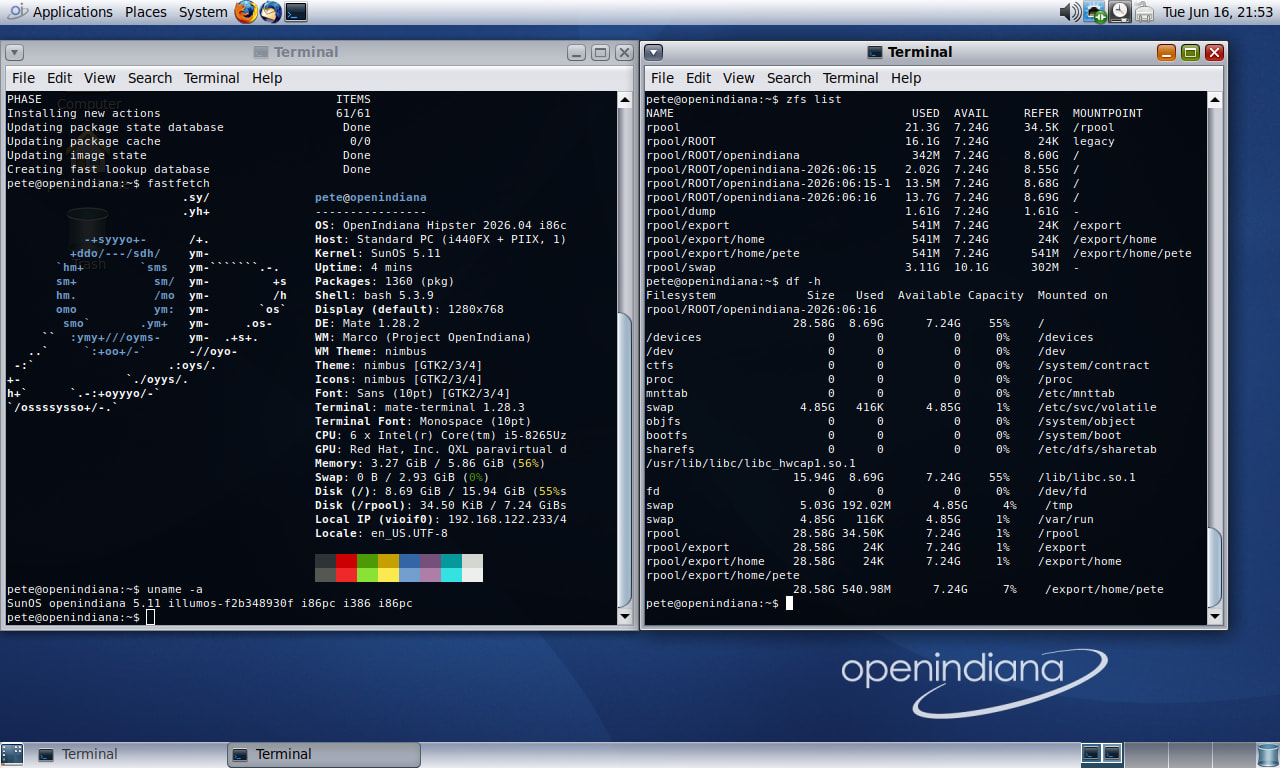
Here’s a screenshot of my virtual machine (QEMU) running OpenIndiana with Mate desktop:
If it works in a VM but not in a hard install , the graphics card ( or some other hardware) is a likely reason.
If it is ZFS a hard install is dangerous, except in a machine of its own. I have clobbered whole machines with ZFS installs. Absolutely ruined the disk and had to resort to wipefs command to clean it.
I think I would advise working with a VM.
I used Solaris years ago on Sun workstations. I prefer BSD.
Actually OpenIndiana is a port of OpenSolaris - which was from when Sun Microsystems owned Solaris and they opensourced it (Oracle quickly killed it off when they took over - but it, NFS and ZFS had already escaped!) - but - Linus actually released Linux in 1991 - Solaris (2.5) wasn’t released till 1992…
So Linux is technically older… And Solaris didn’t really have much of SunOS (1980s) in it…
SunOS was pretty much a BSD UNIX with a bunch of stuff Sun made… Solaris was a SystemV UNIX…
You can actually download “Official” Solaris 10 and 11 for X86… I usually keep a VM around to prompt / remember how to do mirroring and patching on Solaris…
First off, welcome to the illumos community! I am a daily power user here of both OI and Solaris on bare metal systems.
So, with ZPOOLs, you definitely want to be careful interchanging/importing between them. Version 5000 (b151a) of OpenZFS is what OI used. As I understand it, illumos used to be upstream for OpenZFS, but now there exists different versions for different platforms, see Why are there four different repositories?: FAQ - OpenZFS ? So if you want to import pools, make sure you are as consistent as possible between versions. If you cannot run the same version, you might try using zfs send/receive to clone datasets from your other system to OI.
The GeForce GTX 1060 is not supported with the NVIDIA driver for Solaris (Quadro mostly), however, I have unofficially run GeForce cards with the NVIDIA driver for Solaris (a mobile 1070 in a laptop). It outputted not to the laptop screen but my HDMI output. Your luck may vary though. Do you know if the NVIDIA driver is attaching? Or is it VESA? If all else fails, you can default to framebuffer, OI just came out with a new framebuffer driver too (xf86-video-illumosfb)!
I can’t really say anything on dual booting other than that OI uses what we call the illumos bootloader (yes, I know where I’ve seen you before lol, but we’re going to roll with that name) and Solaris runs GRUB still. Maybe an expert can chime in here on that more, though in time you may see OI rocks so much you won’t need/want any other OS on the disk!
If you have more questions, feel free to ask! Personally, I’m trying to become a bigger contributor with OI, so I’d be happy to help.
Hi @solaris-leopards ,
Thank you for that helpful reply.
We do not often get cross fertilizing between forums, so you ard very welcome.
My bad experience with zfs was with one of the BSD’s. I just think Linux people need to be award of its peculiarites, especially in a multi-boot situation.
The issue seems to be that zfs does more than just manage a filesystem … it writes on parts of the disk outside its designated partition, where the partition tables and stuff reside… that interferes with grub. It is a bit like systemd … does more than you want and does it behind your back .
I’d say it’s nothing like SystemD - I’ve had issues with ZFS on Linux - but rock solid on FreeBSD and Solaris… Sure it does a bit more than some other software RAID (e.g. lvm, btrfs) - i.e. you can even specify share paramets for SMB and NFS in the ZFS set…
And - it’s so easy to recover from so long as you have the disks there… Try that with LVM… I think there’s a way to scan for the LVM name maybe? But with LVM you need to know the VG and PV details too!
I’ve never tried ZFS in a multi or dual boot scenario… I don’t dual or multi boot…
I’ve had FreeNAS - new install - instantly identify the 4 disks in a previous instance ZPOOL…
Wow! Nice answers and a new member with a lot of experience, welcome!
Maybe I was lucky with my hardware install to my laptop because it still boots to Gentoo.. I did have to correct my boot with efibootmgr and grub-install afterwards to get the booting start automatically with Gentoo’s grub. I made a partition for OpenIndiana, installer found it and didn’t use the whole disk. Here’s more info about my laptop:
The computer with a Nvidia has one SSD for FreeBSD and it’s ZFS pool wasn’t the same version what OpenIndiana uses. The installer was complaining and didn’t make a mess there. I think I’ll leave that box with FreeBSD and Gentoo on another SSD if the GTX1060 is not supported. Thanks for the info and looking forward seeing your posts on this forum!
OK, so both are about the same age. Nice to know! You still work with some “Official” Solaris servers?
I was lucky I guess.. My bios was a bit of mess after the OpenIndiana install and needed to press F12 to get to grub. When I looked at the boot order in bios it showed random strings instead Gentoo/OpenIndiana and it had switched the secure boot enabled. A lesson learned! VM is fine!
Thank you! I’ll stick with the VM now and keep learning. Nice to have a power user helping others!
OpenIndiana can definitely be challenging to install, especially on modern hardware configurations. The combination of ZFS, dual-boot setup, and an Nvidia GTX 1060 GPU may all contribute to the installation issues you are experiencing. OpenIndiana and other Solaris-based systems sometimes have limited support for newer graphics hardware and can be very strict about ZFS pool configurations. Dual booting with FreeBSD can also complicate bootloader detection and pool management. Using a separate external drive is probably a smart next step because it avoids partition conflicts and makes troubleshooting easier. Native bootloaders often handle ZFS environments better than GRUB in Solaris-based operating systems.
welcome and thank you for th reply! I was taking a bit too big bite when trying to install OpenIndiana to my existing system. I’ll learn to use it in a VM now and try a hardware install on an empty SSD later this summer.
Yeah - all Sparc T1 systems - and almost 99% running as VMs (LDOMs) on the sparc hypervisor (which was always more mature than Intel VT or AMD/v)…
It gets confusing when you get a call out at 3 am for an issue :
is this Solaris on bare metal?
is this Solaris running as an LDOM (logical domain)?
is this Solaris running as a “zone” (container)?
Solaris was good in its day - but it’s on it’s way out and that day can’t come soon enough… it’s just horrible… Even on Solaris 11 - because Larry Ellison hates OSS so much - you don’t get GNU find - you get Solaris “find” and it can’t even do f–king case insentitive “-iname” so you have find all sorts of finger-twisting ways of finding a file…
Six years ago I tried to compile POVRay (ray tracer) on Sparc UNIX (Solaris 10 - dual Sparc SunBlade 2500 with 16 GB RAM - it’s still under my desk but haven’t powered it up for 2-3 years) and gave up - library dependancy after dependancy, ad nauseam… The POVRay team do an awesome job - but the UNIX code is pretty much 100% Linux on x86_64…
In 1992/3 I got the C source for POVRay from a PC magazine (floppy disk) - and we (mostly a colleague) compiled it on a DG-UX AViiON (Motorola RISC 88010) - it was pretty easy - DG-UX were kinda famous for shipping a GCC compatible C compiler with the O/S - other UNIX vendors made you pay extra just for a C compiler… it was amazing how much faster a raytrace job could finish on a RISC CPU (dual) with 128 MB RAM vs a DOS PC with an 80386 with 8 GB RAM…
Note : before Oracle - there was an awesome website called “Sunfreeware” and you could get PKG (like an RPM or a DEB) files for Sparc or x86 (for Solaris 8, 9 and 10) for ubiquitous stuff like tar, or find or whatever (POVRay), and even GCC - but within 9-12 months of Larry Ellison buying out Sun Microsystems - Oracle sent nasty lawyer “cease and desist” emails to the maintainers of SunFreeware - i.e. in one foul swoop Larry Ellison ENSHITTIFIED Solaris… It killed the golden goose… No more binaries… Thanks Larry!
Several months ago, I installed OI in a QEMU VM seemingly without problems. It had the Matte desktop. However, I couldn’t find a office suite that would install so I dropped it. I was intending to switch from Linux but I needed a office suite. No one I asked knew of one. Do you?
This is the product that Sun Microsystems bought, ran on Windows, Linux and Solaris (on sparc and intel) - then they open-sourced it and it got forked as Libre Office…
 - I’ve had issues with ZFS on Linux - but rock solid on FreeBSD and Solaris… Sure it does a bit more than some other software RAID (e.g. lvm, btrfs) - i.e. you can even specify share paramets for SMB and NFS in the ZFS set…