Bridge connection in Virt Manager

Thank you that helps. At least I can see what permissions to set.

In virtmanager you can set what starts automatically in the Virtual Machine Manager window. Edit → Connections → Virtual Networks.
The default is a NAT connection called virbr0. Apart from NAT you can have Routed, Open, or Isolated.

If you start more than one, you can switch between them in a running VM. Go to Details → NIC. and choose the desired network name, and apply. Here you can also choose to use a bridge or macvtap, but they must have been defined in the OS before you start the VM.

I found that double dip approach quite confusing, and it took me ages to get it sorted in my mind.
It has the advantage that you can switch between network interfaces on the fly, but you have to do all the setting up beforehand, either in the Manager window or in the OS.

3 Likes

Are you using virt-manager? I’m not real familiar with Void, but yes, I believe you need to create the file. (probably need to set chmod 0640 bridge.conf and chmod 4755 /etc/qemu) Also see if qemu-bridge-helper is present. (often /usr/libexec/qemu-bridge-helper or /usr/lib/qemu/qemu-bridge-helper)- probably will have to sudo chmod u+s the file.

Virt-manager usually handles it’s virbr0 out of the box- adding your own bridge is when you need to have /etc/qemu/bridge.conf and the qemu-bridge-helper file.

also, make sure your user is in libvirt and kvm groups.

4 Likes

Once you get everything setup for the bridge. If using virt-manager- go to vm’s NIC settings →Network source choose” bridge device”. Then enter Device name - whatever you named your bridge (br0) then “apply”

2 Likes

Made bridge .conf and set its permissions.
I have /usr/libexec/qemu-bridge-helper… set its permissions
nevj is in libvirt and kvm groups.

I made a script of your ip instructions

#!/usr/bin/bash
# Create the bridge
# first argument is bridge name ( eg br0 )
# second argument is interface name  to link bridge to ( eg enp17s0)

ip link add name $1 type bridge

# Optional-disable STP and forwarding delay -good for simple setup
ip link set $1 type bridge stp_state 0 forward_delay 0

# Bring the bridge up
ip link set $1 up

# Remove any existing IP from the physical interface (critical)
ip addr flush dev $2

# Enslave the physical interface to the bridge
ip link set $2 master $1

# Bring the physical interface up
ip link set $2 up

# Request DHCP lease on the bridge
#dhclient $1
#dhcpcd $1

# NB add 'allow br0' to /etc/qemu/bridge.conf

the dhclient ( or dhcpcd) is commented out because I have a static interface.
After running the script

# sh -ex makebridge br0 enp17s0
+ ip link add name br0 type bridge
+ ip link set br0 type bridge stp_state 0 forward_delay 0
+ ip link set br0 up
+ ip addr flush dev enp17s0
+ ip link set enp17s0 master br0
+ ip link set enp17s0 up
# ip a
3: enp17s0: <BROADCAST,MULTICAST,UP,LOWER_UP> mtu 1500 qdisc pfifo_fast master br0 state UP group default qlen 1000
    link/ether c8:60:00:cb:0b:6c brd ff:ff:ff:ff:ff:ff
14: br0: <BROADCAST,MULTICAST,UP,LOWER_UP> mtu 1500 qdisc noqueue state UP group default qlen 1000
    link/ether c8:60:00:cb:0b:6c brd ff:ff:ff:ff:ff:ff
    inet6 fe80::282b:8cff:fee8:41a7/64 scope link proto kernel_ll 
       valid_lft forever preferred_lft forever

Neither epp17s0 nor br0 have an IP address.
So I defined a static address

# Now give br0 a static address
# ip addr add 192.168.32.6/24 dev br0
# ip a

3: enp17s0: <BROADCAST,MULTICAST,UP,LOWER_UP> mtu 1500 qdisc pfifo_fast master br0 state UP group default qlen 1000
    link/ether c8:60:00:cb:0b:6c brd ff:ff:ff:ff:ff:ff

14: br0: <BROADCAST,MULTICAST,UP,LOWER_UP> mtu 1500 qdisc noqueue state UP group default qlen 1000
    link/ether c8:60:00:cb:0b:6c brd ff:ff:ff:ff:ff:ff
    inet 192.168.32.6/24 scope global br0
       valid_lft forever preferred_lft forever
    inet6 fe80::282b:8cff:fee8:41a7/64 scope link proto kernel_ll 
       valid_lft forever preferred_lft forever

So now br0 has a static address … I used the same address that enp17s0 originally had.

Now start a VM… it is Alpine
Its eth0 does not have an IP address … it tries to get one by dhcp and fails.
So give etho an ip address and a default route

ip addr add 192.168.32.6/24 dev eth0
ip route add default via 192.168.32.6 dev eth0

Now from within the VM I can ping 192.168.32.6, 192.168.32.7 ( another computer on the 192.168.32.0 network) and 192.168.32.98 ( a network printer). I cant ping 192.168.0.57 ( the other ethernet card on the host) ?

And from the host I can ping 192.168.32.6( the VM) , 192.168.32.7 ( the other computer , Mary) , and 192.168.32.98 ( the network printer)

And from the other computer (Mary, 192.168.32.7) I can ping 192.168.32.6, 192.168.32.98, 192.168.0.57

So I bit the bullet and ssh’d from Mary into the VM. It works.

I deliberately linked br0 to the static local net because I want ed to see if the other computer on the local net could communicate with the VM… it can

I suspect there is a routing issue with the VM not pinging the hosts eno1 interface , which is dhcp and connects to the modem and is controlled by NetworkManager.
It works when I use the default NAT connection in virtmanager.

What would happen if I linked the bridge to eno1? I would then use dhcp. I would probably have to use @daniel.m.tripp 's NetworkManager setup, instead of ip, to define br0.

I find the whole business rather weird. There must be an easier way

I dont understand why a bridge effectively disables the interface it is linked to. I dont understand how virt-manager attaches itself to the bridge. I dont understand why I cant just put a VM on the local net like any other computer.

Thanks to @JoelA and @daniel.m.tripp . I never would have got there alone.

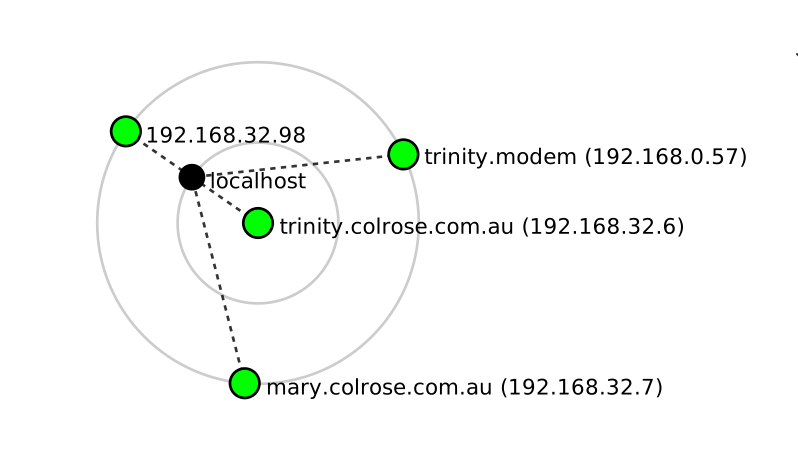
Three things are strange in that topology diagram

  • it calls 192.168.32.6 trinity… trinity is the host not the VM?
  • it can see Mary ( computer on local net) but it does not see a VM on the same neyt? It only sees the interface to it in the host.
  • it says there is access to 192.168.0.57 via localhost ( the host) but pings from 192.168.32.6 dont get there?

Afterthought:
I think I should have used a different IP number within the VM.
ie leave br0 as 192.168.32.6 and set eth0 in VM to eg 192.168.32.8
4 Likes

(post deleted by author)

Yes, I believe you are correct. Should not be same ip address.

(I only have one network card, so I just let my physical router assign the ip)

2 Likes

My local net is not managed by the modem/router. That is the old fashioned way of doing things. The machine I am working on is a gateway,with 2 ethernet interfaces… one on the modem and one on the local static net..

I think you are right… separate ip address for the VM … think what would happen it there were 2 VM’s.

Will have another try tomorrow. When I understand this, I may be able to write something… and a better solution for vm’s may appear.
I would not feel at all confident about the security side of a bridge at the moment. ..

3 Likes

Maybe this will help- I will try to explain.

Doesn’t really disable it, it is re-purposed as a switch port.

The bridge device itself (br0) is a virtual Layer 2 switch → forwards frames between ports based on MAC addresses (just like a physical switch). The physical NIC becomes one port on that virtual switch → no IP (same as a switch port). Your host machine still needs network connectivity- so that is why you assign the host’s IP address directly to the bridge interface .(br0)- .

Think of a simple physical switch- It has no ip address (it only receives and transmits raw Ethernet frames) -This is your interface card.

Now think of a Managed physical switch- It has one managed ip assigned to it so you can reach the switch itself to manage it. -This would be the ip you assigned to the bridge (br0) so your host computer could manage the switch.

3 Likes

Thanks, that does help

Here is my view

  • making br0 is like putting a socket on the network it is linked to
  • giving a VM a bridge connection is like plugging it into that socket

Is that for a non-network-jargon attempt?

1 Like

Think about it like this. The bridge (br0) is a switch and the physical NIC is a port on the switch. When you connect VMs they will add a TAP (ex. tap0, vnet0) - they are ports on the switch. ip link show master br0- will show all the “ports” on the “switch”.

When you assign an ip address to br0, the host itself acts as a device connected to one of the switch’s ports. Technically you do not have to assign br0 an ip. ( The IP address you assign to br0 actually belongs to the host) The bridge “switch” will still work, however your host computer would not be able to participate. (OR you can imagine the ip address assigned to br0 like the managed switch analogy)

1 Like

So br0 is like a switch with nothing connected to it.
Instead of highjacking a physical port, could I give br0 its own virtual network and put both the host and the vm on that network via the bridge?
I should be able to assign a new IP to a bridge, instead of using an existing one… then I would get a bridge to nowhere, and woukd have to link both the host and the vm to it.

What I have done puts the VM and the host on the local net
What I am suggesting is put them both on a new vnet, and leave the local net alone.

1 Like

An isolated bridge- I believe so. (Never tried it personally, but yes it should work) I feel bad, we sort of hijacked this post and went off topic.. Hopefully others find this interesting.

2 Likes

I might move it to a new topic… other users might like to search out this discussion in the future.

I will do some experiments with putting a br0 on a new virtual net.
but first I want to try 2 Vm’s with different ip’s to the bridge, but on the bridge’s network.

Another question . What happens if I put br0 on my NIC that connects to the modem . Am I then exposed to connections coming from the internet?

1 Like

Is your modem a modem/router (gateway)? My only NIC is connected to the gateway and it is slaved to my bridge (at times). The gateway sees all vm as real computer (they would be connected to the internet also- most modern gateway block unsolicited incoming connections). With my setup I turn the bridge on and off by a script. I only use the bridge when I am playing around with the virtual machines. (see my post #6 above )

2 Likes

If there is a chance of causing a loop. Like two physical network cards attached to same bridge on host. It is a good idea to leave STP enabled

1 Like

Yes, so it would be like yours.
I thought it safer to bridge to my local net

I moved the topic… that probably happened while you were typing

1 Like

Pros and Cons. Yes you are correct- Better isolation if you put VMs on different subnet/VLAN or separate switch.

2 Likes

Neither do I - and my bridge is working…

1 Like

the qemu-bridge-helper file automatically makes the temporary tap. It needs root permission chmod 4755 (I accidentally typed chmod 0755 earier in post) It looks at the bridge.conf file to see what is allowed.

Primarily it is used when connecting to a bridge with qemu.

ex.-netdev bridge,id=net0,br=br0,helper=/usr/lib/qemu/qemu-bridge-helper

You do not have to use the helper file- you can make the tap manually first. After the tap exists then ex. -netdev tap,id=net0,ifname=tap0,script=no,downscript=no

When running virt-manager in qemu:///system (usually default in virt-manager.) libvirt has root privileges so it can make the tap. If virt-manager is in qemu:///session (user). It doesn’t have root privileges so it needs the qemu-bridge-helper file.

At least that is how I understand it. Things keep changing so it get confusing.

I use both virt-manager and qemu cli.

2 Likes

I repeated the whole exercise

  • make the bridge
  • give br0 an ip
    ip addr add 192.168.32.6/24 dev br0
    ie the same ip as the nic it linked to
  • put virtmanager NIC to br0
  • setup eth0 in first vm ( alpine)
    ip addr add 192.168.32.8/24 dev etho
  • setup eth0 in second vm ( Peppermint)
    ip addr add 192.168.32.9/24 dev eth0

So now I have 2 VM’s on the same local net as the bridge
All pings work as before. The other computer on the local net can ping both VM’s
The 2 VM’s can ping each other.

So that settles it … each VM should have an IP on the same net as the bridge, but not the same ip as the bridge itself.

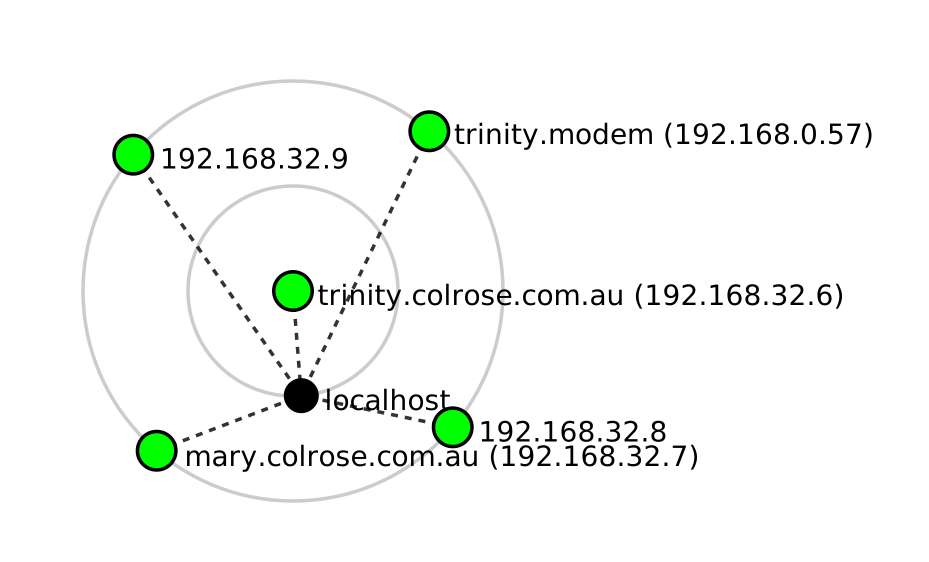
The network topography is now like this


ie it sees the two VM’s as separate nodes, as well as the bridge.
Before it could not distinguish the bridge from the one VM.

So that confirms it, each VM and the bridge should have a separate IP’s

I used zenmap to draw those togographies. It is not perfect… it does not recognize the bridge… it treats it as a computer which it is … it is an interface on the VM host but not the same as localhost. It does recognise the modem.
Does anyone know a better network diagram app?

3 Likes