It was @Manuel_Jordan - he had issues with VirtualBox on Debian Trixie…
The only thing VirtualBox has over KVM? Getting bridged mode to work - its a piece of cake on VBox - its devilishly complex on qemu/kvm - i.e. you don’t setup / create a bridge in virt-manager - you do it in your operating system - then you access that device from virt-manager.
I got it working once (i.e. bridged device and in KVM) - then broke it (by changing some settings on the USB 3 Gigabit NIC I had working as a bridge in NetworkManager)…
I ripped out that USB 3 Gigabit NIC / dongle - plonked in another one - followed a tutorial about setting up a bridge in Ubuntu (and a few tips on here) - and - got it working again!
The “macvtap” adapter in QEMU/KVM can work as a sort of bridge - i.e. the guest can get a DHCP lease from your DHCP server (e.g. WiFi / router) - you can get to the IP address of the guest from other hosts on the same LAN, but - I was unable to ssh to the guest, from the host running KVM.
With a bridged adapter in NetworkManager - for all intents and purposes, your VM guest looks like a real host on your LAN, even from the KVM “server / hypervisor” machine…
I should dig out that post where I mentioned I’d resolved bridged mode (using NetworkManager in Ubuntu)…
It’s still considerably harder than VBox…
virt-manager qemu / kvm kinda reminds me a bit of hardware virtualization on Solaris T series servers (the “T” series have a hypervisor)…
To do anything at all - you have to create a storage manager, and a virtual switch! Fortunately some of that can be scripted - but it’s not easy…
At one time - Oracle VM (NOT VirtualBox! Different product) Manager - would let you manage x86 and Sparc (T series) hardware virtualization - took some of the heavy lifting out of it… I only ever used it in a training course for Sparc… But I did manage (and deploy) a clustered OVM for x86 implementation - i.e. two hypervisor machines at each Data Centre, and dedicated Manager server at each DC - the VM images hosted on ZFS NAS and replicated across both DC’s…
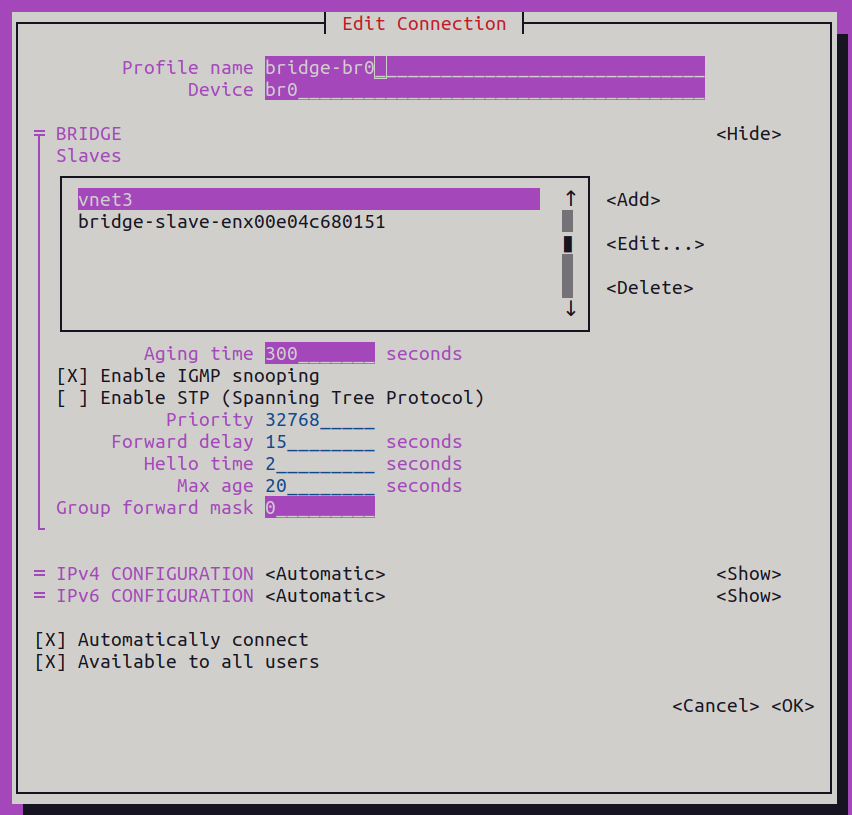
From my shell history - this is what fixed it (needed to reboot after these commands) :
sudo nmcli con add type bridge ifname br0 stp no bridge.mac-address 00:e0:4c:68:01:51
sudo nmcli con add type bridge-slave ifname enx00e04c680151 master br0
sudo nmcli con mod bridge-br0 ipv4.method auto
sudo nmcli con up bridge-br0
Note - reboot may not be necessary - probably down then up the link would do it too? Was easier to reboot in my case… When I want to take a look at that connection in a more human friendly format - I run “nmtui”…
That “vnet3” slave device is “dynamic” i.e. virt-manager only instantiates that when a VM is using it (I’m running my new Mageia install)… I’m always very careful not to change ANYTHING!
Note : someone else’s device will have a different NIC device name and MAC address…
And, they may not use Network Manager.
It is difficult… I looked up virt-manager… there is no plugin or addon facility.
Networking is a sea of individual cases… it is difficult to write something that would work for anyone.
Thanks for the summary… I will have another try. Maybe I can learn enough to generalise it.
And impossible with a Wifi in a laptop.
On a desktop with a wired ethernet NIC it’s doable, as it can “enter promiscous mode”.
This something I cannot do with a wifi, still VBox does it…
For my purposes VBox was quite OK so far.
Now I face a different problem, I’d need to create an aarch64 (arm64) VM on x86_64 machine (for a special testing purpose), which is clearly out of the possibilities of VBox, but within a shooting distance with Qemu.
My post on the topic from a while back- this is what I did to set up a bridge with network manager.
Did you guys ever figure this out? I do not know if this will help, but- I have a dual-boot system (The Host) that I wanted to keep the same static IP addressed assigned to. I play around with Vbox, Virt-Manager,& Qemu. What I did was make a bridge and enslaved the physical Ethernet interface to it (I created the bridge with the same MAC address as the physical Ethernet interface ). I’m using Ubuntu 22.04 and Network Manager. The Host machine keeps the same static IP assigned by the router & All VMs can attach to the bridge etc….I also wrote a script to turn the bridge on or off since my Host only has one physical Ethernet interface and I play around with VMs but do not need them all the time. I would be happy to go into more details on exactly how I set it up.
this is a brief summary-
Create the “br0” bridge with the same MAC address as enp6s0 (my physical Ethernet interface name): So replace the MAC address and “enp6s0” with yours. sudo nmcli con add type bridge ifname br0 stp no bridge.mac-address d8:5e:d3:0e:a0:25 sudo nmcli con add type bridge-slave ifname enp6s0 master br0 sudo nmcli con mod bridge-br0 ipv4.method auto sudo nmcli con up bridge-br0
Be sure to Disable any conflicting connections (e.g., “Wired connection 1”): sudo nmcli con down “Wired connection 1” sudo nmcli con mod “Wired connection 1” connection.autoconnect no
Not exactly a bridge, but a macvtap device. It just didn’t work at all, though it worked on the desktop with a wired NIC. Then later have read that wifi isn’t supported in that regard.
Sorry, I don’t remember the source of the info.
I tried this in the past- I sort of understand why it is not possible.
My attempt to explain–
Wifi is forced to use its own Mac address when transmitting. The majority of Wifi uses 3 addresses- transmitter, receiver, source & destination (depending on direction)
Ethernet uses 2 addresses- source & destination
It is the transmitter that causes the bridge not to work.
There are some wifi that uses 4 addresses and they are able to bridge. (but has to be enabled on both sides.)
Most people who want actual “WiFi” in a VM are n00bs trying to get USB (or WiFi) passthrough working in a Kali VM…
I remember the intertubes would get inundated with them when the TV show Mr Robot aired a new season…
It’s relatively straightforward to pass through a USB device in VBox and pass through to a VM… I’ve never tried this in qemu / kvm…
I recently tried to emulate a Pi3 (arm7l [although Pi3 is aarch64]) to run Raspbian - and hit a few snags and gave up… (Note : on MacOS M1 - I use “UTM” which does heap of heavy lifting for doing QEMU) I’ve also tried emulating sparc on x86_64 qemu/kvm and gave up… I have an ancient “to do” I intened to do : emulate PPC (PowerPC) in qemu and install AIX (IBM’s UNIX) - but never gotten around to it…
Same here… it’s essentially just a NIC… and if you only have WiFi and run VMs - they’ll be using the WiFi as if it was an ethernet NIC.
If I do anything to try and drag this bridge stuff together into something that may help with virtmanager, credits will be to @daniel.m.tripp and @JoelA .
Dont get excited, it will be a long haul for me.
Did I say I want wifi ina VM?
No, I just want some network.
And the VM to be a cessible from outside, so from other computers on the network, including the host of that VM
And all this whith having the host only wifi.
┌─[pete@gentoo]─[~]
└──╼ cat /etc/qemu/bridge.conf
# This should have the following permissions: root:qemu 0640

# allow br0
# Uncommenting the above would allow users in the 'qemu' group
# to add devices to 'br0'

# allow virbr0
# Uncommenting the above would allow users in the 'qemu' group
# to add devices to 'virbr0'

# include /etc/qemu/bob.conf
# Uncommenting the above would allow users in the 'bob' group
# to have permissions defined in it, iff it has the following
# permissions: root:bob 0640
as you can see it’s just a template which I haven’t modified and still wifi works on my qemu. It’s making a virtual bridge so I don’t have to edit that file. Try to copy it to your Void and see if it helps. Just uncomment the allow br0
When I start qemu on my laptop the virbr0 starts automatically (I use NetworkManager):