Do you use firejail and how?

I found out about firejail in this forum not long ago and it seemed to me a good way to improve privacy and security and I installed it (openSUSE Slowroll). The default configuration run straight away but it set all apps to run by default under firejail using a maze of layered default profiles. I found very hard to work out what was going on. Using the command (firejail –option app) relies on the same layered default profiles so not any clearer. I started writing my own user profiles using the defaults profiles and template as a guidance but working out what is needed, what is an option, how affected by the order of commands etc. is very hit-and-miss, to be repeated for every app I want to run firejailed.

So thinking going back to the default ‘black box’ configuration - how do you use firejail ?.

3 Likes

Hi @RG1, :waving_hand:

I use firejail on a daily basis for every app connecting to the internet and even for a lot of them which don´t.

It adds an additional layer of securily, like you mentioned.

Also: it´s splendid for doing my online-banking:

  • I use these commands whenever I need to download documents from my banking account:

(everything using fish syntax)

[ -d /media/rosika/f14a27c2-0b49-4607-94ea-2e56bbf76fe1/DATEN-PARTITION/Dokumente/prov ]; and  echo already_exists; or mkdir /media/rosika/f14a27c2-0b49-4607-94ea-2e56bbf76fe1/DATEN-PARTITION/Dokumente/prov
already_exists

In this case (already existing folder) I delete the leftover from my previous visit to my online banking site (i.e. I delete the folder prov) and afterwards run the above command again.

Then:

firejail --private=/media/rosika/f14a27c2-0b49-4607-94ea-2e56bbf76fe1/DATEN-PARTITION/Dokumente/prov/ --dns=1.1.1.1 --dns=9.9.9.9 falkon -no-remote

(you can use any other GUI browser of course)

This gives me nothing less than a fresh install of the browser, which has never seen any site before. No leftovers from anything).

If I don´t need to download documents it´s even simpler. I just run the command

firejail --private --dns=1.1.1.1 --dns=9.9.9.9 falkon -no-remote

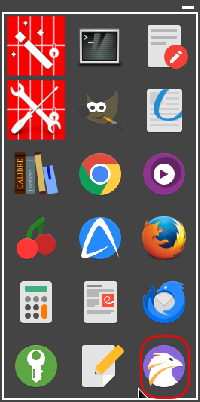
It´s already included as a quick-launch symbol in my firetools GUI.:

Like you said you can also write your own profiles, but firejail already comes with a lot of profiles by default:

ll /etc/firejail | wc -l
1365

You can always ask for help with creating your own profiles here:

I´ve found them to be quite helpful. :wink:

If you want to find out more about what´s going on under the hood you may use the command:

firejail --tree

If that´s not enough the firetools GUI can dig much deeper…

Many greetings from Rosika :slightly_smiling_face:

5 Likes

Hi @Rosika thank you for your help and useful pointers!.

Taking the simpler command (item 3), does it goes on to run the default relevant global & falkon.profile(s), or your own user profile(s) or no profiles at all?

Regards, Ramiro

2 Likes

I use @Rosika 's case 3 with firefox and waterfox browsers.
With firefox it uses the supplied firefox profile
With waterfox I had to write a profile, to stop it using the global default profile.

3 Likes

Thanks @nevj I assume that the system waterfox.profile was giving you errors and so ended up writing your own user waterfox.profile.

In my case the default profile runs without errors. But the command goes through a chain of linked default, include, local and global profiles and I find very hard to work out what is isolated, what is not isolated and what could be added or removed from those lists. I thought writing my own profile I might find out and tweak to better suit my system, but I am finding it hard going. Blind trust on defaults is of course tempting as the easier (and possibly safer!?) alternative.

Regards, Ramiro

2 Likes

I installed the suggested GUI firetools which I had missed. It solved many of the issues I was having, it allowed me to tweak the settings and run apps within or without firejail!. Great, thanks again for your help.

Regards, Ramiro

4 Likes

Hi @RG1 and @nevj , :waving_hand:

you´re welcome, Ramiro. :heart:

That´s easy to find out. If you run it from the command line you can look at firejail´s messages. The sandbox is quite verbose:

firejail --private --dns=1.1.1.1 --dns=9.9.9.9 falkon -no-remote
Reading profile /etc/firejail/falkon.profile
Reading profile /etc/firejail/disable-common.inc
Reading profile /etc/firejail/disable-devel.inc
Reading profile /etc/firejail/disable-exec.inc
Reading profile /etc/firejail/disable-interpreters.inc
Reading profile /etc/firejail/disable-programs.inc
Reading profile /etc/firejail/disable-xdg.inc
Reading profile /etc/firejail/whitelist-common.inc
Reading profile /etc/firejail/whitelist-run-common.inc
Reading profile /etc/firejail/whitelist-runuser-common.inc
Reading profile /etc/firejail/whitelist-usr-share-common.inc
Reading profile /etc/firejail/whitelist-var-common.inc
Warning: networking feature is disabled in Firejail configuration file
firejail version 0.9.74

Seccomp list in: !chroot, check list: @default-keep, prelist: unknown,
Parent pid 6461, child pid 6462

DNS server 1.1.1.1
DNS server 9.9.9.9

As you can see, falkon´s own profile is applied, the way it comes wih the firejail installation.
Of course, if you use another browser e.g. firefox the firefox.profile is applied.

If you for any reason want to tweak the browsers´s profile for firejail you might want to put it in:

~/.config/firejail

like so: ~/.config/firejail/falkon.profile.

The profile name needs to be the same as in /etc/firejail. So the user-defined profile takes precedence over the one in firejail´s own profile directory.
This method is better because /etc/firejail gets overwritten with each update of firejail.

The same with me, I´m glad to say.

Running firejail with the --private option:

--private
              Mount new /root and /home/user directories in temporary
              filesystems. All modifications are discarded when the
              sandbox is closed.

(from: firejail(1) - Linux manual page)

That is as restrictive as it gets. Pretty secure, I should say. :wink:

If you provide a dedicated work directory to the option --private, like I did:

firejail --private=/media/rosika/f14a27c2-0b49-4607-94ea-2e56bbf76fe1/DATEN-PARTITION/Dokumente/prov/ --dns=1.1.1.1 --dns=9.9.9.9 falkon -no-remote

the “temporary” home directory won´t be discarded unless you explicitely delete it.
That´s if you need to download anything…
… or if you want to keep your browser bookmarks, history, add-ons and the like.

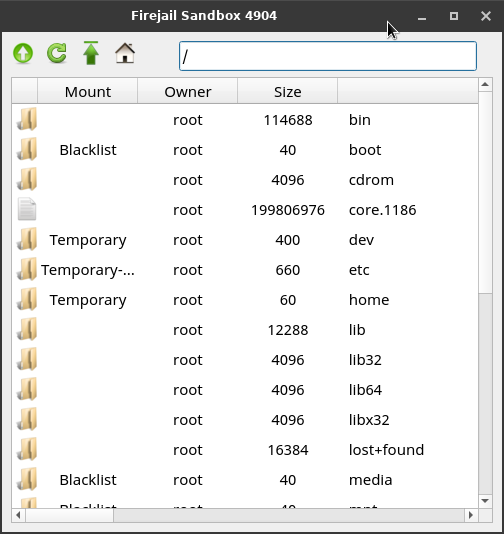
That´s great. With it you can dig even deeper.
E.g. with firetool´s built-in File Manager:

Many greetings from Rosika :slightly_smiling_face:

3 Likes

Hi @Rosika thank you for your help. I think I am now on the way to becoming a regular firejail user.

Thanks again and great New Year celebrations to you and all.

Regards, Ramiro

5 Likes

@RG1 :

Hi Ramiro, :waving_hand:

you´re welcome.

That´s great. :blush:

Here are 2 more links you may find useful:

Thanks a lot. The same to you and your family…
… and to everyone else in this forum. :heart: :rocket:

Many greetings from Rosika :slightly_smiling_face:

4 Likes