No they don’t. I have 32” curved QHD 2560x1440p with FreeSync meaning no screen tearing, saving me a lot of time mucking around with NVIDIA drivers. The thing is with curved screens, it takes a while for eyes to adjust, but just like using a normal monitor, with more depth to the overall image you’re looking at.
I use GIMP a lot and drawing guide lines for instance are always straight. The only curvature you’ll see is mainly at the top of the screen. Office work does not affect the overall work like graphs, everything you do normally, like graphs will always be in line, you’ll have a clearer image, especially at the resolution of 2560x1440p. Which is four times of 1280x720p resolution. If you can imagine a screen of 32” and in the four corners of the screen top and bottom are 1280x720 squares which are then pushed together to make one giant 32” screen, then the four squares in the four corners will then add up to 2560x1440. Took me a while to get my head around it, but then bigger monitors go for 4K 1920x1080 four times, then to go even wilder 8K which is another four of 1920x1080 resolution on top of 1920x1080. Screen would have to be bigger like a 56” to 65”. Then you have ultra wide screens, which are ridiculously squashed, like when the BBC cheaped out to get wide screen and put tape over the top and bottom of the camera. I think I saw that on Alias Smith And Jones, with Mel Smith and Griff Rhys Jones.
Bought curved 32” in 2017, to replace 2 ea 20” that had grown tired. Personally, I think the curved screen on the 32” was marketing gorp. Can’t tell any difference from flat. Maybe newer ones have more curvature. I don’t game. Do some programming, and remote IT support. Like the monitor, but curvature is not a biggie. When I replace it, will probably go back to multiple.
Not in my case…
I’m running a 32" QHD flat screen above all my other monitors - but - 3 x 32" QHD curved monitors across my desk… I can tell the difference… Also - all three 32" curved monitors are gaming “grade” - i.e. a much higher refresh rate than my flat one…
I bought the flat 32" QHD flat one when I got sent home to WFH in 2020 during the first Covid shutdowns…
I then decided to get curved screens in 2022…
I really like them… I don’t really notice the curvature… but when I turn my head across 3 x 32" QHD monitors - virtually 7690 pixels wide - all the pixels are the same distance away as I turn my head… Across 3 different computers…
Yeah, Nah… I only game on one of them usually - the middle one running off my Ubuntu desktop machine (it’s a Gigabyte branded one - 164 hz - the two on either side are Lenovo and can do 150 hz - the top “flat” monitor (also running off my Ubuntu desktop) maxes out at 60 hz (but even so - when it was my main monitor - I still gamed on it - and never really noticed any artifacts, lag, or “tearing”).
Curvature - across my desk - i.e. 7690 x 1440 (virtual) is more important than refresh rate… From the angle I view them - they don’t appear especially curved… My eyes sit level about half way vertically up each monitor and about 1 metre away - and as I turn my head - my eyes are always approx 1 metre from the monitor…
Usually screens tend to show different color viewing from a different angle.
Even an IPS panel does that, however less noticeable of course.
The ultra-wide screens are bent a bit, so when you look at the edges you see them in a more similar angle as the middle of the screen.
So they provide a better uniformity.
If you wear “reading eye glasses”, the distances of the monitors edge are less differente from your eye than the middle of the screen, so that helps you viewing it more comfortably.
I’d love to have curved monitors, but I don’t.
Instead, I (try to) set up my 3 totally flat monitors along a tangent of a circle, so I watch them from a more or less same angle.
My 24" LG’s have only one input, a HDMI. For me that’s enaough anyway
I’m quite sure the DSUB supports higher resolution than this table shows.
We successfully used FullHD over it, though the quality of the cable between video card and monitor matters a lot. Cheap cables tend to have higher attenuation for high freqencies, causing the image to be blurry, the wave-impedance inaccurate causing reflections (ghost image, multiple vertical edges). Such a cable probably limits usable resolution.
A good cable surely supports FullHD, I’m not sure of the theoretical maximum.
Not only Dells use it. My RX6600XT has 3 DP ports, and one HDMI. Nothing Dell in there
AFAIK DVI-D, Displayport, HDMI carry the same physical signals (escept that DVI doesn’t have lines for adudio), so a converter between them is just connecting the signals accordingly.
Steam on Linux brings Valve’s huge game library to the open-source OS, primarily through the built-in Proton compatibility layer, allowing most Windows games to run seamlessly via SteamOS (like on the Steam Deck) or standard Linux distributions, making Linux a strong gaming platform with official support for Ubuntu and broad compatibility with many other distros. While most games work, some anti-cheat games struggle, but users can easily manage Proton versions and find community reports on {ProtonDB.comwww.protondb.com}."
If we can believe what we read, you install Steam in some Linux distro (maybe Ubuntu) ,
add your game(s), and it works.
Can some gaming guru explain why it might not work?
I did install Steam on my laptop under Ubuntu 24.04 and it did work for a couple games I tried. Today I just installed Steam on my new desktop, again running 24.04, and the first game I tried did not work even though it did on my laptop.
A couple points:
I think the number of games that really do work is overestimated and depends on your hardware much more than running under Windows.
Anti-cheat is a problem for some percentage of games.
I hope things continue to improve, but at this point your mileage will vary as far as how many games work on your computer. It varies by hardware configuration and distro even when using Steam.
Pop!_OS and Ubuntu mostly… But few years back also on elementary (5? 6?)
Before I shell out money for a Windows only game on Steam - I’ll look it up on ProtonDB - where Windows games are rated on playability, or not, in Proton / Steam Play : https://www.protondb.com/
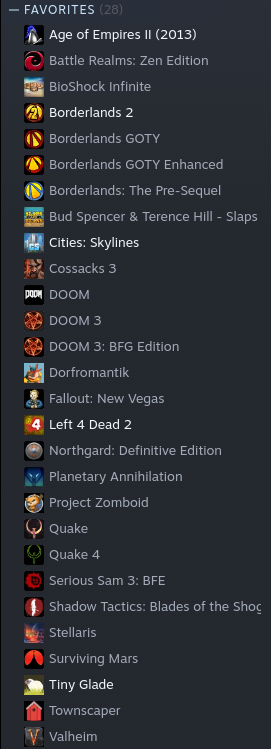
My favourites - quite a few of these are Windows only - but - 100% playable on Llinux via Proton / SteamPlay :
That’s probably about 1/3 of my whole Steam Games library - there’ve been a few I’ve taken a chance on but didn’t enjoy them, or they just got too damn hard to play… of that list of “Favourites” above - 7 of them are Windows only games (that I play on Linux) :
Age of Empires II
Battle Realms
Borderlands GOTY
Borderlands GOTY Enhanced
Dorfromantik
Fallout: New Vegas
Townscaper
Note : “Borderlands 2” and “Borderlands: The Pre-Sequel” are both Linux native… and I think Gearbox software’s Australian team were heavily responsible for - and - “The Pre-Sequel” has a mostly Australian voice cast - which is refreshing…
So Bill, after @daniel.m.tripp has confirmed what I thought I had read, we have to work on you and find out what you are tripping up on?
Can you tell us what you try to do and where it hangs?
We would dearly like you to enjoy linux games, as it now seems possible .