I’m installing MS Edge via flatpak with flatpak install com.microsoft.Edge
My internet connection is shoddy (hotspot connection) and I’ve been getting this error:
Failed to install com.microsoft.Edge: While downloading https://packages.microsoft.com/repos/edge/pool/main/m/microsoft-edge-stable/microsoft-edge-stable_151.0.4129.107-1_amd64.deb:
I can download the DEB myself. I’m using flatpak for it’s sandboxing capabilities. Call me paranoid but I’d rather not install the DEB directly as it adds the an MS repo automatically.
Flatpak is just a wrapper? The DEB is still sandboxed, right?
Hmmm. That’s a bit odd. I’ve installed the Flatpak before but have the DEB installed now. You’re right the DEB does add a MS repo. I would assume you’d like to keep the installed version up to date. That’s what the repo is for, of course. The Flatpak version you would have to update manually. I don’t believe Flatpaks automatically update themselves, unlike Snaps.
My system automatically updates flatpaks. I guess it’s distro dependent but Fedora KDE and Kubuntu all auto update repos, flatpaks, and Snaps through Discover. Vanilla Ubuntu’s App Store behaves this way too. I don’t know about other distros off the top of my head.
Aside from that I have a bash alias: alias up="sudo apt update && sudo apt full-upgrade -o APT::Get::Always-Include-Phased-Updates=true && sudo snap refresh && flatpak update && sudo apt autoremove"
This updates the repos while overriding phased updates (take a walk on the wild side ) , Snaps, and Flatpaks in one go.
I often wonder about this business of ‘playing stacks on the mill’
We all buy the convenience of scripts and aliases.
We all complain when something goes wrong and we cant track where the bug is.
What is the right balance?
And then press the upwards button from keyboard. I only use su - when updating so it’s usually few key pressings to find the commands. I’m on Gentoo so I do the update process manually in terminal.
I could use an alias just like:
emaint -a sync && emerge -uND --with-bdebs=y && emerge -c
But there are times when you need manually do something else during the update. Last time it was portage (the package manager) which needed to get updated before updating the rest of the system
I don’t use flatpaks or Edge so my posting was a pointless one, sorry
If it’s referencing as a DEB it’s likely a wrapper. I’m going to assume this is third party which is why that is happening. I typically prefer using DEBs from official repositories over Flatpaks. Even if it is a wrapper, once it’s uploaded as a Flatpak it’s containerized in its ecosystem.
Confession : I didn’t read the whole topic… but it’s kinda bizarre - 10 years ago people were compaining about “apt get” getting the snap instead of the deb…
I’d like to live long enough to see something like: we just install whatever we like on our non-Microsoft or non-Apple FREE operating that’s so ubiquitous - we don’t care if it’s a self contained thingie like a flatpak/appimage/snap so long as it works well in our chosen DE - follows the theming in our chosen DE and “does the thing” it was designed for…
I wish we were there. Unfortunately, we are not, especially when I consider the horror stories Alan Pope (of all people!) is revealing about the security flaws of snap this past year. And even Flatpaks will differentiate from a chosen DE in terms of UI. For me, it’s mostly security concerns. I do like that Flathub is becoming more selective, and when I do have to use one (when a native option is not really available), I will choose Flatpak. I am hopeful that as Linux becomes more poplar, this will become a thing of the past and all of these apps will work in every setting without some of their past/current issues.
Distributing binaries will probably always bring problems.
The Gentoo approach avoids issues with binaries, but brings its own issues.
Maybe the whole idea of compiling to a binary is flawed?
There are alternatives
interpreted languages like Basic and R
jit compiler languages like Julia
bytecode languages like Java
Maybe those are the future
I use Flatpak apps occasionally for immutable distros (currently addicted to NixOS) that don’t do “rolling” updates (like OpenSUSE) that I find annoying hogs of bandwidth. And there are apps like Obsidian (another addiction) that only come available via FP on some distros like Fedora (no RPM offered).
In my experience, Flatpak ties to Discover in my KDE Plasma and does update the apps I care about regularly. On rolling releases such as OpenSUSE/Fedora, I’ll see the multi-gigabyte monthly lib and app updates included in Discover, I suppose it’s possible to filter out OS updates, but this gives me a comfortable middle ground between constant downloads (OK, not as bad as Windows 11) and critical apps such as Thunderbird/Brave/Obsidian, that I want to be latest releases at all times. I can get critical updates for NixOS through their “rolling” channel, but the main idea for me is to install a scant few apps, rather than OTB-type things like LibreOffice, Akonadi and other apps that update regularly (in 15-20 languages I don’t use). Got to be some reason the latest Ubuntu ISO files are 7.x GB, almost as large as MS installers!
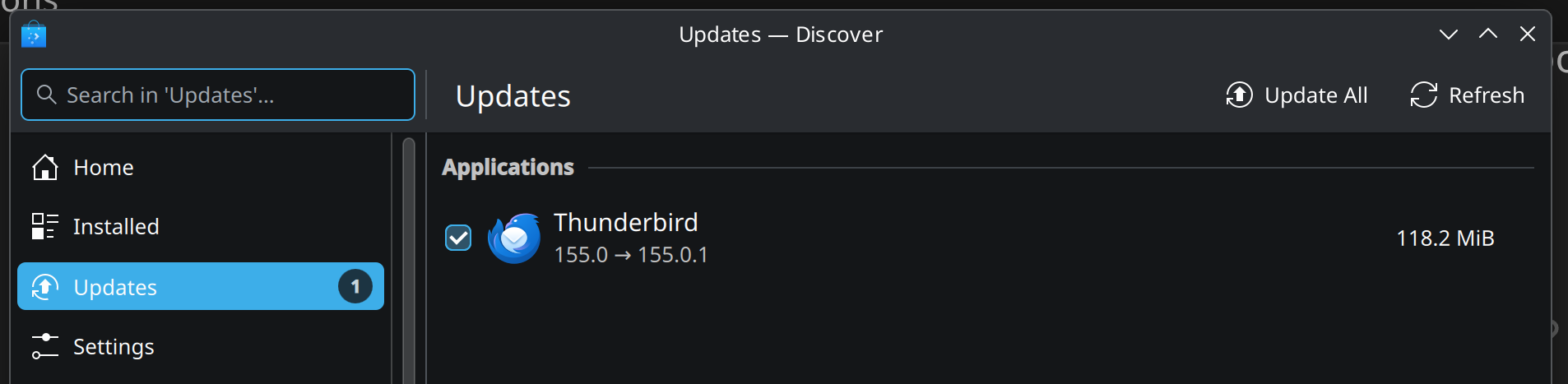
This just popped up as I was typing, it appears only Flatpak and supporting libraries are being updated, and the cadence and byte totals are more reasonable than rolling releases (I have seen upwards of 3 GB downloaded for monthly updates on OpenSUSE):
Package maintainers are key to a distro’s viability. Free/UnFree debate aside, there is a lot of burnout in this critical area, and many distros are moving to AI resources as their human oversight gets more and more bleary-eyed and burnt-out. This happened recently in the Nix Packages space, one of the FOSS world’s largest, with two long-time package maintainers jumping ship. AI has its place, but trusting AI to monitor AI code blocks for vulnerabilities is, in my opinion, a slippery slope.
Absolutely true. People are the most important resource behind a distro, by a long way.
I can see AI helping with some of the hack work, but not with the important decision making and not with the innovative bits.
I’m using Obsidian as an AppImage, which I also dislike, but it’s still better than Flatpak.
OK, I confess I have a personal problem with Flatpak, strong enough to keep it off my systems.
OK, I fully understand; I’m the same way with snaps; avoid 'em wherever possible.
If I am OK with two-month-old Thunderbird (153) on Fedora, that is what the RedHat package providers have determined in their security/compatibility scans to be the most stable, I’ll go with it unless launching it with a shared ~/.thunderbird data source (I know, already a bad idea – but I test a lot of OSes and have 4-5gB of mail archives I don’t want to replicate all over the place). In this use case, Thunderbird developers have been telling me that, if I touched the data with 155 version (say a Flatpak version), I have to upgrade the app or create a new profile.
What this means to me as the end user is: a) The Thunderbird dev team is gradually moving from .DEB/.RPM package distribution mechanisms to Flatpak/Snap; and, b) with distros like Fedora and OpenSUSE, which I favor for their security “tightness”, I will always be nervous launching their packaged binaries. Flatpak atm solves that issue, as long as I keep FP itself up to date. This means trusting Flatpak app developers/distribution providers for a given app like Brave or Thunderbird or Obsidian.
So the difference between 1-2 gb monthly downloads for these two distros and 100-200 mb for Flatpak and supporting libraries is noticeable. With that said, even the “bulkiest” distro like OpenSUSE Tumbleweed is 3-4x faster than Microsoft mechanisms, as their bloat gets ever more palpable.
Maybe this deserves its own thread, but lots of pros and cons around Flatpak as a legit contender for multi-platform/distro software distribution.
I think all us FOSS worshippers will agree distro-hopping is a fun but challenging way to break certain apps. Modern DEs like Plasma 6.x and Gnome 45+ have come a goodly ways in delivering graphics-neutral platforms that mimic but not quite equal the iron fist Microsoft has on their dev community. And I have been part of that community since the early .NET days, but as the ITSFOSS article points out, there is a huge version-to-version learning curve with the .NET platform, although following that twisted path can result in apps that distribute in Kbyte size, not Gbyte size that Flatpak apps carry as baggage to deliver a sandboxed experience.
I go a step further. When a software manufacturer denies supporting my system’s native package concept, he can keep his software wherever he wants to. I won’t use it.
 ) , Snaps, and Flatpaks in one go.