FreeBSD - a Unix type of OS

I have no need to… I have a NAS if I need to share files… or scp… or rsync… I haven’t tried ResilioSync on GhostBSD yet - annoyingly - the vendor of ResilioSync have stopped releasing binaries for BSD - fortunately the 2.x BSD client binary still works / syncs to/from other clients running version 3.x… i.e. I run it manually in my FreeBSD shell in my NAS…

I’ve seen other sync utils, that won’t sync if a minor revision on one machine is slightly different - that was a util called “unison”… Stopped using it 'cause of that…

I NEVER dual boot… it shouldn’t ever be an issue for me… No need to read ext4… Ran into snags in the past trying to read ext2/3/4 USB drives (e.g. on MacOS) - gave up - use Fat32 or ExFat…

Note also - I accept the default of using ZFS on both GhostBSD installs…

Hmmm - just mounted my NAS share onto GhostBSD VM - so it’s mounted - but - what’s the BSD equivalent of /etc/mtab? On Solaris it was /etc/mnttab…

Hmmm - it doesn’t have anything like that?

I’m lazy - if I manually mount something on Linux - I verify it’s the last line of /etc/mtab, make a backup of /etc/fstab, then append the last line of /etc/mtab to /etc/fstab

e.g.

cp /etc/fsttab /etc/fstab.$(date '+%Y%m%d')
tail -1 /etc/mtab
tail -1 /etc/mtab >> /etc/fstab

Note : above is VERY dangerous - if I were to accidentally use a single “>” - I’d have hosed my /etc/fstab - hence the previous step to make a backup just in case…

I guess on FreeBSD I need to edit fstab - but it looks weird - i.e. even weirder than /etc/vfstab on Solaris :

x@x-ghostbsd ~> sudo cat /etc/fstab
# Device		Mountpoint		FStype		Options	Dump Pass
/dev/label/swap0	none		swap	sw	0	0
procfs			/proc			procfs		rw		0	0
linprocfs		/compat/linux/proc	linprocfs	rw		0	0
tmpfs /tmp tmpfs rw,mode=1777 0 0
linsysfs /compat/linux/sys linsysfs rw 0 0
fdesc /dev/fd fdescfs rw 0

Added this line - and it worked :

baphomet.local:/mnt/BARGEARSE /mnt/BARGEARSE nfs rw 0 0

(note: I have an entry in /etc/hosts for baphomet.local)

I can unmount and mount and it will try to mount it on boot…

Um, where is the root filesystem?

Yeah - that is weird! Some kinda ZFS thing maybe?
Stand By Me Campfire GIF - Find & Share on GIPHY

Looks like FreeBSD barely uses /etc/fstab at all… it’s even weirder on my TrueNAS system :

root@baphomet[~]# cat /etc/fstab
fdescfs	/dev/fd	fdescfs rw	0 0

Now I’m curious about Solaris - I could swear the mount argument for “/” in /etc/vfstab is there for a ZFS “/” - but I don’t have a Solaris system handy right now (I guess I could Citrix into one of my customers and take a look - but it’s holiday time!).

I might standup a Solaris 10 or 11 x86 VM and take a look… I like to “practise” my zfs mirror creation skills for Solaris from time to time anyway…

I will have a look at my Freebsd, which is UFS filesystem.?

How do we remove the “Solution” flag off this post - it’s annoying each time I reply…

Just checked Solaris 11 :

root@slowfartis00:~# cat /etc/vfstab
#device         device          mount           FS      fsck    mount   mount
#to mount       to fsck         point           type    pass    at boot options
#
# START Informational entries for filesystems mounted by the kernel
#/devices       -               /devices        devfs   -       no      -
#/proc          -               /proc           proc    -       no      -
#ctfs           -               /system/contract ctfs   -       no      -
#objfs          -               /system/object  objfs   -       no      -
#sharefs        -               /etc/dfs/sharetab       sharefs -       no      -
#fd             -               /dev/fd         fd      -       no      -
#swap           -               /tmp            tmpfs   -       yes     -
# END Informational entries for filesystems mounted by the kernel

/dev/zvol/dsk/rpool/swap        -               -               swap    -       no      -

So it’s getting the mount from ZFS somehow…

root@slowfartis00:~# mount |grep ROOT
/ on rpool/ROOT/solaris read/write/setuid/devices/rstchown/dev=39d0002 on Thu Jan  1 08:00:00 1970

Yeah - I reckon you’ll have UFS entries in /etc/fstab…

I will do it … problems have solutions, discussions have outcomes

I dont understand zfs

Me neither. I’m going to try it when I have time.

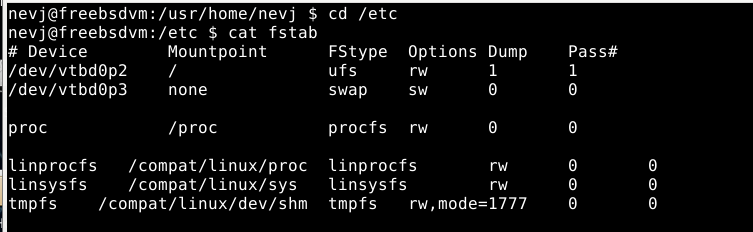
my UFS fstab:

pete@FreeBSD:~ $ cat /etc/fstab

Device Mountpoint FStype Options Dump Pass#

/dev/ada1p2 / ufs rw 1 1
/dev/ada1p1 /boot/efi msdosfs rw 2 2
/dev/ada1p3 none swap sw 0 0
/proc /proc procfs rw 0 0

so it’s quite the same as with Linuxes. The /proc is needed for Cinnamon.

quote from FreeBSD Handbook:

Cinnamon requires /proc to be mounted. Add this line to /etc/fstab to mount this file system automatically during system startup:

# Device                Mountpoint      FStype  Options         Dump    Pass#
proc                    /proc           procfs  rw              0       0

Freebsd

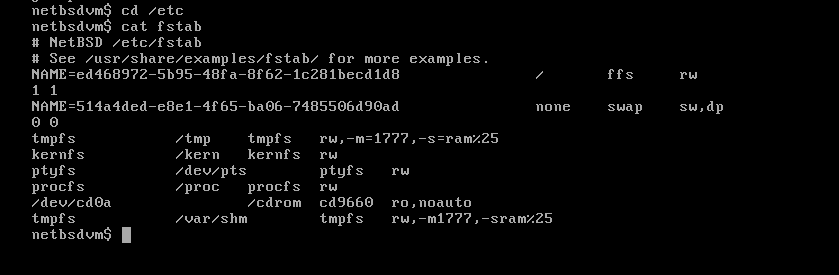
Netbsd

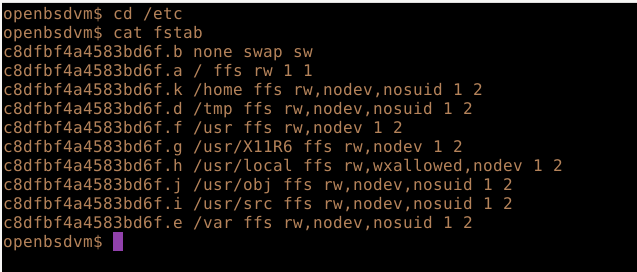
Openbsd

Yeah, they all mount /
They were all VM’s

NetBSD hard install

$ cat fstab
# NetBSD /etc/fstab
# See /usr/share/examples/fstab/ for more examples.
NAME=NetBSD             /       ffs     rw               1 1
NAME=EFI\ system /mnt/EFI/boot  msdos   rw               0 0
NAME=NetbsdSwap         none    swap    sw,dp            0 0
kernfs          /kern   kernfs  rw
ptyfs           /dev/pts        ptyfs   rw
procfs          /proc   procfs  rw
/dev/cd0a               /cdrom  cd9660  ro,noauto
tmpfs           /var/shm        tmpfs   rw,-m1777,-sram%25

NAME=ShareExt2    /mnt/share   ext2fs    rw      1 1

It uses partiton names instead of UUID’s

I wonder why BSD needs to have / defined in fstab? It boots without an initramfs, so it should not need to know where the rootfilesystem is … the bootloader should know.

@ihasama
Your FreeBSD is essentially same as mine. I do not have EFI because the VM is legacy boot. The Linux compatability lines are extra. I have /proc but I do not have Cinnamon.

Maybe it’s needed with many packages. Anyways I wipe the SSD and reinstall FreeBSD with ZFS when I have time.

Look at that date?
Has it really been mounted for 55 years?

How bizarre and unfriendly is /proc on a non-Linux system…

Before I ever used Digital Unix (AKA Tru64) - I’d been using Linux (Slackware 3 and kernel 1.2.13) - and I LOVED the /proc filesystem - it was like all my hardware stuff as files, with actual names that related to the “stuff” - e.g. /proc/cpuinfo - in 1995? /proc/meminfo? I alread knew that everything in UNIX is a file, but on Linux, every piece of hardware discovered had a human readable entry in proc! WOW!

On ALL other UNIX I looked at - sure - they had /proc… Could you actually discover anything as a regular human from it? NO!

Solaris, Tru64, even AIX, maybe DG-UX - none of them had any human friendly shit in /proc… I don’t remember checking on other NIX systems… I’m sure SCO didn’t even have /proc at all - it was derived from Xenix anyway - Microsoft’s attempt at UNIX…

Right there - a damn good reason for Linux to be the UNIX king, which it basically is - there’s not a single non-Linux computer in the top500 super-computers…

Note - MacOS - despite being a “UNIX” - does not have a /proc…

Neither the original BSD nor AT&T Unix had /proc. It came from plan9.
I think the later BSD’s must have copied it from either plan9 or linux, but how did they come to make it so unfriendly?

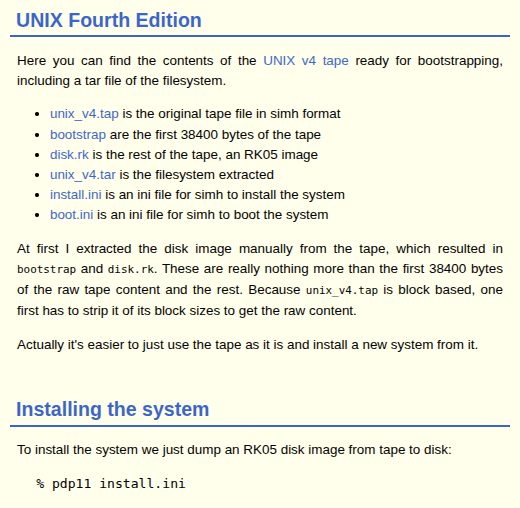
Or you could just try UNIX itself? The very first version with a kernel written in C:

I would like to try that.
You would need a pdp11 or Vax emulator.

I saw somewhere else somebody did it in TermUX… Don’t ask me how - maybe they were lying?

Yeah - a PDP11 emulator - that should be possible - wouldn’t surprise me if QEMU can do that - it can emulate a PowerPC RISC CPU to run AIX on…

We may have a project here.

Can I ask Why a project, what will it do different, apart from a learning experiance ?

It would never compete with a modern BSD or linux.
It would be like visiting an historical landmark… an exercise of appreciation of one of the building blocks of our past.
Why do people visit Stonehenge?

Never been, anything south of Yorkshire is not worth seeing.

That is more than half of the earth, including all, the Southern Hemisphere.