I reckon’ I’m going to have to shitcan the idea of “bazzite” - can’t even get an md5sum or sha256sum…
What are they hiding? I tried to boot a VM off their live image ISO and KVM said “no bootable image” - WTF? Yeah ok - they don’t like the virtual GPU that KVM (spice) presents - but that’s like a bazillion years before boot! GRUB shouldn’t give a rat’s arse about the GPU…
They may have vmlinuz in a strange place where grub doesnt look… ie not in /boot or not called vmlinuz.
Loop mount the iso and unsquash the image and see what their filesystem is like. … you might need to add a symlink to help grub find the image. … add the symlink to the unsquashed filesystem , then squash it back into the iso.
Bit unhappy it just defaulted to btrfs without asking…
But I’ll reserve final judgement… Overall? I’m liking what I’ve seen so far… It’s got nearly everything included by default - e.g. on Ubuntu I have to install gnome-tweak-tool to get left side window controls - Bazzite Gnome has a tweak too built in…
Most of the stuff seems to be flatpaks… that doesn’t bother me…
It’s more a case of using it as a demonstration to my daughter that she shouldn’t need Windows 11… to have a gaming PC…
This ThinkPad is an E495 - not quite as good as a “T” series - but it has nearly the same specs as the SteamDeck - Ryzen 5, Vega8 GPU (actually APU) 16 GB RAM and 1 TB NVMe… The main difference being how shit the battery in the E495 is!
Bazzite clearly states during the install - it won’t work with multi or dual boot with another Linux distro… It claims to work with dual boot alongside Windows though… There’s even some option (no idea how it works) to boot the Windows environment after the DE has loaded…
That doesn’t bother me - I never multi-boot or dual-boot - single O/S per device for me…
It’s ultimately designed to be a gaming platform and that seems to work… Seems pretty easy to use…
Steam installed - now installing Borderlands 2 (Linux native game)…
I found Steam on Kubuntu or Fedora does better for my BF4 (I’m drownzsurf) than Wine, or GeForceNow. Still struggling way more to get my EA games, than it was with Windows, which died after its last update. Ultramarine is a nice Fedora offshoot, ready for gamers.
I have downloaded Ultramarine and will try it to see how it is. I hope Bazzite is working for you Dan. Pika os is also a gaming distro based on Debian unstalbe.
Seems okay - haven’t had a chance to get my daughter to have a play…
Borderlands 2 (Linux native) and Fallout New Vegas (Windows game via SteamPlay) install fine and play fine…
I just installed TinyGlade - it’s more of a toy than an actual game - but I can spend hours in it - that should run just fine (it’s Linux native - but also has a Windows version)…
What most impresses me about Bazzite is how easy everything seems…
I might try and and see if the Alderon Game launcher works - the only game I have via that game library is “Path of Titans” - a dinosaur (and other reptilian megafauna) “simulator”…
I reckon I’m going to kill it - i.e. take it down the back paddock and put it out of its misery…
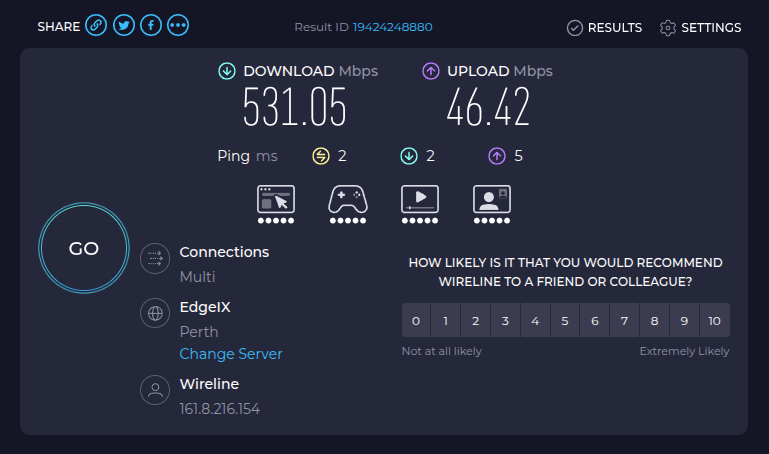
No seriously - I just got upgraded from 50/20 VDSL to 500/50 Fibre this morning - which just “worked” straight away - but - then broke when I followed my ISP’s suggestion… Came back up again when I IGNORED their advice and set it back the way it had been previously with VDSL…
Anyway I wanted to do some speedtests - with internet, and over gigabit/s from device to device over ethernet… e.g. setup a Pi4 as an iperf3 server listening on it’s gigabit port…
Do you think I could easily install iperf3 on Bazzite? NO! Had to do some garbage like create a fedora “sandbox” doohicky - which I called “fedora-SUX”… And then I had to wait for that to create the container or jail or chroot or whatever it does - that took 10 mins - then dnf install iperf3 - what a giant PITA!
And then : does Bazzite’s default terminal app let you middle-button paste strings from the X-Select buffer??? NO!
WTF? No middle button paste in a terminal??? FFS - MacOS lets you do that “Out Of The Box”!
So - I’m 100% ruling out Bazzite as a potential contender…
Reckon I might just as well go Ubuntu… General purpose O/S - I couldn’t give a rat’s “a” about all that immutable stuff…
Bazzite may not impress, but I would like that download speed. we get about 50/20 with fixed wireless. ( Correction, that was from the tablet using Wifi, my PC on gigabit ethernet does 140/20)
I blew it away earlier - now running Ubuntu 26.04 until I get sick of that… Saying I’m “less than impressed” with Bazzite is probably an understatement… I need some kinda “sandbox” just to run iperf or iperf3? Do they get full speed if they’re sandboxed?
On Ubuntu 26.04 I had to jump through hoops to get middle-button paste working in terminal - then I realised it was using the “new fangled” version of terminal for gnome (the package of which is NOT “gnome-terminal”)…
sudo apt install gnome-terminal and get the old gnome terminal back - middle button paste works - and I can get transparency settings… I do occasionally like to peer through and see some text in another window underneath my terminal…
I saw a reddit post that they’d removed middle-button-paste as it confused new users!
WTF? Mac users get this feature in the MacOS terminal app - BY DEFAULT! So - it’s too confusing for new Linux desktop users - but not for seasoned Mac users???
Are they complete morons (the gnome / ubuntu developers) who make arbitrary decisions like this? - like the one where they removed slow double click in Nautilus to rename a file - a feature you get by default in Windows Explorer and MacOS Finder!
I use Linux because it’s essentially UNIX! And whether using xorg or wayland - I want UNIX look and feel and behaviour - NOT f–king Windows!
Ok. sorry its been so troublesome for you,it works fine for me but then i only use steam and my games in steam, if you like Debian you have pika os which is based on Debian and is a gaming os .
What happens to me is if I copy a set of lines that wrap in one window, the lines that wrap become 2 lines in the destination.
That screws up any code or script.
I must take note and track down when/wnere it occurs.