You are fortunate. that is what PC’s are built for. People like me who run big CPU jobs should really buy a commercial server box… they are designed for a heavier load, and you also get ECC memory.
My machine is a half way house… custom built . It copes fairly well but is getting old ( eg DDR3 memory) and an early generation corei7. It has had some replacement of disks and video card, but I will not be doing any more to it.
It copes because the house is air conditioned.
Overheating - it’s getting serious.
The final act, after my reported issues. Lately I wanted to run my monthly image backup of my desktop. Saving the system partition went well, without any issue. But during the second half of the home partition, the fan began yelling, and soon after, the backup process was aborted due to a fatal error.
After that, I opened the case and cleaned the interior of any dust. Additionally, I placed the box elsewhere to improve exhausting the warm air.
BTW, my idle temperature lowered from 52° to 44° now.
You are onto it. Just take care like I do, …and do your big compute jobs in the winter.
In your next purchase get a water cooler.
I need my image backup all year, not just in winter.
Strongly doubt this. Isn’t this for gaming towers only?
Yes, but not only. I had the option when mine was built, but rejected it. … mainly because it is noisy. There is a pump.
I at least have a big roomy tower with multiple fans.
I dont know what yours is like, but a lot of desktops are marginal for heat control, and laptops are worse.
I would like a device that cools the incoming air.
I guess that was mainly the dust removed. Next time maybe take it more apart.
Remove the heatsink from the CPU, clean it, as well as the surface of the CPU.
Apply new thermal paste and fit the heatsink again. At least I’d try this.
I bet the idle temp would go down below 40C, maybe 32..35C.
Aircondition fro the PC! 
Maybe a heatsink built with peltier cells? 
Not exactly what you mean, but that could cool the CPU like the ambient temperature was 15C lower.
BTW, during video streaming, the temperature stays at app. 75°.
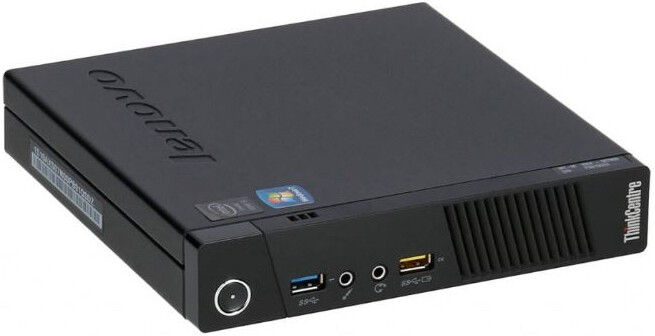
Yeah, that will be nearly as poorly cooled as a laptop.
A laptop cooling pad may help.
That is within bounds.
It will depend what you do… more cpu usage will mean higher temp.
Streaming is probably more IO than cpu.
Yeah, all cores are at 25…30% load. My heaviest load seems to be the backup jobs. They use all cores at a significantly higher level.
I dont think you can get such a PC off the shelf, but there are kits
I like it.
If I was building a new PC I would be asking.
That is the compression algorithm.
Compression is the speed limjting factor in most backups with Eg Clonezilla. You could rsync the lot without compression in a fraction of the time and without the heatload.
I’ve done it with Redo Rescue since a long time ago, and I don’t intend to use anything else.
Mainly because I know it works.
Hi Alfred,
My idea is worth what it’s worth, but if you say there was a significant change when you switched to LMDE7, I would do a simple test: on a flash drive, I would run Linux Mint Live with the same DE you are using (cinnamon?) and check if, when idle, the temperature was very different from the current temperature you have with LMDE7 when idle.
Jorge
I had a read about it. It sounds similar to Clonezilla but with a gui.
The main thing is it works from a CD with all the disks unmounted.
All of them use compression and some of the modern compression algorithms use multiple threads, so that is where the huge cpu load comes from .
I found that out the hard way… I tried to speed up Clonezilla by backing up to a demountable sata disk instead of an external usb disk.. It made no difference. The disk speed is not the limiting factor.
Meanwhile, I know that it was not LMDE7-related. After cleaning the interior of the box and moving it elsewhere, the temperature is lower than before with LMDE6.
Update : replaced my ATX power supply - horrible rattle noise gone - completely… So it was the Power Supply! Doh!
While I was there - I also “damped” the GPU mount with some rubber (off an old bicycle innertube) - to be sure, to be sure…
Spotted this on GamingOnLinux (I get a daily digest of new articles in my mailbox) :
And here :
My only issue with it is that’s its an AppImage and I can’t make the tiny fonts more legible (they’re so tiny - almost illegible) - odd how it doesn’t honour my accessibility settings, but does honour my dark theming :
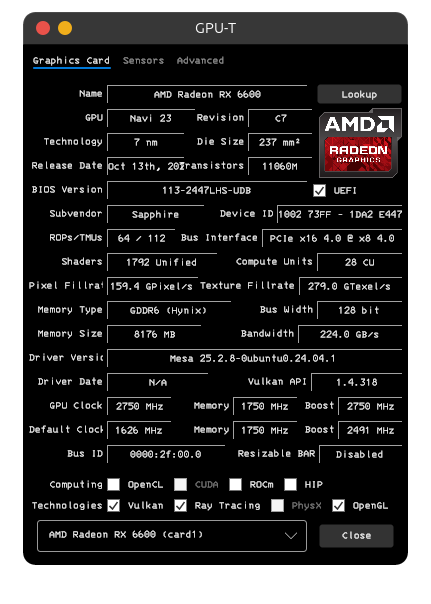
But it looks useful… Easy to download and run… worked “out of the box”…
I’d be more likely though, to just type “inxi -G” (or “inxi -Fxz”) to get details of my GPU - but it’s nice this tool shows the amount of VRAM - inxi doesn’t report how much VRAM my GPU has…
Can you get vram usage … like with free or vmstat?
It does not show temperature..
I guess it is static… not a monitor