Gentoo install ... issues with keys and mounts

I am doing a VM Gentoo install using
stage3-amd64-openrc-20260920T170055Z.tar.xz

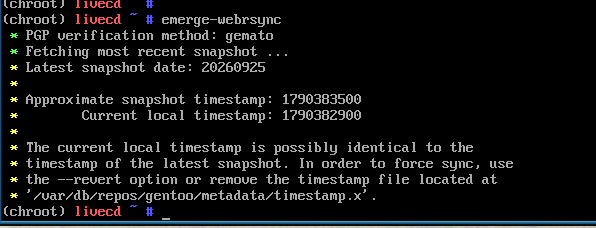
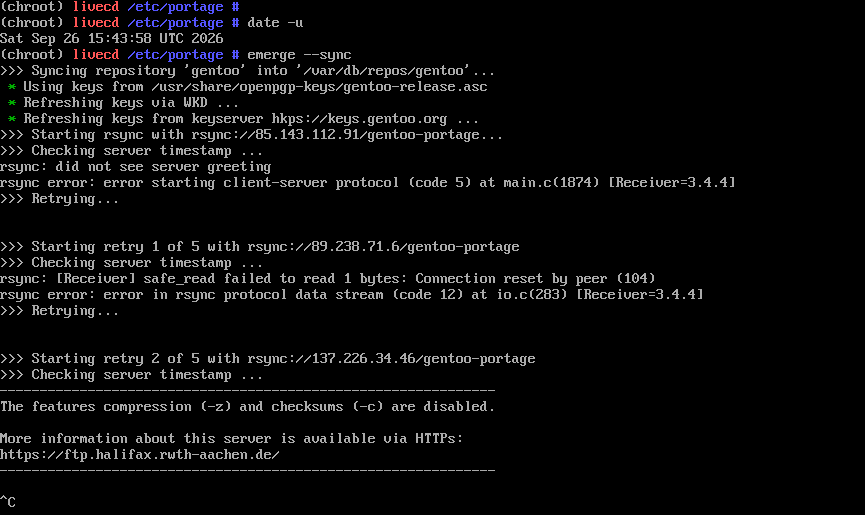
I am in the chroot and trying to do an rsync

Does this just mean their keyserver is down, and I should wait?

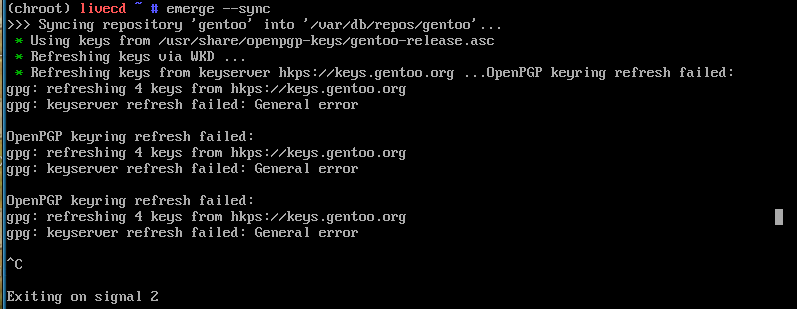
I tried to refresh the keys manually with
gpg --refresh-keys
but that does nothing?

Hi Neville,

I asked AI for assistance and it suggested trying a couple options. May or may not help.

Good Luck.

I tried that. It fails too.
I did not know about getuto … will investigate.

Edit:
@easyt50
getuto does not exist.

Can you ping? I usually forget to do this before chrooting:

cp --dereference /etc/resolv.conf /mnt/gentoo/etc/

Edit: you have internet access because it downloaded. So my post won’t help. Check the time zone?

What is in your /etc/portage/make.conf?

COMMON_FLAGE="-O2 -pipe"
CFLAGS="${COMMON_FLAGS}"
CXXFLAGS+"${COMMON_FLAGS}"
FCFLAGS="${COMMON_FLAGS}"
FFLAGS="${COMMON_FLAGS}"

LC_MESSAGES+C.UTF-8

MAKEOPTS="-j8"

That is default except for last line.
I have not got to editing make.conf yet. I am just trying to rsync the database.

I think I must have mistyped some command or omitted to do something … it is difficult in a VM without copy/paste.

There is stuff in make.conf.example about Binary packages GnuPG commands … do I need that?

I did that.
The chroot can ping google.

The timezone in /etc/timezone is Australia/Sydney

Ok, maybe the problem is on Gentoo’s end.

You can skip the check for now:

emerge-webrsync --raw

This is safe IMO for now because you’ll do the emptytree emerge later.

Error: Invalid option ‘–raw’

This works

emerge-webrsync --no-pgp-verify

Thanks, you triggered it.

Ok, I remembered the command wrongly but glad you found the solution. Emerge has so many flags

Not quite. It only got me past that step.

I have done this

mkdir /etc/portage/repos.conf
cp /usr/share/portage/config/repos.conf /etc/portage/repos.conf/gentoo.conf

I dont have enough understanding of keys

I tried this in /etc/portage/repos..conf/gentoo.conf

sync-rsync-verify-metamanifest = no
sync-webrsync-verify-signature = no
sync-git-verify-commit-signature = no

It makes no difference.

Check your /etc/resolv.conf

DNS is working, network is reachable, time/date is right. If the problem is with the Gentoo servers? What

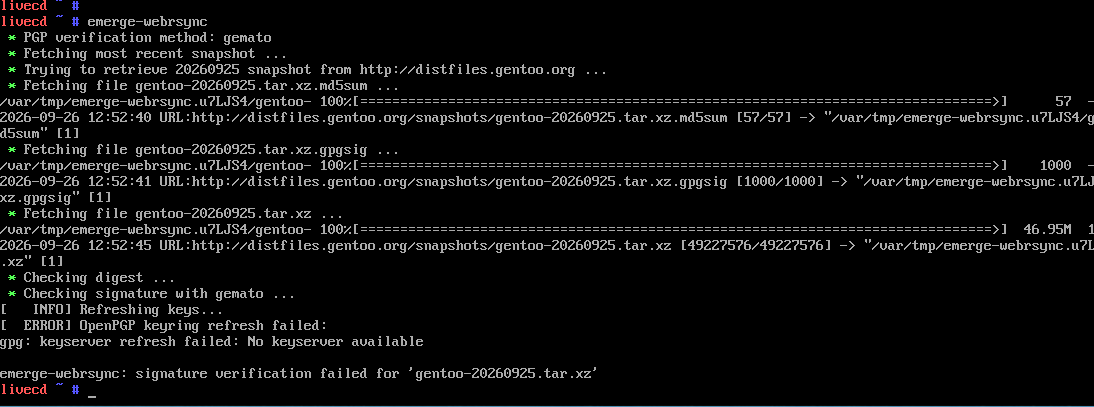
emerge-webrsync

does now?

The time given by my date command in the chroot seems to be about half an hour early, compared to the VM host.
I could set tit manually … there is no NTP or chrony in the chroot environment

That might be the reason! Handbook has a program mentioned which you could use to get the time right. It’s in the earlier pages than where you’re now. I’ll find it for you… gimme sec

Check your

etc/conf.d/hwclock

There should be UTC

You can change the time with

date -u

For Gentoo, even in a VM, this will get you nowhere COMMON_FLAGE=“-O2 -pipe” ? “FLAGS” !! There is no copy/paste in a VM, the “COMMONFLAGS=”-O2 -pipe" or COMMON_FLAGS=“native-O2 -pipe” or fine with a VM ?

With “MAKEOPTS=”-j8" you do not need to have binary packages enabled!!

COMMON_FLAGS=“-march=core2 -O2 -pipe”
CFLAGS=“${COMMON_FLAGS}”
CXXFLAGS=“${COMMON_FLAGS}”
FCFLAGS=“${COMMON_FLAGS}”
FFLAGS=“${COMMON_FLAGS}”
MAKEOPTS=“-j3”
CHOST=“x86_64-pc-linux-gnu”
VIDEO_CARDS=“nvidia nouveau”
INPUT_DEVICES=“libinput”
CPU_FLAGS_X86=“mmx mmxext sse sse3 ssse3”
GENTOO_MIRRORS=“”
ACCEPT_KEYWORDS=“”
ACCEPT_LICENSE=“- @FREE @BINARY-REDISTRIBUTABLE"
GRUB_PLATFORMS=“pc”
LINGUAS=“en”
L10N=“en” This is my /etc/portage/make.conf for my custom kernel!! The only two binary packages I use are gentoo-kernel-bin and www-client/firefox-bin!! Make this fit your machine or VM!! ACCEPT_LICENSE="
”*" can also be used!! Consult your HANDBOOK!! How are you using your virtual drive? VIDEO_CARDS_CARDS=“virtualbox” If you are using VirtualBox!! Do you need help!!

It would seem so.
Not up to make.conf yet
Still have a key problem… it is either my timekeeping, or the virt-manager networking is interfering with pgp

see my reply to @ihasama

It changed something but
date -u
still leaves the date at 15:49 … it is now 21:09

It is UTC in /etc/conf.d/hwclock

I think you can add the time there after -u.

I checked and at least this web page says date -s Mastering Linux Date and Time: A Comprehensive Guide — linuxvox.com

Setting the System Date and Time#

To set the system date and time, you can use the date command with the appropriate options. For example, to set the date to January 1, 2024, at 12:00 PM:
sudo date -s “2024-01-01 12:00:00”

Mine is set to “local” date =mmddhhmmyyyy or in my case date 092806192026

I used

date -s "2026-09-28 21:19:00"

Now emerge --sync works

Thank you
It would seem virt-manager does not pick up the machine’s clock date?
So yes … a VM issue.