It probably is a USB port, meant for a dongle device!!!
1 Like
It may have ifconfig rather than ip.
1 Like
No, not found.
Maybe I’ll retry LFS. Anyways, my dir structure is broken anyways.
2 Likes
Finally have LLVM and rustc compiled for LFS, will be working to get Mesa compiled, I can then move on to get Xorg up and running.
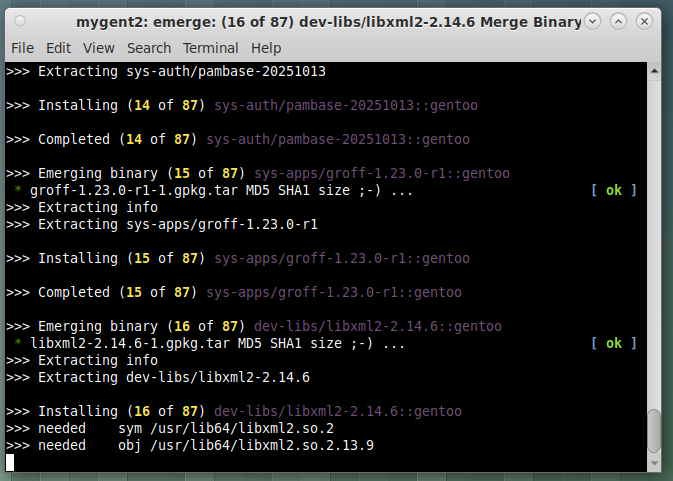
This morning I am updating Gentoo, which is booting LFS!!! I always update my core apps first with “ emerge -a -uD @system “ and then run “ emerge –update –deep –newuse @world “ and this will pull in a kernel update!!
Looks like portage has pulled in 87 updates, just for my core packages, and I usually do this, at least once a week!!!
5 Likes
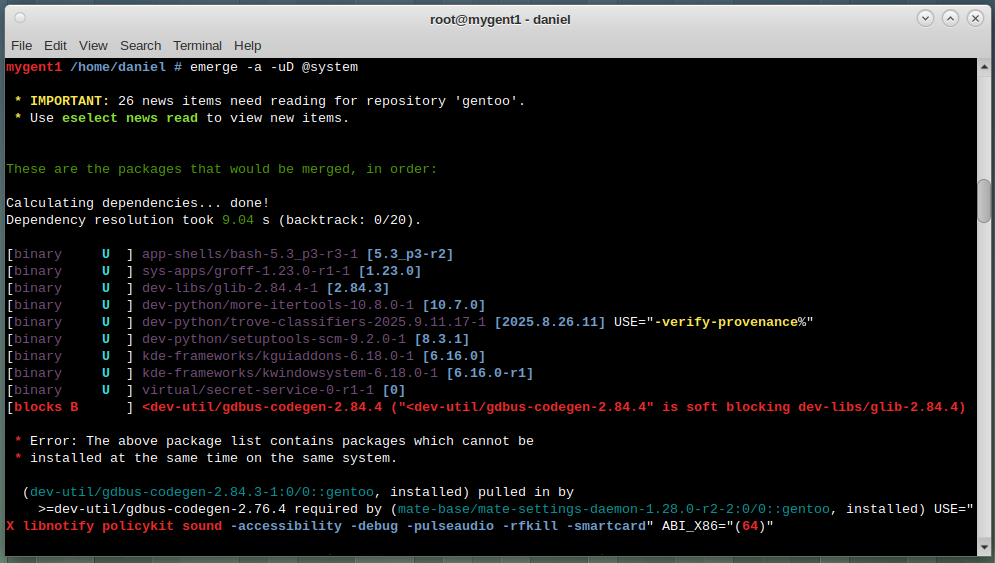
Please show the full output. You should get more info from portage. Or add --verbose to the emerge. It’s complaining something about slot conflict?
2 Likes
Also ‘eselect news read’ please!
1 Like
Can you mask the codegen package, or the package that calls it?
1 Like
Why? You see everything you need to solve the issue!!! But you are close!!!
1 Like
Read the issue again, it will give you the answer!!! Masking? Maybe? I doubt it?
2 Likes
Soft blocking issue!!!
Notice gdbus-codegen and glib have the same “2.84.4” file version, thus the conflict!!! If the file versions were different, you could use emerge -1 and install one package at a time!!! gdbus-codegen used to ship and install with glib but is now a separate package!!!
Had to dig through my archived list of Gentoo commands to solve this, but it still works!! You make Portage resolve the issue with a “ emerge -uDNav –verbose-conflicts @world “ and the update will continue!!!
3 Likes
Because I like how informative Portage is😁
I had this also a while ago. I even tried --backtrack=30 or more and some other weird options before found the solution. I’ve found that dispatch-conf and emerge @preserved-rebuild helps sometimes. And usually I just ignore the messages for a couple of days and then try to update again. Usually it just works then because someone has reported the bug and all is well in Gentoo-land again🐧
2 Likes
One can usually find a way with Gentoo and Portage!!!
2 Likes
Softblocking Issue
Codegen 2.84.4 is softblocking glib 2.84.4
Well one of them has to be removed?
glib sounds a bit important , so I would remove codegen… what does it do? is it a build hangover?
1 Like
What happens if you unmerge gdbus?
1 Like
I every day just fire up a VM and install Gentoo just to not forget my Linux skills and delete it just afterwards…
4 Likes
That is not an option, there are other packages that need gdbus-codegen as a dependency!!
You cannot run a modern Gentoo system without gdbus-codegen. It is not an end-user program but a critical build-time dependency for many core components of the system.
I run the Mate DE, so gdbus-codegen is compiled when Gentoo is compiled!!!
Portage just puts gdbus and glib in different slots for compiling!!!
1 Like
I know you do!!!
1 Like
I had similar issue today when I decided to update my external SSD with gentoo installed. It’s my backup plan for my work laptop to have the same system on another SSD. I rarely update it, so usually it throws some errors when I chroot to it and start updating.
first emerge attempt gave me this error:
[blocks B ] <app-shells/bash-completion-2.16.0-r1 (“<app-shells/bash-completion-2.16.0-r1” is soft blocking app-crypt/libsecret-0.21.7)
Total: 142 packages (118 upgrades, 3 in new slots, 21 reinstalls, 128 binaries, 1 uninstall), Size of downloads: 578,489 KiB
Conflict: 3 blocks (1 unsatisfied)
- Error: The above package list contains packages which cannot be
- installed at the same time on the same system.
(app-shells/bash-completion-2.16.0:0/0::gentoo, installed) pulled in by
app-shells/bash-completion required by @selected
next emerge with
(chroot) gentoo / # emerge -uDN --verbose-conflicts @world
I got this issue (which was solved with dispatch-conf, use new)
IMPORTANT: config file ‘/etc/portage/package.use/xdg-desktop-portal-wlr’ needs updating.
See the CONFIGURATION FILES and CONFIGURATION FILES UPDATE TOOLS
sections of the emerge man page to learn how to update config files.
In order to avoid wasting time, backtracking has terminated early
due to the above autounmask change(s). The --autounmask-backtrack=y
option can be used to force further backtracking, but there is no
guarantee that it will produce a solution.
and after dispatch-conf I could start the world update:
Total: 383 packages (326 upgrades, 7 new, 6 in new slots, 44 reinstalls, 307 binaries, 1 uninstall), Size of downloads: 2,219,791 KiB
Conflict: 10 blocks (all satisfied)
I think Portage is the best package manager because it can handle all kind of issues and it gives you info how to proceed.
3 Likes
What? How? Not even my colleagues knew about it, not even my parents.
1 Like