Getting Portal (from steam) running on a netbook

So i am trying to get portal running on a netbook with antix(and mx linux) installed on the hdd

(my specs are intel atom n450, gma 3150 (opengl 1.4) and 1gb ddr2 ram)

So i am trying to use llvmpipe (software renderer) with mesa to achieve higher opengl versions(like 2.1 which portal needs, or 4.5 which is the maximum)

And ive installed portal but its crashing as soon as i press play,

what ive done so far: added the 32 bit architecture, used launch options in steam (like LIBGL_ALWAYS_SOFTWARE=1 and -sw) and i made sure mesa was installed and functioning (glxgears works fine)

So if anyone has any advice or anything i would apreciate it a lot! thanks! (also i hope i’m doing these forum things correctly, ive never really used any forums before)

2 Likes

You have come to the right place and you are very welcome

Sadly think your project is too advanced for tye netbook you have available 32bit processor and 1 gb memory. You are very lucky to be able to just run linux on such a low spec machine. I Have a similar spec netbook and run a 32 bit version of linux mint but it is very slow and very limited what will run now on it.

Sorry to be the delivery of poor news.

Although I have never tried what you are wanting to do, perhaps another of our members will be able to guide you further. Bonne courage

4 Likes

Can you start portal from the CLI?
If so, you can use strace to find out what it was doing just before it crashed

strace outfile
then run portal from cli
ctrl d
then inspect outfile

I dont think you can use strace if you have to run portal from a menu.

It may be a known bug

1 Like

Welcome to the forum @TheCatTamer. We will try to help you the best way we can.

I agree with @callpaul.eu that this PC is not a good match for gaming. I checked PassMask CPU benchmark on the CPU in the PC and it was rank at 204. For reference, my wife’s laptop has a CPU i5-520m and it was ranked at 1730. I don’t believe her PC, which is rated 8 times faster, would support gaming either.

Good Luck,
Howard

1 Like

I have Portal, and Portal 2 in my Steam games library… I spent hours playing “Portal” when I got it… I had to give in with Portal 2, it was just too hard to play…

Anyway - I haven’t run it on my current system - but - I did play it on my circa 2010 AMD Phenom II system - with 16 GB DDR3 and a 2 GB NVidia GTX650-ti-OC GPU… It ran well… Natively on Linux… Probably Ubuntu 14? 18?

So long ago… Just looked - according to Steam I last played it in December 2015! 10 years ago! So it would have been Ubuntu 14 or even 15 I ran it on…

The system requirements look pretty conservative - 512 MB RAM and no specific graphics card model… I’m sure it used to list Windows and Linux requirements separately - now it only shows Windows requirements… It still has a Steam logo next to the Windows one - so you can still get the Linux native version…

So - anyway - it sounds like it should run on a Netbook - maybe with the lowest possible settings…

Note: Atom is technically 64 bit - but in my experience, you’re better off running a 32 distro on them…

Note also : even “today” a whole bunch of Steam binaries and libraries on Linux are 32 bit - you can see it install a pile of i386 stuff … And given that Portal is a Windows XP era game - it’s probably 100% 32 bit…

There is also a proviso at the bottom under the system requirements :

" ***** Starting January 1st, 2024, the Steam Client will only support Windows 10 and later versions."

I’m not sure what that means actually… I assume if you’re running Windows X, Vista, 7 or 8 - you’re fresh outta luck… It’s a shame they no longer mention recommended spex for Linux.

I’m intrigued to play it again now - as there’s an RTX version (raytracing) - when I first got my current GPU (Radeon X6600) around 2022, the open source drivers didn’t support raytracing - they do now!

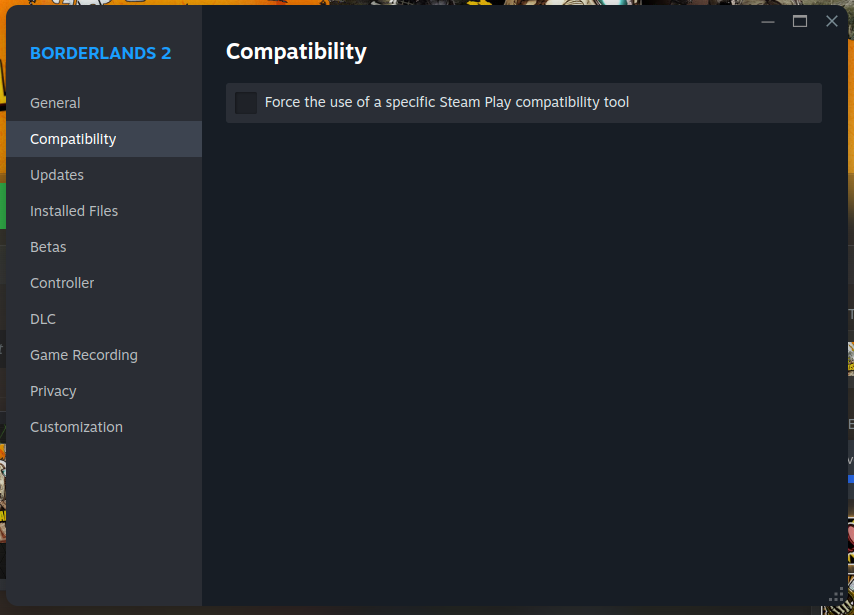
Here’s one suggestion - can you try setting it in your Steam Games library to use Proton which will install the Windows version through Proton/Steamplay emulation layer (it uses Wine). I’ve had to do that in the past with a Linux native game - that ran really crappily natively - but the Windows version seemed better (an RTS game called “Cossack 3”).

e.g. I could instruct Steam to install and run the Windows version of Borderlands 2 instead of the Linux native (check the box “Force the use of a specific Steam Play compatibility tool”:


But that would be silly - there’s nothing wrong with the Linux native version…

Anyway - a google seach says it should run on a Netbook…

3 Likes

update here, thanks for all the advice everyone! i DID in fact get portal “technically” launched! sadly it didn’t get past the loading screen (at least i saw the valve logo) because, A: the computer is hot garbage B: the graphic card is so terrible (15 time worse than the intel hd graphics 3000) C: steam itself uses about 300 - 500 mb of my 1gb ram and the system uses 200 - 300 so theres MAYBE 200 mbs of ram for portal! and i also did run half life 1 and… “shudders in 8 fps” and FINALLY D: portal needs openGL 2.1 or something BUT the gma 3150 only supports opengl 1.4 (yes) SO i had to use software rendering! (llvmpipe) sooo yeah.. if you are for some reason insane enough to try this… good luck

4 Likes

Thank you for the feedback and the frank assessment.

2 Likes