Yes 512GB is not uncommon today in servers.
I made a similar mistake weekend before last - my broadband internet was down for some 72+hours (Thursday arvo to Sunday arvo) - and I had to use my phone internet “shared” - and my wife used hers - I get 35 GB - she gets 17 GB - per month… Anyway - she kept getting warnings (she watches lots of online streaming stuff on her iPad) about data… But in those warnings was reminder she had 500 GB in her “data bank”… I’m looking at that and seeing 500 MB!
I just recently deployed some physical servers to run KVM (done by a third party vendor with their inhouse product to deploy KVM guests) - each server came with 768 GB RAM (and two physical CPU with like 48 cores each - or maybe more?).
Most “blades” purchased by corporates, are to run VMware ESXi and 1 TB RAM is not uncommon… I don’t usually get involved in that stuff though… Only deploying Linux VMs in VMware…
Back to the old 640 K limit - and MS-DOS - the “fun” things we had to do with high memory settings meant the “power user” of DOS learned a lot - himem.sys settings in config.sys - e.g. you MS-DOS can address 640K of RAM - but you’ve got a whole MB - or even 8 MB! A Whopping 8 MB of RAM?.. And when MS-DOS 5 and 6 had actual menu options you could implement in config.sys - WOW! You’d have an option for e.g. best for running Windows (3.1, 3.11) - and another for running one game - then yet another config.sys environment setting for some other game… and also do things like whether to load soundblaster drivers “now” or leave that up to Windows (i.e. use the multimedia shyte in Windows instead of MS-DOS drivers).
My first foray into running Linux was on a 386 with 8 MB of RAM!
Great memories! While I don’t really miss the fun I had learning ways to overcome the limitations of MS-DOS, I do miss the character of the many users I met back then - mostly on BBSes using a 9600 baud phone modem!
Ernie
Even more fun on a 1200 baud modem on the Atari 400 PC.
When I started we had 300 baud modems, which I used to connect 26 sales points to our datapoint mini. It was interesting (read slow) when they had technical issues and I had to go on line to repair files using hexadécimal, search for error, repair or put end of file markets then recover next part….. happy days
Normally it is my main target for the following reason
- An incorporated battery for a blackout is a priority
Therefore I can work in peace according the 2 following concerns:
- Keep safe data integrity
- Keep lifespan SSD (critcal)
Of course as mentioned
- RAM soldered is a problem
Now for either a PC Desktop or (even better a Mini PC)
- Price is lowest than a laptop
- Size is smaller than a laptop
- A monitor can be ignored to be purchased (LAN) case. Of course, is mandatory have one at hand to do a quick connection for any special situation (i.e BIOS access) . For a laptop can’t be accomplished, so the monitor is always incorporated and it always increases the price
- Mandatory buy a UPS (it is not small)
If the next generation of Mini PCs come with a battery … goodbye laptops 
Dont think that will happen, you see so many on trains, but many now use tablets.
I am absolutely agree with what … my thought was for a “simple” LAN, it in our houses. Of course a professional LAN requires expensive hardware
Thanks Neville
Very very interesting … I hope the Beelink team has something similar
Before my IBM-compatible PC I had first a Commodore Vic 20, then a Commodore 64, neither of which had a phone modem, so it was with my MS-DOS based Gateway IBM-compatible PC powered by an 8088 CPU, 649Kb RAM and a 100MB MFM drive, running MS-DOS 3.1 that I purchases my first phone modem and connected to various BBS sites to connect with their communities. That endeavor presented me with many challenges, but success was very satisfying!
Ernie
I just took a look, and the Australian Amazon site says this device is not available and that thy don’t know when or if it will become available again …
Ernie
RS232 x 2 - wow!  must be nearly 10 years since I last needed RS232 (to connect to serial console on Sun Sparc systems to do a data wipe)…
My first modem I owned was in 1994 - it was a 14,400 baud ISA “modem card”… I didn’t do enough research however - as the UART on it wasn’t quite up to “standard” - but it worked…
Anyway - I’d dial up BBS - including one I paid $40 pa for membership, that $$$ annual membership granted me TWO WHOLE hours and a WHOPPING 2 Megabyte download a day!
But I also used to dial up my Uni modem pool - they were ALL 300 baud! It was basically get a shell on a UNIX box and telnet to other unix boxes, run pine mail, or use pine for NewsGroups, plus access gopher, and FTP sites… >> edit - I ended up using the old “sneaker-net” (i.e. on foot wearing sneakers) to actually get those files - it was quicker to drive to campus - download to floppy disk - then drive home - than to download over 300 baud <<
In late 1995 - my Uni upgraded their modem pool to 33.6 kbps (or maybe 28.8?) with PPP so you could do “internet” from your dial up PC… But you could only use that during semester - it blocked logging in over November / December / January…
However - from 1993 - I was using a work computer at work (I was a shift mainframe operator - on evening shift I was the only human in the building) I’d dial up BBS’s - and - Compuserve - as there was often a lot of idle time waiting for jobs to finish running…
In 1997 - I already sorta/kinda had internet access at work - but I lumped out some cash and got a 33.6 kbps modem and subscribed monthly to an ISP (iiNet) - and as I was already into Linux (and Windows NT) - I’d share that PPP link with a 2nd or even 3rd PC at home - so my missus and kids could use it too…
Yeah - I did have some Linux stuff around back then - but still mostly used Windows, Windows 95 and Windows NT 4.0 - and I’d run “wingate” to share my dial up over ethernet (using coax AKA “10Base2” - 10 mbit).
But it just looks like a fat tablet with extra ports, or did i miss something, you could even describes it as a microsoft surface …..
Yeah, and Ernie found it was discontinued.
Does not look promising .
I read that mini PC’ s consume too much power to be totally on battery, but you might use a battery as a fallback for power outages, as @Manuel_Jordan was suggesting.
You can apparently put a powerbank on a mini PC.
I’ve been seeing reviews of a few mini PCs that make a few of them look promising, but I don’t know about using one as a laptop replacement, but if I can find one that comes with good enough specs, I may consider it as a potential home lab device, but I’d want it tied to UPS though
Ernie
But it’s not discontinued? It shows not available to Ernie 'cause he’s not in AU - it looks available for me on Amazon AU website…
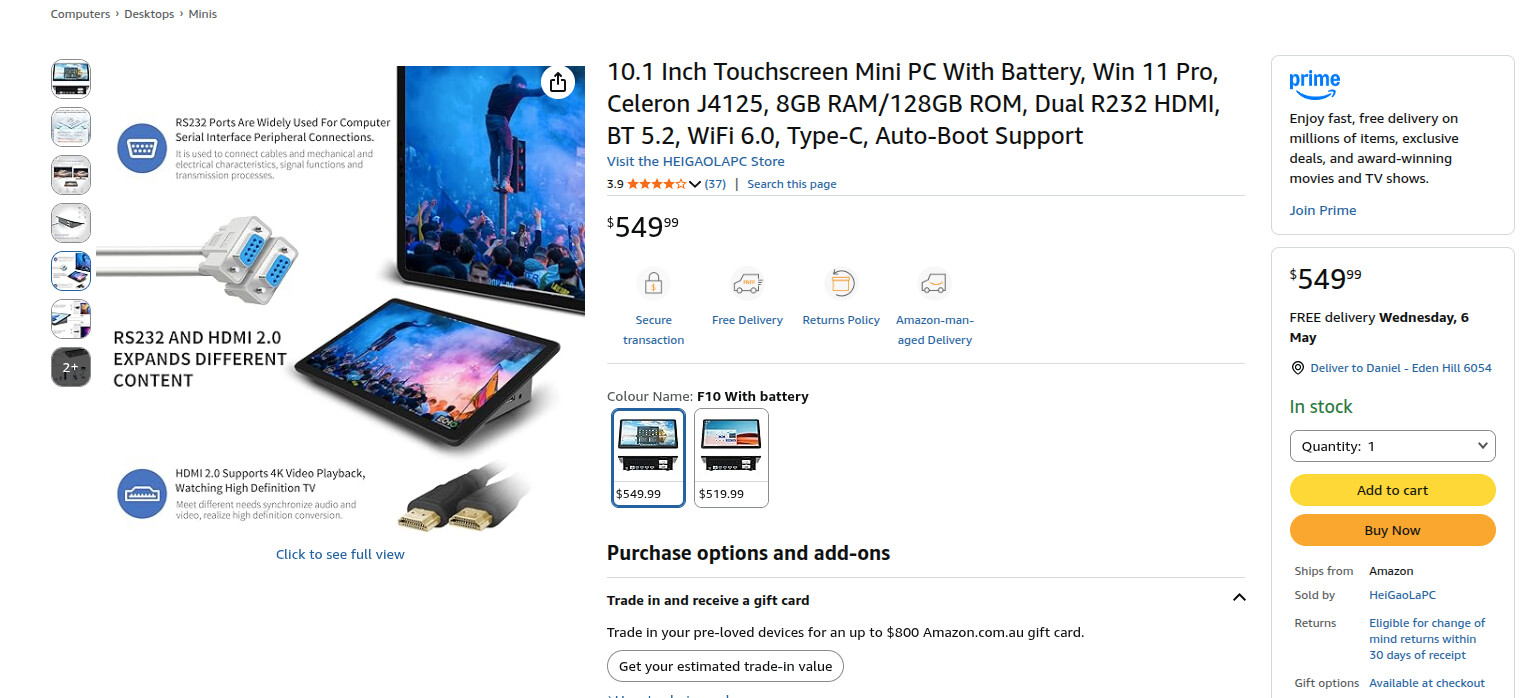
Many “mini PCs” are in fact just laptops without a screen or battery… Hence why most of them use mobile versions of desktop CPU and LPDDR SO-DIMM (laptop RAM). E.G. you will see Mini-PC with Atom or “Celeron” CPU…
I’ve posted somewhere else - I read a reddit post ~12-18 months ago - someone got a Mac Mini M1 or M2 to run off a powerbank and they use it like a laptop with a portable monitor - and they said they use it in internet available coffee shops to write and work…
Note : the Intel Mac Mini hosted a MacBook motherboard… i.e. it was just a MacBook without screen or keyboard or battery…
You’re probably correct, although I waasn’t aware that national location had any affect on availability on Amazon - they’re so big …
Ernie
Sadly it does, quite often I see, we do not export outside of the uk to france. Due to tax implications
I suppose that it’s really true … we really do learn something new every day … provided we pay attention. I unthinkingly had the idea that because Amazon’s so huge, it was a truly global operation, but instead, I’ve learned that it’s really a Nationally scoped entity, but in most every Nation in the world …
Ernie