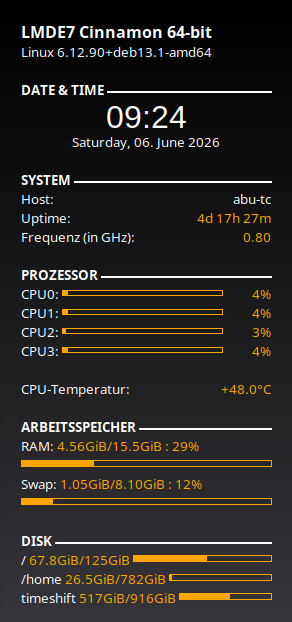
Do you know a GUI app where it shows the total and current RAM being used?
Until here the already installed System Monitor app (at GNOME) does the job
But is need it show at real time the frequency (MHz) too. Is it possible?
Just in case as an alternative in the terminal world the htop and btop apps do not show the frequency (MHz). I know the dmidecode command can show data of the RAM but it is static, is need it at real time.
Maybe he is talking about MHz (Megahertz) or MT (MegaTransfers) speed of Ram.
Example: DDR4 3200 is 1600 MHz / 3200 MT
I’m sure you already know about this, but I thought I would include example for anyone that may not be clear about Ram speed. At least I believe this is what Manuel is talking about.
Is it not controlled by processor and mother board ?
At one stage there was the posibility of over clocking the speeds but thought that trend had gone away. If a computer is clocked at X with memory marked at Y does knowing these numbers change much.
Good question. It is a set value dependent on the memory stick installed. The Windows app CPU-Z would display the MHz of the RAM. Linux CPU-X does not show the value.
Curious, I asked ChatGPT about it. The answer was if you run sudo CPU-X the Ram speed is shown as MT.
I’ve never seen that fluctuate… But e.g. on my desktop system - I had 2 x 16GB at 3200 MT/s and 2 x 4 GB at 2133 (40 GB RAM) - but all running at 2133 (i.e. speed of the slowest modules).
But realised my desktop machine was capable of running much faster DDR4 RAM (3600+) to I replaced those 2 x 16 and 2 x 4 with 2 x 16 @ 3600 MT/s… and ran it like that for maybe 18 months - but - didn’t notice any difference in performance (anecdotal) - so - put the 2 x 16 3200 back in for a total of 64 GB but the 3600 modules down to 3200 (i.e. the slowest RAM will slow faster RAM down - makes sense)…
This is my Dell Optiplex SFF PC (that runs debian “headless” and JellyFin media server) :
╭─x@mimas ~
╰─➤  sudo dmidecode --type 17 | grep -E "Speed|Type|Factor"
	Form Factor: DIMM
	Type: DDR4
	Type Detail: Synchronous
	Speed: 3200 MT/s
	Configured Memory Speed: 2133 MT/s
	Form Factor: DIMM
	Type: DDR4
	Type Detail: Synchronous
	Speed: 2133 MT/s
	Configured Memory Speed: 2133 MT/s
	Form Factor: DIMM
	Type: DDR4
	Type Detail: Synchronous
	Speed: 2133 MT/s
	Configured Memory Speed: 2133 MT/s
	Form Factor: DIMM
	Type: DDR4
	Type Detail: Synchronous
	Speed: 2133 MT/s
	Configured Memory Speed: 2133 MT/s
The first module reported shows it can run at 3200 MT/s - but it’s throttled down to 2133 (the same speed as the slowest modules).
I’ve never checked my RAM speed “on the fly” - but - I do use “CoolerControl” (GUI app) so I can see what’s happening when I’m gaming or running a GPU task (e.g. offloading an ffmpeg job to the GPU) - and I’m sure it provided a heap of info about RAM speed etc…
that was way back when I was running a heavy CPU or GPU task and my whole PC would start making a terrible rattling sound (loud enough to hear throughout the house) - so I replaced the CPU heatsink and fan - which didn’t make any difference - so I replaced my ATX power suppy and that 100% fixed my PC noise issue - who’d a thunk it?
TL;DR (too long, didn’t read) synopsis - you don’t need to monitor RAM speed in realtime - it’s a once only thing - check it once - verify - the RAM’s running at the rate you would expect it to and what was marked on the packaging and the stickers on the modules… That is useful - it’s a common thing for counterfeiters to label stuff deliberately “wrong” - i.e. to get a premium price for something that’s not premium…
I guess buying brand name ram modules is some protection against that.
But maybe not … I recently bought a Makita branded angle grinder skin. Works fine, looks exactly like a genuine Makita, Makita parts fit, but its not, it is a cheap Chinese copy. I knew that before I purchased … took the risk at $30 versus $250. What can I lose?
Maybe where you purchase it is better protection? I bought it on ebay.
But probably not on e-bay… dunno about Alibaba or Temu…
Amazon I’m sure has the odd dodgy bit of kit - but you can usually get your money back in full and not have to worry about sending the shonky item back… And you’re also protected if you use PayPal…
i.e. some shonky fly by nighters sell item “x” labelled as product “Z”… let’s say Corsair 32 GB DDR4 module at 3200 MT/s - but - what you end up with is some other brand of RAM, still 32 GB - but 2133 MT/s (note - I bought those 2133 MT/s 4GB DDR4 modules in 2016 accidentally by mistake from a shop that won’t do refunds if you opened the package - I bought DDR4 thinking it was DDR3 - and it wasn’t any pricier than DDR3 - so I didn’t twig till I opened them and tried to install)…
I once bought some 128 GB USB sticks off e-bay - they inserted and formatted as 128 GB - but I couldn’t even put 32 GB of stuff on them and they’d fail - I found some low-level “inspection” software and discovered they were really 16 GB modules that someone had actually taken the effort to hack the firmware on them to report “128 GB”
And stupidly I did the same (I was really dumb - getting caught out 2nd time around) some Samsung branded thumb drives - I had a pair of 256 GB modules I used in my Pi3 and Pi4 - they had a nice “metal / alloy” housing… So I went looking for the same with higher capacity - landed on e-bay - bought a pair of claimed 1 TB sticks… Yeah - Nah… They weren’t 1 TB! But I was being lazy - I didn’t do the research - I coulda just gone to Samsung’s website to find out that 256 GB was the LARGEST they made in that format! Doh!
What got me - at the time - someone’s gone to ALL that trouble to get that gunmetal colour alloy, silk screen it with Samsung’s logo, silk screen it with 1 TB - that’s a lot of effort!