Oh, I dont like that.
I guess for someone wanting to distribute a distro or a spin, the alternative to sourceforge is to operate ones own website.
Are there any other options?
Github is for source code only
Also, I think github allows you to store binaries up to a certain size, outside of repositories, on their servers. For releases.
I don’t know their limits, but I assume storing 4GB ISO files is not allowed, at least not in the free tier.
I think the limit is 2GB?
Checked… No the limit is 100Mb per file in repositaries.
I will look. They have a limited webpage service… it may be associated with that?
They do have LFS (Large file storage)… I tried it once and failed to master it.
Found it:
I should use that for xv
Is this the Freemind you refer to:
?
Well if yes, it’s written in Java, as the title says.
Linux distros have their JRE, I’d better look for the way how to run the Java program on that JRE.
Edit:
shouldn’t be that hard 
I downloaded the zip and there’s a freemind.sh in it.
That suggests me it should run. Let me test it, couple minutes…
Well, it runs:
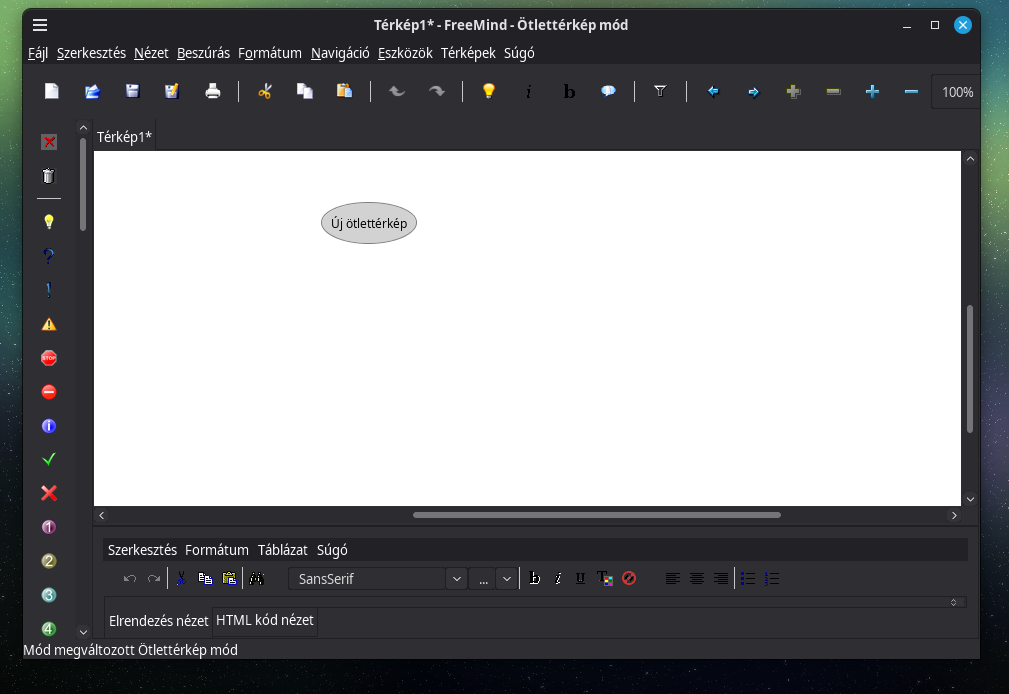
Hello Friends
Thanks for the replies
Paul
Thanks for the link. I will read it soon as I can
Laszlo
Thanks for that approach, about your link shared
Now taking in consideration the following link:
- What file did you use?
I used the freemind-bin-max-1.0.1.zip file.
Just in case for Windows I used the FreeMind-Windows-Installer-1.0.1-max-java-installer-embedded.exe file because is mandatory have an old JRE where it is installed at the C:\Program Files (x86)\Java\jre7 directory (thanks to the installed itself - FreeMind-Windows-Installer-1.0.1-max-java-installer-embedded.exe)
Sadly this approach was not applied for the freemind-bin-max-1.0.1.zip file. Therefore:
$ ./freemind.sh
ERROR:   Couldn't find a java virtual machine,
         define JAVACMD, JAVA_BINDIR, JAVA_HOME or PATH.
I have Java 21 and 25 installed but due the change of API against Java 7 happens:
./freemind.sh
Checking Java Version...
java.io.FileNotFoundException: /home/manueljordan/.freemind/auto.properties (No such file or directory)
	at java.base/java.io.FileInputStream.open0(Native Method)
	at java.base/java.io.FileInputStream.open(FileInputStream.java:185)
	at java.base/java.io.FileInputStream.<init>(FileInputStream.java:139)
	at freemind.main.FreeMindStarter.readUsersPreferences(FreeMindStarter.java:165)
	at freemind.main.FreeMindStarter.main(FreeMindStarter.java:59)
Panic! Error while loading default properties.
Exception in thread "main" java.lang.reflect.InaccessibleObjectException: Unable to make field private static java.lang.String sun.awt.X11.XToolkit.awtAppClassName accessible: module java.desktop does not "opens sun.awt.X11" to unnamed module @51521cc1
	at java.base/java.lang.reflect.AccessibleObject.throwInaccessibleObjectException(AccessibleObject.java:353)
	at java.base/java.lang.reflect.AccessibleObject.checkCanSetAccessible(AccessibleObject.java:329)
	at java.base/java.lang.reflect.AccessibleObject.checkCanSetAccessible(AccessibleObject.java:277)
	at java.base/java.lang.reflect.Field.checkCanSetAccessible(Field.java:179)
	at java.base/java.lang.reflect.Field.setAccessible(Field.java:173)
	at freemind.main.FreeMindStarter.main(FreeMindStarter.java:72)
- Did you install manually a JRE?
I think yes, perhaps from here?:
https://www.oracle.com/java/technologies/javase/javase7-archive-downloads.html
Thanks for your understanding
Yes, but not for this. My wife uses something Java based, so JRE was already set up a long time ago.
If you use Debian (based) distro try installind default JRE first, see if it works.
Something like apt install default-jre
Edit:
Sorry, looking at it closer, I see we have oracle jre 8.
Probably try it from here:
https://www.oracle.com/java/technologies/javase/javase8u211-later-archive-downloads.html
Huge thanks for the support Laszlo
Yes, but not for this. My wife uses something Java based, so JRE was already set up a long time ago.
Now has more sense. Could I know what app is used by your wife? It due the old JRE used (Java 8)
If you use Debian (based) distro try installind default JRE first, see if it works.
Something likeapt install default-jre
Thanks for that
Edit:
Sorry, looking at it closer, I see we have oracle jre 8.
Probably try it from here:
Java Archive Downloads - Java SE 8u211 and later
Yes has a lot of sense
I downloaded the JRE 7 (from Java Archive Downloads - Java SE 7) and now works freemind in Linux 
Really Huge thanks for your support!!! 
@nevj pls could you consider to move since post #3 to here to the following post?:
Once done that I am going to mark it as solved (thanks for your support in advance)