Proud to say I built a GNOME Shell extension called Snap Text that lets you extract text from anywhere on your screen.
The idea is simple: select an area (or press a hotkey), and the detected text is copied to your clipboard. It is useful for text that normally cannot be selected, such as text inside images, screenshots, videos, dialogs, PDFs, remote desktop windows, and other apps.
It also includes a Smart Extract mode for grabbing structured values like URLs, email addresses, phone numbers, IP addresses, and color codes from the area under your cursor.
There is optional auto-translation as well.
In Gnome Extension Manager: search “Snap Text” and you’ll find it.
Thanks you for your contribution i look forward to the reaction from fellow members to your tool
Perhaps you would care to give more details on why you built it, using what, any difficulties you found or just general background others may learn from
Thanks Paul, encouraging. I built it because this feature long exists on MacOS but unfortunately not yet within Gnome. I run Gnome on all my systems at home, taught my kids how to use it and they love it, but it’s sometimes little things where MacOS still stands out. One of those things is the ability to simply “snap” text from still images, or intelligently parse a phone number without the user having to retype.
Linux has many great libs already built-in or available in existing repos. One of them is Tesseract, a standard and highly tuneable OCR library. I used this to built the solution. One challenge being that scanning and extract text from a small screengrab requires a different approach than from a black on white document. The extension tries to detect which algorithm to run, also inversing colors if need be to get to a higher accurate result.
One other challenge is the amount of ‘UI gibberish’ that OCR tends to extract, if you select a border between windows accidentally in your clip - it gets extracted as a bunch of pipes (‘|’ just as example) To deal with these things is a real challenge.
I’m also hitting the limits here of what a Gnome extension is allowed to do per Gnome EGO code reviewers. Next step is likely I’ll turn this into a dedicated background service - so that the amount of front-end logic in the extension can be more minimal.
Curious if any of you here have ideas or thoughts about features I could add. I had some replies that folks expect this native to Mutter/Gnome, but I think that may a way more invasive/lengthy path.
Until you explained that, I could not see how it differed from copy/paste … perhaps because I have never used a Mac.
Now I see …it extracts text from graphic elements on the screen which were not originally text, using OCR.
Do I have it right?
You might make this clearer in your documentation.
I have used Tesseract … it is a good piece of software.
I see from your Github site that it is javascript ( .js files) .
I think , the way things are these days, you need to say if you used AI tools to write the javascript, or if you wrote it yourself, or some percentage?
Yes that’s right, it utilizes optical-character recognition (OCR) to grab text from anything you capture - and then sends it to clipboard. It’s hard for me to explain this in a way that its easily understood
PS.
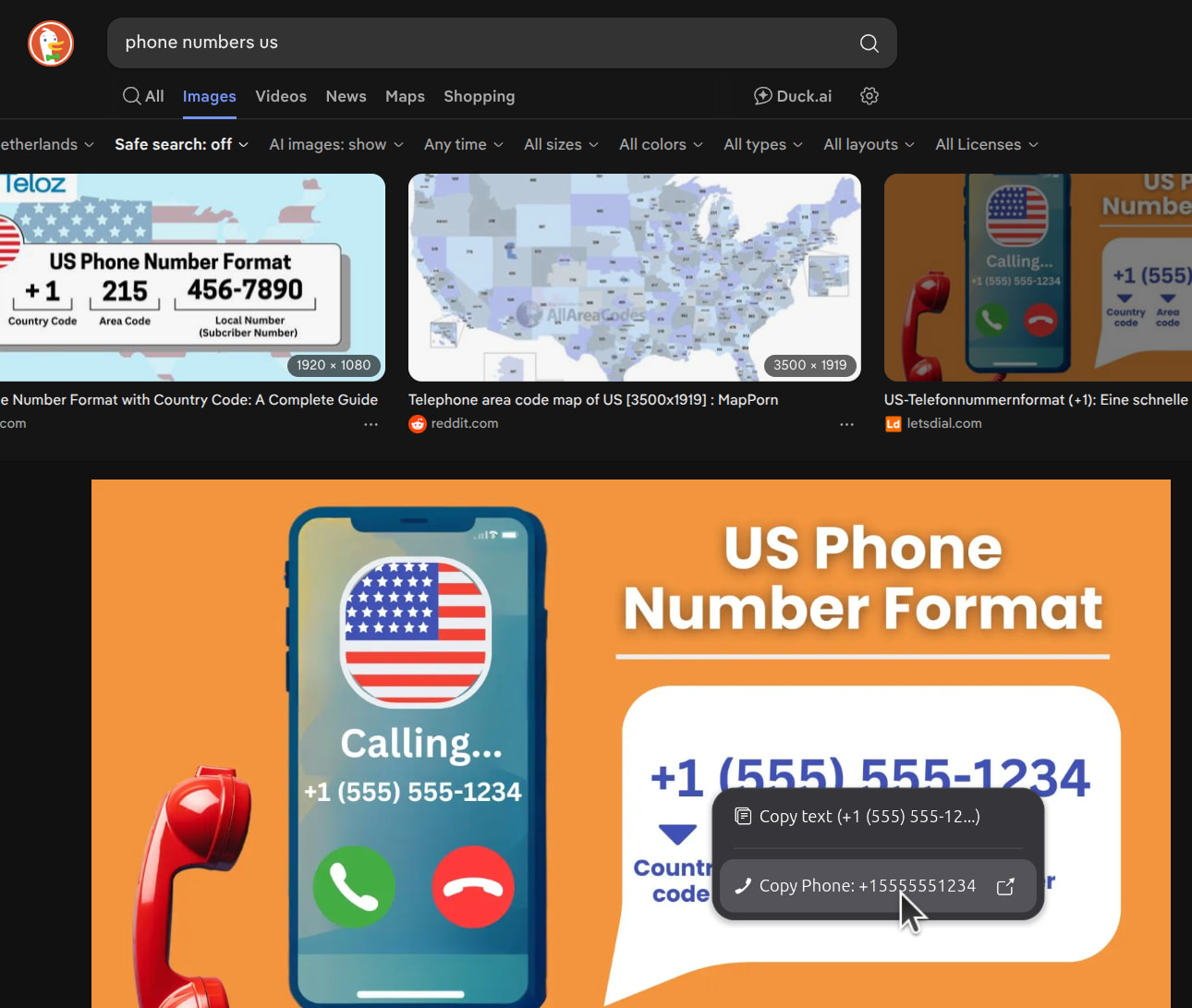
Kind of a hidden feature (a bit untested feature), but if you hit a hotkey above an image, it tries to parse the phone number from it (also works with an IP address or URL, GUID or IBAN) - without having to draw a rectangle to snap it first. I called it Smart Extract for lack of a better name (you can configure this in settings)
Smart extraction from anywhere on screen (see context menu popping up):
It’s an extension you can add to Gnome - which is written in gJS (Gnome JavaScript) It calls upon Tesseract a.o. to do the actual interactions. This was still written the old-fashioned way but I used AI to generate translation files - so its also available in other languages.
Thanks for the honest presentation.
I like it… you wrote the code yourself… and did the design
We all need help with translation.
I needed to ask because there are individuals who object to 100% AI generated projects.
You are well above that line … you should add a statement to yours docs.
Try something like this.
There are areas of the screen that are like printed text. They can not be copy/pasted but they can be scanned ( .like scanning paper with a scanner) then OCR can be used to extract text from a scanner image. This software provides a facility to ‘scan’ and OCR text from such areas of the screen. It only works with Gnome DE.
Hope it helps. I cant test it … do not use Gnome.
You really need to make the description simple, and keep jargon out of it.
Have to admit - as a Gnome and MacOS user - it’s a feature I miss…
it’s built into MacOs - double click on a bitmap file, e.g. a screenshot - and it will identify text in the bitmap…
I can even do a screen shot from my Ubuntu 24.04 gnome desktop - save it (they save to a resilioSync share my Macs can see) and I can open in MacOS Finder and drag select a string of text, or e.g. an IP address…