I have been fascinated by hyprland DE but couldn’t find a distro that ran it well. Void was no good as I had errors saying missing dependecies. It seemed to work sort of well with Arch so I went back to my old friend CachyOS. Installed with Cosmic DE with Hyprland over the top thanks to dot files from GitHub - mylinuxforwork/dotfiles: The ML4W OS - Dotfiles for Hyprland - An advanced and full-featured configuration for the dynamic tiling window manager Hyprland. Ready to install from a Live ISO or with the Dotfiles Installer app with setup scripts for Arch Linux, Fedora and openSuse. · GitHub. This set up allows me to compare hyprland & Cosmic, without having to reboot, so far I like Cosmic but there is a fine line between the two, Cosmic is smooth and very use-able however hyprland is more flexible. I’m leaning toward Cosmic because its looks are to my taste but I can still tweak as I like. After all it’s all to the individual choice. OH by the way both DE’s can be installed on most modern distros, some may require a little patience. Thanks to Abishek & all who contribute to this community. Huge Love from KIWI Paulie
Hi,
Nice to hear from someone nearby, I am in NSW, Australia.
Hyprland and Cosmic are both for Wayland only, as I understand it.
I have been experimenting with antiX … X11 not Wayland. It has the seemingly unique ability to switch dynamically between desktops, without even logging out. I have only tried WM’s and simple DE’s like Xfce, but it seems to be robust. When you switch , all your active windows remain, and it just sort of slides a new DE underneath them.
It is indeed possible to install multiple DE’s today.. Years ago I would have said they could clash if there were common files. That seems to have disappeared. You sèem to be going fine with Hyprland and Cosmic.
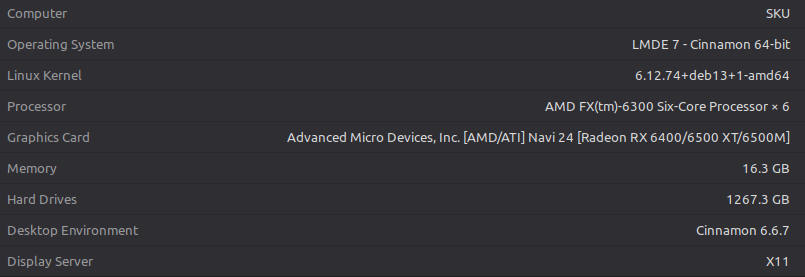
Your computer is like mine … 6x processor and amd 6400 graphics card. I originally had trouble with the amdgpu driver, but that resolved itself with time. I like Void and MX with Xfce. … not a fan of high powered DE’s.
Regards
Neville
I switched from Hyprland to Sway because I don’t need the eye candy and Hyprland is moving so fast that on Gentoo it has it’s own overlay now. It’s not an official overlay. A bit like AUR on Arch. I bet it works best with bleeding edge system like Arch.
My dot files needed some modifications from Hyprland to Sway (different syntax and the original dot files were for SystemD and I’m on OpenRC) but now everything works.
I dropped Pop!_OS 22 after running it for nearly 3 years - in favour of “vanilla” Ubuntu 24.04… Because I didn’t want to use Cosmic… But I wanted the Ubuntu 24.04 base…
I don’t want a tiling window manager… and I can’t use Wayland yet… and Cosmic doesn’t have enough tweaking tools (yet)… e.g. on Cosmic I can’t easily move the window control widgets to the left unlike I could on Pop!_OS 22.04, or Ubuntu 24.04…
I can’t use Wayland yet because I NEED Synergy KVM - and last time I tried it on Wayland - it still didn’t work - tried 1.20.x and 3.0 Synergy releases and they didn’t work… I have a Pro license for Synergy… I wasted about 3 hours trying to get it to work and gave up and switched back to xorg and Synergy 1.20.x…
I’m happy to single boot with a single O/S install (and no MS Windows!) and a single DE… call me boring 
My Synergy dependancy could well hold me back from progressing - apparently Ubuntu 26 will be Gnome 5 and Wayland ONLY…
I might actually try Wayland on my ThinkPad - as I hardly ever drive it from Synergy…
I ran into something annoying in Gnome 4.x on Red Hat (EL) 10 recently - some stupid disclaimer that Gnome-Tweaks wasn’t required as it was all incorporated into the RHEL Gnome 4x settings - but it WASN’T! i.e. not easy to install gnome-tweaks - not in any of the default RHEL10 repos (I have a “developer subscription” for RHEL).
Gidday mate, good to hear from someone across the ditch. I had an old computer given by my old nieghbour. Had Pentium II with 512M of ram. AntiX was the only OS that would run. You should go MX Linux Its a brilliant mash of AntiX & other. Yep XFCE is my fave but now I run LMDE which is using Cinnamon but I modded with cairo dock + other tweaks. Linux is cool like that. Go Hard out with your computing Neville, open your mind,
Yeah sway is just as good, cool about Gentoo
No comment, your use scenario is special, just figure out to do it. X11 is still prevelent but the wayland is the new display server for linux
MX is my main daily driver. Void is for VM’s and containers.
I multiboot a few other distros , including antiX.
The latest antiX has 5 init systems which you can switch between … I prefer dinit … I am a non-systemd fanatic.
Chimera is interesting too.
Good on ya mate. I multiboot LMDE, Bazzite (for gaming, its good, based on fedora) CachyOS for testing, plus I love Arch, arch based just rock. I don’t like UBUNTU because of Canonical, they tell you what you can & cannot do. So much for open source eh? I also like SysV or runit. These two distros allow choice of init systems I think
Obviously never used Red Hat (RHEL) - boy do they tell you what you’re allowed to do and especially draw a line in the sand about what you’re NOT ALLOWED to do…
Using Ubuntu desktop (or server) feels like Freedom coming out of Red Hat land…
Unfortunately I have to work with “architects” who have basically FA knowledge about UNIX Linux and they’re dictating “Everything RHEL”… They’re basically dumb “yes men” with virtually zero real world experience on UNIX (never mind Linux) hoping to apply what little they know about Microsoft, to Open Source…
I prefer Ubuntu for desktops, and Debian for servers… But apparently these Microsoft Slave “architects” know better than my 30+ years of UNIX experience… it’s like a f–ing mantra - “RED HAT RED HAT RED HAT ALL THE WAY!”
I think the best non-systemd init system for home use is dinit. It is only recent and has almost all the capabilities of systemd , without any of the bloat and takeover attributes.
Its commands are similar to systemd, eg dinitctl start ntpd
It is only available in Artix, antiX, and Chimera at the moment.
I haven’t tried dinit so my question is why it’s better than Void’s Runit or Gentoo’s OpenRC. I know you use both of them also.
This is an academic question because I like OpenRC more than Runit or SystemD. Maybe it’s just my personal preference, but to me the spirit of FOSS is freedom of choice — use whatever tools you prefer AND respect anyone’s preference.
All three are good choices.
- OpenRC is a script, and is therefore slower, but speed is not very important. Its config files are the same sysvinit… ie they are scripts too… and therefore OpenRC can be used alone or on top of sysVinit.
- Runit is an implementation of daemontools. It runs a supervisor process for every service, in addition to the daemon. S6 is like this too. Runit is frozen… no development. Runit’s config files are scripts … easier than sysvinit scripts but still difficult to write. In Void , all the scripts you will ever need are present, you very rarely need to write one, but not so in Devuan. Artix and antiX have some scripts available.
- Dinit is a C++ program. Its init program does everything… it does not use a supervisor process for every daemon like runit. Dinit’s config files are not scripts… they are descriptive… like most files in /etc, and they are all in one place in /etc/dinit.d, which makes it consistent, and easier to find and work with. ( Runit has config files in multiple places and they are not in the same directories in different distros)
OK that is how they differ to look at. What can they do.? They can all start and stop daemons.Runit and dinit provide an init process . They can all manage dependencies between services. They can all do parallel startup, and they all supervise daemons, but in different ways. Dinit allows user controlled services (like systemd).
Dinit can do almost everything systemd can do, except bundling of services, To get that you have to go to S6. Bundling is useful only in servers where you want to manage stopping and starting groups of services.
Most of the arguments for systemd compare it with sysvinit, and ignore the fact that other modern init systems can do the same as systemd without all the bloat and bloat and takeover aspects. Systemd is 69 binaries and nearly 1.5million lines of code. Dinit is 1 binary and about 10000 lines of code. The others are in between.
Make your own choice. I say S6 to replace systemd on servers and dinit for home use.
Thanks! So Dinit would be “the ideal” SystemD. I’ll stick with OpenRC for now. Will read those links you posted!
Yes stay with OpenRC. Dinit is only available in Chimera, Artix and antiX at the moment. One could install dinit in Gentoo, but it would be lots of work… wait for Gentoo to do it.
That sums it up nicely.
This would be the fairest and most authoritative init system comparison that I have seen
It is written by the author of dinit. He obviously has some internal knowledge of how various init systems work.
Me too on my Gentoo box… I didn’t want to enable hyproverlay to wait even more on emerge --sync. And what kind of FOSS software offers a premium membership? Seems like just one of these short living hypes right now. Had used it on Arch, wasn’t very happy with it. They change the config syntax every now and then and you need to spend hours trying to figure out where the error is with no helpful error messages at all. What a great WM. I’d also tried COSMIC in the past, but it just always messed up all my themes after logout. I think it’s a great project, but still in its way too early stages to be used productively.