It is not often needed. … only if the initrd.img file in /boot is missing or corrupted.
Yes it is worth knowing about, for those rare cases.
It is not often needed. … only if the initrd.img file in /boot is missing or corrupted.
Yes it is worth knowing about, for those rare cases.
I agree - I have actually done that in the past - many many years ago…
I’ve also done rescue boot on VMs in VMware (i.e. ESX / vSphere / vCenter) occasionally on server VMs…
But if it’s my main daily driver - I just want to get it going again ASAP - and - re-install is the quickest known outcome… 
All these mentions of panic remind me of Douglas Adams’ “Hitchkikers Guide to the Galaxy” :
Hi @Manuel_Jordan,
Any feedback? Did any of the suggestion help? Did your problem get resolved?
Just curious. I also had a kernel panic, but glad it was corrected.
Huge thanks to all for the replies
Any feedback? Did any of the suggestion help? Did your problem get resolved?
Just curious. I also had a kernel panic, but glad it was corrected.
Due the second flood my magsafe is gone … once in hands the new one I must take this mission again …
Big sorry but I can’t reply each comment as normally I do due the current situation I had with the flood. Time very tight and resolving the problem with other laptop chargers
Huge thanks for your understanding
Yes, that is a good last resort. Reformat the partition if you do that.
We are all feeling for you with the flood issue.
Hello Friends
To gain time to resolve this situation, if you open Google Chrome and put ubuntu grub menu as search term and then click in Images you can see many examples being similar and different. The point is that appears many items to select
My question is because it is the first time with this situation
The most top or bottom? Or other option as Recovery Mode or any else?
Thanks in advance
It depends what you want to do
Top item will boot the default OS
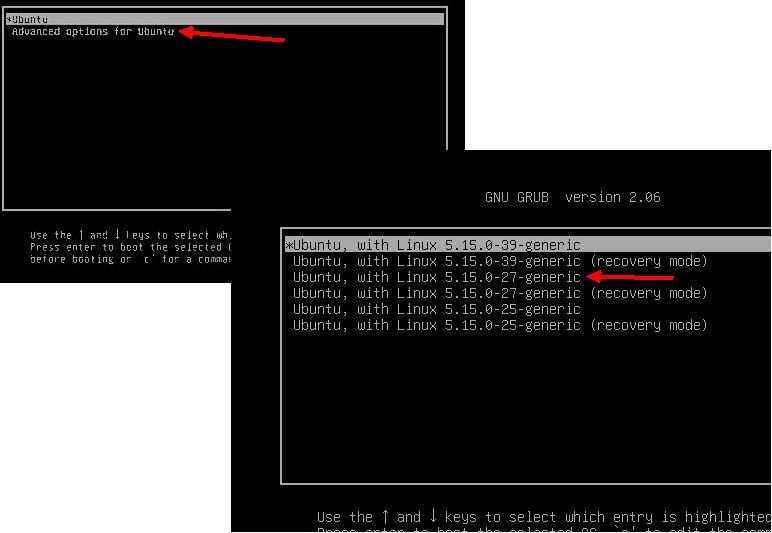
The second item will be Recovery or Advanced … it brings up a submenu which allows both choice of kernel and choicd od recovery mode. Recovery moddbis single user … ie root only, and requires mounts to access filesystems and is cli only
Unless you multiboot there will only be 2 lines… plus maybe memtest
Oh I see, it is not a easy task ..
Under what name I should do a research on the Web?
It to get experience with those options and avoid do a not desired disaster
I would initially try - advance option–> the second to the top regular kernel (not recovery)
The first one (top one- under advance) is the kernel that is messed up that you are trying to fix.
Joel
Thanks for the reply, pls could you take a photo/screen of your GRUB for a better understanding? perhaps the distribution of options is different
Thanks in advance
Joel
Huge thanks for the screenshots … it is useful for the guidance need it …  …
…
What to expect next? Something automatic to be done by Ubuntu itself or is mandatory do something by my side (write some commands)
To all you friends - huge thanks for your support
You are following reply no 4 from @ihasama .
if you try to boot an older kernel then
I would try what I posted above-
sudo dpkg --configure -a This finishes interrupted configs
sudo apt install -f Tries to repairs any broken deps that might show up
sudo apt update
sudo apt install --reinstall linux-image-generic-hwe-24.04 linux-headers-generic-hwe-24.04 Should Re-trigger proper kernel setup & initramfs
sudo update-initramfs -u -k all Rebuilds initramfs
sudo update-grub
Then reboot.
If you get errors- they would be helpful to see what is actually going wrong.
Thanks Nevile for the feedback as resume.
Understood
Just being curious if the second latest option fails (because the first one has kernel panic), if exists other old kernels (3rd, 4th) should I tried them?
Hello Joel
Thanks for the set of commands, just being curious
This was your inital post-
This means something went wrong- It really depends on what went wrong- but my directions try to fix it- Yes, If you can get into your system (even with old kernel) use the commands to try to fix it.
If you can get into your system with an older kernel - It would be smart to first save your important files just in case.
Side note- do you have virtual box installed? If you do, that might be the problem- see this post here ubuntu-upgrade-issue-6-14-0-37-generic-to-6-17-0-14-generic-kernel
Hello Joel
This means something went wrong- It really depends on what went wrong- but my directions try to fix it- Yes, If you can get into your system (even with old kernel) use the commands to try to fix it.
Understood … it is going to be the latest action
If you can get into your system with an older kernel - It would be smart to first save your important files just in case.
Yes, it is the primary and main action
Side note- do you have virtual box installed? If you do, that might be the problem- see this post here ubuntu-upgrade-issue-6-14-0-37-generic-to-6-17-0-14-generic-kernel
Yes, as another few laptops with Ubuntu too, where for one of them was update/upgraded (apt) and works normal
Thanks for the support to all
Yes… no harm in trying, and easy to do.
It surprises me that you have apparently never used or seen a grub menu?
Does Ubuntu not display a grub menu during boot?