Normally we discourage entries pushing products, but as yours may be of interest to some members at this stage I will leave it on our site, but this is subject to review and modération by others
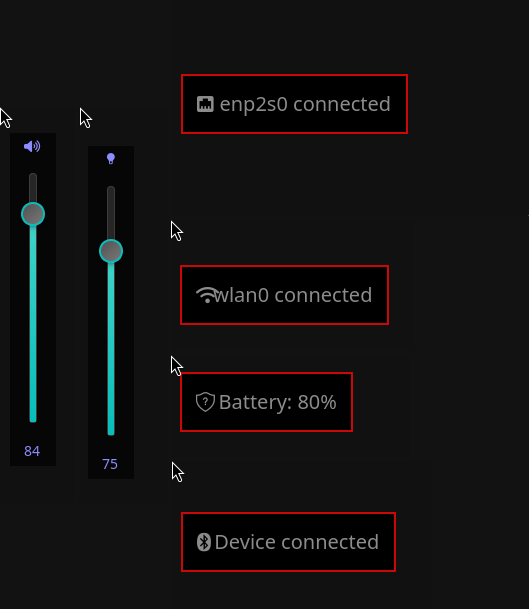
Can you tell me why this is better, than -for example- Cinnamons OSD items?
(Won’t interfere this one with the built-in solutions in KDE, GNOME, Cinnamon, etc.?)
Can you show some screenshots?
As for brightness control, does it work via i2C towards monitors, like ddc-util, and some extensions like this one?
I think this one is framed more as a request for comment. I think that is OK. … he wants constructive input, not sales or website hits.
Sorry @ninja … we have to review such things.
Your website says it supports Wayland … so not X11 correct?
It is wiitten in C and uses standard libraries… I see no reason why it would not compile in BSD… have you tried?
This daemon is a desktop-agnostic system event controller for Linux that enables users to run fully customizable commands based on real-time system state changes.
What it uses
inotify: Monitors filesystem events such as backlight changes, configuration updates, and sysfs state changes.
netlink sockets: Listens to kernel-level events such as device changes, audio routing updates, and hardware state transitions.
Why it is better
Works independently of desktop environment (DE/WM agnostic)
Avoids inconsistent or missing native OSD implementations
Gives full user control over system feedback and actions
Best fit for
Minimal window managers (i3, Openbox)
Wayland compositors (Hyprland, Sway)
Lightweight or custom Linux setups
Users who want full control over OSD, brightness, and audio behavior
It uses GTK4… does that rule out qt5 desktops like KDE or LXQT.?
I like the idea that it works in WM’s … it may be a good fit in antiX or some of the other minimal distros.
I wouldn’t classify this as “pushing products”, it’s a single hobbyist developer publishing a linux application with source code… It meets every definition of “FOSS” for me…
I won’t be trying it out though - I don’t run Wayland… Stuck on xorg/x11 for the meantime…
Also - I prefer to use keyboard for things like sound volume…
It’s always difficult to identify the difference between one and another especially if it’s something I know nothing about. So I best guess… but happy others look and decide.
If I understood it correctly, you set the volume -for example- the way you used to, no matter if keyboard or mouse, this something just gives a visual feedback of the change.
It is the second time I see this kind of post about Open Source Project
Why not create a new section/category about this?
Such as “OSP” Open Source Projects
For your consideration @sourav … thanks for your understanding
but because it is the second post announcing an app through GitHub (in the future would be through GitLab) I thought is better create a dedicated category.
Honestly I don’t know how it would improve my own daily usage. Anyway I find it interesting.
As for scripting, I used ifup.d ifdown.d and ifpreup.d directories to run some action for network state change, especially when VPN gets connected/disconnected…
I never needed to run something on sound volume change, but in the past it would have been interesting to catch events like a sound device (BT connected of course ) appeared.
Is your stuff scriptable to do something when a new sound card is plugged or connected via Bluetooth?
As I see your effort may seem underrated at the moment, as it provides a functionality for which most DE’s already have something to offer.
I think your best hope is that a lightweight DE’s developers discover your creation, and the include/integrate it into their work.
Still I have one question this project is worth for continue?
Consider to create a video and upload in YouTube to show in real action what it does. Trust me, if a Figure is better than words, a video is better than a Figure. Share/embed the video in your GitHub project.
There are many developers first searching the following when they arrive to a new repository at GitHub:
Quick/Concrete description
Screenshots
Video(s)
Keep doing your work, never stop due the opinions of others
I think your best hope is that a lightweight DE’s developers discover your creation, and the include/integrate it into their work.
Furthermore use other networks to announce your work. Start with LinkedIn, there are many groups available there. What about X? (ex Twitter). And finally the official forums for many distributions such as Debian, Ubuntu, Mint etc …
Worst business is do not nothing
Imagine if Linus Torvalds when was 21 years old decided to stop his OS by any reason …