Yes, Linux has it’s version of Blue Screen of Death, but my screen was not blue.
It happen after updating Mint 22.3 and having kernel 7.0 installed.
After the update / upgrade the next boot I got;
Kernel Panic
Please Reboot your PC
UFS: Unable to mount root FS on unknown - block(0,0)
From my research, I found I could go to advance option on the grub menu and select a different kernel to boot. Selecting kernel 6.17 the PC booted fine. I next uninstall kernel 7.0 and ‘sudo update-grub’.
It was nice that my PC is dual boot. I was able to boot MX and search how to correct the problem.
It cant mount the root filesystem .
That may be an initramfs problem
It doesnt seem to be a grub issue because you could boot another kernel.
I would not like to see that happen to a beginner. … how could they release a dud kernel? That is bad.
I will say that a recovery from the kernel panic was a lot easier then Window’s Blue screen of death.
In Windows, I would of had to restore the OS. Because I have Linux, I was able to recover form the kernel panic just by selecting a different kernel.
Another plus for Linux. The OS takes such a small partition, I had a second Linux distro on the PC that I was able to boot from and than search for an answer to the panic.
Most Linuxes will run in a 25Gb VM with 4G of ram. Some cutdown linuxes like antix will run in much less than that.
I would not make a hard partition that small though … you need a big of breathing space.
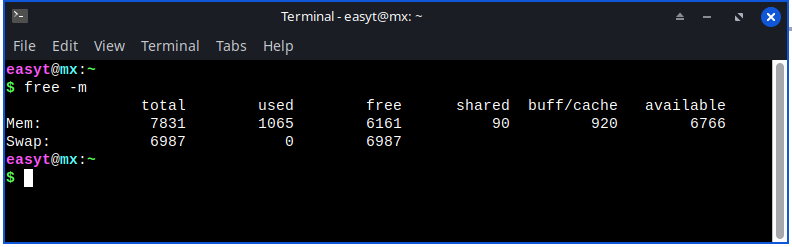
Try free -m … see how much ram it uses
The result will depend on how much ram you have in your computer. The kernel adapts … if you put it in a smaller compiter it will use less ram
Yeah, that 1065 includes some buffers/caching, but not the whole 920.
If you use Conky you get a buffer free figure and it will be lower … probably about 2/3 or around 700.
For me it was always some odd combination of programs, drivers, uptime, memory fragmentation, or voodoo that caused it. It “never” happened again on reboot.
I had trouble with Linux Mint back some 6-8 years ago. Maybe it was my laptop causing the problems. I eventually went to a desktop using POP-OS and the troubles have been far and few between over the last 5 years. I tried Mint again a year or two ago in a virtual box and didn’t like it as well as I do POP-OS. No black screens of death.
It is quite unusual for linux to hang likd that with a blank screen, while it is running…
I happens quite often while booting… usually caused by a Login Manager failure or an X11 failure. X11 failures are often caused by graphics driver issues.
I started with Linux back in 2018 and it was with Mint. I have been with Mint every since. The screen of death is very rare with Linux, so it was a big surprise to me when I got the screen of death for the second time this year.
This last screen of death was because of kernel 7.0. Once I booted with kernel 6.17, my desktop was fine. I did not catch it, so when my other desktop was updated with kernel 7 it also received the screen of death.
I also have MX installed on my PC. Early this year I also got the screen of death while testing MX. It was not from MX, but again it was from Mint. It was caused when I switched from MX to Mint without powering the PC all the way down.
My guess is kernel7.0 was failing to start the xserver.
Your other case with Mint affecting MX is mysterious. .
Mint must have left some hardware in a strange state … eg with corrupt firmware.
There is no other way one OS can affect another.
Actually, it was Mint that got the screen of death. MX was always fine switching from Mint to MX. Mint was okay if the PC was powered off. It was only (and not every time) switching from MX to Mint on a PC restart that the I got the screen of death on Mint.