It been a few years since my last visit to Linux and I am well and truly done with Microsoft. I like the look of Linux Mint Cinnamon and I am looking to purchase a used hp eliteone 800 g3 23.8-in touch aio to install it on, specs - intel core i5 7500, 8GB RAM, 1TB SSD. Is this spec suitable for a Linux Miint Cinnamon install?
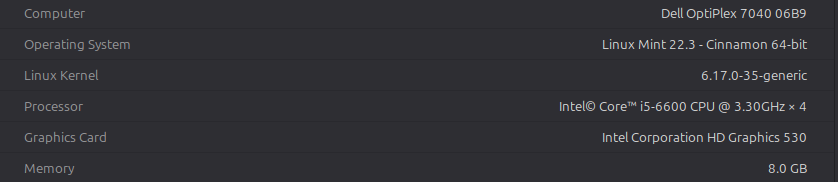
Here are my spec for my desktop. Linux Mint runs great on my PC. Regular Mint is more up-to-date then LMDE but either one is a very good selection. The main difference is regular Mint is based on Ubuntu and LMDE is built on top of Debian.
Regarding horsepower it is going to be plenty.
It will easily run any Linux.
The 8GB RAM is well enough if you use the system normally, that can be small if you plan to run virtual machines, or if you browse the web like todays young people: never close any browser tab, just open a new, and the browser chews up all memory with tons of pages open and loaded… that solely depends on your usage habits.
The computer is not a shiny new one, and also not an ancient one, so I expect everything to work with a todays kernel.
But we cannot be sure of this, as we don’t know what network card it has installed, even today some wifi cards don’t play well with Linux out of the box. I see it’s a “touch screen”, probably it will work (it worked for me with a Lenovo touc laptop), but this isn’t quite sure.
In case something doesn’t work out of the box, don’t be scared, there’s a solution for almost any problems…
No… Go lmde. Then if it dont work which is highlight unlikely try mint.
On network cards in laptops I have never had a problem with any version of mint and done over 400 installons for clients. Only time I had a problem was the WiFi card was dead on purchase. Swapped it out and new one detected, working 5 mins later, took me longer to screw it back together. And wifi cards are around 10 euros on usb keys now. The one I replaced was on a tower mother board, only did it as part of the general clean inside.
Some of the broadcoms (definitely not all of them!). But I can’t give you an exact list.
I never was a victim of that, but time to time on the forums pop up threads that discuss wifi not working, and then usually the solution is to go to github, grab something bcm43-whatever patched driver, compile from source, blacklist the original distro provided kernel module, and use the compiled one.
I second LMDE, as I’m a fan of Debian.
LMDE is 95% Debian, just tailored to look&feel like Mint.
On the other side the “original” Mint is based on Ubuntu.
If you prefer newer codebase, newer everything, Mint is the way to go.
If you prefer maturity, stability, reliability, LMDE will be th better choice.
Because:
Mint is a descendent from Ubuntu, which is a descendent of Debian - testing. It is basically a developement branch of Debian, so we can say, Ubuntu and so Mint is based on Debian developement release.
On the other hand LMDE is based on Debian - stable, which is the stable branch of Debian.
I could say it contains what Debian considers production ready.
This also means, Debian -stable-, and so LMDE has an older codebase.
This was now 7 years ago on my touch screen PC.
“When I booted Mint 18, the cursor was jumping all over the screen.”
It happen on a Lenovo X220 which was a tablet laptop with a touch screen. Anyway, I found a fix for the problem by disabling a couple xinput parameters. So if this happens on your PC, the fix is fairly easy.
The temp fix on my X220 was open a terminal and enter ‘xinput disable 14’ which was the touch screen input. Xinput might be different on your laptop and you may not even have the same problem I had.
The permanent fix was to edit /usr/share/X11/xorg.conf.d/10-evdev.conf and add ’ Option “Ignore” “on” ’ to the device for touch screen.
It might be worth checking that. Almost all Intel or AMD cards or inboard graphics will work with Linux, but if it is an Nvidia card check the model … a very new card may not yet have Linux drivers. A very old Nvidia card may also no longer have Linux support.
Sid is not a bad version of debian its just a devellopement branche this is where new packages and updates appear on debian first right from experimental . Many distributions have been based on sid over the years like siduction linux for exemple . As for ubuntu they actually take a snapshot of debian sid freeze the packages and apply their patches and modification to it . In short although it is based on debian sid its heavilly modified to give a debian based distro with up to date packages and ease of use .
From what I read, a much better answer about Ubuntu.
From the web;
" Ubuntu develops and maintains a cross-platform, open-source operating system based on Debian, with a focus on release quality, enterprise security updates and leadership in key platform capabilities for integration, security and usability."
All distros have a starting point. It is the end results that matters.
I could not agree more howard , i was just trying to explain what ubuntu is based on and that debian sid is not a bad version of debian just a développement branche .
Up to date packages are becoming a big issue…getting linux issues with drivers on new hardware is one of the most frequent issues we hear about on this forum .
It is something that new users have difficulty dealing with , because adding driver modeles to the kernel needs CLI skills.
We recently had an issue where LMDE would not boot, but Mint would. … because unlike Ubuntu, LMDE is based on Debian stable.
Now I am starting to see why some treat Debian sid as a sort of rolling release… but I think using raw sid would be a poor choice… it needs some management like Ubuntu provides.