That is not a very high load. I doubt if it ran out of memory or cpu capacity. Check that it did not fill a filesystem.
I think it is more likely a software gliche.
Does LMDE have logs? I would be looking there.
That crash.tar.gz file contains a coredump and system info. It is unlikely to be useful.
You were using the browser when it froze. Check out the browser … eg use another browser and see if the pronlem recurs.
Do you have browser plugins. ? Get rid of them.
I was reading a post on itsfoss (just saying that by coincidence that is what I was doing, not that this website caused the crash) but had other tasks running simultaneously: Transmission seeding several distros, Vivaldi browser connected to Gmail, and Firefox with 4 or 5 open tabs.
My point is that even it if slows down, an OS should not freeze in a way that it needs to be restarted. Here is the link to the previous crash (I hope someone can point which program is causing the freeze)
You need to study the logs. There will be something in the logs that will tell you what it was doing when it crashed. Use the time of crash to find where to look in each logfile.
The crash.tar.gz file will not tell you .
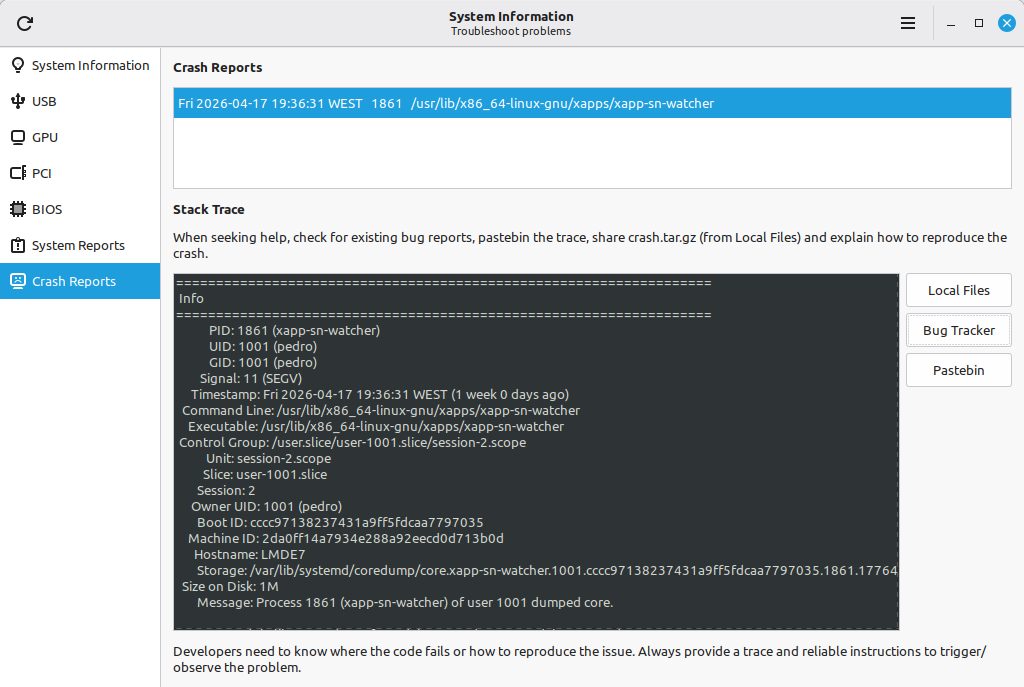
I downloaded the crash.tar.gz file, extracted it, then uploaded to Copilot to see what it thought.
It looks like something from Cinnamon notifications caused this problem. Maybe an update is available for that?
Short version: this is a user‑space crash of a Cinnamon/XApp helper, not a kernel or driver blow‑up.
From your stack trace:
Process 1861 (xapp-sn-watcher) of user 1001 dumped core.
Program terminated with signal SIGSEGV, Segmentation fault.
Core was generated by `/usr/lib/x86_64-linux-gnu/xapps/xapp-sn-watcher’. #0 0x00007f2599111fc5 in g_dbus_proxy_get_name () from /lib/x86_64-linux-gnu/libgio-2.0.so.0
So:
What was running: xapp-sn-watcher, a background XApp service used by Cinnamon to watch/manipulate status icons/notifications in the panel.
What crashed / where:
It crashed in g_dbus_proxy_get_name() (GLib/GIO’s D‑Bus proxy API) called from xapp-sn-watcher:
#0 g_dbus_proxy_get_name () #1 0x00005575d207e8c8 in ?? () #13 g_application_run () from libgio-2.0.so.0 #14 0x00005575d20750f2 in main ()
That’s a classic NULL/invalid pointer dereference inside a D‑Bus proxy call—almost certainly a bug in xapp-sn-watcher’s use of GIO, not your hardware or GPU drivers.
Scope of impact:
Only this daemon died; the rest of the system kept running.
Other threads (1874–1878) are just GLib main loops and dconf threads waiting in ppoll()/g_main_loop_run()—nothing suspicious there.
What I’d do next
1. Check if this is a known bug and update XApps/Cinnamon
On LMDE 7 (Debian 13 base), this kind of crash is usually fixed via package updates.
Run:
sudo apt update
sudo apt full-upgrade
Then reboot and see if xapp-sn-watcher still crashes.
If you want to be more targeted, you can check the installed version:
apt policy xapps xapp-sn-watcher
2. See if it’s reproducible
Try to notice if it happens when you do something specific, like:
plugging/unplugging devices,
changing panel applets,
starting some tray‑using app (e.g., a messenger, VPN, etc.).
If you can trigger it, we can narrow down which D‑Bus name/proxy it’s choking on.
3. Temporary workaround (if it’s noisy but harmless)
If the crash is frequent and annoying but doesn’t break your session:
You can disable the autostart of xapp-sn-watcher in Startup Applications (or by editing its .desktop file in ~/.config/autostart if present).
The downside: some status icon integration might be missing or flaky.
4. If you want a deeper debug pass
If you’re up for it, we can:
Install debug symbols for xapps/libgio-2.0-0 (if available in your repos).
Reproduce the crash under gdb to see exactly what g_dbus_proxy_get_name() is being called on (likely a freed or NULL proxy).
If you tell me whether this was a one‑off or you’re seeing repeated “xapp-sn-watcher crashed” notifications, I can suggest either “ignore and update later” or a more surgical workaround.
Wow, an init supervisor loop.
Maybe he could fix it by disabling supervision of the daemon? … then it would die once and be forgotten.
I maybe disable the daemon itself?
I think that was what Copilot suggested. That would also mean the notifications normally shown by that service would not be shown. There could be other side effects too.
OK … I had trouble grasping that systemd stuff.
The idea that you manage daemons with the init system by simply restarting them if they fail seems to have a logical flaw in it. Infinite loops are possible.
I didn’t mention it before (my bad!). It is a 2015 Asus N552VX laptop with an Intel Core i7-6700HQ and 8GB RAM (pretty recent and powerful for my standards!)
Yes, top does show all 8GB. I haven’t had any crash since I disabled the Transmission icon in the notification area (could be a coincidence). I’ll have to keep pushing it. Thank you for the suggestions. I am a happy LMDE user for the moment