MX Linux distro supporting "From RAM"

Hi all, :waving_hand:

anyone who´s using MX Linux as a daily driver:

It seems to be a very reliable system. That´s great.

I might be interested in it as well. The reason for that is the following:

Currently I´m using Linux Lite 6.2. It works well and I´m completely satisfied with how it perorms with my PC.

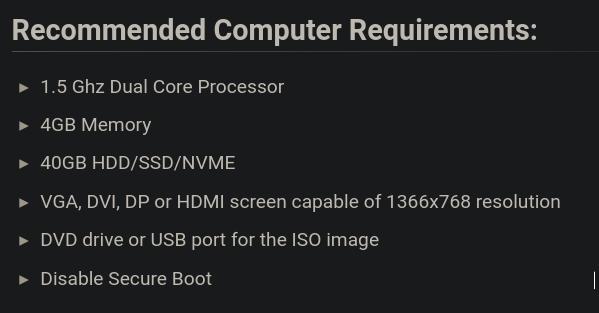
However Linux Lite´s latest version 7.6 now lists 4 GB of RAM as “Recommended Computer Requirements” (see: Start | Linux Lite Wiki). :astonished_face:

Pretty incredible. It used to say:

“Linux Lite requires a minimum of 768 MB of RAM, a 1 GHz dual-core processor, and at least 8 GB of disk space. For optimal performance, 1 GB of RAM is recommended”.

That´s a huge increase in RAM demand, especially for a distro that claims to be lightweight.

My current Linux Lite will receive updates until April 2027. So I won´t need to rush things. But I´d like to prepare myself well in advance. :wink:

So I stumbled across MX Linux, which is very much leaner as far as RAM requirements are concerned:

Minimum: 1 GB RAM
Recommended: 2 GB RAM or more

Compared to Linux Lite 7.6, which recommends 4 GB RAM, MX Linux is far lighter.

Just wanted to ask you:

  • are you satisfied running MX Linux as a daily driver? No problems there?
  • What about this “From RAM” category distrowatch mentions?

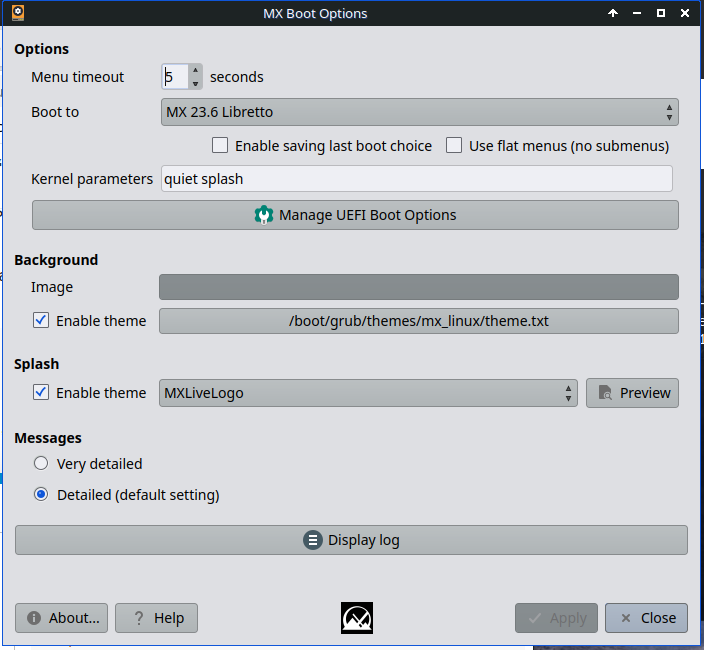
I found out MX Linux (like its sibling antiX) has a special live mode you can select when booting from a USB stick.

In this mode, the entire operating system gets copied into your system’s RAM at boot.
Once it’s fully loaded into memory, the USB stick can actually be removed, and the OS keeps running entirely from RAM.

But this is for live mode only, right :red_question_mark:

When the system is installed on the HDD, there´s no such thing, I hope.
Because I need my RAM (4 GB) for more important things. :wink:

Thanks a lot in advance for your help. :heart:

Many greetings from Rosika :slightly_smiling_face:

2 Likes

Hi Rosika,
Yes I am satisfied with MX. It is my main daily driver.
I will check its ram usage for you.

I am surprised.
Are you sure the Lite figure is not a mistake? You could ask them.

Regards
Neville

3 Likes

Hi Rosika,
I have MX running…Xfce, 10 termiunal windows and a browser open. It is using 2.6GB

nevj@trinity:~
$ free
               total        used        free      shared  buff/cache   available
Mem:        65818564     2600056    62752656       24740     1110748    63218508
Swap:      307199996           0   307199996

It is not swapping.
That is more than their stated minimum.
I think some of these ‘stated’ figures are meaningless.

I cant see any ‘from ram’ option?

Just for fun, while I have all these hard installs

MX               2.6GB    10 terms + browser
Void(glibc)      2.2GB  8 terms + browser
Void(musl)       1.8GB  3 terms + browser
Devuan           1.7GB  10 terms
Artix/dinit      2.1GB  8 terms + browser 
Antix/IceWM      1.2GB  1 term
Alpine           1.8GB  2 terms + browser
NetBSD           0.3GB  1 term.... Note this has been revised to 0.8GB ! ...... see below

They are all Xfce except Antix. All are at idle.
The results are from free, except for NetBSD where there was no free and I had to use vmstat
I checked in MX… vmstat -a gives the same result as free, if you add active and inactive ram usage. free is only a frontend to vmstat.

Why? The linux kernel uses more ram than the BSD kernel.
The BSD kernel can be 200-300Mb at idle. The whole of MacOS ( which is BSD) uses 750Mb. The linux kernel alone in a desktop configurations, uses 1.0 to 1.4 Gb. at idle.
They all use more ram when busy, because they grab memory for caching.

Regards
Neville

On running from ram
“MX Linux can be run from RAM by using the toram boot parameter or selecting a “load to RAM” option from its boot menu, which copies the system to your computer’s memory after booting from a live medium like a USB drive. This allows the entire operating system to run from RAM, making the boot medium removable and greatly improving performance and responsiveness by eliminating disk I/O”
"

Retry in NetBSD:
I compiled free in Netbsd.
free says Used =809Mb
vmstat says avm = 367Mb
I dont understand ?
In Linux free and vmstat give the same result.
NetBSD is still substantially smaller than any Linux

3 Likes

@nevj :

Hi Neville, :waving_hand:

thank you for your very detailed replies. :heart:

Thanks for your evaluation of it.

Good idea, I may ask about it in their forum. Thanks for the suggestion.

But I´m pretty sure about their statement. I was also very surprised to see it:
Here for Linux Lite 7.6 it says the following (screenshot):

Unfortunately they dropped their information about “minimal” requirements. :neutral_face:

I see.
Well, I guess with a browser open (and a bit more) it´s rather the “recommended” category that would be applicable. MX says: 2 GB of RAM or more. Thant makes sense, I guess.

Thank you for sharing the comparative information about your hard installs.
Antix and Devuan seem pretty good. But no browser running at the time.

I thought as much. Thanks for pointing it out, Neville.

That was my understanding as well. "From RAM"´s main purpose is to load the entire OS into RAM when running from a live medium.
It´s not supposed to be an option for an installed system.
I wouldn´t need that feature to be enabled as I have 4 GB of RAM.

I don´t want to waste precious RAM space, not even when running a live system.

According to my research:

  • free:
    Used: Total memory used by processes, including buffers and caches.
    (amount of free and used memory in the system. )

  • vmstat:
    avm: Active virtual memory currently in use by processes.
    (amount of virtual memory that is currently active. This includes memory that is actively being used by processes but does not account for all memory usage, such as cached or buffered memory.)

Thanks again and many greetings from Rosika :slightly_smiling_face:

2 Likes

Hi Rosika,
Thank you for resolving that.
It seems vmstat in BSD leaves cached memory out of the accounting.
BSD vmstat is indeed different from linux vmstat… it has different options… it is like the old vmstat I used in Berkeley Unix.

This business of minimal ram required is a mystery. The kernel does not have the ability to use less ram if you load it into a small computer. The only way to get a small kernel is to compile it leaving things out… eg unused drivers. So you are going to need about 1GB for a linux kernel, then it needs some user space… how much depends on how many jobs you run and what memory each job uses. I think their minimal requirement must assume one user and one modest job.? I think it is guesswork mixed with promotion.

Regards
Neville

3 Likes

Hi Neville, :waving_hand:

Thanks for the explanation. That must be it.

That used to be the case.
But now the Linux Lite people no longer provide minimal values, only the recommended ones (see my screenshot in my previous post).

I just attempted to ask about it in their forum.
But I cannot acces my account any longer. When trying to it says:

I’m sorry, but you are banned. You may not post, read threads, or access the forum. Please contact your forum administrator should you have any questions.

Tried it with 3 different browsers.

Well, I´m slowly getting a bit frustrated.
First they raise their hardware requirements to an unusually high level (for a lightweight distro) - from one major release to another.
Then they ban me from their forum. Why on earth did they do that? I didn´t do anything to them. :angry:

Thanks a lot, Neville.

Cheers from Rosika :slightly_smiling_face:

3 Likes

I would say you would be the last person on internet to get banned😂

3 Likes

I think they must have some automatic procedure that is making stupid decisions.
Contact the administrator.

This is interesting

" . For a full-featured graphical environment on older or low-spec hardware, Puppy Linux and Antix Linux are excellent choices, requiring under 500MB or even less than 200MB at idle, respectively."

They must have cut down kernels.
How much memory does your Lite use?.. measured with free … not what they claim

4 Likes

Hi @all:

thanks for your latest replies.

@ihasama :

Thank youe very much for your kindness. :blush:

@nevj :

Yes, I was meaning to do that. But how to contact the admin if I cannot login :red_question_mark: :thinking:

Thanks for the suggestions, Neville.

As far as Antix is concerned:
Isn´t it involved in MX Linux somehow?

distrowatch defines MX Linux the following way:

MX Linux, a desktop-oriented Linux distribution based on Debian’s “Stable” branch, is a cooperative venture between the antiX and former MEPIS Linux communities.

So what´s the difference in performance / hardware requirements then?

I guess Antix would be even less demanding.
Your remark “requiring under 500MB” would suggest as much.

I´ll have to measure it with free next time I boot my system.
Today I measured it with top -i:

Tasks: 243 total,   1 running, 242 sleeping,   0 stopped,   0 zombie
%Cpu(s):  0,2 us,  0,4 sy,  1,4 ni, 88,8 id,  9,1 wa,  0,0 hi,  0,2 si,  0,0 st
MiB Mem :   3830,3 total,   1805,0 free,    803,3 used,   1222,0 buff/cache
MiB Swap:   1915,2 total,   1915,2 free,      0,0 used.   2718,1 avail Mem
[...]

htop showed 886 MB.

All this right after boot and login with nothing started other than top -i or htop.

Thanks again and many greetings from Rosika :slightly_smiling_face:

2 Likes

Hi Rosika,
Right… Antix is a small distro with WM instead of DE. It is supposed to be really good for old laptops … it supports Wifi thoroughly , like for people wanting to move around and use hotspots.
I have found Antix less stable than MX, especially the runit version (it uses OpenRC or Runit). It is one of the few Debian based distros that are non-systemd..
I do like its simple WM desktop. It offers a choice of about 10 different window managers… I use IceWM.
Yes it is a contributor to MX. , especially to the tools.

Well 800Mb at idle is really good. I doubt you will find much less than that in a usable distro. Lite must compile a cutdown kernel.
I was disappointed with Alpine… I thought it was supposed to be small?

Regards
Neville

3 Likes

Hi Neville, :waving_hand:

Ah, that´s really convenient for concocting a lightweight distro. :wink:

I´d still prefer MX Linux, I think. Seems to be more lightweight than Linux Lite´s latest version. So my PC should be able to cope well.

Thanks for your evaluation, Neville.
But remember that I´m still on Linux Lite 6.2, which is much less demanding than 7.6.

I will also look at free next time I boot and let you know about it.

I understand your frustration.

Unfortunately I cannot help you with alpine as I have no experience with it. Sorry about that.

But I do have alpine installed on my system. :wink:
Yes, it´s the e-mail client for the terminal:
man-pages say:

alpine - an Alternatively Licensed Program for Internet News and Email

It has the same name as the OS. But of course it wouldn´t be of any help to you. :wink:

Many greetings from Rosika :slightly_smiling_face:

3 Likes

Hi Rosika,
How do you know?
I am not sure I believe what they write about Lite. The only way to be sure is to try it.
By all means try MX… maybe you could do a multi-boot
If I was worried about Lite 7.6 I would install it alongside your current one in a multi-boot. Then you dont mess up your system while trying
Regards
Neville

3 Likes

Hi Neville, :waving_hand:

Of course I cannot be 100% sure about it but for a start I tend to believe what the official Linux Lite site tells me (see: screenshot in my post #4)

  • They say: 4 GB Memory (recommended requirements)

  • They used to say (pre-7.6): “Linux Lite requires a minimum of 768 MB of RAM, a 1 GHz dual-core processor, and at least 8 GB of disk space. For optimal performance, 1 GB of RAM is recommended.”

What a huge difference. :neutral_face:

So I´m inclined to believe hardware requirements (especially RAM) have increased to a considerable extent.

Of course trying it out in the first place is the only way to be sure.

That really is a good idea. Thanks, Neville. :heart:

I´m not overly ambitious as to what my system should be able to achieve.
The one criterion it should meet:

At present I can perfectly run my firefox or waterfox browser and at the same time run a virtual machine (Debian) with KVM/qemu/virt-manager.
The virtual machine runs with 1 GB of virtual RAM allocated to it, which leaves my main system with 3 GB of RAM at runtime.
Absolutely no problem at present.
Any new installation of an OS should be able to do the same. :wink:

Cheers from Rosika :slightly_smiling_face:

2 Likes

Hi Rosika,
From a ddg query

" Linux Distributions with Modified Kernels for Reduced Memory Footprint

Some Linux distributions modify their kernels to optimize performance and reduce memory usage. Here are notable examples:

1. Tiny Core Linux

  • Kernel Modifications: Uses a minimal kernel tailored for low resource usage.
  • Memory Footprint: Extremely lightweight, with a base installation under 16 MB.

2. Alpine Linux

  • Kernel Modifications: Utilizes a hardened kernel with optimizations for security and performance.
  • Memory Footprint: Designed for efficiency, often used in container environments.

3. Puppy Linux

  • Kernel Modifications: Custom kernel configurations to run on older hardware.
  • Memory Footprint: Typically requires less than 300 MB of RAM for a full desktop experience.

4. Arch Linux

  • Kernel Modifications: Users can customize the kernel during installation for specific needs.
  • Memory Footprint: Minimal base system allows for a lightweight setup.

5. Linux From Scratch (LFS)

  • Kernel Modifications: Users build their own kernel, allowing for maximum customization.
  • Memory Footprint: Can be optimized for minimal resource usage based on user preferences.

6. antiX

  • Kernel Modifications: Uses a lightweight kernel designed for older hardware.
  • Memory Footprint: Aims to run efficiently on systems with limited resources.

7. Bodhi Linux

  • Kernel Modifications: Custom kernel settings to enhance performance on low-end devices.
  • Memory Footprint: Lightweight, typically requiring around 512 MB of RAM.

These distributions focus on reducing memory usage through kernel modifications and optimizations, making them suitable for older or resource-constrained hardware"

Regards
Neville

I do not understand why my Alpine is 1.8GB?
Note you can customize a kernel in Arch… never tried that.
They dont mention Gentoo

3 Likes

Hi Neville, :waving_hand:

thank you so much for performing a dedicated ddg search. :heart:

Apart from Arch I actually have some experience with Bodhi Linux running in a virtual machine.
I used to experiment with it in ancient times (a few years back :wink:).
As usual I allocated 1 GB of virtual RAM to it and it ran like greased lightning.
Thanks for mentioning it.

I´ll have a closer look at all of the OS´s in your list.

But wouldn´t I miss out on something if using a modified kernel?
Could I still be sure it supports all of my hardware components out-of-the-box, like my current system (with no modified kernel) does?

Beats me.

Factors affecting RAM Usage would normally be:

  • Installed Packages
  • Running Services
  • Configuration Settings
  • […]

But 1.8 GB when idle, straight after boot, seems pretty high indeed.

Cheers from Rosika :slightly_smiling_face:

2 Likes

Void Linux can be stripped down to occupy 96MB on a bare minimum system. Lets just say you get a really minimalist system in that case, but getting wifi will involve some work in that case.

4 Likes

Hi Rosika.
What they delete is mostly driver modules supporting unusual hardware that you are unlikely to have, and support for exotic filesystems like zfs and btrfs.

The ultimate is to use Gentoo and build your own kernel. I will have a look and see how much ram my Gentoo uses. @Daniel_Phillips can probably give us some more info on Gentoo memory footprint… I know he has installed it in old laptops with either 2 or 4 GB of ram… cant remember which.

You can compile and customize a kernel in any distro, even Debian. For example, here are the kernel buikd instructions for Arch

AI Overview
+9
To customize a kernel in Arch Linux, download and unpack the kernel source, then configure it using make olddefconfig or make menuconfig to select your desired options, compile it with make -j$(nproc) and sudo make modules_install install, and finally update your bootloader with sudo grub-mkconfig -o /boot/grub/grub.cfg to make the new kernel bootable. 
1. Prepare Your System

    Install prerequisites:
    Install necessary packages for building the kernel using pacman: sudo pacman -S bc. 

Create a work directory:
Create a new directory to hold the kernel source: mkdir ~/newkernel && cd ~/newkernel. 

2. Download the Kernel Source 

    Download the source: Obtain the kernel source from the official Linux kernel website (kernel.org) or clone the latest version from the Linux kernel GitHub repository using wget or git clone.
    Unpack the source: Extract the downloaded source tarball into your working directory. 

Code

# Example using wget for a specific version
wget https://cdn.kernel.org/pub/linux/kernel/v6.x/linux-6.x.x.tar.xz # Replace with desired version
tar -xf linux-6.x.x.tar.xz
cd linux-6.x.x

3. Configure the Kernel

    Create an initial configuration:
    Use your current kernel's configuration as a base: cp /boot/config-$(uname -r) .config or make olddefconfig to get a configuration from the kernel's Makefile with default values for new options. 

Customize the configuration:
Run make menuconfig to open an interactive menu to select or deselect features, modules (m), built-in options (y), or disabled options (n) for your kernel. 

4. Compile the Kernel 

    Compile the kernel and modules: Use the make command to compile the kernel and its modules. The -j option with the number of your CPU cores speeds up compilation. 

Code

    make -j$(nproc)

    Install the modules: Install the compiled kernel modules: sudo make modules_install. 

Install the kernel: Install the compiled kernel image to /boot/: 

Code

    sudo make install

5. Update the Bootloader 

    Generate GRUB configuration: Update your GRUB configuration file so it recognizes the new kernel: 

Code

    sudo grub-mkconfig -o /boot/grub/grub.cfg

6. Reboot and Verify

    Reboot your system: Reboot your computer. 

Select the new kernel: During boot, you may need to enter the GRUB menu (by quickly pressing an arrow key) to select your newly compiled kernel from the boot options. 

Not all that difficult . Anyone with CLI skills could do that.

The issue with custom kernels is, they are not part of the package system, so they do not get updates. Void linux has an approach which allows compiling a kernel within the package system, so it can get updates. That seems a good idea to me.

Regards
Neville

4 Likes

Hi Rosika,
From my small computer (8GB ram)

Debian 11   0.9GB  7 terminals + browser
Gentoo        1.3GB  6 terminals + browser

I started Gentoo compiling an update, and it rose to 1.9GB
So , obviously, the way I compiled my Gentoo kernel did not optimise it for memory footprint

I might have a try at building a new kernel by a different method.

In Gentoo top and free agree, but vmstat -a is different. I guess they are sampling a dynamic situation by different methods.

Regards
Neville

3 Likes

I know it’s not your aim, but have you tried installing either puppy or small core linux on a hard disk to run instead of a full blown version of linux. It’s not an easy path to follow. I did try on a 1 gb memory machine and 100 GB disk just to see if it was worth doing but failed. While back so don’t remember the details but could not boot afterwards so changed to a very slow debian xfce instead.

1 Like

A CLI only install would be fine for that machine. Maybe IceWM.

Have not tried. Some variety of Puppy or EasyOS may provide a workable desktop.