I wanted to do a hard disk install of Alpine.
I first tried pre-making a partition on one of my internal disks, and telling Alpine to install to that using the procedure given here
It threatened to overwrite other things on my disk, so I decided to install Alpine to a 1TB plugable SATA disk which was empty. I followed to simple procedure for a ‘whole disk’ install which is documented here
That ‘whole disk’ install is simple . It made partitions as follows
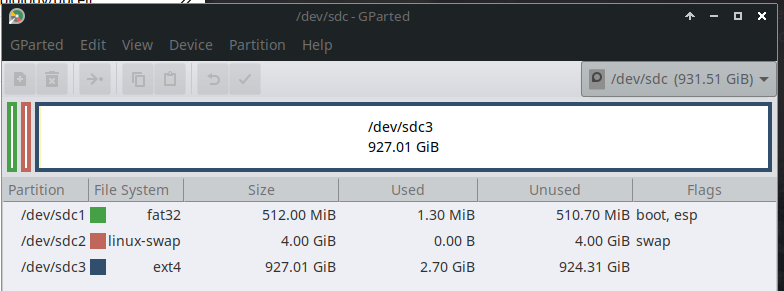
It used GPT partitioning.
The install was easy, but it would not boot….. I started MX, which controls grub, did `update-grub` and os-prober found Alpine on the hotplug disk, made a grub menu entry, but the menu entry would not boot Alpine.
To check, I copied the Alpine root filesystem to an internal disk partiton, fixed the UUID’s in its `/etc/fstab` and grub.cfg, did another update-grub in MX, and this time it made a grub menu entry that would boot. So, no problem with the Alpine install…. the problem is the hotplug disk.
BIOS sees the hotplug disk
Grub sees the hotplug disk
Grub does not see the partitions on the hotplug disk? ie it sees (hd3) but not (hd3,gpt1) etc
I have done insmod part_gpt
What else can I try?
Here is what grub sees
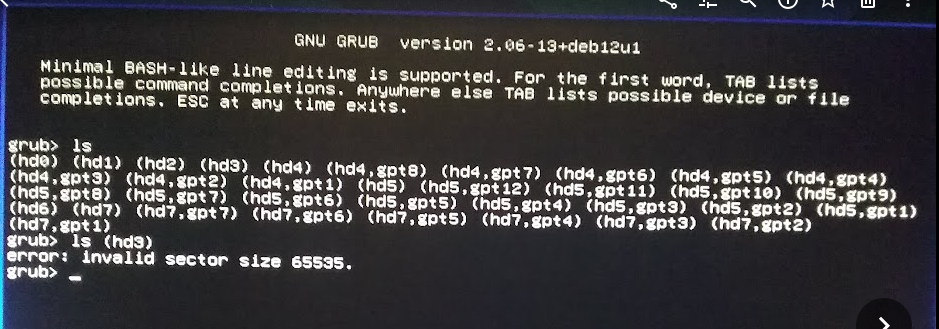
The disks (hd0) to (hd3) are hotplugable… grub can not see the partitions
The disks (hd4), (hd5), (hd7) are internal disks… grub can see partitons on those
I dont know what (hd6) is , but grub cant see its partitons.
I know one can boot from an external USB drive. Why cant I boot from an external SATA drive?.. maybe the BIOS or grub cant handle the ASM1061 controller?
Solved:
There is a BIOS setting which enables or disables scanning of the hotplug disks on the ASM1061 controller. I had it disabled, because that speeds up the boot. If I enable it, the BIOS detects my 2 hotplug disks, and I can boot Alpine from the hotplug HDD containig Alpine.
Strangely, grub can still not see the partitons on the hotplug disks… doesnt matter, it boots the contents OK.
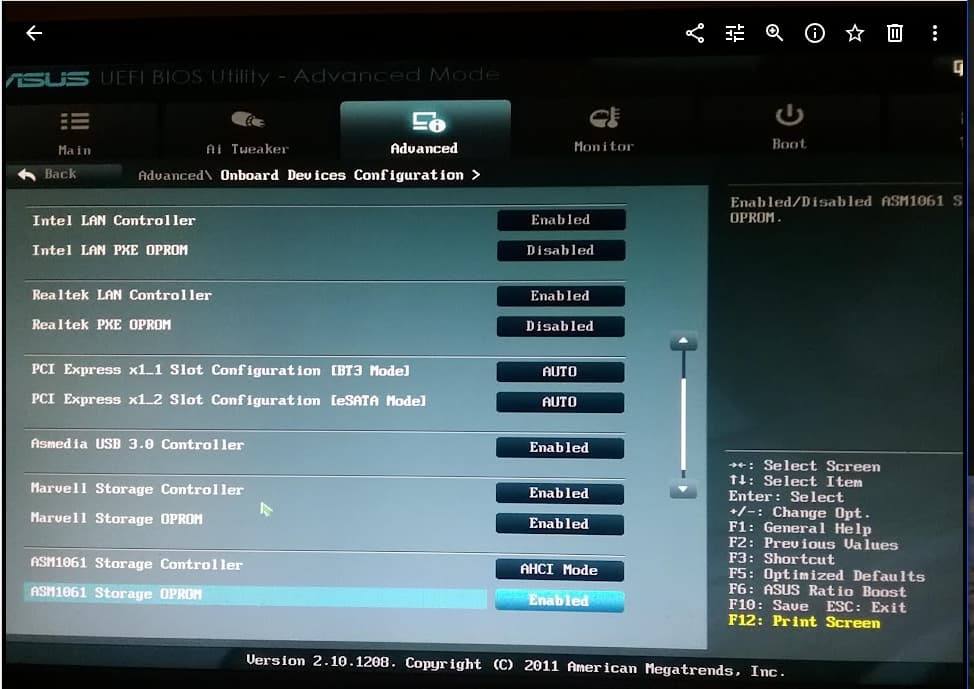
That highlighted setting at the bottom.
I think some BIOS’s call it ‘Fast Boot’
There is also an OPROM for the Marvell interface. I would not want to disable that as it runs one of my internal disks.
So what is an OpROM, and why do I need to enable it in order to boot?
I found this
" An OPROM, or Option ROM, is a piece of firmware on a plug-in expansion card that provides drivers and functionality to the system’s BIOS or UEFI during the boot process. OPROMs enable the system to recognize and boot from devices like RAID controllers, network cards (for network booting), and video cards. They essentially extend the base system’s capabilities, adding support for specific hardware that the main firmware wouldn’t otherwise know how to handle."
So it is some sort of firmware that extends the BIOS so it can see RAID disks or other things and allow booting from them
It all makes sense now.
except
Why couldnt grub see the partitions on those hotplug disks with the OpROM enabled, and how come it could boot from the Alpine partition without seeing it?
Does anyone understand OpROMs for storage devices and how they interact with grub?
I know those storage devices ( Marvell and ASM1060) are raid capable, but I am not using them that way… they are just normal SATA disks, except the ones on the ASM1060 are external and hotplugable. External USB disks do not seem to have this problem, only SATA disks?