You have no devices in Thunar. ?
Can it not see your disk partitions? … You have the same problem
I guess you are in Gentoo.
Will try it. I rarely do it , so no problem.
Again simple question from me
I thought these were the same?
So sudo is super user do x command
Where su just puts you in super user mode
Is this suggesting that you go into su mode then you do sudo for one command like a even higher level
Occasions I use sudo are limited. Like installation of something.
Do one thing then drop out of command line box to continue
But if you do su how do you end su for future command line entries
Bet it’s an easy answer
Yes, it’s Gentoo and I haven’t installed the package you mentioned for Alpine. It’s just for browsing the web. I usually mount USB sticks with cli mount command on my laptops.
About the sudo/su and GUI / Xorg / Wayland check this Arch wiki page: Running GUI applications as root - ArchWiki
Su = switch user (=need root password)
Sudo = super user do (=user password is needed and user needs to be in sudoers file or wheel or sudo group)
Sudo su = switch user (=user password and sudoers/wheel/sudo group needed as per sudo)
When you enter su or sudo su you can go back to normal user by typing ‘exit’.
To become root in Alpine you type su - !!! Alpine has no sudo by default!!! Have to pay attention to your prompt!!! If you are running xfce, then gvfs should install with xfce!!!
You exit the shell.
No. su gives full privileges.
but
sudo may be configured on a per user basis to have limited privileges.
These fine distinctions only matter in a multi-user public computer… you might want some users to have limited privileges, like mount a DVD, but nothing else.
I never noticed, because I only use su. That ‘watch the prompt’ thing is just like old Unix.
It didnt. I had to install it after I installed xfce. Gvfs did not solve the problem.
gvfs might be there in Gentoo.
What I learnt from the Gentoo wiki is that Thunar can be compiled with or without udisk2 support. … ie udisk2 USE flag in Gentoo.
That may be the explanation… the base-Alpine .iso may have Thunar compiled without udisk2 support. In that case it would never see disk partitions even with gvfs.
So maybe one should use the desktop-alpine .iso if one wants to make a desktop Alpine.
I have no idea how to find out what options Thunar was compiled with in Alpine. In Gentoo it would be a simple question of what flags for portage.
I found this much
" Alpine Linux uses APKBUILD files to define how packages are built. You can find the APKBUILD for Thunar in the Alpine Linux aports tree (the repository for Alpine packages). This file will contain the build dependencies, source URLs, and most importantly, the build() function which specifies the commands used to compile the software, including any configure options and make arguments that might pass compiler flags.
- You can typically find the aports tree online or, if you have a local copy, navigate to the relevant directory (e.g.,
aports/main/xfce4-thunar)."
Looks like I have some searching to do.
Global Use Flags
exif
gtk-doc
introspection
libnotify
pcre
policykit
udisks
X
Gentoo use flags for xfce-thunar!!!
Required Packages for Alpine Disk Recognition
Make sure these are installed:
• thunar – the file manager itself
• thunar-volman – enables volume management (this is key!)
• gvfs – provides mounting support for removable media
• polkit – handles permissions for mounting/unmounting
• udisks2 – backend for disk management
• xfce-panel (optional but useful for integration)
You can install them with:
apk add thunar thunar-volman gvfs polkit udisks2
OK. I think udisks2 is installed. I am wondering whether thunar in Alpine was compiled with udisks2 support? Cant tell from the binary. I need to find what the build parameters were.
Do a apk info -v for packages that have been installed!! You are going to need thunar-volman!!!
That is only for demountable disks (ie volumes).
I will try it, see what happens.
No-one has explained to me yet how I can have only the ‘main’ repo, but can install things from the ‘community’ repo.
You have them linked, some how!!!
Possible Explanations
- Package Migration Between Repositories
• Alpine promotes packages from community to main once they’re deemed stable and widely used.
• If a package was previously in community but has matured, it may now reside in main—and apk will pull it from there. - Mirror or Repository Misconfiguration
• Your /etc/apk/repositories file might be pointing only to main, but the package index could still include community packages if you previously enabled it and ran apk update.
• Double-check that the community line isn’t commented out:
cat /etc/apk/repositories
Look for something like:
/etc/apk $ cat repositories
#/media/sdf/apks
http://mirrors.dotsrc.org/alpine/v3.22/main
#http://mirrors.dotsrc.org/alpine/v3.22/community
http://mirrors.dotsrc.org/alpine/v3.22/main
#http://mirrors.dotsrc.org/alpine/v3.22/community
http://mirrors.dotsrc.org/alpine/v3.22/community
Oh sorry, I do have community…I was looking at the comment line
All OK.
I added thunar-volman. Rebooted. Thunar is the same…only cdrom and usb.
apk info -v
polkit-126-r0
polkit-common-126-r0
polkit-noelogind-libs-126-r0
polkit-openrc-126-r0

thunar-4.20.3-r0
thunar-volman-4.20.0-r0

xfce4-4.20-r0
xfce4-appfinder-4.20.0-r0
xfce4-panel-4.20.4-r0
xfce4-power-manager-4.20.0-r1
xfce4-screensaver-4.18.4-r0
xfce4-screenshooter-1.11.1-r0
xfce4-session-4.20.2-r0
xfce4-settings-4.20.1-r0
xfce4-terminal-1.1.3-r0
xfconf-4.20.0-r1
xfdesktop-4.20.1-r0
xfwm4-4.20.0-r1
What is missing?
@Daniel_Phillips @ihasama @pdecker @Rosika @callpaul.eu @xahodo
~ $ apk search udisk
udiskie-2.5.7-r0
udiskie-bash-completion-2.5.7-r0
udiskie-doc-2.5.7-r0
udiskie-lang-2.5.7-r0
udiskie-pyc-2.5.7-r0
udiskie-zsh-completion-2.5.7-r0
udisks2-2.10.1-r3
udisks2-bash-completion-2.10.1-r3
udisks2-dev-2.10.1-r3
udisks2-doc-2.10.1-r3
udisks2-gtk-doc-2.10.1-r3
udisks2-lang-2.10.1-r3
udisks2-libs-2.10.1-r3
udisks2-openrc-2.10.1-r3
udisks2-zsh-completion-2.10.1-r3
/home/nevj # apk add udisks2
(1/26) Installing libatasmart (0.19-r4)
(2/26) Installing mpfr4 (4.2.1_p1-r0)
(3/26) Installing libbytesize (2.11-r0)
(4/26) Installing libfdisk (2.41-r9)
(5/26) Installing ndctl-libs (80-r1)
(6/26) Installing libnvme (1.14-r0)
(7/26) Installing readline (8.2.13-r1)
(8/26) Installing parted (3.6-r2)
(9/26) Installing libassuan (2.5.7-r0)
(10/26) Installing pinentry (1.3.1-r0)
Executing pinentry-1.3.1-r0.post-install
(11/26) Installing gnupg-gpgconf (2.4.7-r0)
(12/26) Installing libksba (1.6.7-r0)
(13/26) Installing gdbm (1.24-r0)
(14/26) Installing libsasl (2.1.28-r8)
(15/26) Installing libldap (2.6.8-r0)
(16/26) Installing npth (1.8-r0)
(17/26) Installing gnupg-dirmngr (2.4.7-r0)
(18/26) Installing gnupg-keyboxd (2.4.7-r0)
(19/26) Installing gpg (2.4.7-r0)
(20/26) Installing gpg-agent (2.4.7-r0)
(21/26) Installing gpgsm (2.4.7-r0)
(22/26) Installing gpgme (1.24.2-r1)
(23/26) Installing volume_key (0.3.12-r7)
(24/26) Installing libblockdev (3.1.1-r2)
(25/26) Installing udisks2 (2.10.1-r3)
(26/26) Installing udisks2-openrc (2.10.1-r3)
Executing busybox-1.37.0-r19.trigger
Executing eudev-3.2.14-r5.trigger
Executing dbus-1.16.2-r1.trigger
OK: 1317 MiB in 449 packages
That fixed it. Now I can see my partitions
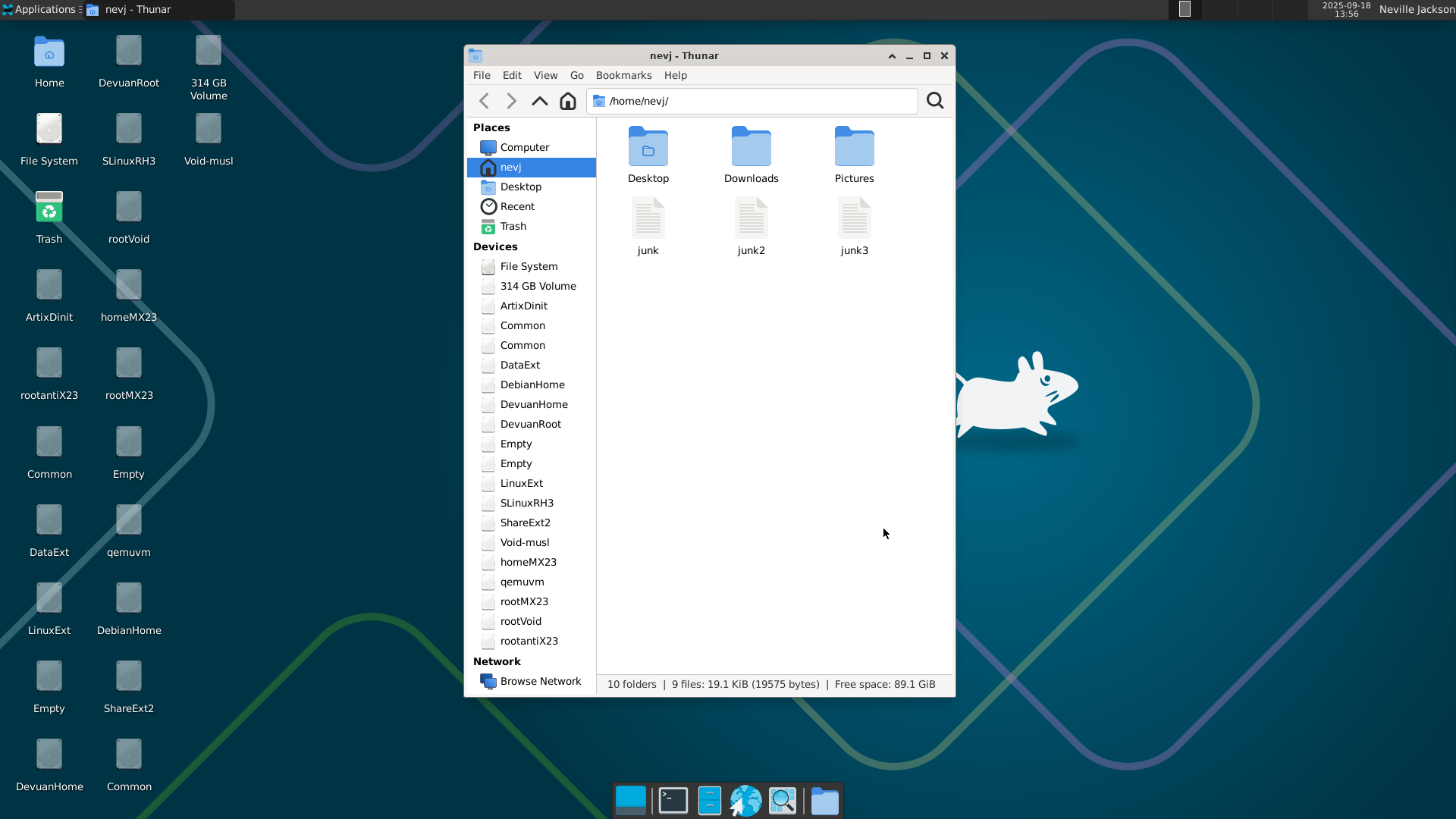
And there is a moral to this story… I found out about udisks2 reading the Gentoo Wiki.
Every Linux user should have at least one go at Gentoo.
Thanks to everyone
PS It looks like those partition icons come from udiskd2 as well. Void linux has those, but other distros do not. I find them useful because I have a lot of partitions and cant remember details. The icons refer to all partitions as ‘Removable Volume’ ??? they are not removable??
Thunar refers to each as eg /dev/sdb10
It is not a complete solution. Thunar ( or the icons) say I do not have permission to mount them
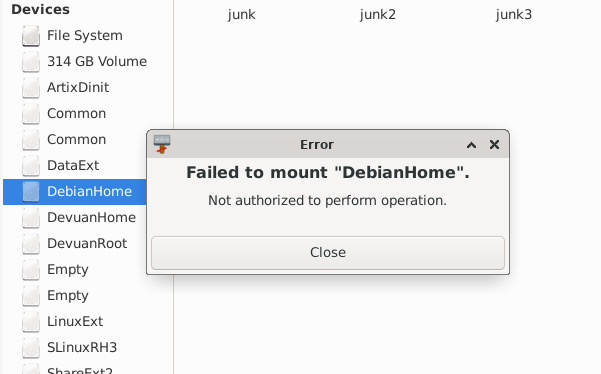
I may need to belong to some group?
It’s the best. Nice that you found solution!
Already noted!
Does anyone know what this means?
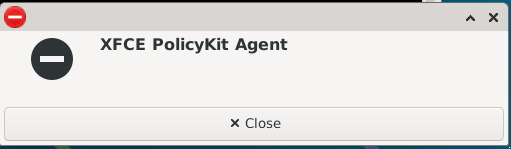
It appears when the Xfce DE first starts up.
Does the ‘-’ sign mean missing?
I dont think so, it is running
~ $ ps ax | grep polkit
 4453 ?        Sl     0:00 /usr/lib/polkit-1/polkitd --no-debug
 4715 ?        Sl     0:00 /usr/lib/xfce4/xfce-polkit
Maybe it means an error in its config files?