I believe in redundancy. I dual boot because if one distro has trouble, I have another to rely on for normal daily work. I dont have the luxury or space to have one machine for each distro.
What you are really suggesting is that I use Gentoo more for daily work. That is possible … I have been intending to installl it in my main machine for some time.
I dont really stress any distro. I use very few packages and by spreading work over multiple distros I keep each of them simple.
I dont see much difference between distros when working. It is setting them up and maintenance that differs.
Same here. Just think when I went to my mom’s and my trusty laptop would not get to the login screen and I did not know how to resolve it until I got back home and you helped me figure it out.
Thankfully, I always have dual boot systems so that I can boot into the other(s) and access my flies and things needed for work.
You mean I have to dual-boot, triple-boot or whatever, just to have a safety net!!! I can run my PC, for years, with just only Windows, and a few backups!!! That is not speaking highly of Linux!!!
If a machine is important for business or critical personal jobs, it is always better to have redundancy in the software. Some do it with backups, like you would do with windows, but it is more convenient to to have either raid or dual boot, in addition to backups.
Nasty hangups only happen infrequently ( in Linux or Win) , but when they do it is usually at an inconvenient time and you want a quick workaround. … followed by a proper fix when time permits.
Backups take much longer to get up and running than just rebooting into a different distro. I had updated and unplugged my HDMI when packing my laptop and for some reason, it would not “display” to the login screen. Fixed it in a few minutes once I returned home and had time after taking care of my mom.
Easy to workaround while I was too busy to troubleshoot. Took 1 min to reboot into Garuda and all my backed up stuff was already there. No need to restore anything.
I really can’t be arsed with the hassle of dual booting…
Before the advent of Steam on Linux (circa 2012) I used to dual boot some Ubuntu version with Windows 7…
Soon as Steam had a native Linux client and some top shelf titles native on Linux (Left 4 Dead and Serious Sam 3) - I wiped my HDD - installed Ubuntu and never dual booted again…
If things go catastrophically bad - I’ll have to re-install - but I don’t lose any data - all my important stuff is in my self-hosted cloud and all my games are available from Steam, and my main music collection and movies is on my NAS on RAIDZ1 (RAID is not backup - I know ).
You may lose some time if there is a lot of reconfiguring to be done. If you dont like dual boot, why not keep an rsync copy of the whole OS… a bit like a hand driven raid. The you can recover rapidly.
Anyone trying to compile LLVM on LFS 12.4? Will I have been trying, the past few days, and while it will compile, using the BLFS commands, it is useless, because it is incompatible, with clang and lld and lld is needed for rustc, and rustc is needed for Mesa!!!
I know! Tried using LFS-12.4-sysv-r53 on a Surface and disabled secure boot and everything, and GRUB says installed, and it just won’t budge! Trying to use os-prober on the host, hope it works. They really need to rethink the gcc. Why not use clang? Yeah, there is CMLFS, but that’s pretty much dead.
I’m trying to get my network card to work - even worse. wpa_supplicant has these deps and it’s even worse than compiling gcc with make -j1. And about
try using the development release, it’s way more current.
Hope this helps.
Yea, well I screwed up big time last night doing a kernel config!!! What happened was I somehow did a mount /dev/sdb /boot rather than a mount /dev/sdb1 /boot, do not know where everything went but LFS was made useless!! Still have Gentoo and W11, will maybe start LFS later on!!!
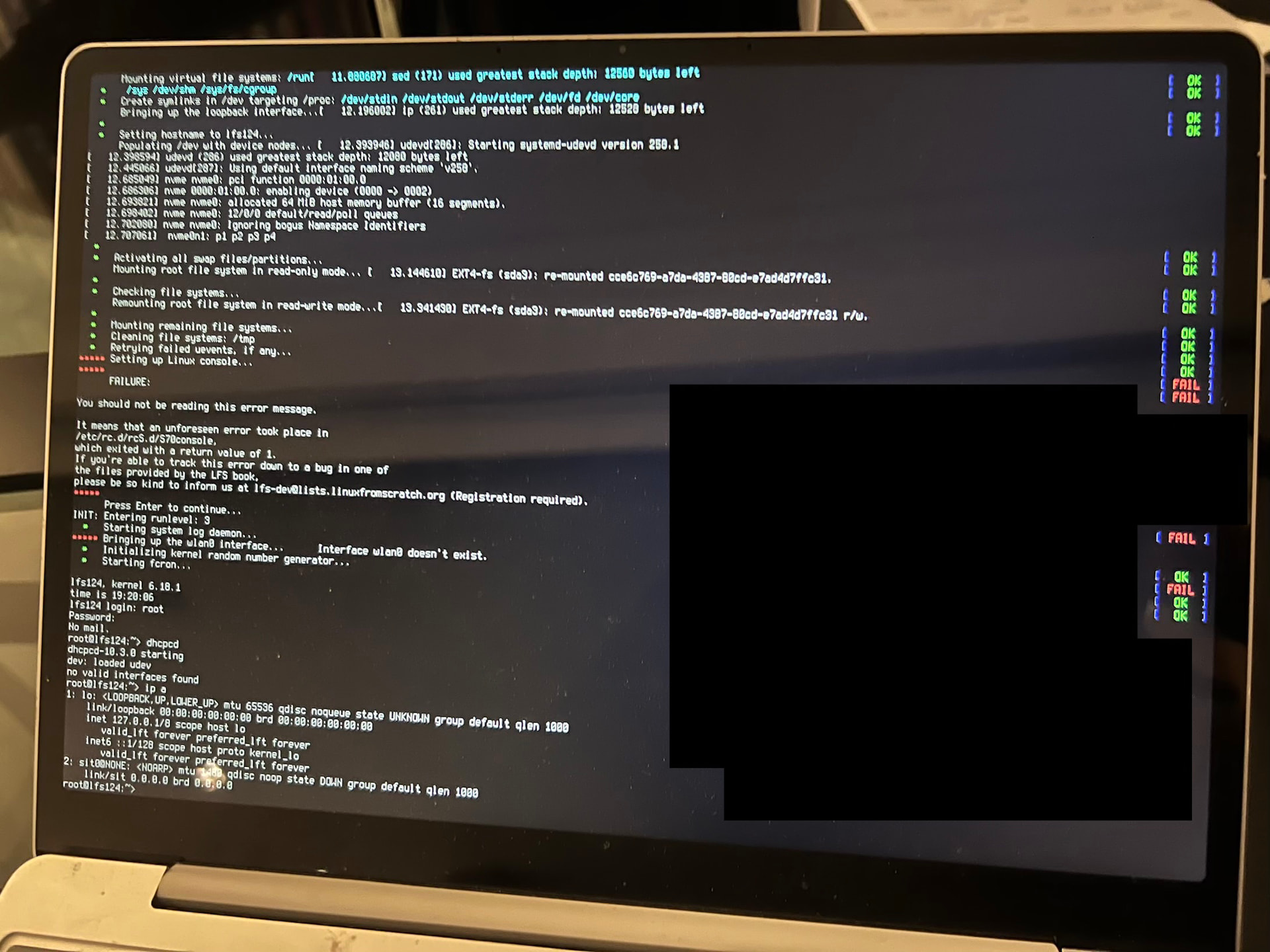
Oh well, just finished 12.4-r53. After loads of grub.cfg and UEFI boot. I managed to finish it. Snd it doesn‘t detect my net card, even though all drivers are loaded, and LFS Bootscripts console just shows an error on boot.
Oh well. We share the same thing. I never knew cmake and it keeps thinking I’m building for i386 or ARM64. How useless. Well I tried passing march and it worked.
We share the same fate. ninja’s just hating me today and making my output useless by adding millions of warnings so I can’t see what’s going on.
I think bmake should become standard. How nice with auto deps handling. I found myself installing tons of packages in LFS that weren’t specified by them for what? A simple python module that just does something I didn’t understand.
I agree! If Linux just fixed its problems, I would have deleted my Win install a long time ago! Why force rust on us people if its code is, let’s say, rusty, and rustc needs the LLVM and clang compilers, and they all take way longer to compile (but on me less than GCC)… only to install a simple DRM kernel module? Why? I would prefer to build clang LFS from start! And CMLFS has not even been updated since a year!
I will try and keep this post updated, have no idea on how to do a blog!!!
Important to learn first the asciidoc/asciidoctor syntax (the .adoc file) and later find a good platform to let render that content. For example in any GitHub project supports markdown and asciidoc syntax it about the readme.md file for example. GitHub Pages I think is other option
 ).
).