Hey Guys,
I’m seeing an odd issue with my generic wireless mouse from Amazon. On other mice (primarily Logitech devices), I’m able to remap the back and forward buttons to the home and end keys with KDE’s built in remapping utility (Mouse options > Add binding). In Firefox, Right Click > Back Arrow is sufficient for me. Generally, I find wanting to get to the top (navigation) of a website more often then needing the dedicated back button.
The problem with this specific mouse is when go to Mouse > Configure extra buttons > Add Binding > Click back button. It brings me to the previous screen. That’s the intended function of the button but for remapping it’s useless.
So my question is two part: Is the back button hard coded on this specific mouse and thus unable to be remapped? Depending on the answer to the first question, is there a way to temporarily disable the back button so it’s remappable?
Output of lsusb:
drh@ideapad:~$ lsusb
Bus 001 Device 001: ID 1d6b:0002 Linux Foundation 2.0 root hub
Bus 001 Device 002: ID 04f2:b798 Chicony Electronics Co., Ltd Integrated RGB Camera
Bus 002 Device 001: ID 1d6b:0003 Linux Foundation 3.0 root hub
Bus 003 Device 001: ID 1d6b:0002 Linux Foundation 2.0 root hub
Bus 003 Device 002: ID 1a86:8095 QinHeng Electronics USB Hub
Bus 003 Device 003: ID 0489:e0cd Foxconn / Hon Hai MediaTek Bluetooth Adapter
Bus 003 Device 004: ID 062a:4101 MosArt Semiconductor Corp. Wireless Keyboard/Mouse
Bus 003 Device 005: ID 27c6:55a2 Shenzhen Goodix Technology Co.,Ltd. Goodix FingerPrint Device
Bus 003 Device 006: ID 0bda:8152 Realtek Semiconductor Corp. RTL8152 Fast Ethernet Adapter
Bus 003 Device 007: ID 067b:2586 Prolific Technology, Inc. USB 2.0 Hub
Bus 003 Device 008: ID 062a:4106 MosArt Semiconductor Corp. Wireless Mouse 2.4G
Bus 004 Device 001: ID 1d6b:0003 Linux Foundation 3.0 root hub
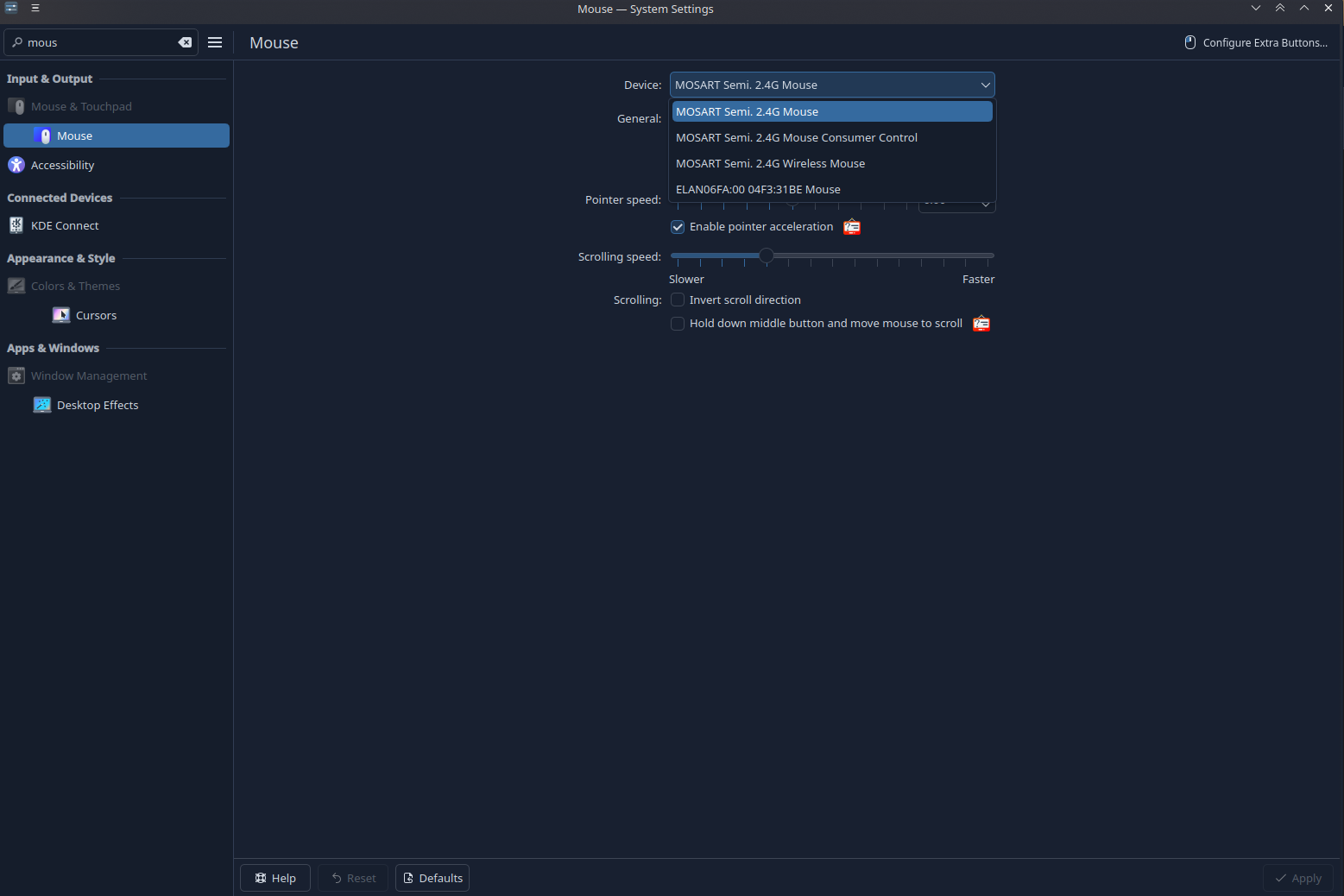
Screenshot of the mouse config screen. This is pertinent because it shows three different entries for the same mouse.  Before you ask..Yes, I did try each one and none worked as expected.
Any ideas? Thanks in advance!
Cheers,
Dan