I recently installed Remmina in Ubuntu 24.04.3. I use it connect to my server with public key authentication. I’ve enabled X11 forwarding and X11 compression. It runs fine as a terminal session and I’m able to launch Moneydance on the server and operate it from my laptop. However, when I try to run Brave I get an icon in the dock of the client machine but no display of the browser session and, unless I quit the session on the dock the entire laptop remains locked up.
I should add that Brave runs remotely if I SSH into the server. Remmina is said to have faster throughput than SSH which is why I’m interested in getting it working. (The latency of Moneydance running remotely in an SSH connection far from home—the other side of the country or from Europe—is so long that it’s unusable.)
Has anyone run into this problem? I’m doing something wrong. Are there settings that will permit Brave to run?
A clarification: getting Moneydance to run in Remmina was my original reason for installing Remmina, and that works well. Moneydance is slow to open but runs smoothly once it starts.
Getting Brave to run in Remmina is a minor desire. Also, Firefox won’t run for me in Remmina. I’ve tried exporting different DISPLAY settings but, so far, no success. That the browsers won’t run is puzzling but not a show-stopper.
Yes, that’s what I’m trying to do. I’m guessing it’s a display setting problem since, AFAIK, authentication only happens once when the connection is established.
Is the remote host you’re connecting to also Linux? It’s not clear…
Typically - I’d only use Remmina to RDP to a Windows machine… But I haven’t used it for years now - since my work killed their VPN and I have to use Microsoft AVD - and that doesn’t work [or play well] on Linux - so I use MacOS (don’t have any Windows systems on my home network - except for a few VMs I use to test stuff (e.g. a Windows 2025 server for testing AD).
What remote desktop “server” is the remote server machine running?
i.e. so you’re tunneling stuff over SSH? But using Remmina’s SSH client or something?
I’ve nearly always - the few times I’ve tried it - running a web browser from another host where $DISPLAY is my local machine - whether tunnelled over SSH, or direct - not very “responsive”…
I just tried to run firefox, and brave, tunnelled over SSH (Ubuntu 24.04 desktop “titanii” and “ssh -X” to Ubuntu 24.04 Thinkpad “fenrixii”) didn’t work for me (note : I’m getting a “proper” $DISPLAY) :
╭─x@titanii ~/MPZ/DeadMeadow/2025-VoyagerToVoyager-BCRIP
╰─➤  ssh -X fenriz
Welcome to Ubuntu 24.04.3 LTS (GNU/Linux 6.14.0-33-generic x86_64)

 * Documentation:  https://help.ubuntu.com
 * Management:     https://landscape.canonical.com
 * Support:        https://ubuntu.com/pro

Expanded Security Maintenance for Applications is not enabled.

96 updates can be applied immediately.
To see these additional updates run: apt list --upgradable

24 additional security updates can be applied with ESM Apps.
Learn more about enabling ESM Apps service at https://ubuntu.com/esm

*** System restart required ***
Last login: Fri Jan  2 11:21:22 2026 from 10.1.1.162
╭─x@fenrixii ~
╰─➤  firefox &
[1] 1796785
╭─x@fenrixii ~
╰─➤  Error: cannot open display: localhost:10.0

[1]  + 1796785 exit 1     firefox
╭─x@fenrixii ~
╰─➤  echo $DISPLAY
localhost:10.0
╭─x@fenrixii ~
╰─➤  brave &
[1] 1796941
╭─x@fenrixii ~
╰─➤  X11 connection rejected because of wrong authentication.
[1797033:1797033:0102/112631.780845:ERROR:ui/ozone/platform/x11/ozone_platform_x11.cc:259] Missing X server or $DISPLAY
[1797033:1797033:0102/112631.780884:ERROR:ui/aura/env.cc:257] The platform failed to initialize.  Exiting.

[1]  + 1796941 done       brave
But it’s not something I need - so I probably won’t investigate further…
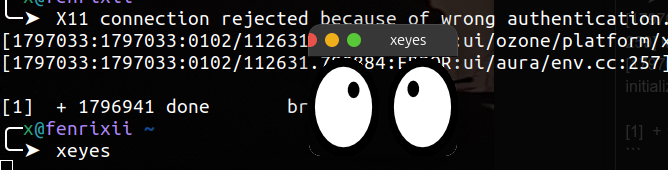
Note : “xeyes” does work just fine tunnelled over SSH :
Have you tried running something small and simple like “xeyes” or “xclock”? Heck even “xterm” (just noticed - “xterm” binary app isn’t installed by default on Ubuntu 24.04 - so I had to install it - and it works)…
In the “olden days” of UNIX I remember I’d have to enable remote X with “xhost +” (if there wasn’t an .xhost file)… I don’t know if that’s necessary these days… But I usually do it anyway - to be sure, to be sure…
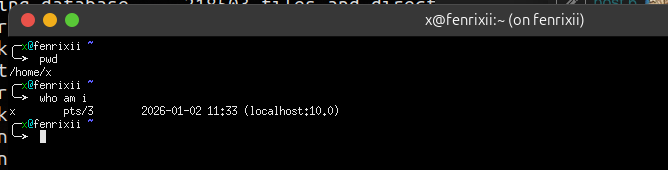
And “xterm” after installing it on the remote host (“ssh -X fenrizii” then “xterm &”):
Tthanks for the info Dan. To answer some of your questions:
Both server and client are running Ubuntu 24.04.3
I’'ve not installed any remote desktop server, just Remmina.
I can connect to the server using SSH originating from within Remmina. xeyes runs and displays as expected on the client machine. Some other graphical apps run and display normally on the client but neither Firefox nor Brave run. Both browsers appear to start but freeze without displaying a window.
That the browsers won’t run in a Remmina connection is not an issue for me; it’s more along the lines of a puzzle.
I have no experience in what you are trying to do but wanted to see if I could be of some help so I asked AI about your question. I submitted the question about Firefox and Brave and there were a few suggestions about what may be the problem.
" Firefox and Brave are far heavier X11 clients than xeyes or most small GUI apps, and they rely on GPU acceleration, shared memory, and sandboxing features that don’t always play nicely with X11 forwarding—especially when launched inside Remmina’s SSH‑X11 environment."
One of the suggestions for Firefox was lunching as;
“firefox --no-remote --safe-mode”
I do not see how gpu acceleration would work with either x11 forwarding or remmina?
It seems to me a browser would accelerate for the machine in which it is running and that may be inappropriate for the machine receiving the forwarding.
There is a setting in firefox to turn off acceleration. That may be worth a try.
and @easyt50 ,
That is a good example of how to use AI on the forum. Keep it short, quote it, acknowledge it, and say something yourself as well.