Setting up antiX26 as a daily workplace
I have done some testing with antiX26-beta and antix26-rc1, and I feel I am now equipped to look into seriously using antiX26 as a daily work distro.
Note that antiX is intended as a moderately configured distro for older hardware. It is neither minimalist nor a full dropin solution. Some work is involved in making it my workplace.
The steps I took to setup antiX26 are as follows:
-
Install antix-26_x64-full.iso.
I chose not to write grub … that led to multiboot difficulties because my installed antiX26 had no grub.cfg file, and would not boot. I had to edit the grub boot menu and change root=/dev/sdd5 to root=UUID=… -
my antiX boots very slowly because it cannot handle hotplug disks. I have to edit
/etc/default/gruband make the lineGRUB_CMDLINE_LINUX="intel_iommu=off", then doupdate-grubin antiX, then doupdate-grubin the distro which controls grub. -
The first thing I notice is that my antiX26 is using the
runitinit system … that must be what it defaults to … there was no choice offered to me at install time ( unlike antiX26-rc1).
I need to switch it to dinit
root@trinity:~# cd /sbin
root@trinity:/sbin# ls -l ini*
lrwxrwxrwx 1 root root 10 Apr 15 20:27 init -> init-runit
lrwxrwxrwx 1 root root 18 Mar 21 23:22 init-dinit -> ../lib/dinit/dinit
lrwxrwxrwx 1 root root 23 Mar 21 23:31 init-runit -> ../lib/runit/runit-init
lrwxrwxrwx 1 root root 23 Mar 21 23:22 init-s6-66 -> ../lib/s6-66/s6-66-init
lrwxrwxrwx 1 root root 23 Mar 21 23:22 init-s6-rc -> ../lib/s6-rc/s6-rc-init
lrwxrwxrwx 1 root root 20 Mar 21 23:31 init-sysvinit -> ../lib/sysvinit/init
root@trinity:/sbin# rm init
root@trinity:/sbin# ln -s init-dinit init
root@trinity:/sbin# ls -l ini*
lrwxrwxrwx 1 root root 10 Apr 17 20:20 init -> init-dinit
lrwxrwxrwx 1 root root 18 Mar 21 23:22 init-dinit -> ../lib/dinit/dinit
lrwxrwxrwx 1 root root 23 Mar 21 23:31 init-runit -> ../lib/runit/runit-init
lrwxrwxrwx 1 root root 23 Mar 21 23:22 init-s6-66 -> ../lib/s6-66/s6-66-init
lrwxrwxrwx 1 root root 23 Mar 21 23:22 init-s6-rc -> ../lib/s6-rc/s6-rc-init
lrwxrwxrwx 1 root root 20 Mar 21 23:31 init-sysvinit -> ../lib/sysvinit/init
So now the init link points to dinit. It should be using dinit after the next boot.
Reboot and check. Yes it is now running dinit.
I could have use the Control Center → Services → Boot Menu init GUI
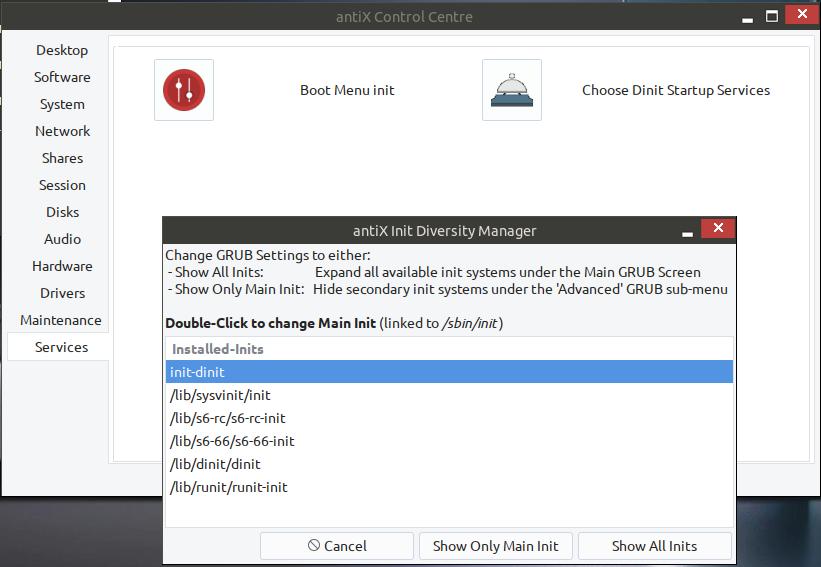
I could also have booted with the dinit option in the grub menu under Advance Options for AntiX. But I wanted the main menu item to be dinit not runit.
- I need to mount my data directory,
mkdir /commonandmount /dev/sdd4 /common. I need to put an entry in/etc/fstabto make it mount at boot.
mkdir /common
cd /etc
cp fstab fstab.orig
vi fstab
copy the following lines from my MX fstab file
# common partition - filesystem shared by several os's
UUID=7b735092-4202-453a-bd29-de07590816fa /common  ext4   rw   0  2
save and exit
that will now mount /common at boot.
- I need to define a swap partiton. I deliberately did not do this at install time , because that would cause it to have a new UUID … I share my swap partition among several Linuxes and I do not want the UUID changed.
So I put another entry in /etc/fstab
cd /etc
vi fstab
copy the following lines from my MX fstab file
#Entry for 2Tb HDD :
UUID=add7b156-7d68-4cc7-be9b-e34978bca563 none	swap	sw	0	0
#Entry for 4Tb HDD :
UUID=396d565a-a962-4a76-8d69-d36b28f13949	none	swap	sw	0	0
save and exit
I have 2 swap partitions on different disks.
I can check it with
root@trinity:/etc# swapon -a
root@trinity:/etc# swapon
NAME      TYPE        SIZE USED PRIO
/dev/sda3 partition 195.3G   0B   -2
/dev/sdd3 partition   293G   0B   -3
That should happen automatically at next boot, without my doing swapon -a
- before installing anything I need to do an update/upgrade
Check the repo with Control Center-> Software -> Repo Manager. .... it is set to some mirror site in Greece. I change it to an Australian mirror (https://mirror.aarnet.edu.au/pub/mxlinux/packages)
apt update
apt upgrade
It installs/updates a large number of packages.
There is also a GUI… Control Centre → Software → antiX Updater.
-
antiX comes with
click to focus. I wantfocus follows mouse. In the default WMzzz-icewmthat is easy …Settings -> Focus -> Sloppy Mouse Focus. More on that later when we come to Xfce. -
In previous antiX versions there were issues caused by
$TERM=xterm. That now seems to have been fixed … it defaults to$TERM=gnome-256color. -
The default File Manager for zzz-IceWM is
zzzFM. It refuses to mount internal filesystems, with permission problems. zzzFM can see internal partitions, but does not have mount permission.
Alsoudevil mount /dev/sdxxhas permission problems.
There are other File Managers available, but
None of zzzFM , SpaceFM, Rox-filer will mount internal disk partitions.
The following are the only ways to mount internal disks in zzz-IceWM:
- Can use Control Centre → Disks → Disk Manager
Click on the device name and tick the box, and it mounts the device in /media/partitionname. That is the best GUI method. - Become root and use a
mountcommand
mount /dev/sdxx /mnt/mountpoint
- One will undoubtably find one needs some packages that are not installed by default. In my case I need Thunderbird, R, and Latex. Becacuse antiX is Debian based , these are all simple installs using the
aptpackage system commands, or there is a GUI software manager … Control Centre → Software → Package Installer, and there is Synaptic (Control Centre → Software → Manage Packages).
For .deb files there is Control Centre → Software → Debian-Package Installer.
-
In Xfce , I use workspaces a lot, and I like to drag and drop windows between workspaces . IceWM has workspaces ( 3 by default), and the documentations says that drag and drop of windows between workspaces works, but it does not work for me?
-
In Xfce I use Session Saving. IceWM does not have session saving, that saves running apps the way Xfce does.
There is a document on what IcweWM can do here
antiX-FAQ Guide to IceWM
and the IceWM users manual is here
IceWM Manual | manual -
IceWM does not have desktop icons. If you use zzz-icewm or rox-icewm you get a few basic desktop icons, but you can not easily add your own.
To launch an application you can use the menu ar the lower panel. -
There are other window manager alternatives to IceWM. In antiX one can switch between window managers dynamically, without even logging out. Go to
Menu → Desktop → Other Desktops. There are 12 to choose from … JWM and Fluxbox both offer much the same functionality ad IceWM. Herbstluftwm is a tiling WM.
Conclusion
I could live with IceWM on a daily workstation. If one wants a more elaborate DE, the choices I have investigated are Xfce and Enlightenment. There will be a separate topic on setting up Xfce in antiX26.
Please can I have comments and corrections