Spring - Time to clean house (Home)

Looking for some feedback, suggestions, or tips about the /Home folder. I have my /home as a separate partition and allocated 41 GB to it. It is 68% full.

My files use about 1.6 GB or about 4% of the space.
Hidden files take up 25 GB or 64% of the space.

I have a cloud service and know it reserve about 4 GB of space as a staging area.

But here is my question. Can I go in and delete all the hidden files and start with a clean slate and let the areas start to fill up again?

4 Likes

That may be a bit drastic. Those dot files contain all your configurations of your DE and some apps, all your emails, your .bashrc startup file…
Even with a fresh install it puts some default dot files in your home directory.

What I do is have a small /home ( not necessaritly on a separate partition) that contains dot files, Downloads, Desktop, Pictures , and not much else. I put all my personal data files on a separate mounted partition.
So my /home effectively belongs to the system.
Because I share my data among several distros, I mount it to /common and put an entry for it in /etc/fstab.
It keeps me tidy.

7 Likes

That was along the line I was thinking of. On a clean install the hidden files must be for the most part empty. Maybe the best thing is to perform a test. Backup /home to include the ‘.’ files. Delete everything to see what happens. Maybe on re-boot the OS will put these files back into home. I was surprise the system was taking up 25 GB of space with those hidden files.

Maybe tar or rsync will copy hidden files.

2 Likes

Yes, you lose all your emails and your firefox settings and any personal .desktop files.

Yes learn by experiment

You need to be careful.
In rsync use a trailing / on the sourcedirectoryname … that means cpoy everything in this directory recursively, including dot files

See this discussion

5 Likes

I don’t dual boot - nor do I partition my desktop Linux…

it’s just 1 GB for /boot and 1 GB for /boot/efi - then the rest for “/”…

It’s one of my pet hates - micromanaging partitions that weren’t sized properly to begin with…

nvme0n1                     259:5    0   1.8T  0 disk  
├─nvme0n1p1                 259:6    0     1G  0 part  /boot/efi
├─nvme0n1p2                 259:7    0     2G  0 part  /boot
└─nvme0n1p3                 259:8    0   1.8T  0 part  
  └─dm_crypt-0              252:0    0   1.8T  0 crypt 
    └─ubuntu--vg-ubuntu--lv 252:1    0   1.8T  0 lvm   /
╭─x@titanii ~  
╰─➤  alias |grep dfx
dfx='df -h -x squashfs -x tmpfs -x devtmpfs'
gpristine='git reset --hard && git clean --force -dfx'
╭─x@titanii ~  
╰─➤  dfx
Filesystem                         Size  Used Avail Use% Mounted on
/dev/mapper/ubuntu--vg-ubuntu--lv  1.8T  629G  1.1T  37% /
...

I don’t do much file housekeeping - I do occasionally check whats in ~/Downloads and delete stuff I don’t need… But I’ve got 1.1 TB free… I probably housekeep by re-installing my O/S every couple of years or so… All my “ephemeral” and crucial data and documents and photos etc are shared via my self hosted cloud sync (ResilioSync).

And I agree with what Nev said about “hidden files” - but there’s some confusion here over nomenclature… “hidden files” are files with no permissions on them, .dot files are usually just ordinary files - but they won’t list in a default “ls” or some filemanagers…

The main dot files I have are not exactly “hidden” or “dot files” - but they reside in folders that start with a dot “.config” “.themes” et cetera …

Touching or moving or renaming those “dot dirs” in “~” or $HOME would probably break my system - but I do routinely add stuff into subfolders, or directly edit files in the “dot dirs” - especially ~/.ssh - actually - I have a cronjob that backs up that folder daily!

6 Likes

I would say NO DONT DO IT.

If you want a clean up, format a disk, or buy a new disk, that way it’s totally empty (almost) then if need be install a new system. But even then there are files created at install that are needed so should not be removed. If you compare that to your existing disk you may be able to work out what some of these hidden files are.

6 Likes

I never knew that.. I always equated them with dot files.
I cant see what use would be a file with no permissions … ie — — —. Nothing could use it?
Or does hidden files mean something different in Linux to what it means in Windows?

4 Likes

If the space taken is uncomfortable for you, first backup everything.
Only after that delete what you think is a junk. If something breaks, just restore.
I would not touch .config and .local/share and I would look for junk especially in .cache.
Also be careful with .var if you have flaptak apps installed.

6 Likes

Howard,
I think 25GB of hidden files is a lot.

Have you tried figuring out which folder or file is taking up the most space?

I would try the following: LM has ncdu. If you don’t have it installed, I would install it:


sudo apt install ncdu

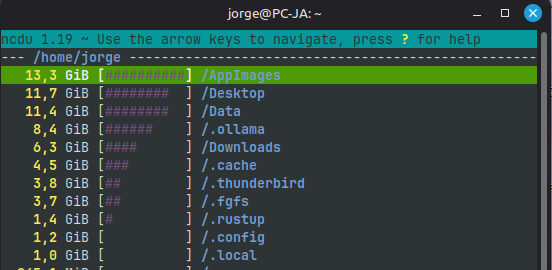
Then, in the terminal, just type ncdu and a list will appear in descending order (with the folders that take up the most space at the top).

Use the UP and DOWN arrow keys to scroll through the list, and when you want to open a folder, press ENTER. It always works this way (if you want to go back to the previous folder, which is the first line of the list—it shows /.. - select that line and press ENTER).
Press ‘q’ to exit.

Try to find out which folder(s) take up the most space, and then which files.

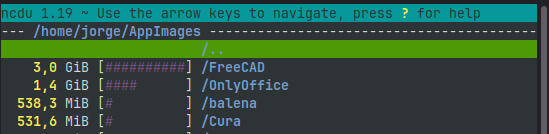
Here’s my example:

I selected /AppImages:

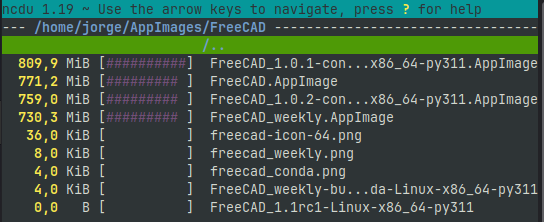
I selected /FreeCAD:

I think these examples make it clear how the program works.


I might be wrong, but I think you’re using Flatpak apps.

If you do, try checking the space used by Flatpak:


du -sh {/var/lib/flatpak,~/.local/share/flatpak,~/.var/app,~/.cache/flatpak}

Lists:

  1. If you want to list all the apps you have installed:

flatpak list --columns=name,size,application

  1. List of apps only
flatpak list --app --columns=name,size,application
  1. List of runtimes only (sets of libraries and core components that apps need to run)

flatpak list --runtime --columns=name,size,application

Note: runtimes are installed and shared by all programs that require those libraries - This is one of the core principles of Flatpak - but with updated runtimes, you may not want to delete the old runtime and installed programs that require a specific runtime; if you later uninstall those programs, the runtimes may remain, and if they are unique to those programs, they become “unused”

How to repair the cache:


flatpak repair

Clear data from removed applications:


flatpak uninstall --delete-data

How to clean up:
The two commands to clean up unused files and data from uninstalled programs:


flatpak uninstall --unused

flatpak uninstall --delete-data

Always make a backup before running these programs—you know the routine :wink:


In practice, I’ll demonstrate this with my examples:

Space used by Flatpak:

image

List:

List only runtimes:

Clean up:

Here you can see two things that happened: I have two files that are pinned and won’t be removed, and the one from org.rncbc.qpwgraph was deleted because I no longer have the program installed

About the 2 pinned files: these are files that have been marked so they won’t be automatically deleted.
These pinned files are themes that Flatpak may have installed so that Flatpak programs look the same as other programs, so I won’t delete them

I hope this helps with your research and understanding of the space occupied in your /home directory

Jorge
8 Likes

I dont know if this is a answer as never tried it myself

Of course not direct from them but via a repository, just gave the link to get more info.

On windows I always used ccleaner but this one rested in my thoughts as an alternative.

Has anyone used it on linux, would it answer the question Howard raised or not ?

3 Likes

I use bleachbit and its great but i never use it as root and it removes junk files and caches if i want.

2 Likes

Lots and lots of options for cleaning and look like a complete list of all the areas. I like the review option, but is there a safe mode? An option to clean but not harm the OS?

2 Likes

The simplest cleanup is a fresh install each time you come to a new release. In my case that cleans the home directory because I keep my data elsewhere.
Rolling release does not have that benefit. I have not cleaned Void for 6 years. It seems OK.

3 Likes

never use it as root if you dont know what your doing,i never use it as root and i never hade any problems after i used it, with every box you check it explains what will be deleted

1 Like

I have used BleachBit, but I’ve bit myself too.

I am betting the most space in your home folder is in Downloads and your browsers caches. I say browsers because I use four different browsers every week if not every day. The cache could sure accumulate. I have MS Edge Stable (1.7 GB), MS Edge Beta (1.7 GB), MS Edge Dev (1.5 GB), Firefox (1.3 GB). It all adds up.

I also use Podman for containers and those can accumulate. It’s at 2.6 GB right now. I should take a look and remove any containers or volumes I don’t need at this point.

I also play at some Python development and use UV for PIP installs and virtual environments. Right now, the cache is at 3.2 GB. I clean that out about once a week or so and when I run apps that need something that was in cache it just repopulates it.

2 Likes

I used to think that but no longer sure… ok its good news, but then you run the updates where it swaps X version for Y version and that needs Z … but does Linux tidy up after itself. .?

Windows does NOT hence you run ccleaner to do the registry but never thought about linux, never needed too as disk size is now massive compared to windows 30 gb against 90 gb is typical.

I know it leave older versions in place so if you have a problem at boot you can go back at least one version of the kernel (at lease with debian versions)

1 Like

Only a little off topic but speaking of spring cleaning, yesterday my wife got to work and found she was missing one earring. She only has the one pair, and they each have a small diamond. She’s had them for 35 years or so and wears them every day.

She called me from work, I was working from home, so I ran up to the bedroom, and the back piece was right underneath the middle of her pillow. The diamond piece was nowhere to be found. I looked in the blankets, carpet, bathroom rug, sink, shower, etc.

We just tore apart the bed and searched there. Wow is it dirty under the bed. Don’t go look. You may feel the need to clean it. We did. Ugh.

Still no diamond, but we’ll sleep better tonight. I don’t feel too bad about losing the earring. It was not that large or valuable. Replacing them will be much more expensive, but can also be a fun process we can do together.

4 Likes

Always the case. Thats why I dont wear them. If we were meant to have holes in our ears then we would be born with them, so they say.

You need st Antony, the one who finds lost things.

But you realise the moment you buy new the lost is found.

3 Likes

Yes, apt cleans up old versions of packages.
Sometimes there are packages that are needed ďuring an install but not needed afterwards. You get a message to run autoclean.

1 Like

I took you advice @nevj and did not delete all the hidden files located in /home. I found a command to find which files / folder were the largest.

du -sh ~/.??* 2>/dev/null | sort -h

The 7 largest files were;
599M /home/easyt/.config
1.3G /home/easyt/.recoll
1.4G /home/easyt/.mozilla
1.8G /home/easyt/.steam
3.6G /home/easyt/.cache
5.1G /home/easyt/.pcloud
9.9G /home/easyt/.local

I don’t use recoll or steam so I deleted them.
I deleted cache and pcloud knowing they could start from scratch.
Last I deleted trash from local.

Now I have 32 GB free of out 41 GB allocated to home or 80% free.

House cleaning completed.

6 Likes