OK - I’ve done this previously running Pop!_OS 22.04 - and produced flawless audio CDs from WAV or FLAC…
But this is the 2nd time it’s happened to me - since I replaced Pop!_OS 22.04 with Ubuntu 24.04..
In both cases - I used Brasero - I couldn’t tell you the exact version on Pop!_OS because I’m no longer running it.
OK - so I burn an AUDIO CD from lossless format (either FLAC or WAV)… I then plonk the Audio CD in the stereo system in my Harley Davidson…
Previously - they were flawless (when burnt within Pop!_OS Brasero).
Now - they’re horrible and staticky… I’ve googled the symptom and not got any hits…
Are the previous CD’s still flawless?
We have to rule out a problem in your Harley.
Given that, try another burner… I use Xfburn… because it comes with Xfce… not because I think it is superior.
You can do it by hand with genisoimage and wodim.
Check the burn speed is not too high.
Edit: Just noticed @JoelA was quicker with the same idea.
I’m not familiar with brasero, but I has trubles with burnt CD’s when the writing speed was high, or the writable media was of poor quality.
I’d set the writing speed to the lowest available.
Maybe…
When I burnt an Audio CD on Friday - and it played all staticky - I ejected it and put the “store bought” Audio I had in it, back in - it played flawlessly…
Note : this bike is 18 years old (2007 FLHX) - damn - still seems kinda newish to me (I bought it new off the showroom floor) - but - it’s nearly vintage - but it is all kinda “newfangled” compare to previous Harleys, e.g. twincam, fuel injected… But apart from the stereo - there’s no mod-cons… The 2008 model actually had cruise control, Brembo disk brakes and anti-lock…
I’ll try burning one more of the same thing and see if I can ramp down the burning speed… if that doesn’t fix it - I’ll give up… I’m not going to waste arm fulls of blank media just to troubleshoot something relatively minor - i.e. I can just play all the factory / store bought Audio CDs I already own… I don’t usually ride very far anyway…
But on Friday I wanted to hear a “new” band I’d only just gotten into (a band from New Zealand called BEASTWARS - but not “new” as in the album I tried to burn after buying it lossless [WAV] from Bandcamp was from 2011).
Tried it just now - burnt (instead of max speed - I chose the lowest “24x”) audio CD from WAV files (Bandcamp also lets you download in WAV format - it’s a freakin’ awesome choice!) - listening to track one on the burnt audio-CD now - sounds fine (on my computer) - i.e. no static or crackling.
Litmus test will be playing it in the CD player in my Harley Davidson… if it’s still horrible - I’ll give up and just use store-bought CDs (or audio CDs I burnt when I was still running Pop!_OS).
Update - never did get out on the Harley, got called into a massive “tech bridge” conference for a Solaris issue with a customer… 30+ people… Too many Chiefs, not enough Indians… or too many cooks… someone was pasting stuff in the chat they’d looked up with AI - yeah - this is SOLARIS UNIX not Linux! GRUB? No! SELINUX? No!
Anyway - will have to wait till the weekend to see if I get same symptoms with an Audio CD burned at 24x speed (instead of max - other choices were 40 x and 32 x - no idea what speed “Max” is).
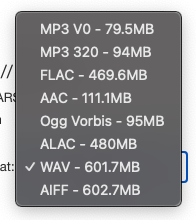
BTW - the album is brilliant - same band I mentioned at the top - Beastwars from New Zealand - new album came out last night - I’d pre-ordered it on digital download - bandcamp offer a plethora of choices :
“WAV” is 100% uncompressed CD-AUDIO quality…
But I usually download the FLAC - fully lossless audio codec (but it is still compressed)… Sometimes I also get the MP3 320 kbps for listening to on my phone - but - I can easily run a shell script to downsample FLAC to 320 kbps :
   1   │ #!/usr/bin/env  bash
   2   │ # grab the flac files in $PWD and convert to mp3 (320k)
   3   │ PROG=$(basename $0)
   4   │ IFS=$(echo -en "\n\b")
   5   │ ALBUM=$1
   6   │ # change "-mp3" at end of dir to "-flac"
   7   │ MP3ALB=$(echo $ALBUM |sed 's/-FLAC/-mp3/')
   8   │ # remove spaces from dirname :
   9   │ MP3ALB=$(echo $MP3ALB | sed 's/\ //g')
  10   │
  11   │ if [ $# -lt 1 ] ; then
  12   │     echo "need an argument"
  13   │     echo "... probably a folder with -FLAC in the end of the name..."
  14   │     echo "e.g. 1971 - If I Could Only Remember My Name-FLAC"
  15   │     echo "e.g.:"
  16   │     echo "          $PROG '1971 - If I Could Only Remember My Name-FLAC'"
  17   │     echo "... exiting now.... "
  18   │     exit 1
  19   │ fi
  20   │
  21   │ if [ ! -d $ALBUM ] ; then
  22   │     set -vx
  23   │     echo "$ALBUM folder doesn't exist..."
  24   │     echo "... so exiting doing nothing..."
  25   │     exit 1
  26   │ fi
  27   │
  28   │ check_it_2 () {
  29   │ if [ -d $MP3ALB ] ; then
  30   │     echo "$MP3ALB folder already exists..."
  31   │     echo "... so exiting doing nothing..."
  32   │     exit 1
  33   │ else
  34   │     mkdir $MP3ALB
  35   │     chmod 0750 $MP3ALB
  36   │ fi
  37   │ }
  38   │
  39   │ echo $MP3ALB
  40   │ echo "source : $ALBUM - destination $MP3ALB"
  41   │
  42   │ convert_it () {
  43   │ cd $ALBUM
  44   │ for f in $(ls *.flac)
  45   │ do
  46   │     # echo $f
  47   │     # echo "ffmpeg -i \"$f\" -ab 320k ../$MP3ALB/\"${f%.*}\".mp3"
  48   │     ffmpeg -i "$f" -ab 320k ../$MP3ALB/"${f%.*}".mp3
  49   │     # find any cover art :
  50   │     find . -maxdepth 1 -iname \*jp\*g -o -iname \*png -exec cp {} $MP3ALB/. \;
  51   │     # echo $MP3ALB/"${f%.*}".mp3
  52   │ done
  53   │ }
  54   │ # check_it_1
  55   │ check_it_2
  56   │ convert_it
  57   │ export NEWALBO=$MP3ALB
Not really - don’t think it’s necessary… As mentioned several times - it doesn’t happen with bought audio CD albums - or - audio CDs I burned months ago…
Only audio CDs I’ve burned since I replaced Pop!_OS 22 with Ubuntu 24.04… but it’s consistent…
Still haven’t tried the CD I burnt on Friday (at the slowest speed Brasero offers) in the Harley…
Brasero was also the burning software I used on Pop!_OS…
Yeah 100% the same hardware - except maybe a different NVMe SSD - but that shouldn’t make any difference… Same Mobo, same CPU, same DVD / CD / BlueRay burner device (it’s 13 years old - hardly ever use it - never did get BlueRay movies to play - software issue way back when I got it)…
Finally got around to testing the last CD I burned at 24x (instead of “max”) - and same symptom… In my Harley’s Harmon Kordon CD player… Plopped a store-bought CD back in - and it played okay…
I give up… I don’t ride that often… But it’s something that only started happening recently… CDs I burned earlier this year play just fine… Not a huge issue - but annoying…
It could be hardware maybe? I did unplug everything (SATA cables) when I replaced my CPU heatsink and fan… But that seems unlikely…
 - but it is all kinda “newfangled” compare to previous Harleys, e.g. twincam, fuel injected… But apart from the stereo - there’s no mod-cons… The 2008 model actually had cruise control, Brembo disk brakes and anti-lock…