I like to keep my system files and my data backups separate. I have the /home directory in it’s own partition meaning home is not in the root directory.
I use Clonezilla to backup the ./ (system) and that works very well.
I use tar to backup my data in the /home directory.
But there are a lot of hidden files in /home that do not get backup with tar which seems fine because they seem to be mostly temporary files that do not matter if I perform a restore of the root system.
Except one Firefox
So I now know I also have to backup the hidden file .mozilla at the same time I backup root.
So my questions are. Are there other hidden files in /home I should be concern with? Should I keep a /home in the root directory and just not use it for data? How do you keep your system and data in home as separate backups or do you combine system and /home data backup together?
First I would check emails. Like if you use Thunderbird backup also these files. Maybe not too critical because you can use your phone to use email but still I prefer not to loose my Thunderbird files.
My root include /home so we have different disk layout.
Yes. I think you should include all dot files in your tar.
I think you can do it like this
Instead of
tar -cf /home/howard/*
can you do
tar -cf /home/howard/.
Note the ‘.’
I think that will include dot files. Check it for me please.
I treat /home as part of the system… whether it is a separate partition or not.
So I dont use /home for personal data… I have an entirely separate partition called /common that I mount to each Linux that I multiboot.
That means all my linuxes can see the same /common… you cant do that with /home because different linuxes have different dot files
I backup /common nightly with rsync (tar would do). I backup system partitions , including home partitions if they are separate, with clonezilla, when I think it is needed. I dont have timeshift snapshots.
So essentially you and I do the same thing.
BTW… Howard I still owe you an investigation of how to view the content of an iso file and whether it can be used for recovery… remember that penguin eggs topic… it is unfinished.
It is coming. I have been busy lately. Too much rsync, and now bridges.
My backup is very similar to yours. I exclude .waterfox/ and .thunderbird/ from my usual $HOME backup. And I’m thinking about moving them below /var, where I already have a user directory for storing user stuff out of $HOME.
All tarballs are stored on multiple hosts or drives.
Yes, I like this idea. Matter of fact that is what I did with Windows. I stored my personal data
in a separate partition, not in the C:\ partition of Windows. I do backup Home regularly, but tar did not copy any of the hidden files.
What happen to me was this. I upgraded my laptop from LM 22.1 to LM 22.2. After the upgrade Firefox was also updated (upgraded). I had a WiFi problem (maybe asking for help later) 2 nights in a row. So what changed? The upgrade. So I restore my OS back to LM 22.1.
After the restore, the only component that complained was Firefox b/c the hidden files did not match the older restored Firefox. I did not notice any other hidden file problem.
Alas, I still had the WiFi problem with LM 22.1, so that was not the problem. Last night was either night 4 or 5 with the same WiFi problem.
I wonder does WiFi have any dot files?
I assume you wound it back with Timeshift? … so that would only be the system not the dot files. You end up with 22.1 running with 22.2’s dot files.
I think it is better to treat the dot files as part of the system… See what @kovacslt did with rsync. Could you do that with Timeshift?
It will not solve the current problem, but it might prevent it in future.
It would be ideal if you could get it to do the dot files, but not the rest of /home.
The dot files really belong with the system… not with your user data,.
IMHO Linux puts them in the wrong place… they are user-owned system files.
and
Thunderbird makes a complete mess of things by putting its mail data in a dot directory.
Agree 100%. The hidden files that belong to the system should be in the ./ partition.
I believe I can can see why Linux did it this way. It is based on Unix. Unix if I remember
correctly was meant to be a multi-user system. So maybe that is why Linux places the hidden files in the user area. In Unix each user would have their own copy of the the hidden files.
I guess that should be doable. I was intrigued by the task and tried to research it.
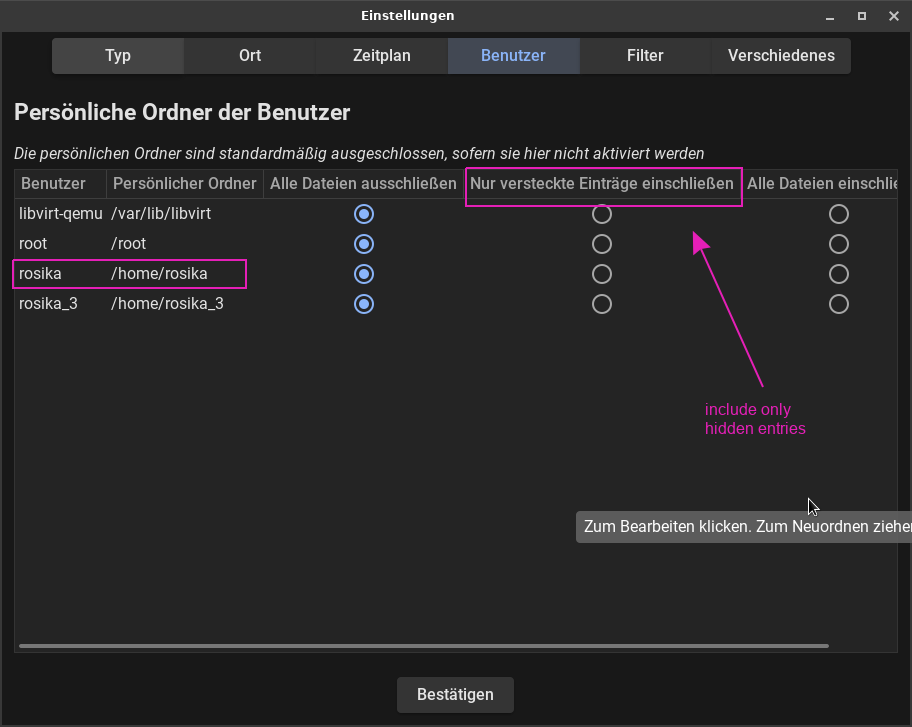
So I looked at my timeshift GUI and it seems to be a matter of clicking the right option:
Open Timeshift: Launch the Timeshift application on your Linux system.
Access Settings: Go to the “Settings” menu.
Users Tab: In the Users tab, you will see options for including or excluding files.
Include Hidden Items:
Check the option to “Include hidden items.” This will allow Timeshift to back up dot files located in your home directory.
Exclude Other Directories:
In the Filters tab, you can specify patterns to exclude other directories or files that you do not want to back up. For example, you can exclude all non-dot files or specific folders like Documents, Downloads, etc
Example of Exclusion Patterns
/* Excludes everything in the home directory except specified items. !/.*/ Includes all dot files.
Hi Rosika,
Great… that looks like exactly what is needed. … one could snapshot the system plus all of one users dot files.
I can not check … I do not have Timeshift.
If someone is checking, could they please verify that ‘hidden files’ includes dot directories as well as dot files , and works recursively.
I wish to thank you both for your input to my Firefox problem and hidden files (. files).
After working with the restored OS, the only problem I have seen was Firefox.
Also checking my system there is over 13GB of hidden files.
My conclusion is almost all of the hidden files are temporary, buffer, or work files that do not seem to matter when I restore my OS. Except one - .mozilla which is only about 1 GB in size.
So I am going to see if there may be a way to copy .mozilla at boot time to ./ so that it is an automate backup with the OS.
Same here - I just use a web browser for my mail… Somewhere on my NAS I have a whole bunch of Eudora mailbox and Outlook Express PST files dating back to 1997…
But - my main Gmail inbox goes back some 14 years and my alternative one goes back 23 years - I’m just being lazy I guess… But I’ll let Alphabet co manage that for me…
I still wish Google would do “folders” instead of labels like Outlook does…


 - I’m just being lazy I guess… But I’ll let Alphabet co manage that for me…