A good use for AI

I’ve used this a few different times. I normally update from the command line:

sudo apt update

sudo apt list --upgradable

sudo apt upgrade -y

sudo apt autoremove -y --purge

sudo apt autoclean

$ sudo apt list --upgradable
Listing… Done
nano/noble-updates,noble-security 7.2-2ubuntu0.2 amd64 [upgradable from: 7.2-2ubuntu0.1]

It listed nano as the only thing included as upgradable. I wondered what it was.

I copied and pasted the line into Copilot and it gave me a very nice explanation of what was being fixed and why. There are likely other ways to find the same thing, but this is quick.

It was fixing a few CVEs that are unlikely to cause most people problems, but good to have them fixed.

6 Likes

I have been flogging AI ( various… ddg, google, GPT) at the moment trying to understand a permissions issue in antiX.
It does seem to have insight into how things work, but one has to be wary of

  • outdated info … give it versions specs exactly
  • general linux answers … always give the distro name
  • unwanted detail or insufficient depth … try to give it some idea of the level of understanding needed
6 Likes

All good points. Many times I get advice for something that turns out to be outdated. Things change quickly and these LLMs were trained as of some date. Some of them will also include search results with more current information.

It is a good idea to provide versions and other details in the prompts.

3 Likes

Sometimes it is good to verify the information from AI with a second source.

8 Likes

Normally I’m not interested in such details. I fully trust clem, the creator and maintainer of LM, that there are real reasons for an upgrade.

The fact that the upgrades are categorized is sufficient for me.

3 Likes

Fully agree. This might include your personal mind and knowledge. :wink:

6 Likes

Hello Tim

I use the following set of commands since years ago in peace

sudo apt update
sudo apt upgrade 
sudo apt autoremove
sudo apt autoclean
sudo apt clean

Best!

2 Likes

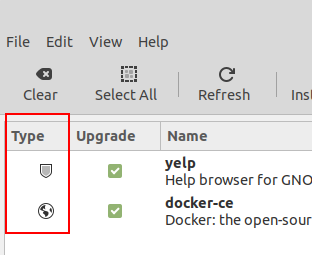
Linux Mint shows the updates (upgrades) the same way.

3 Likes

I agree with you. The mint team appear to get it right making it a pleasure to work with

2 Likes

It is Linux Mint (LMDE) running here.

2 Likes

The update box looks almost the same across all versions of mint, cinammon, mate, debian and xfce minor image difference.

2 Likes

Yes, it’s mintupdate running under Cinnamon.

1 Like

My only concern with Mint is its systemd dependence.
I need Linux Mint Devuan Edition … like Peppermint has.

3 Likes

I wrote a bash script that just runs that command. I use it to see what was held back after an update that leaves things undone.

1 Like

Fully agree. This might include your personal mind and knowledge. :wink:

Use it or lose it!

1 Like