Bad news on two fronts

Those NONGS and DRONGOS at the Gnome foundation are always doing SHIT that nobody asked for…

Like removing slow-double-click rename from Nautilus! WHY? Who asked for that to be removed? Why? I read somewhere that it confused new users - WTF? You mean someone who’d NEVER used Windows or Apple OS? Never used a computer? i.e. slow double click a file name in the Finder on Apple System6 (i.e. 1980s) let you rename a file - Windows 95 Explorer file manager introduced this feature too - so it’s been STANDARD for OVER THIRTY YEARS!

Nautilus/Files in Gnome used to have this feature. I think you can turn it on in Thunar and Nemo - but it’s permanently disabled in Gnome’s Nautilus/Files…

So now no middle-click-paste? WHAT THE ACTUAL F-you-sea-kay?

For those who don’t know what this is - it’s called the “X Select Buffer” - select a piece of text, e.g. a string of chars, and it’s AUTOMATICALLY in the “X Select Buffer” which sits alongside, and in tandem with, the actual “Clipboard” (you can integrate them into a single “buffer” if you want - I don’t). Even Apple “sorta” has this feature - in iTerm - when you drag select some text - it’s loaded into the MacOS clipboard - and - if you have 3 mouse buttons, you can paste clipboard text into a terminal (works in iTerm from Apple and iTerm2) - you can emulate middle mouse button click (i.e. the wheel on most mouses) on an Apple touchpad with three finger tap…

Yeah - I’ll be dumping Gnome if they do that - it’s the single most useful feature in ANY Linux / UNIX graphical environment. The X-Select Buffer has been part of X Windows / X11 / Xorg and all their related DE’s (CDE, Motif, OSF et cetera) since the late 1980s, who knows - maybe the original ancestor of “X”, “W” had this feature???

But some NONG / DRONGO at Gnome is making an arbitrary decision to drop a feature… Why?

I kinda hate KDE but I might have to shift to it… I used to like XFCE but it kinda feels a bit primitive / clunky (especially side-by-side with MacOS on my other monitors)… Or maybe even MATE? Cinnamon? If elementary wasn’t so locked down - that might be an option too… There used to be an option to install Pantheon DE on other distros besides elementary…

I don’t run LFS and happy to use SystemD - so the latter decision probably won’t affect me…
3 Likes

Agree 100%

It should be illegal to remove longstanding features.

3 Likes

Oh, that might not be so bad.

1 Like

Someone should tell microsoft that, bring back word 6 icon bar so it looks like libreoffice

1 Like

Yeah it works - but it’s SLOW and wasteful when you’ve been using muscle memory for 30 years…

If I want to paste a bitmap from the clipboard (e.g. a screenshot) - yeah sure - but not when I’m doing stuff with text - i.e. text out, text in…

It’s so much faster :

UNIX / X11 :

  1. select text in a terminal (or a web page)… it’s AUTOMAGICALY in the “X Select Buffer”…
  2. middle click in a Window that accepts text input and it’s pasted… That’s two clicks… And because we’re still in a UNIX like environment - the focus should follow the mouse…

Traditional MS Windows :

  1. select text (1 click)
  2. right click and select “Copy” (2nd click)
  3. click to activate some other app window (3rd click)
  4. right click and select “Paste” (4th click)

Or even worser still :

  1. select text (1 click)
  2. Press Ctrl+C (two keyboard clicks) to place it in clipboard
  3. Click to activate some other app window (3rd click) and probably click again where to place it…
  4. Press Ctrl+V (two keyboard clicks) to paste it

Note - I remember in the early days of Linux - if you had a mouse plugged in and running Linux as a console TTY - you could select text, and then middle-button paste it - in the TTY… Same process as in X11 / xorg …


I’ve noticed a few annoyances in the Raspbian version of Debian - they disable middle button paste in vi / vim - e.g. even if you’re using it in a remote terminal over SSH…

To make it work have to edit .vimrc (and you can’t paste into it - NOT YET anyway!)

╭─x@frambo ~  
╰─➤  cat .vimrc
syntax on
set mouse-=a
set ttymouse=

I keep a copy on my main system and scp it to a machine with this UNASKED for handicap… Who? Why?

2 Likes

But its great exercise for the brain …. Like learning a new language or how to dance …

You may not get Alzheimer’s …. Lets do a test, can you remember his first name ?

See brain exercise works

Plus imagine the exercise for eye = hand coordination better already

Positive thoughts

You made your point perfectly.
I can remember Sun workstation keyboards used to have copy and paste keys … but I still used the mouse middle button click.

There is a difference between being popular and being correct or efficient.

2 Likes

Until your post I never knew about the mouse middle click. Maybe Windows did not have that option.

4 Likes

Yes it did but not all mouse worked

1 Like

It is the original Unix/X11 way of doing copy/paste. Try it … highlight with left mouse button, then paste with middle mouse button. The copy bit is automatic when you highlight. It only needs one hand.
It works best if you use focus follows mouse

4 Likes

One hand, and two clicks… Magic!

If that feature is taken away I’ll find some other O/S (or DE).

Slight correction - sometimes it’s 3 clicks - i.e. instead of “drag select” text to put it in the “X Select Buffer” - you double click on a string with “known” delimiters - and the whole string is now in the X Select Buffer and can be pasted elsewhere with middle button click…

Note also - when I use MS Windows - its remotely via Azure AVD or Citrix - and I only access those to connect (SSH) to Linux servers. I run MobaXterm on those and it’s been so long since I set it up - I can’t remember if I had to setup middle button paste or if MobaXterm does that by default. What MobaXterm (and puTTY) do by default is - when you drag select (or double click a string) - it’s placed into the Windows clipboard… In MobaXterm - I can then go to another terminal tab - and paste the clipboard contents with middle button click…

I’m pretty sure the default in puTTY is right click to paste - which is not the least bit intuitive… So I always change that in the default profile of puTTY… But I only ever use puTTY in dire emergencies… MobaXterm actually provides a proper bash shell and openssh key management and client config… I LOATHE having to mess with pageant.exe and PPK files (why couldn’t Mr Tatham have use OpenSSH PEM key format???).

I mostly use middle-button paste in a terminal - e.g. in MobaXterm - to paste in a password… I DETEST typing out passwords - and I hardly ever do it…


BTW - on Mac - outside of the terminal (e.g. iTerm [from Apple] or iTerm2 [3rd party]) clipboard is either right-click then “Copy” and paste right-click then “Paste” and “right click” without a 2 button mouse is a PITA (two finger click)…

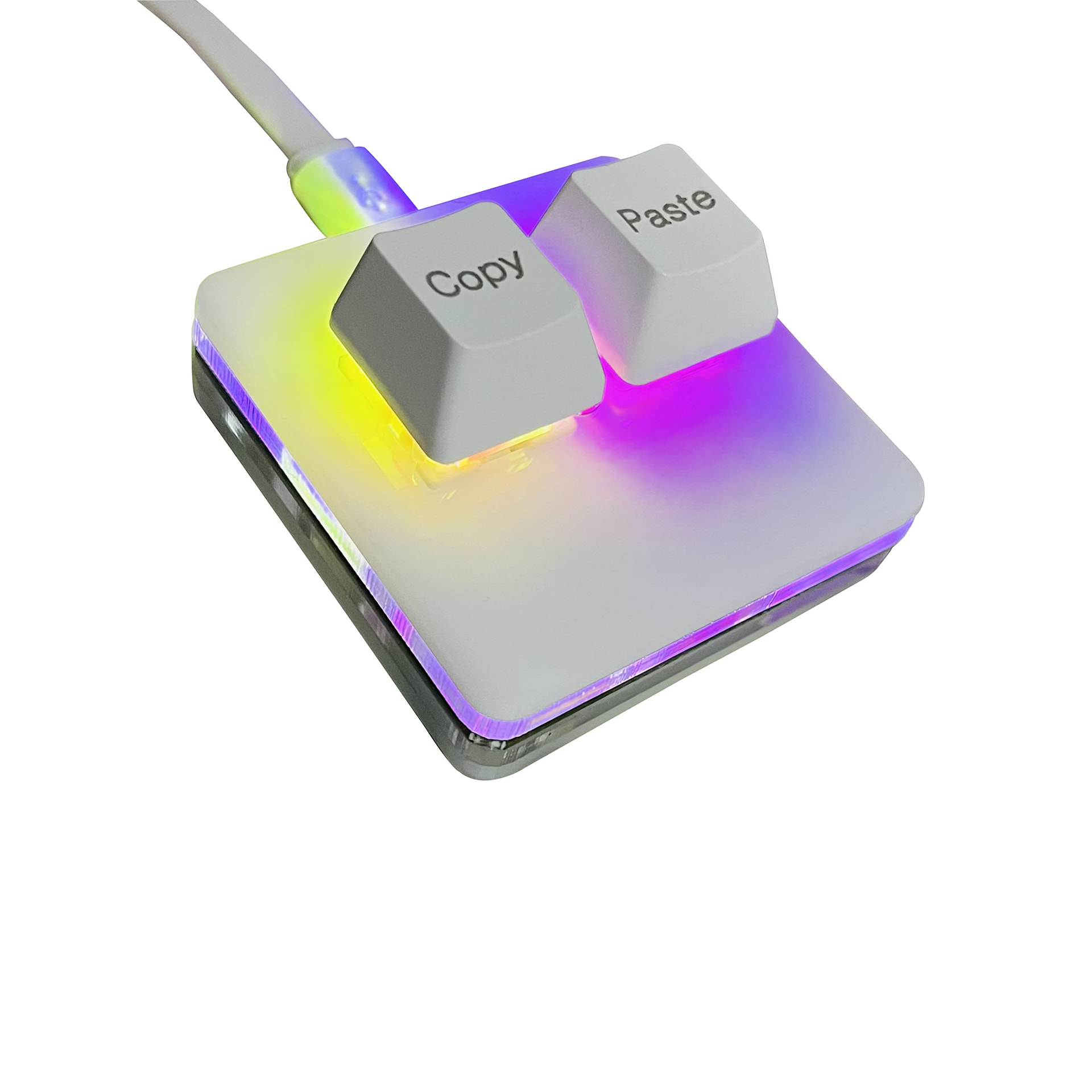
So - on BOTH my Macs (M1 MacBook Pro) - have hooked up a small USB two button key which I’ve programmed the left button to “CMD+C”, and the right button to “CMD+V”…

And because I’m running Synergy KVM - my clipboard is shared across my work MBP on the left, my Linux desktop in the middle (the Synergy “server”) and my personal MBP on the right…

I also use Keepass-CLI to retrieve my passwords - and I just have to type “xp $ENTRY” (e.g. “ls” to list my entries, then “xp 3” to copy the password for entry “3” into the clipboard… Then I can middle-button paste that elsewhere…

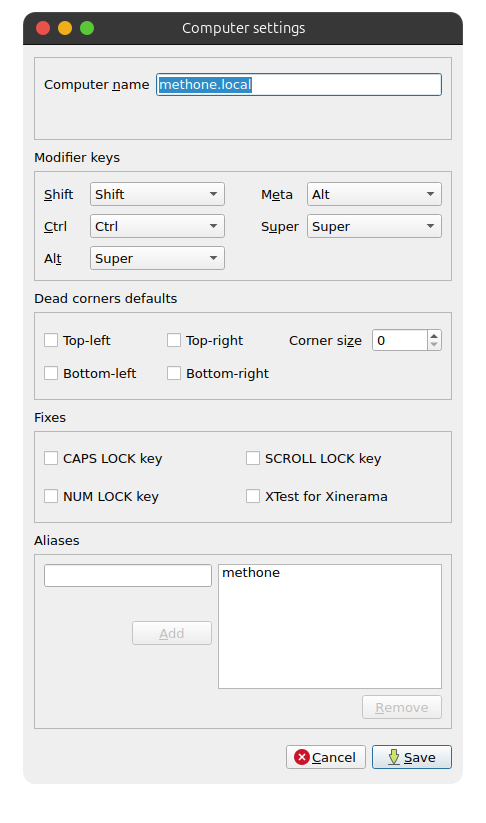
And - in Synergy - hitting the “Alt” key on my keyboard sends “CMD” to my Mac clients…


Note also - middle-button click works fine out of the box with Synergy - physical 3 button mouse on my desktop - shared as a virtual mouse to my two Mac Synergy client machines…

3 Likes

I love the 2 button key

2 Likes

Never had a apple with one button ?

1 Like

I was taken aback when I learned about these “tweaks” in Plasma’s Konsole that I knew about 10% of. So, sorry friend @Nevj but I think with the AI “wave” of asked-for and who-cares features about to crash ashore, there are that same 90% added features for all the 10% that are being removed to make the world one big happy Stephen Hawking place for everyone that ever drove a keyboard, trackpad, mouse, HUD or touchscreen.

Any chance you could program that functionality with e.g., NixOS “flake” or “dot” rather than giving up on the aGNOsticME layer.

2 Likes

One can program anything. A computer is a general purpose machine.
The effort involved may not be worth it, and having special code to maintain means problems every time you update. …

2 Likes

That two button device is not a mouse… Just two keys…

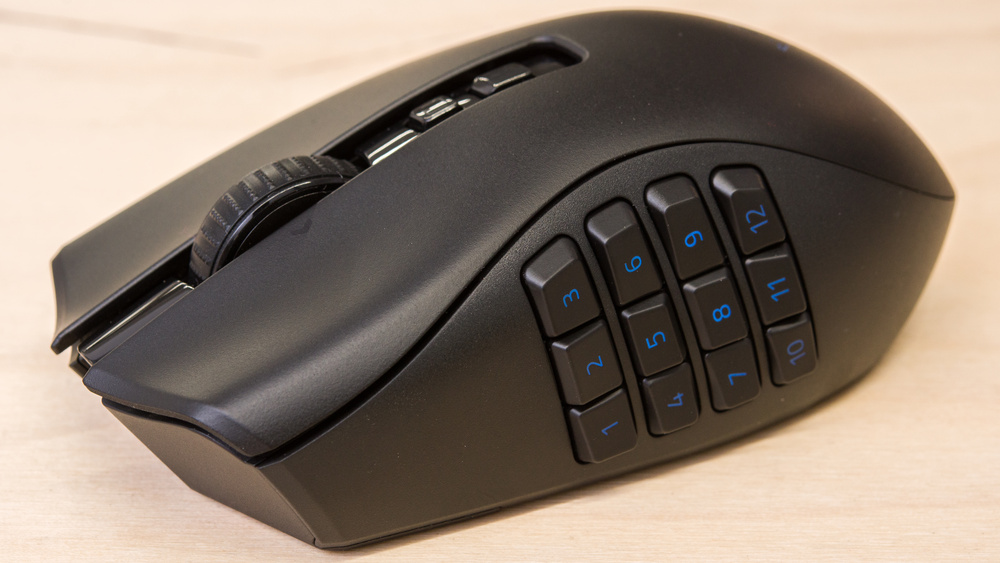
I’d really LOVE to have those buttons on my mouse!

However - I’ve tried those devices on Linux - after I programmed them to hit CMD+C and CMD+V - doesn’t work at all - nor across Synergy… (note “CMD” maps to the same place as “ALT” on a PC keyboiard).

2 Likes

Perhaps you need

Sadly its limited to 12 buttons and right hand only .

For many now, with tablets and phones we dont have the use of a mouse. Perhaps tomorrow technology will move to to something better.

2 Likes

Laser pointer.

1 Like

and I’m a mollydooker! (lefty)

3 Likes

Not heared of that, in the uk it was a southpaw but perhaps only in boxing

1 Like