Bridge connection in Virt Manager

Testing making a bridge to a NetworkManager controlled NIC.

Today I want to try a bridge linked to my DHCP interface that goes to the modem and is controlled by NeworkManager.
I used @daniel.m.tripp 's comands, set up as a script

#!/usr/bin/bash
# Create a bridge with NetworkManager

# first argument is bridge name ( eg br0 )
# second argument is NIC name  to link bridge to ( eg eno1)
# third argument is the mac address of the NIC (eg c8:60:00:cb:0e:28)

# link bridge to the mac address of the NIC
nmcli con add type bridge ifname $1 stp no bridge.mac-address $3
# make the NIC a slave 
nmcli con add type bridge-slave ifname $2 master $1
# Modify connection parameters 
nmcli con mod bridge-$1 ipv4.method auto
# bring bridge up
nmcli con up bridge-$1

Here it is running

[nevj@trinity ~]$ sh -ex ./makebridge.nm br0 eno1 c8:60:00:cb:0e:28
+ nmcli con add type bridge ifname br0 stp no bridge.mac-address c8:60:00:cb:0e:28
Connection 'bridge-br0' (3b5b71fc-6b11-46e3-a633-249339e72aab) successfully added.
+ nmcli con add type bridge-slave ifname eno1 master br0
Connection 'bridge-slave-eno1' (f4245908-407b-4e78-9a24-efcc84378141) successfully added.
+ nmcli con mod bridge-br0 ipv4.method auto
+ nmcli con up bridge-br0
Connection successfully activated (controller waiting for ports) (D-Bus active path: /org/freedesktop/NetworkManager/ActiveConnection/9)

and it makes a br0

[nevj@trinity ~]$ ip a
2: eno1: <BROADCAST,MULTICAST,UP,LOWER_UP> mtu 1500 qdisc pfifo_fast state UP group default qlen 1000
    link/ether c8:60:00:cb:0e:28 brd ff:ff:ff:ff:ff:ff
    inet 192.168.0.57/24 brd 192.168.0.255 scope global dynamic noprefixroute eno1
       valid_lft 84309sec preferred_lft 84309sec
    inet6 2001:8003:2c09:f600:f9fd:b4b4:32c3:b78f/64 scope global dynamic noprefixroute 
       valid_lft 59219sec preferred_lft 59219sec
    inet6 fe80::fe69:873c:74e6:14b/64 scope link noprefixroute 
       valid_lft forever preferred_lft forever


9: br0: <NO-CARRIER,BROADCAST,MULTICAST,UP> mtu 1500 qdisc noqueue state DOWN group default qlen 1000
    link/ether c8:60:00:cb:0e:28 brd ff:ff:ff:ff:ff:ff

but the interface br0 is down and has no IP address.
and the eno1 interface is UP and has an IP address.
That is different to what I did with a static IP interface.

I dont think that is going to work?
I dont see how I can reboot after running the script ( as @daniel.m.tripp recommended)… It will lose all the settings?

I tried bringing up an Alpine VM. The bridge does not work.
eth0 in alpine is UP but has no IP address… it should get one by DHCP.

I think somehow dhcp is not working for br0… because it has no IP address.
My modem connection is still working… ie eno1 is still functioning.

Afterthought:
I can see my mistake, I think… I gave my script the mac address of the eno1 NIC. I should have made up a new mac address for br0 and specified that as the third parameter.
My bridge links en01 to itself!!
Oh dear, networking is not my forte.
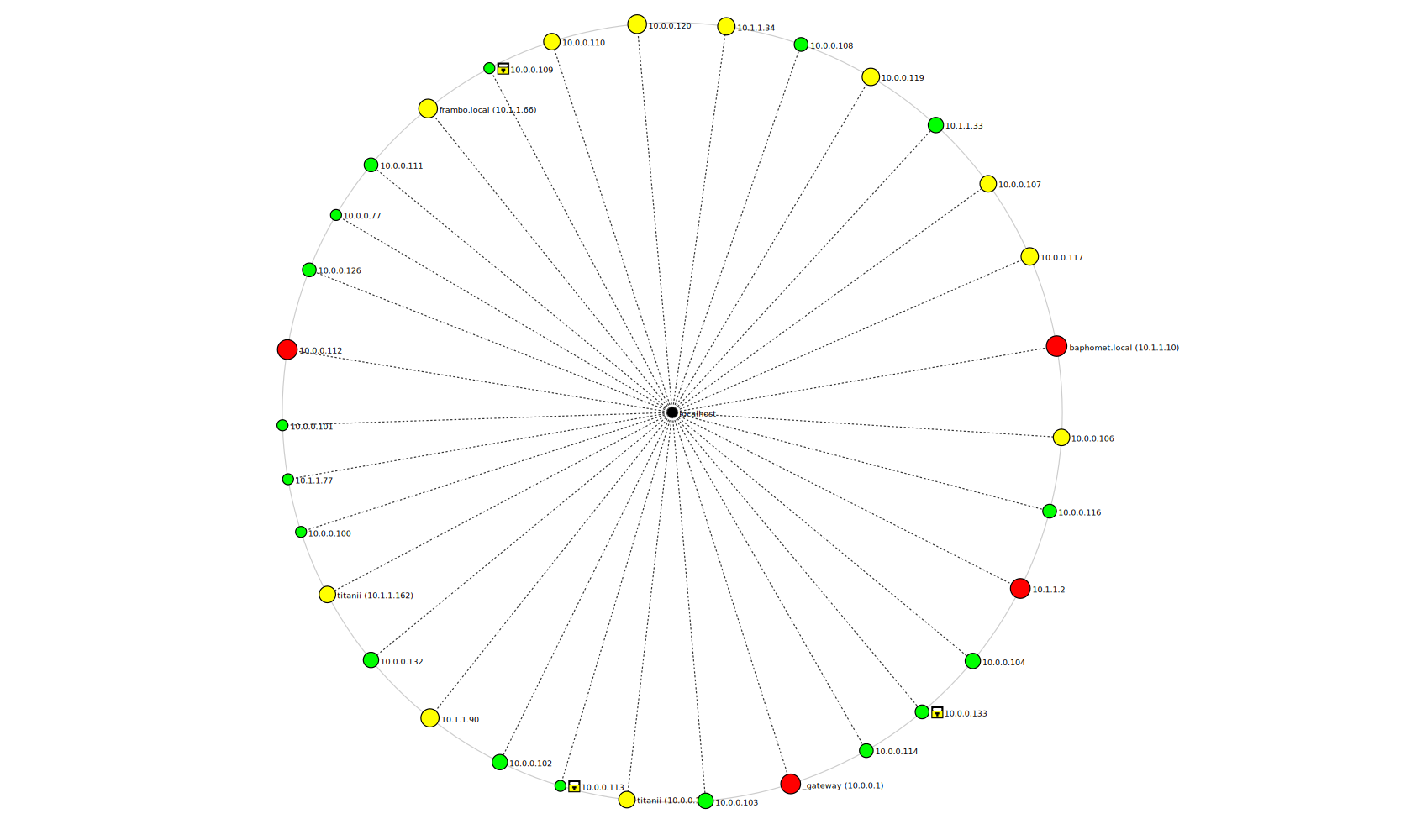
You have to give nmap an interface to scan… that fooled me first try
When the nmap scan finishes , hit topography button.
You can scan a second interface and it will add to the diagram
I like visual aids.

What does nmcli conn show say?
Also did you disable any conflicting connections? ex. nmcli con down your original connection.
Giving br0 mac address of the slave is fine

see my post ~#6 above.of this thread

No missed that. Will try again
I followed @daniel.m.tripp … missed your reply no 6.

Thanks … that is not the problem then.

I will have another try tomorrow night. Many thanks.

That’ll teach me for using a /14 CIDR (i.e. over 260,000 potential addresses)…

My nmap scan was never finishing…

I did a quick scan with two ranges and it sorta worked…

10.0.0.1-255 and 10.1.1.1-255 and it finished and I got a diagram… Also - I was trying to run it without root privs… Better results as root… But I kinda HATE running userland graphical apps as root…

I don’t have any VMs currently running in KVM…

When I tried give nmap an “interface” to scan - I got no results… e.g. enp39s0…

I used to be anal about redacting IP address information… But I don’t care… Having said that - I’d NEVER not redact hostnames and addressing and DNS if this was a customer network… And I’d never show the same diagram with my ISP assigned external IP address or DNS name (I use NoIP).

It works with a globbed IP like 192.168.32.*

[nevj@trinity ~]$ nmcli conn show
NAME                UUID                                  TYPE      DEVICE  
bridge-br0          3b5b71fc-6b11-46e3-a633-249339e72aab  bridge    br0     
bridge-slave-eno1   f4245908-407b-4e78-9a24-efcc84378141  ethernet  eno1    
enp17s0             3930e890-b57b-439d-aa50-3f34fd265374  ethernet  enp17s0 
lo                  7a0c9747-7b43-4d4b-95b3-3c96949c9123  loopback  lo      
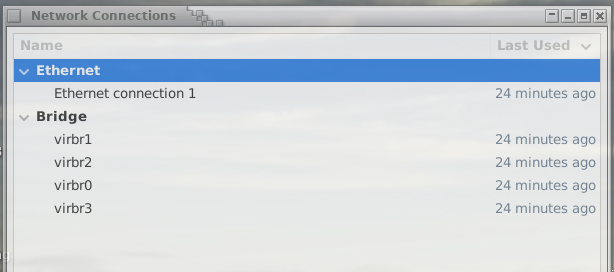
virbr0              45352040-7146-4313-a268-b69eca18abb0  bridge    virbr0  
virbr1              2ba1dbc0-b9bb-405f-9506-a2db7decf05a  bridge    virbr1  
virbr2              8994bdaf-80c2-44f9-a2b9-c4db50928396  bridge    virbr2  
virbr3              88dc99b1-99ae-4e2b-b4d7-7dcb34c98337  bridge    virbr3  
vnet0               da933c9f-74c2-46d2-aad7-a0da723e0137  tun       vnet0   
Wired connection 1  9d98f6f9-9435-3fdb-8860-6305f3e81e5d  ethernet  --      
[nevj@trinity ~]$ 

Well, the good news is, the problem fixed itself.
When I rebooted tonight, I get

[nevj@trinity ~]$ ip a

2: eno1: <BROADCAST,MULTICAST,UP,LOWER_UP> mtu 1500 qdisc pfifo_fast master br0 state UP group default qlen 1000
    link/ether c8:60:00:cb:0e:28 brd ff:ff:ff:ff:ff:ff

5: br0: <BROADCAST,MULTICAST,UP,LOWER_UP> mtu 1500 qdisc noqueue state UP group default qlen 1000
    link/ether c8:60:00:cb:0e:28 brd ff:ff:ff:ff:ff:ff
    inet 192.168.0.57/24 brd 192.168.0.255 scope global dynamic noprefixroute br0
       valid_lft 86370sec preferred_lft 86370sec
    inet6 2001:8003:2c09:f600:9f97:e1bc:9d7c:7e2/64 scope global dynamic noprefixroute 
       valid_lft 61328sec preferred_lft 61328sec
    inet6 fe80::693a:24a4:2dfa:ec8/64 scope link noprefixroute 
       valid_lft forever preferred_lft forever

So eno1 is a slave, and br0 has an IP address on the modem.
I can reach the internet from both the host and the guest.
The VM guest can ping anything on the modem ( 192.168.0.*) but it can not ping anything on the local net ( 192.168.32.0).
The host can ping the VM guest.
The other computer on the local net can ping the host and the VM guest.

What I did not realize was that creating a bridge with NetworkManager is permanent ( ie it survives a boot) . That does not happen with ip.

So @daniel.m.tripp was right , it needed a boot.

While researching I found this good link
https://www.cyberciti.biz/faq/how-to-add-network-bridge-with-nmcli-networkmanager-on-linux/

and it shows how to turn off the NIC and turn on the bridge

sudo nmcli con down "Wired connection 1"
sudo nmcli con up br0
nmcli con show

So I imagine I could have used that.

I am now going to try the reverse… see if I can disable br0 and bring eno1 up

 nmcli con down br0

and br0 disappears from ip a but NetworkManager still lists it, and the VM loses its connection., but eno1 does not get an IP address ?

How do I properly disable this bridge and restore my internet NIC?

I had to resort to giving eno1 a static address and doing dhcpcd eno1 to get my internet back and post this. I need go get eno1 back under control of NetworkManager.

to deactivate bridge
sudo nmcli con down bridge-br0
sudo nmcli con down bridge-slave-eno1

Most of the time the slave should deactivate with bridge- but it doesn’t hurt to make sure

to activate
sudo nmcli con up “Wired connection 1”

also- you shouldn’t have to reboot- to change between “wired connection 1” and bridge.

How to make your “wired connection 1“ be the one that connects at boot-

sudo nmcli con mod "Wired connection 1" connection.autoconnect yes

or in network manager gui - there is a “connect automatically” box you can check or uncheck.

deactivate “Wired connection1”

sudo nmcli con down "Wired connection 1"

to activate bridge

sudo nmcli con up bridge-br0

sudo nmcli con up bridge-slave-eno1

I find including slave works the best. Depending the setup, it might follow the bridge, but I have found it is not consistent.

I do not understand how

  • a computer on the local net can ping the VM, but
  • the VM cant ping anything on the local net

Maybe the VM needs a default route?..it does not seem to know what to do with packets not addressed to its own network.

I had no such problem when I linked the bridge to the local net.

I do not completely understand your setup. How do the computers on the local network get internet access? - If they have it- they can see your router/modem and what is attached. Maybe firewall not allowing certain types (unsolicited) on inbound traffic?? Probably easier to create a bridge on the LAN NIC -like before.

Also just some info-

and br0 disappears from ip a but NetworkManager still lists it, and the VM loses its connection.

The br0 device will disappear from ip a because kernel no longer sees it as an active device. Network manager looks at connection profiles. The profile remains in NM’s configuration until it is deleted.

When using network manager it is better to use the Name ex. bridge-br0 instead of the Device br0. The Advance Network Manager is nice for those who like gui. It will show all profiles with options. I tend to use nmcli conn show to see what is going on. Also a good (but old) command brctl show to see bridges and what are attached to them.

If you need to delete bridge-

sudo nmcli con down bridge-br0
sudo nmcli con delete bridge-br0
sudo nmcli con down bridge-slave-eno1
sudo nmcli con delete bridge-slave-eno1

If the gateway computer is running, the computer on the local net accesses internet via the gateway. If the gateway is down, the co puter on the local net acts like a laptop and accesses tbe internet via wireless to the modem.

Yes, that suits what I need.
I tried the modem NIC just to see what it was like using Network Manager.

OK , I get it… NetworkManager keeps its own records of connections.

I did look at that. There was further confusion evident. The modem NIC was not there and the local network NIC had become “Wired Network 1”. Normally the modem NIC is “Wired Network 1” ? I dont like NetworkManager… it has a daemon and does things automatically behind your back.

Thank you Joel.
I need some practice with NM.

My next step, when I get the testbed back to normal, is to try configuring the local network bridge with ifupdown…ie in /etc/network/interfaces

That is odd - I did notice you originally used different subnets… But then without a route - neither of those should work… So at least one subnet knows how to get to the other…

I just bung all my stuff on the same VLAN (and yeah - I used a /14 - mainly cause I was lazy - I didn’t want to change the IP address of my NAS which was 10.1.1.10, but I got a new router and set it up on 10.0.0.0 - so I went /14 so both were the same VLAN (and then change the subnet mask on the NAS later)…

My goal for VirtManager qemu/kvm was to make it work exactly (or nearly) how bridged mode works on VirtualBox - and I’m happy now… Don’t need VirtualBox…

If it’s any help - I often use nmtui which is a lot easier than rememberinng nmcli commands…

You are right.
The local subnet computer knows how to route to the gateway computer.
The gateway computer and its VM,s should know about the static local net, but I think with my fiddling around with NM caused NM to take over the local net NIC… it is not normally controlled by NM… I set it up manually.

I will clear it all and start from scratch.

I will have a look at nmtui. The “Advanced Network Settings” gui is not very intuitive. I dont often fiddle with NM.

It works.
I needed then to reconfigure eno1 … I did that by adding it with “Advanced Network Config” menu.

In the process I discovered that I had the local NIC enp17s0 being configured in /etc/rc.local

# local static network
ip link set dev enp17s0 up
ip addr add 192.168.32.6/24 brd + dev enp17s0

I thought that would block it from being controlled by NM… but it doesnt… NM seems to own enp17s0

NAME                   UUID                                  TYPE      DEVICE  
Ethernet connection 1  6c5d9a99-9f6a-4eda-aed6-3aba012321fd  ethernet  eno1    
enp17s0                196ae6d9-6ffd-40a7-a312-cc2bbf46f36f  ethernet  enp17s0 
lo                     0d0d21b1-0a6a-4cc1-a6b9-c7a5c0862848  loopback  lo      
virbr0                 921d1580-bc8e-4f35-a60a-db151dd7027a  bridge    virbr0  
virbr1                 dbcde49a-ea53-48a7-b031-1e981e81d3b7  bridge    virbr1  
virbr2                 70b3d255-dfbb-46d9-bc54-d8fe84cbbabd  bridge    virbr2  
virbr3                 8e0becae-3561-4304-b509-b2ea95b2b774  bridge    virbr3  
# 

I do know that if I define a static interface in /etc/network/interfaces, that takes it out of NM control. I thought using rc.local would do the same , but it doesnt.

Anyway , I have the testbed back to normal. Thanks.

Getting an interface out of NetworkManager control

I want to try building a bridge with ifupdown.
To do that I have to have my local net inferface controlled manually, not by Network Manager.
So I took these ip statements

# local static network
#ip link set dev enp17s0 up
#ip addr add 192.168.32.6/24 brd + dev enp17s0

out of rc.local,
Installed the package

[*] ifupdown-0.8.37_1    High level tools to configure network interfaces

Note that is the original ifupdown , not what Debian calls ifupdown2 or what Void calls ifupdown-ng

I then set up thefollowing in /etc/network/interfaces file

source interfaces.d/*

#auto lo
#iface lo inet loopback

#auto eno1
#iface eno1 inet dhcp

auto enp17s0
iface enp17s0 inet static
    address 192.168.32.6
    netmask 255.255.255.0
    gateway 0.0.0.0

Note interfaces lo and eno1 are commented out. I will leave them with NetworkManager, I only wan to control enp17s0 manually.
That gateway 0.0.0.0 means no gateway.

I then rebooted and checked what NetworkManager controlled.

NAME                   UUID                                  TYPE      DEVICE  
Ethernet connection 1  6c5d9a99-9f6a-4eda-aed6-3aba012321fd  ethernet  eno1    
enp17s0                196ae6d9-6ffd-40a7-a312-cc2bbf46f36f  ethernet  enp17s0 
lo                     0d0d21b1-0a6a-4cc1-a6b9-c7a5c0862848  loopback  lo      
virbr0                 921d1580-bc8e-4f35-a60a-db151dd7027a  bridge    virbr0  
virbr1                 dbcde49a-ea53-48a7-b031-1e981e81d3b7  bridge    virbr1  
virbr2                 70b3d255-dfbb-46d9-bc54-d8fe84cbbabd  bridge    virbr2  
virbr3                 8e0becae-3561-4304-b509-b2ea95b2b774  bridge    virbr3  

No difference? NetworkManager still controls enp17s0, but it seems to pick up its static address from the declaration in /etc/network/interfaces ???
So Void is different from every other Linux where I have done this. I suspect the runit init system is ordering the startup of network services differently. That would have worked in Debian,.

The solution was to tell NetworkManager directly not to control enp17s0. To do that

mkdir /etc/NetworkManager/conf.d
cd /etc/NetworkManager/conf.d
vi unmanaged.conf
add the lines
[keyfile]
unmanaged-devices=interface-name:enp17s0

Then reboot again, and test

[nevj@trinity ~]$ nmcli con show
NAME                   UUID                                  TYPE      DEVICE 
Ethernet connection 1  6c5d9a99-9f6a-4eda-aed6-3aba012321fd  ethernet  eno1   
lo                     d6f968d7-8893-4e86-9c73-5566d3c5ca30  loopback  lo     
virbr0                 ec69cc95-0e84-4975-a5f5-a56b7b50b7db  bridge    virbr0 
virbr1                 6d65e7b0-7b56-4edc-baee-c5548059c60b  bridge    virbr1 
virbr2                 46ff3b73-77c5-4be9-9d7f-3c291651b7d5  bridge    virbr2 
virbr3                 fe7d1c01-4245-439c-83d1-64305a161ca3  bridge    virbr3 

Now enp17s0 is missing … so NM does not control it.

Double check
Applications → Settings → Advanced Network Configuration

No, enp17s0 is not there.

So now I am ready to try and make a bridge with ifupdown.
Start by reading the man page

man 5 interfaces

and

It reads like I may need the package

[*] bridge-utils-1.7.1_1        Layer2 ethernet bridging for Linux

it is present.
While searching I also found this

[-] create_ap-0.4.6_3           Script to create a NATed or Bridged WiFi Access Point

which may interest those asking about wireless + bridge.

I also may need brctl command… it comes with the bridge-utils package.

OK, all prepared , wish me luck.

Now you mention it - I seem to remember some WiFi chipsets could be used as a bridge - e.g. bridge WiFi to ethernet - e.g. use as a range extender… Some WiFi chips support “monitor mode” too - which is what all the Kali n00bs try to get working (using Kali as their entry into Linux).
Pretty sure the old Pi3 WiFi could bridge…

After several inadequate attempts, I find that it is possible to create a bridge linked to a static local network whose interface is not controlled by Network Manager.

The appropriate file /etc/network/interfaces for my case is

source interfaces.d/*

#auto lo
#iface lo inet loopback

#auto eno1
#iface eno1 inet dhcp

auto enp17s0
iface enp17s0 inet static
    address 192.168.32.6
    netmask 255.255.255.0
    gateway 0.0.0.0

auto br0
    iface br0 inet static
    pre-up ip addr flush dev enp17s0
    pre-up brctl addbr br0
    pre-up brctl addif br0 enp17s0 
    address 192.168.32.6
    network 192.168.32.0
    netmask 255.255.255.0
    broadcast 192.168.32.255
    bridge_ports enp17s0
    bridge_stp off   # Spanning Tree Protocol ..off for faster connection
    bridge_fd 0  # Forwarding delay
    bridge_maxwait 0
    post-down brctl delbr br0

Note that it is essential to define the local net NIC ( enp17s0 in my case) and to have it UP, before using brctl to create the bridge.

After booting , my ip -a looks as follows

[nevj@trinity ~]$ ip a

....
3: enp17s0: <BROADCAST,MULTICAST,UP,LOWER_UP> mtu 1500 qdisc pfifo_fast master br0 state UP group default qlen 1000
    link/ether c8:60:00:cb:0b:6c brd ff:ff:ff:ff:ff:ff
    inet6 fe80::ca60:ff:fecb:b6c/64 scope link proto kernel_ll 
       valid_lft forever preferred_lft forever
....
5: br0: <BROADCAST,MULTICAST,UP,LOWER_UP> mtu 1500 qdisc noqueue state UP group default qlen 1000
    link/ether c8:60:00:cb:0b:6c brd ff:ff:ff:ff:ff:ff
    inet 192.168.32.6/24 brd 192.168.32.255 scope global br0
       valid_lft forever preferred_lft forever
    inet6 fe80::ca60:ff:fecb:b6c/64 scope link proto kernel_ll 
       valid_lft forever preferred_lft forever

So the NIC ( enp17s0) is UP but has no IP address, and the bridge (br0) is UP and has the IP address of the NIC.

There is one other step.
I boot a VM ( in this case Alpine) and tries and fails to use DHCP to setup its eth0 interface. … because there is no dns server on my local static net.
I have to setup eth0 in the VM as follows

ip addr add 192.168.32.8/24 dev eth0
ip route add default via 192.168.32.8 dev eth0

ie I have to give it a static IP number and a default route.

Then all pings work

  • from VM to everything on the local net
  • from VM to my modem NIC in the host
  • from another computer on the local net to the VM
  • from host to the VM

The only thing the VM does not have is DNS… ie I can ping IP numbers but not names. I think I need a /etc/hosts file in the Alpine VM for that… yes that works… I can ping any name defined in /etc/hosts

It is interesting … if I use a NAT ( ie default connection) VM I can use host names.
A NAT connection must have some way of forwarding hostname resolution to the host.

My VM behaves just like a real computer connected to my local net.
Using ifupdown to create a bridge may be an old fashioned way of doing things, but it has all the facilities, eg

[nevj@trinity network]$ brctl show
bridge name	bridge id		STP enabled	interfaces
br0		8000.c86000cb0b6c	no		enp17s0
							vnet0
virbr0		8000.5254004f9f2a	yes		
virbr1		8000.525400f4f6b8	yes		
virbr2		8000.5254004273ac	yes		
virbr3		8000.5254000d2d3f	yes		

not much different from nmcli con show
and
I did learn a few things from making extra mistakes.

I consulted a number of links to try and learn how to do this. Beware, many of them tell you half a story. Nowhere is it explained that ifupdown entries in /etc/network/interfaces can configure NIC 's, but not bridges… you have to use brctl in a pre-up statement to configure a bridge. … or do it manually outside of /etc/network/interfaces after the system boots.

Can anyone see any faults, or unnecessary steps, or better ways of doing this?
What have I done to my security?