Debian 13 Shows Error When Using APT

Hello Friends

For a laptop with Debian 13 Desktop happened the following experience

Yesterday in the night when was executed the apt update command happened a blackout. Now today when the same command is executed appears the following output

apt update
Ign:1 http://deb.debian.org/debian trixie InRelease                                                                                                  
Ign:2 http://security.debian.org/debian-security trixie-security InRelease                                                                           
Ign:3 https://dl.google.com/linux/chrome/deb stable InRelease                                                                                        
Ign:4 https://repo.vivaldi.com/stable/deb stable InRelease                                                                                           
Ign:5 https://packages.microsoft.com/repos/code stable InRelease                                                                                     
Ign:2 http://security.debian.org/debian-security trixie-security InRelease                                                                           
Ign:4 https://repo.vivaldi.com/stable/deb stable InRelease                                                                                           
Ign:5 https://packages.microsoft.com/repos/code stable InRelease                                                                                     
Ign:6 http://deb.debian.org/debian trixie-updates InRelease                                                                                          
Ign:3 https://dl.google.com/linux/chrome/deb stable InRelease  
Ign:4 https://repo.vivaldi.com/stable/deb stable InRelease                                                                                           
Ign:5 https://packages.microsoft.com/repos/code stable InRelease                                                                                     
Ign:1 http://deb.debian.org/debian trixie InRelease                                                                                                  
Ign:2 http://security.debian.org/debian-security trixie-security InRelease                         
Ign:3 https://dl.google.com/linux/chrome/deb stable InRelease       
Ign:6 http://deb.debian.org/debian trixie-updates InRelease                                                                                          
Err:2 http://security.debian.org/debian-security trixie-security InRelease                                                                           
  Temporary failure resolving 'security.debian.org'
Err:3 https://dl.google.com/linux/chrome/deb stable InRelease                                                                               
  Temporary failure resolving 'dl.google.com'
Err:4 https://repo.vivaldi.com/stable/deb stable InRelease                                                                                  
  Temporary failure resolving 'repo.vivaldi.com'
Err:5 https://packages.microsoft.com/repos/code stable InRelease                                                                            
  Temporary failure resolving 'packages.microsoft.com'
Ign:1 http://deb.debian.org/debian trixie InRelease                                                                                         
Ign:6 http://deb.debian.org/debian trixie-updates InRelease
Err:1 http://deb.debian.org/debian trixie InRelease
  Temporary failure resolving 'deb.debian.org'
Err:6 http://deb.debian.org/debian trixie-updates InRelease
  Temporary failure resolving 'deb.debian.org'
All packages are up to date.     
Warning: Failed to fetch http://deb.debian.org/debian/dists/trixie/InRelease  Temporary failure resolving 'deb.debian.org'
Warning: Failed to fetch http://security.debian.org/debian-security/dists/trixie-security/InRelease  Temporary failure resolving 'security.debian.org'
Warning: Failed to fetch http://deb.debian.org/debian/dists/trixie-updates/InRelease  Temporary failure resolving 'deb.debian.org'
Warning: Failed to fetch https://dl.google.com/linux/chrome/deb/dists/stable/InRelease  Temporary failure resolving 'dl.google.com'
Warning: Failed to fetch https://repo.vivaldi.com/stable/deb/dists/stable/InRelease  Temporary failure resolving 'repo.vivaldi.com'
Warning: Failed to fetch https://packages.microsoft.com/repos/code/dists/stable/InRelease  Temporary failure resolving 'packages.microsoft.com'
Warning: Some index files failed to download. They have been ignored, or old ones used instead.

Observe there are some Err messages

The apt upgrade works until “some point”

Note

When is opened any web browser is not possible access any web page

Therefore due the blackout I am assuming something is perhaps “corrupt”. What to do?

Thanks in advance
Restore the system to the previous backup.
That is a good example of why backups are necessary.
Powerouts during updates are disasters… restore backup or reinstall.

If you have Timeshift active you could also try this option.

Good Luck.

Did you already try re-booting your OS?

You can try

sudo apt clean

sudo apt -f install or re-run sudo apt update && sudo apt upgrade

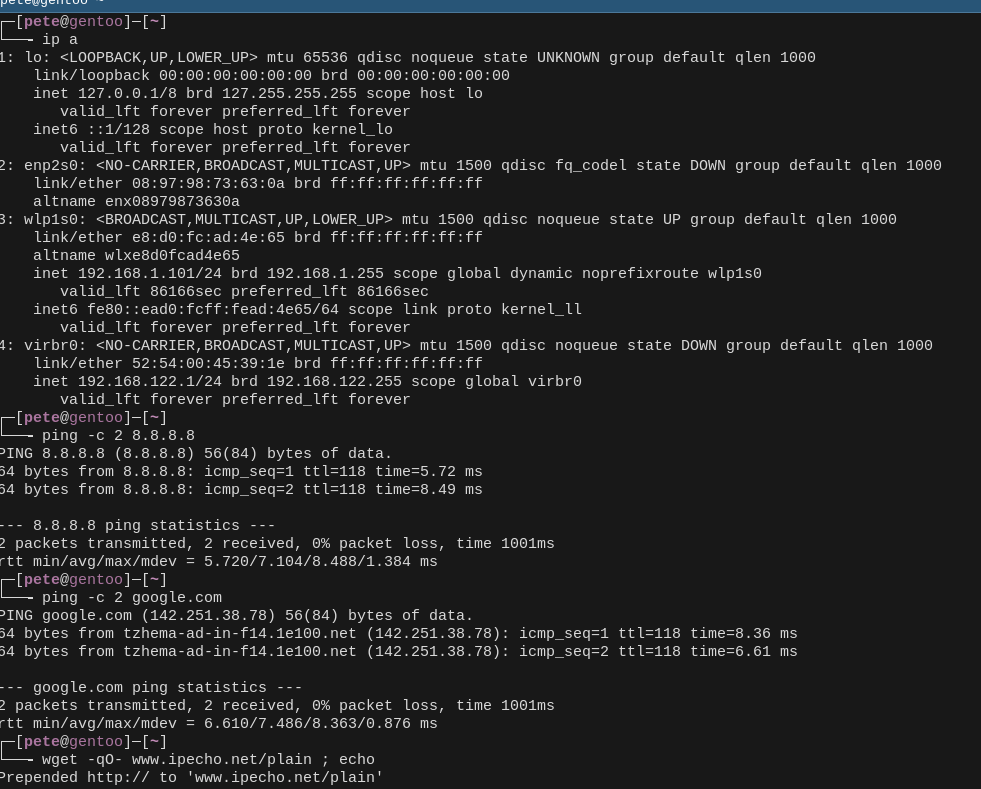
Have you tried to ping 8.8.8.8 ? Or google.com? What ip a says? Also you can try wget -qO- www.ipecho.net/plain ; echo

If any of these work you have some kind of net access. If all work your web browser is corrupted during the power failure.

Here’s my laptop’s terminal with these commands (I’ve left the output of the wget off because it shows my IP)

Hi @Manuel_Jordan,

Sometimes restarting the network manager will work with out perform a restore.

sudo systemctl restart NetworkManager systemd-resolved
sudo systemctl restart networking

Looks like DNS to me…

I have occasional Internet problems, mostly involving my browser. As a sanity check, I make sure my LAN is working by going to my router’s home page, (192.168.8.1, but different routers use different addresses). If I get the router login screen, then I know the lan is working. Then it’s really an Internet problem.

A problem with interrupting apt is that it uses several lock files and I have a script that unlocks them, but from you description, that’s not your problem. The errors you show are what happens when your Internet access isn’t quite right and I’m not as good at fixing that.

Usually internet problems are DNS failures. Sometimes setting a different nameserver helps, but apart from that there is little you can do except wait for the nameserver to be fixed.
Major outages can sometimes be identified by checking with your ISP.
Minor local problems, like your modem needing a reboot or not functioning, need you to intervene.

Yeah. I know all the easy stuff.

What I’m seeing now is that when I launch Vivaldi the first time after a reboot, it can’t even see the LAN, but if I close and reopen it, it works. Zen doesn’t have this problem.

Hopefully, this is just because of my ancient distro (I’m still running Kubuntu 18.04 on my old notebook).

That happens all the time with firefox.
I think it is a timeout issue … never tried to fix it, but see if you can give the browser more time before timing out waiting for a LAN response.

Thanks to all for the replies

Neville

Restore the system to the previous backup.
That is a good example of why backups are necessary.
Powerouts during updates are disasters… restore backup or reinstall.

No backup for this laptop (About the OS itself)

Howard

If you have Timeshift active you could also try this option.

Thanks for that suggestion

Did you already try re-booting your OS?

Yes, same situation so far

ihasama

sudo apt clean
sudo apt -f install or re-run sudo apt update && sudo apt upgrade

Therefore

~# apt clean
~# apt -f install
Summary:                        
  Upgrading: 0, Installing: 0, Removing: 0, Not Upgrading: 0

Just in case even with

~# apt install --fix-broken
Summary:                        
  Upgrading: 0, Installing: 0, Removing: 0, Not Upgrading: 0

Same problem as the beginning for apt and Web Browser

Howard

Sometimes restarting the network manager will work with out perform a restore.
sudo systemctl restart NetworkManager systemd-resolved
sudo systemctl restart networking

OK

~# systemctl restart NetworkManager systemd-resolved
Failed to restart systemd-resolved.service: Unit systemd-resolved.service not found.
~# systemctl restart networking

Error for the first command

Just in case

~# systemctl restart systemd-networkd
~# systemctl restart NetworkManager

Same problem as the beginning for apt and Web Browser

Note : I forgot to indicate that is possible so far get access to the target laptop through Remmina in the same LAN

What to do?

Can you start with boot usb debian ?

Does everything work from that usb

Is it a faulty hard disk can you run fsck with -f command file system check on it ?

As @daniel.m.tripp stated, it’s DNS. Fix those failed resolving... errors first. Everything else is just a waste of time.

Yes, but they could be because the power outage corrupted the apt database or the repo links, rather than DNS.

If through the GUI (Settings app) I see the Network - Wired settings it is the same as other laptops in the LAN, the DNS values are the same, of course the IPv4 is other

But something happened, the Gateway has the same value as the IP and not 192.168.1.1. It was fixed and all work normal.

I don’t have any idea why happened this

A power outage can do anything.
There may be other problems.

A power outage can do anything.

I had few blackout, in other laptop (even without battery) theoretically the SSD has something wrong about CCE or something like that but appears “OK” about the report shown through the “smart HD/SSD” tool (something like that).

There may be other problems.

I hope no :cold_face:

Maybe, yes. I’ve learned fixing things ordered by their relevance.:wink:

Yes, and concentrate on the first error message, as you pointed out