I wait this release…. Hoping it’s going to be good especially with the new features of cinnamon but having read this perhaps I will not do it the first day out
3 Likes
OK, but please note that this is my personal view. I speak for myself only; I’m not an “influencer”. 
3 Likes
It’s not a hurry for me either.
I have 2 system partitions, one holds Bookworm, which is completely functional. On another I have now Trixie with Cinnamon. I just boot Trixie, do my tinkering with it, evaluate it. I like to cook my setup, change configs, install this, remove that… When it comes to work, boot up Bookworm.
I especially like nemo-file-preview in the new version. Generally have a good feeling about how it behaves, somehow it seems so fluent and responsive. I don’t like the slick greeter, but already removed it  purged slick greeter in favour of lightdm-gtk-greeter, some tweak in lightdm.conf, and I have the usual old-school logon screen.
So it slowly becomes something that I start to like.
3 Likes
I would never claim to be one, I always give my clients a choice go Linux mint Debian edition or go elsewhere for computer solutions.
.. ok sometimes I offer xfce if it’s older slower.
2 Likes
I’ve been using Debian 13 and a variation (Modicia) since Trixie started. No problems.
I don’t have enough overblown ego to call myself an ‘influencer.’
2 Likes
But you do have influence. Everything we do affects other people, for better or worse.
Lets try and make it more of the better side.
2 Likes
Not strictly true - it does share folders… your /etc/exports file will list NFS shared folders …
You can share most filesystems over NFS - e.g. UFS, or ZFS (ZFS does native NFS export), ext1,2,3.4 et cetera, and XFS, probably btrfs too (haven’t tried btrfs).
Most decent NAS solutions will even let you share the same folder over BOTH SMB and NFS… Probably the main enterprise NAS solution, NetApp, can share NFS and SMB of the same folder structure… Oracle’s ZFS filer can too… I had to migrate a NetApp to Nutanix AFS a while back - nowhere near as easy to setup NFS and SMB on the same folder as on NetApp (or even TrueNAS).
On my NAS solution (TrueNAS) I share
/mn/BARGEARSE as a whole NFS share…
But I also share subfolders as SMB shares… Mac can do NFS - but defaults to SMB (they dropped Appleshare many years ago now).
Anyway - I digress - and this isn’t helping the OP…
NFS is not easy - it’s not automatic in some apps like Nautilus / Files on Gnome DE… You generally mount the NFS share e.g. from /etc/fstab (so it happens after bootup - but before DE loads)… Me? I mount via /etc/fstab, and then I have symlinks to various folders on the NFS share on my $HOME - e.g. Videos :
╭─x@titanii ~/Videos
╰─➤  ls -al
total 8
drwxr-xr-x   2 x x 4096 Aug 31 10:47 .
drwxr-x---+ 31 x x 4096 Oct 10 11:21 ..
lrwxrwxrwx   1 x x   32 Aug  6 11:39 Documentaries -> /mnt/BARGEARSE/VIZ/Documentaries
lrwxrwxrwx   1 x x   23 Aug  6 11:40 Home -> /mnt/BARGEARSE/VIZ/Home
lrwxrwxrwx   1 x x   18 Aug  6 11:39 Movies -> /mnt/BARGEARSE/MVZ
lrwxrwxrwx   1 x x   24 Aug  6 11:39 Music -> /mnt/BARGEARSE/VIZ/Music
lrwxrwxrwx   1 x x   18 Aug  6 11:39 TVShows -> /mnt/BARGEARSE/TVZ
And my /etc/fstab entry :
baphomet.local:/mnt/BARGEARSE /mnt/BARGEARSE nfs4 rw,relatime,vers=4.1,rsize=131072,wsize=131072,namlen=255,hard,proto=tcp,timeo=600,retrans=2,sec=sys,clientaddr=10.1.1.162,local_lock=none,addr=10.1.1.10 0 0
But - I have no idea about Synology NAS setup… Sorry…
3 Likes
Correct, but it encourages you to access existing folders , rather than create a new special shared folder and copy stuff fo be shared into it.
NFS is centralised with a client/server model. What I call a shared folder is more a peer to peer thing.
1 Like
True. But it’s a side effect, sometimes unwanted.
2 Likes
I tried Cinnamon DE to see if it fixed the SMB shares on desktop issue mentioned earlier in the Topic - it did not. Do I presume you do not use or have a need for that long standing feature?
2 Likes
This matches with my concerns. They prefer to “beautify” any widgets and add a new set of wallpapers or mouse pointers rather than fixing things under the hood.
3 Likes
Do you have samba installed at all?
gazda@nagygep-cin-13:~$ dpkg -l samba*
Desired=Unknown/Install/Remove/Purge/Hold
| Status=Not/Inst/Conf-files/Unpacked/halF-conf/Half-inst/trig-aWait/Trig-pend
|/ Err?=(none)/Reinst-required (Status,Err: uppercase=bad)
||/ Név                      Verzió                  Architecture         Leírás
+++-========================-=======================-====================-=========================================================
ii  samba                    2:4.22.4+dfsg-1~deb13u1 amd64                SMB/CIFS file, print, and login server for Unix
ii  samba-ad-dc              2:4.22.4+dfsg-1~deb13u1 amd64                Samba control files to run AD Domain Controller
ii  samba-ad-provision       2:4.22.4+dfsg-1~deb13u1 all                  Samba files needed for AD domain provision
un  samba-client             <none>                  architektúra <nincs> (nincs leírás)
ii  samba-common             2:4.22.4+dfsg-1~deb13u1 all                  common files used by both the Samba server and client
ii  samba-common-bin         2:4.22.4+dfsg-1~deb13u1 amd64                Samba common files used by both the server and the client
ii  samba-dsdb-modules:amd64 2:4.22.4+dfsg-1~deb13u1 amd64                Samba Directory Services Database
ii  samba-libs:amd64         2:4.22.4+dfsg-1~deb13u1 amd64                Samba core libraries
un  samba-vfs-ceph           <none>                  architektúra <nincs> (nincs leírás)
un  samba-vfs-glusterfs      <none>                  architektúra <nincs> (nincs leírás)
un  samba-vfs-modules        <none>                  architektúra <nincs> (nincs leírás)
gazda@nagygep-cin-13:~$
As I remember I always installed them “manually”, even on Debian 12. Something like sudo apt install samba.
Then next question: what kind of SMB server do you try to connect to?
Maybe the dialect differs, such as SMBv1-only server versus SMBv3 only client.
1 Like
I assume, @GrahamLees knows that he has and needs at least the samba-client.
2 Likes
Yes, most of the time. The idea of " setting a good example" without deliberately targetting anyone, seems to be fading out of our modern world.
2 Likes
It to connect to a Synology NAS which uses SMB 3 by default. The clients are all Linux (Ubuntu 22.04, Debian 12 & Debian 13) and not a windoze client in sight. The NAS and the client drives are all formatted EXT4. SMB is enabled on the NAS and the clients have sudo apt install cifs-utils installed. Only the Debian 13 client has the issue of not showing the SMB mounts on the desktop in spite of being configured the same way and accessing the same NAS. The others have worked without issue since probably about Ubuntu 18.04 as far as I can recall (may be 16.04, but can’t remember that far back tbh).
The SMB shares in Debian 13 are certainly there - confirmed 3 ways - terminal mount -av and In Nautilus using the GNOME Extension Network-share-automount which shows the shares in the sidebar (and are selectable) and finally by pasting the contents of the boot sequence to terminal using dmesg | less and scrolling through the output which shows the mounts are achieved.
The only thought I currently have is that the GNOME Extension Desktop Icons NG (DING) hasn’t yet been updated by the developer for the newer version of GNOME shipped with 13 or there is an issue with the Debian specific kernel. I tried posting something on the extension page in GitHub but it didn’t provoke any response.
1 Like
Might be a permission issue.
So you put the cifs mount in fstab, like this?
//ubuserver.local/homes /home/laco/cifsm cifs defaults,credentials=/home/laco/smbcreds,gid=1001,uid=1001,nofail 0 0
For me it show up correctly in Nemo:
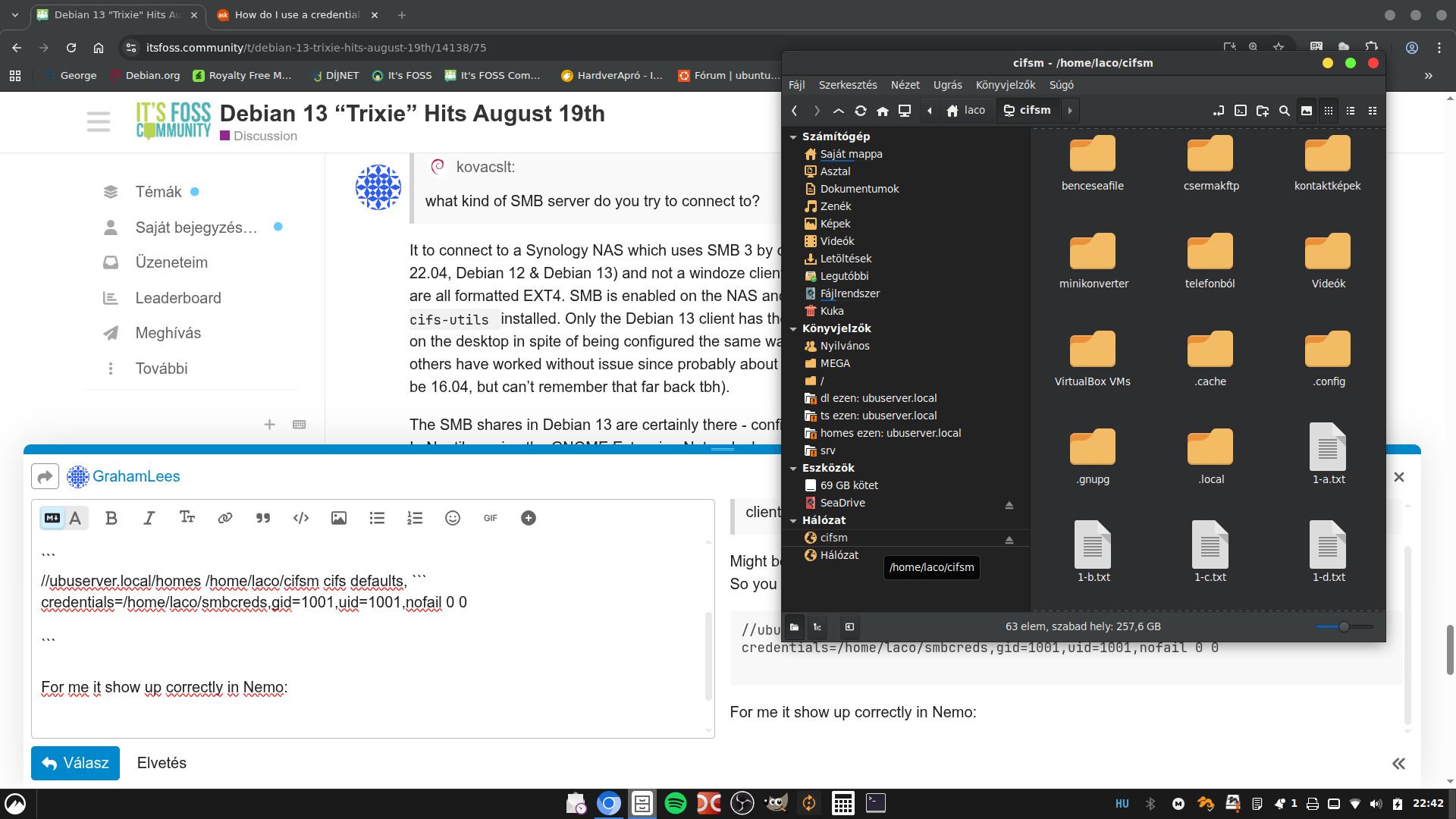
Please note, that the mount point is in my home directory, where I have the necessary permissions.
2 Likes
Basically, yes
//192.168.1.117/video`` /media/NAS/video cifs username=video,password=<password>,rw,uid=1000,gid=500
However, I note that you use cifsm Is there a reason for that?
An update from today - it seems that this is now fixed in Debian 13. An update to the system this morning seems to have updated something along the way. The boot sequence wasn’t a single hit as previously experienced but a restart followed by another uncommanded restart. On completion, the desktop icons still did not appear but out of curiosity, I also selected the option “Show network drives in the desktop” which has in the past had no effect but on this occasion Voila! the SMB shares appeared (along with the IP address which hasn’t occurred before). But still, its progress.
I’m yet to check if they still work if I remove the bookmarked network shares - an experiment for later perhaps.
I think it might be a newer version of the Kernel. apt list –installed | grep linux-image now shows “linux-image-amd64/stable-security,now 6.12.48-1 amd64” whereas the prior ones were “[…] 6.12.48+deb13=amd64 […]”.
3 Likes
That cifsm is the mount point in my home ( /home/laco/cifsm ). Could be anything, just took it as anacronym for “cifs mount”. Just quickly needed an empty directory to test as I otherwise use gvfs mounts on samba, not the cifs
That mount point is outside of your home. To check if this can be a problem, I modified my cifs mount to /media/S/cifsm.
The mount succeeds, I can cd into it in cli, but I see no trace of it in the left pane of the filemanager. I think this the situation that disturbed you, so I could reproduce the phenomenon.
1 Like
Certainly is not. Its on the client inside the home network as is the host NAS - all on the same router (Orange France) and data switch. I could have used /mnt.
You may be interested in this discussion about the difference between the differnet mount point directories.
1 Like
Probably I worded it wrong.
I meant the home directory of your user on the computer you are using.
Such as /home/graham/NAS/video would be in your home, but /media/NAS/video is not in your home.
I tend to like mount points for personal usage in the home of a user (/home/<user_name>/point) and mounts for system-wide usage to reside under /mnt/.
1 Like